13 Answer(s)
-
0
To integrate LDAP (Active Directory) authentication in an ABP MVC Core Razor application, follow these steps:
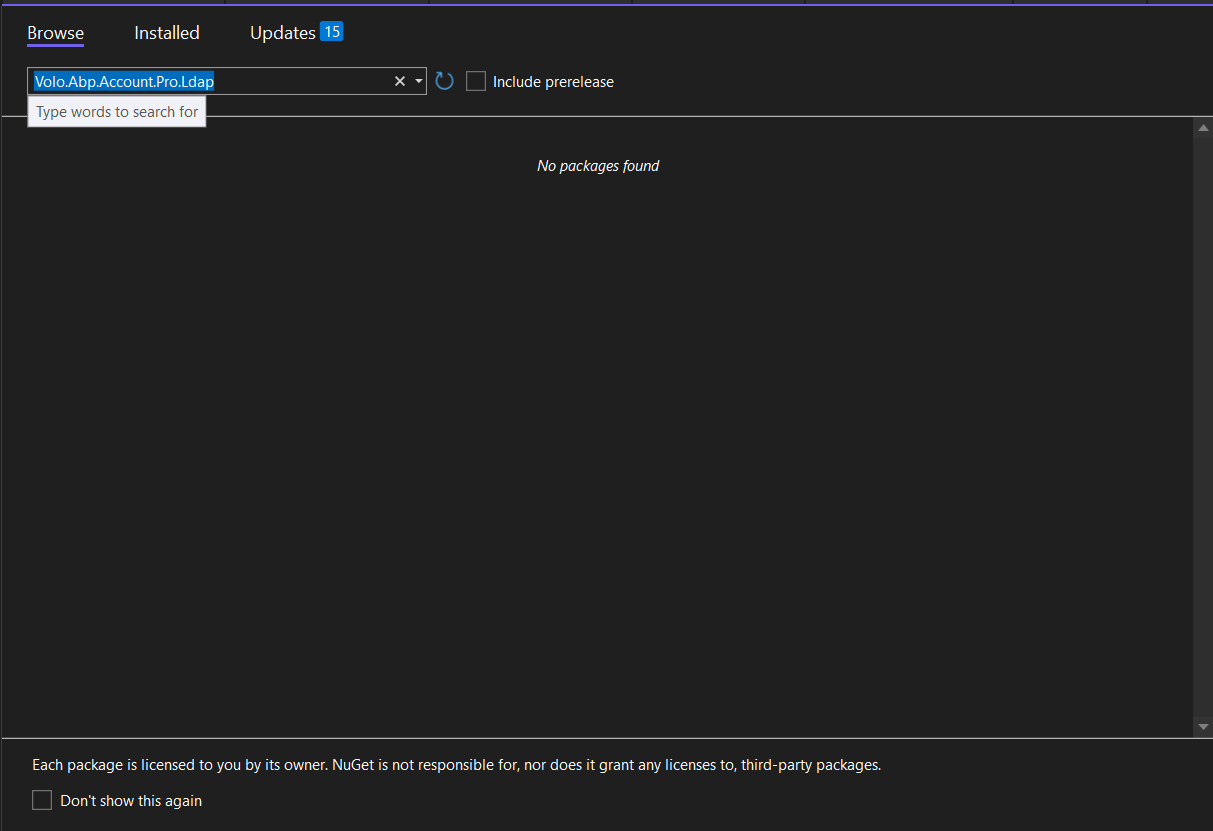
Install the necessary NuGet package:
- Add the
Volo.Abp.Account.Pro.Ldappackage to your project.
- Add the
Configure LDAP settings in your
appsettings.json:
"Ldap": {
     "IsEnabled": "true",
     "Domain": "your-domain",
     "UserName": "ldap-user",
     "Password": "ldap-password",
     "ServerHost": "your-ldap-server",
     "ServerPort": "389"
   }
Enable the LDAP login feature:
- Go to the Feature Management UI in your application.
- Enable the
Account.EnableLdapLoginfeature for the relevant tenant or host.
Test your LDAP configuration:
- You can use the provided ABP LDAP Test Application to verify your LDAP settings before integrating them into your main application.
- Repository: https://github.com/abpframework/abp-samples/tree/master/AbpLdapSample
Clear the cache if you change feature settings to ensure the new configuration is applied.
After these steps, users will be able to log in using their Active Directory credentials.
Sources:
- https://abp.io/docs/latest/modules/identity/idap
- https://github.com/abpframework/abp-samples/tree/master/AbpLdapSample
This response was generated by AI. If it didn’t solve your problem, feel free to post a new answer — our support team will jump in to help you soon.
Markdown supported.Copy, paste, or drag & drop images and files (max 100 MB per file, 100 MB total per post) -
0
I try this code it gives me searchResults count 0
public async static Task<int> Main(string[] args)
{
    var server = "xxx.xxx.com";
    var serverPort = 12345;
    var baseDc = "DC=xxx,DC=com";
    var adminUserName = "xxx";
    var adminPassword = "xxx";
    var testUserName = "xxx@xxx.com"; // Replace with a real AD user
    var testPassword = "xxx";         // Replace with actual password

    using (var ldapConnection = new LdapConnection())
    {
        ldapConnection.Connect(server, serverPort, Native.LdapSchema.LDAP, Native.LdapVersion.LDAP_VERSION3);

        try
        {
            // Bind as LDAP admin (Bind DN)
            await ldapConnection.BindAsync(Native.LdapAuthType.Simple, new LdapCredential
            {
                UserName = $"CN={adminUserName},{baseDc}",  // Important: Full DN of bind user
                Password = adminPassword
            });

            Console.WriteLine($"{adminUserName} bind success!");

            // Search for the user using sAMAccountName (common in Active Directory)
            var filter = $"(&(objectClass=user)(sAMAccountName={testUserName}))";
            var searchResults = await ldapConnection.SearchAsync(baseDc, filter);

            if (!searchResults.Any())
            {
                Console.WriteLine($"User {testUserName} not found.");

            }

            var userEntry = searchResults.First();
            Console.WriteLine();
            Console.WriteLine($"{testUserName} attributes:");
            Console.WriteLine(string.Join(", ", userEntry.ToDirectoryEntry().Attributes));

            // Now bind as the found user to test password
            await ldapConnection.BindAsync(Native.LdapAuthType.Simple, new LdapCredential
            {
                UserName = userEntry.Dn,
                Password = testPassword
            });

            Console.WriteLine();
            Console.WriteLine($"{testUserName} login success!");
        }
        catch (Exception e)
        {
            Console.WriteLine("LDAP Error:");
            Console.WriteLine(e.Message);
        }

        Console.ReadKey();
    }
    ```
Markdown supported.Copy, paste, or drag & drop images and files (max 100 MB per file, 100 MB total per post) -
0
hi
I don't know about your LDAP server, you can try to replace several filter strings
var filter = $"(&(objectClass=user)(sAMAccountName={testUserName}))";Thanks.
Markdown supported.Copy, paste, or drag & drop images and files (max 100 MB per file, 100 MB total per post) -
0
hi
Yes, once the username and password pass LDAP validation. abp will create a user if it does not exist.
but i tried steps and not work,
I don't know about your LDAP server, you can try to replace several filter strings.
var filter = $"(&(objectClass=user)(sAMAccountName={testUserName}))";Thanks.
Markdown supported.Copy, paste, or drag & drop images and files (max 100 MB per file, 100 MB total per post) -
0
Thanks,
 var filter = $"(&(objectClass=person)(uid={testUserName}))"; this works for me when try this

var server = "xxxx";
var serverPort = xxxx;
var baseDc = "xxxx";

var adminUserName = "xxxx";
var adminPassword = xxxx";

var testUserName = "xxxxx"; // short name or sAMAccountName
var testPassword = "xxxx"; // real user password

using (var ldapConnection = new LdapConnection())
{
    ldapConnection.Connect(server, serverPort, Native.LdapSchema.LDAP, Native.LdapVersion.LDAP_VERSION3);

    try
    {
        // Bind as admin
        await ldapConnection.BindAsync(Native.LdapAuthType.Simple, new LdapCredential
        {
            UserName = $"CN={adminUserName},{baseDc}",
            Password = adminPassword
        });

        Console.WriteLine($"{adminUserName} login success!");

        // Search user
        var filter = $"(&(objectClass=person)(uid={testUserName}))";
        var searchResults = await ldapConnection.SearchAsync(baseDc, filter);

        var userEntry = searchResults.FirstOrDefault();
        if (userEntry == null)
        {
            Console.WriteLine($"User '{testUserName}' not found.");

        }

        Console.WriteLine($"{testUserName} DN: {userEntry.Dn}");

        // Try binding as the user
        await ldapConnection.BindAsync(Native.LdapAuthType.Simple, new LdapCredential
        {
            UserName = userEntry.Dn,
            Password = testPassword
        });

        Console.WriteLine($"{testUserName} login success!");
    }
    catch (Exception e)
    {
        Console.WriteLine($"LDAP Error: {e.Message}");
    }

    Console.ReadKey();
}
I make this code in program.cs and it gives me login success and also can't login with this user , i tried to make cofigration from app setting and also admin ui not working
Markdown supported.Copy, paste, or drag & drop images and files (max 100 MB per file, 100 MB total per post) -
0
hi
If your Program code works. You can replace the built-in code.
https://abp.io/docs/latest/modules/identity/idap#customize-built-in-services
There is no
Volo.Abp.Account.Pro.Ldappackage.The
OpenLdapManagerexists inVolo.Abp.Identity.Pro.Domain, It overrides some methods from LdapManagerYou don't need to add any extra packages, the default template already includes LDAP features.
Thanks.
Markdown supported.Copy, paste, or drag & drop images and files (max 100 MB per file, 100 MB total per post)