When initiating a payment using PaymentRequestAppService.StartAsync
Does that send a POST to stripe to create a payment intent? Is there a way to obtain the payment intent ID?
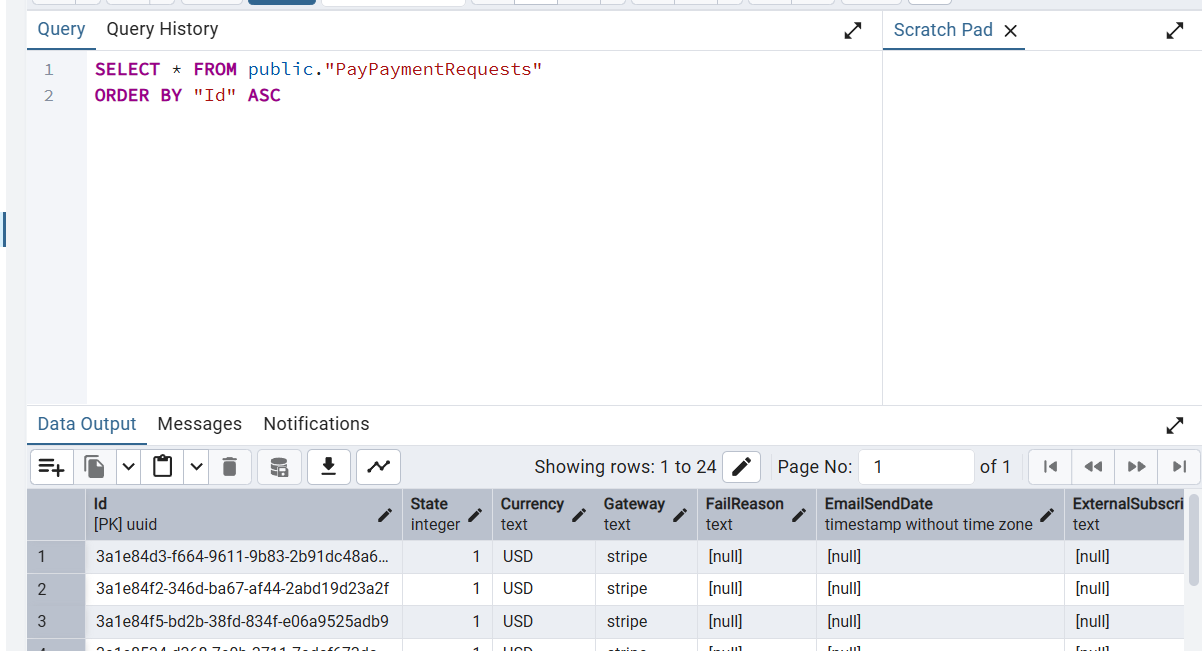
In a nutshell i want a way to tie the entry in PayPaymentRequests table to an entry in Stripe

I am getting this error
duration_ms:
0.4833

error:
true

error.type:
connection_error

http.request.method:
POST

library.name:
System.Net.Http

meta.signal_type:
trace

name:
POST

Sample Rate:
1

server.address:
localhost

server.port:
38271

service.instance.id:
cec7ebab-1095-402f-84ca-ef5bc1259bea

service.name:
Eduverse.HttpApi.Host

span.kind:
client

span.num_events:
0

span.num_links:
0

status_code:
2

telemetry.sdk.language:
dotnet

telemetry.sdk.name:
opentelemetry

telemetry.sdk.version:
1.12.0

trace.span_id:
c9e7c14c1dd5266a

trace.trace_id:
97df45e96bfa735f2306f52a02929f2a

type:
client

url.full:
http://localhost:38271/IStudioHub/Connect
As background, we commented out app.UseAbpStudioLink(); as it was causing issues with signalR
Is there a way to just remove the studio module in non-development envs? ABP Studio is not needed for our prod deployments, only for local dev work
Hello ABP Support Team,
I’m encountering an issue when trying to install the Volo.Payment module via the ABP CLI.
Below is the command and output:
[12:32:03 INF] Press Enter to open your browser to login...
[12:32:52 INF] Successfully logged in as 'lexarius'

$ abp add-module Volo.Payment

[12:32:58 INF] You are running the second generation of the ABP CLI.
If you're interested in the legacy CLI, see https://abp.io/new-cli

System.Exception: Remote server returns '403-Forbidden'.
Message: PRO modules require a commercial license! Should be member of an organization with an active license.
Based on the error, it appears that Volo.Payment is a PRO module, and my account may not currently be associated with an organization that has an active commercial license. Could you help verify whether my account is correctly linked to the organization, or if there is anything else I need to configure?
I logged in with app-access@lexarius.com account
In addition, I’m planning to implement the following workflow:
A customer browses available courses/modules.
They add selected items to a shopping cart.
They proceed to checkout and make payment.
Upon successful payment:
UserCourse or Enrollment).Could you advise on the best practices to implement this in ABP?
Hi ABP,
I am currently using the AwsBlobProvider to upload objects into S3.
However, I want to switch this to CloudFront + S3 for lower latency and better security (S3 will be a private bucket)
Is there a way we can still leverage the BlobProvider but use Cloudfront URL instead of S3?
Thanks
Hi,
i understand that there are ways to delete and add fields on form via form extensions.
How about edit? I want to edit the validation of the username.
I've tried deleting the existing username prop and added a new custom usernameprop but am now having issues when i edit the form.
https://abp.io/docs/latest/framework/ui/angular/dynamic-form-extensions
I've already seen this ticket: https://abp.io/support/questions/7304/Ip-address-in-audit-logs-not-client%27s-ip-address
I've confirmed X-Forwarded-For is correct

I've done the following code changes
In EduverseHttpApiHostModule in OnApplicationInitialization

In EduverseHttpApiHostModule in ConfigureServices

Audit logs still showing wrong IP address

Hi team,
previously i had followed these instructions to add missing CSS files into our backend ABP https://abp.io/support/questions/8551/Angular-CSS-files
However, they are not working again , my guess its after the update to ABP 9.0.2
you can see in the screenshot that bootstrap-light.css style in my code base is:

but when deployed: (there's no import)

This is my Backend csproj code ->
<Project Sdk="Microsoft.NET.Sdk.Web">
<Import Project="....\common.props" />
<PropertyGroup> <TargetFramework>net9.0</TargetFramework> <Nullable>enable</Nullable> <AspNetCoreHostingModel>InProcess</AspNetCoreHostingModel> <RootNamespace>Eduverse</RootNamespace> <PreserveCompilationReferences>true</PreserveCompilationReferences> </PropertyGroup>
<PropertyGroup Condition=" '$(RunConfiguration)' == 'Eduverse.HttpApi.Host' " />
<ItemGroup> <PackageReference Include="AspNetCore.HealthChecks.UI" Version="9.0.0" /> <PackageReference Include="AspNetCore.HealthChecks.UI.Client" Version="9.0.0" /> <PackageReference Include="AspNetCore.SignalR.OpenTelemetry" Version="1.6.0" /> <PackageReference Include="Microsoft.EntityFrameworkCore.InMemory" Version="9.0.1" /> <PackageReference Include="AspNetCore.HealthChecks.UI.InMemory.Storage" Version="9.0.0" /> <PackageReference Include="OpenTelemetry.Exporter.Console" Version="1.11.1" /> <PackageReference Include="OpenTelemetry.Exporter.OpenTelemetryProtocol" Version="1.11.1" /> <PackageReference Include="OpenTelemetry.Extensions.Hosting" Version="1.11.1" /> <PackageReference Include="OpenTelemetry.Instrumentation.AspNetCore" Version="1.11.0" /> <PackageReference Include="OpenTelemetry.Instrumentation.Http" Version="1.11.0" /> <PackageReference Include="Owl.TokenWildcardIssuerValidator" Version="1.0.0" /> <PackageReference Include="Serilog.AspNetCore" Version="9.0.0" /> <PackageReference Include="Serilog.Sinks.Async" Version="2.1.0" /> <PackageReference Include="Microsoft.AspNetCore.Authentication.Google" Version="9.0.1" /> <PackageReference Include="Microsoft.AspNetCore.Authentication.MicrosoftAccount" Version="9.0.1" /> <PackageReference Include="Microsoft.AspNetCore.Authentication.Twitter" Version="9.0.1" /> </ItemGroup>
<ItemGroup> <PackageReference Include="Volo.Abp.AspNetCore.MultiTenancy" Version="9.0.2" /> <PackageReference Include="Volo.Abp.Autofac" Version="9.0.2" /> <PackageReference Include="Volo.Abp.AspNetCore.Serilog" Version="9.0.2" /> <PackageReference Include="Volo.Abp.BlobStoring.Aws" Version="9.0.2" /> <PackageReference Include="Volo.Abp.Caching.StackExchangeRedis" Version="9.0.2" /> <PackageReference Include="Volo.Abp.Swashbuckle" Version="9.0.2" /> </ItemGroup>
<ItemGroup> <PackageReference Include="Volo.Abp.Account.Pro.Public.Web.OpenIddict" Version="9.0.2" /> <PackageReference Include="Volo.Abp.Account.Pro.Public.Web.Impersonation" Version="9.0.2" /> </ItemGroup>
<ItemGroup> <PackageReference Include="Volo.Abp.AspNetCore.Mvc.UI.Theme.LeptonX" Version="4.0.3" /> </ItemGroup>
<ItemGroup> <ProjectReference Include="..\Eduverse.Application\Eduverse.Application.csproj" /> <ProjectReference Include="..\Eduverse.HttpApi\Eduverse.HttpApi.csproj" /> <ProjectReference Include="..\Eduverse.EntityFrameworkCore\Eduverse.EntityFrameworkCore.csproj" /> </ItemGroup>
<ItemGroup> <PackageReference Include="Volo.Abp.Studio.Client.AspNetCore" Version="0.9.19" /> </ItemGroup>
<ItemGroup Condition="Exists('./openiddict.pfx')"> <None Remove="openiddict.pfx" /> <EmbeddedResource Include="openiddict.pfx"> <CopyToOutputDirectory>Always</CopyToOutputDirectory> </EmbeddedResource> </ItemGroup>
<ItemGroup> <Compile Remove="Logs*" /> <Content Remove="Logs*" /> <EmbeddedResource Remove="Logs*" /> <None Remove="Logs*" /> </ItemGroup> <ItemGroup> <Content Include="Pages**.js"> <CopyToOutputDirectory>Always</CopyToOutputDirectory> </Content> <Content Include="Pages**.css"> <CopyToOutputDirectory>Always</CopyToOutputDirectory> </Content> </ItemGroup> <ItemGroup> <Content Include="Themes**.js"> <CopyToOutputDirectory>Always</CopyToOutputDirectory> </Content> <Content Include="Themes**.css"> <CopyToOutputDirectory>Always</CopyToOutputDirectory> </Content> </ItemGroup> </Project>
Hi team,
we have recently upgraded from 8.x.x to 9.0.5.
However the login with this tenant button from host-admin account seems to be gone.
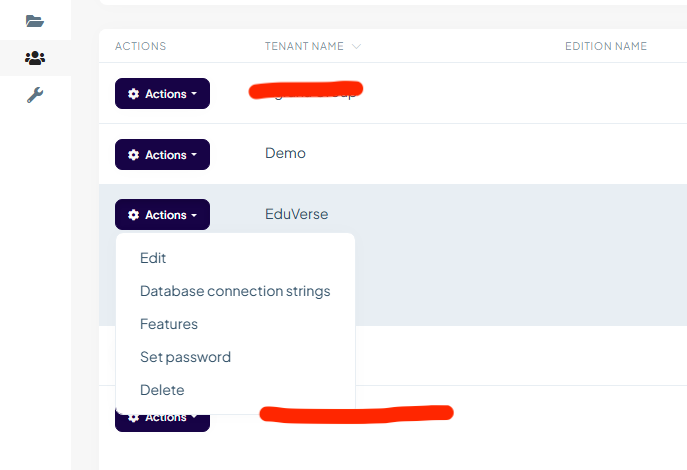
we used to be able to use "Login with this tenant"
 Please advise.
Thank you.
Hi, we noticed that language texts have to be changed in each tenant.
Is there a way to set it platform wide? ie. changing the language text in Host will be applicable for all Tenants.
Thanks.
Intended flow:
    public virtual async Task AutoRegisterUserAsync(string email, CustomSaasTenantDto tenant)
    {
        using (_currentTenant.Change(tenant.Id))
        {
            var existingUser = await _userManager.FindByEmailAsync(email);
            // Check if the user already exists
            if (existingUser == null)
            {
                // Create a new user
                var newUser = new IdentityUser(
                    _guidGenerator.Create(),
                    email,
                    email,
                    tenant.Id // Assign the user to the tenant
                );

                var result = await _userManager.CreateAsync(newUser);
                if (result.Succeeded)
                {
                    // Optionally assign roles to the user
                    await _userManager.AddToRoleAsync(newUser, DefaultRoleConsts.Learner);
                }
            }
        }
    }
After user is created, he should be able to login again with SSO.
User should not be able to login with password as no password was set as part of the SSO onboarding flow
Actual:
User is created the first time he logs in with SSO
Subsequent SSO logins prompt for password reset










