We are also experiencing the same issue. Our pipeline cannot restore the Volo.* packages, even though I provided the correct key. I tried your solution, but unfortunately, it did not resolve the problem.
Normally, NuGet tries to find a package from all nuget-sources (global or defined in the NuGet.config file), so one of the nuget-source that you provided (it might be global nuget source) probably is wrong. Can you please check that? Because, this problem should not be related to nuget.abp.io, because these packages are open-source packages and they are hosted in the nuget.org.
You can list nuget-sources with the following command, btw:
dotnet nuget list source
Hi, the package you are mentioned is an open-source package, which can be seen at https://www.nuget.org/packages/Volo.Abp.DistributedLocking.Abstractions.
So, it's normal that this package can't be found in the nuget.abp.io. If you got this error when you build/restore your solution, your NuGet.Config file might be wrong. Can you share it please?
Hi @EngincanV
Thank you for your response,
This is my Nuget.Config:
<?xml version="1.0" encoding="utf-8"?> <configuration> <packageSources> <add key="nuget.org" value="https://api.nuget.org/v3/index.json" /> <add key="nuget.abp.io" value="https://nuget.abp.io/xxx/v3/index.json" /> </packageSources> <packageSourceMapping> <packageSource key="nuget.org"> <package pattern="" /> <package pattern="Microsoft." /> <package pattern="Volo." /> </packageSource> <packageSource key="nuget.abp.io"> <package pattern="Volo." /> </packageSource> </packageSourceMapping> </configuration>
We added packageSourceMapping to the NuGet.config for faster restoring Volo.* packages, however, it seems it might created an issue in your case. So, can you please update this file as follows:
<?xml version="1.0" encoding="utf-8"?>
<configuration>
  <packageSources>
    <add key="nuget.org" value="https://api.nuget.org/v3/index.json" />
    <add key="ABP Commercial NuGet Source" value="https://nuget.abp.io/xxx/v3/index.json" />
  </packageSources>
</configuration>
Then, retry to restore/build your project. Please, don't forget to replace the xxx part with your api-key and let me know if it works.
Hi, the package you are mentioned is an open-source package, which can be seen at https://www.nuget.org/packages/Volo.Abp.DistributedLocking.Abstractions.
So, it's normal that this package can't be found in the nuget.abp.io. If you got this error when you build/restore your solution, your NuGet.Config file might be wrong. Can you share it please?
Hi, you can refer to https://abp.io/docs/latest/suite/generating-crud-page#establishing-creating-relations-with-installed-abp-modules-entit . This document explains how you can "create relations with installed ABP Modules' Entities".
Tell my your GitHub user, to share with you my project.
Here is my Github profile: https://github.com/EngincanV (username: EngincanV)
Hi, please share your entity/*.json files and enum class, so I can better assist you.
Add the new Blazor WebApp UI option to the single layer option (as can be seen missing here or explain why its not possible..
I was going to create a modular solution (create all my major features as modules) and use the latest Blazor offering but now I´m confused what I should use..🤷♂️
We will add Blazor WebApp UI to the single-layer template. There is an open issue for that, and it's one of our priorities.
can you confirm please?
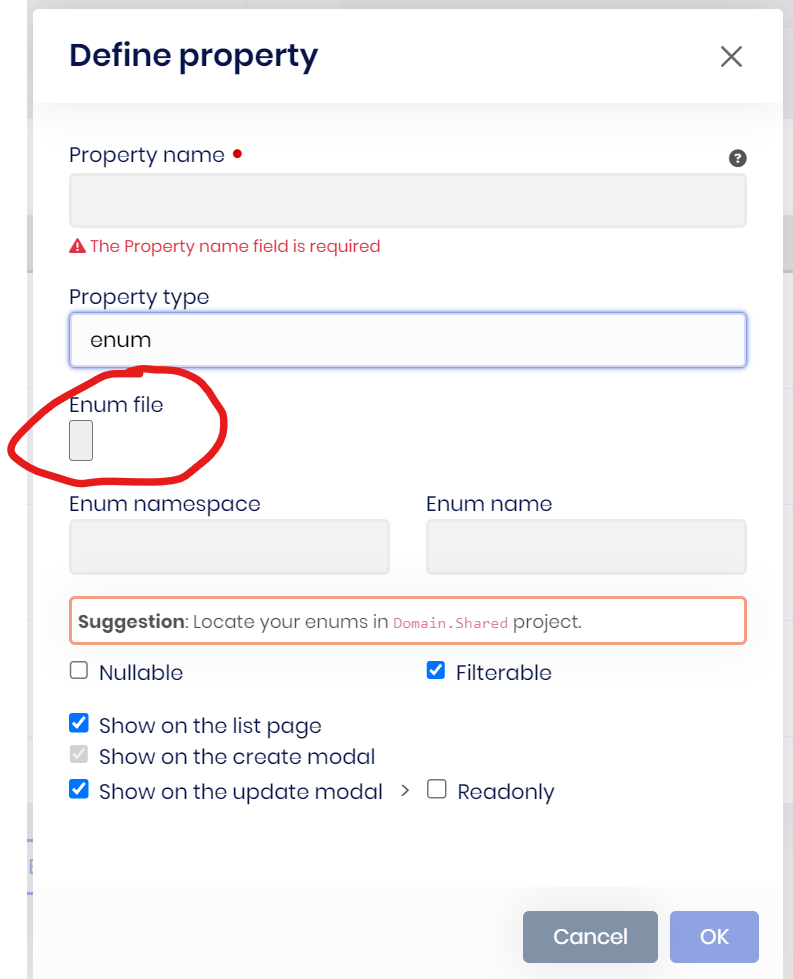
Just tested and you are correct. Its only within ABP Studio browser.
Thanks for the confirmation. I'll create an internal issue for this problem.
Minor stuff but adding an enum in Suite has this maleformed button
Hi, you see the file input like this only inside the ABP Studio browser, right? If you open it in your default browser, you don't see it like that, can you confirm please?
Hi, for Blazor UI code generation, ABP Suite uses the Autocomplete component for Modal and Typeahead UI pickup types.