Maliming,
Here is the latest on where we are and what we are trying to accomplish
site url: https://portal-dev.hiredhandsoftware.com/ auth server url: https://app-auth-dev-aims.azurewebsites.net/Account/Login
Expectation: When visiting this website you are redirected to the auth server with the tenant of "portal-dev". Once logged in you will be logged in with the tenant "portal-dev"
What we arent seeing: When redirected to the auth server we are not seeing the tenant information passed to the auth server
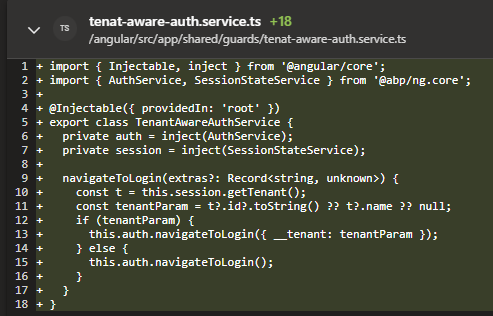
Here are the code changes we have made:
Added a new authguard with redirect with the tenant information
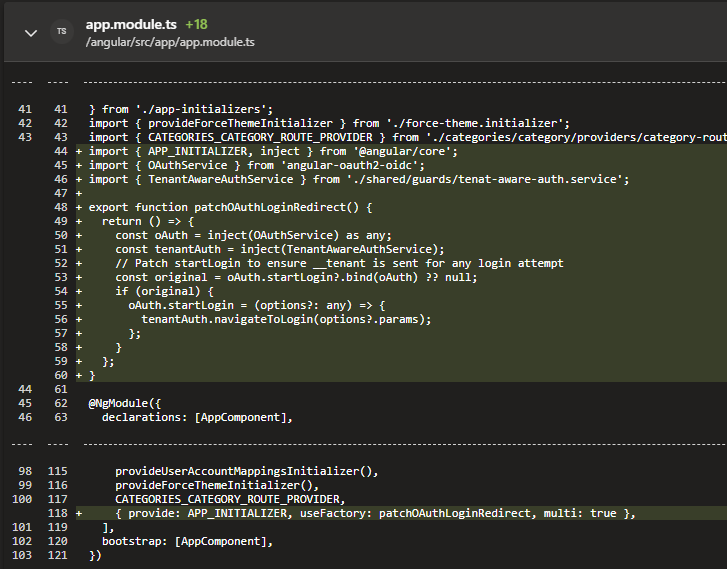
Updated app.module.ts
On the auth server and host added:

Still getting an error. See attached
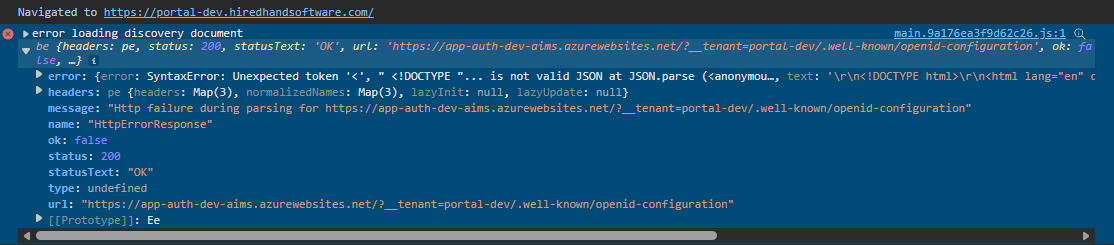
When this was implemented, the redirect failed because it added the tenant query string in the wrong location: https://xxxxxxxx.azurewebsites.net/?__tenant=portal-dev/.well-known/openid-configuration
It causes the page to break because it should be after the .well-known/openid-configuration
We do not want to present a login button or access the home component. The authserver has the login form. We just need to pass the tenant from the angular side to the auth server when the authguard redirects a non-authenticated user.
We tried this solution but our application still isnt picking this up and working. One thing that we noticed was that our route was defaulting to dashboard
const routes: Routes = [ { path: '', pathMatch: 'full', redirectTo: 'dashboard', },
So we are unsure where to add the code where we pass the tenet id before they are getting redirected to the auth server. Also another modification to the original question:
Target Goal: tenant1.domain.com -> webhost (same azure webapp just different domain name) tenant2.domain.com -> webhost (same azure webapp just different domain name) azurehosted-domain.com -> auth server
Target Goal: tenant1.domain.com -> webhost tenant2.domain.com -> webhost auth.domain.com -> auth server
When a user goes to login to tenant1.domain.com they will be logged into tenant1 after they successfully entered credentials in auth
What is happening: When we login we are encountering 2 different issues. One being we get stuck in a redirect loop and the other is we are just logged in to the host admin, which I assume is because there is no tenant being resolved.
What has been tried: We followed the steps here : https://abp.io/docs/latest/framework/architecture/multi-tenancy#domain-subdomain-tenant-resolver We added it to just the auth server with no success and then to both the auth server and web host









