Here is what I get from application-configuration related to lepton theme
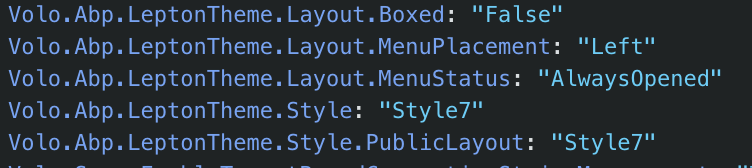 So I didn't figure out yet how layout is selected (empty, application, account)
Do you mean that how I provide LEPTON_THEME_FEATURES_PROVIDERS? Because SET_LEPTON_THEME_SETTING_TAB_VISIBILITY and LEPTON_THEME_FEATURES are only used in this features.token.ts file. ThemeLeptonModule is only one where LEPTON_THEME_FEATURES_PROVIDERS is in provided list. 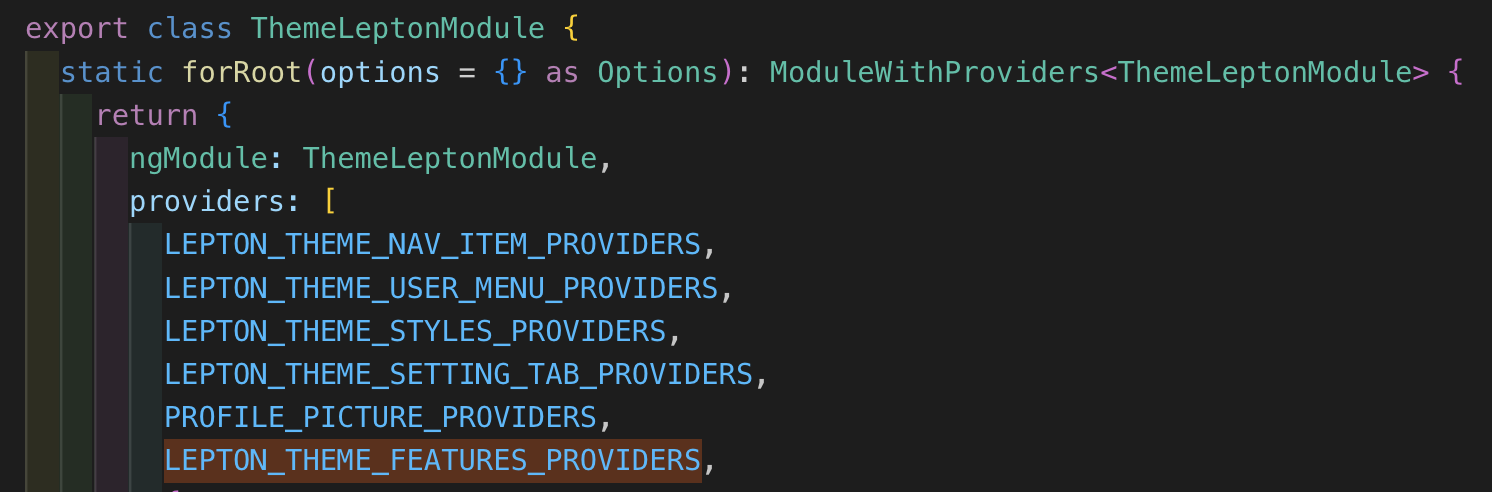
Do you believe that problem might be related to those injection tokens what I provided earlier? This was how they were earlier before I removed APP_INITIALIZER usage.
export const LEPTON_THEME_FEATURES_PROVIDERS = [
  {
    provide: APP_INITIALIZER,
    useFactory: noop,
    deps: [SET_LEPTON_THEME_SETTING_TAB_VISIBILITY],
    multi: true,
  },
];
I have used that new angular build system already in 8.3.4 version. I have read all those related migration guides. Our project is so big so for now we are staying with module style and not going to switch to standalone components. I have tried that angular standalone migration tool but it didn't made good work so it would be huge work to migrate rest by hand and figure out what modules/components need to be imported into each component. We have over 320 components and over 184 modules. It would be quite hard to provide any minimal reproducible example because we are no going to share all of our code and I have no idea what parts are related. Maybe theme-lepton module? I do not have list about what customizations we have done to lepton-theme.
Problem might be related to how layout is selected. Now there is empty layout in use. Are these keys changed at your side?
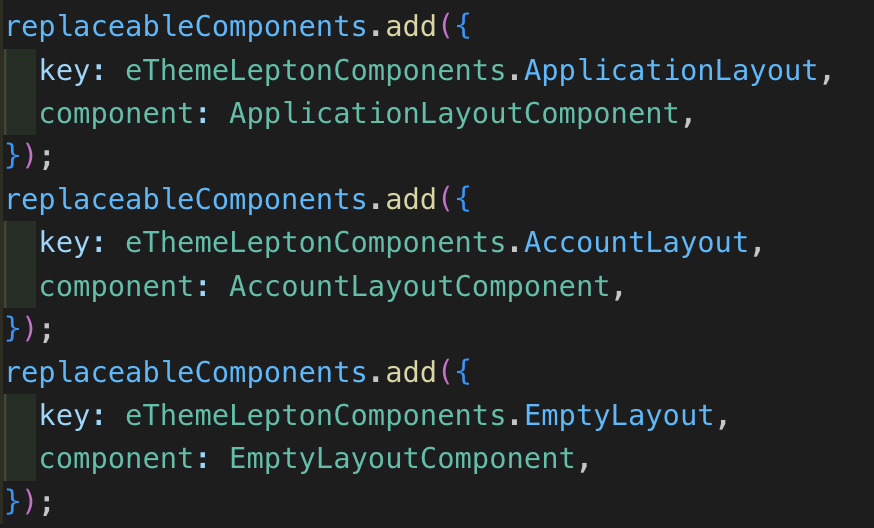
And features.token.ts looks like this
import { ConfigStateService, featuresFactory } from '@abp/ng.core';
import { inject, InjectionToken, provideAppInitializer } from '@angular/core';
import { ModuleVisibility, setModuleVisibilityFactory } from '@volo/abp.commercial.ng.ui/config';
import { SettingTabsService } from '@abp/ng.setting-management/config';
import { Observable } from 'rxjs';
import { eLeptonThemeSettingTabNames } from '../enums/setting-tab-names';

export const LEPTON_THEME_FEATURES = new InjectionToken<Observable<ModuleVisibility>>(
  'LEPTON_THEME_FEATURES',
  {
    providedIn: 'root',
    factory: () => {
      const configState = inject(ConfigStateService);
      const featureKey = 'LeptonManagement.Enable';
      const mapFn = features => ({
        enable: features[featureKey].toLowerCase() !== 'false',
      });

      return featuresFactory(configState, [featureKey], mapFn);
    },
  },
);

export const SET_LEPTON_THEME_SETTING_TAB_VISIBILITY = new InjectionToken(
  'SET_LEPTON_THEME_SETTING_TAB_VISIBILITY',
  {
    providedIn: 'root',
    factory: () => {
      const settingTabs = inject(SettingTabsService);
      const stream = inject(LEPTON_THEME_FEATURES);

      setModuleVisibilityFactory(
        stream,
        settingTabs,
        eLeptonThemeSettingTabNames.LeptonThemeManagement,
      ).subscribe();
    },
  },
);

export const LEPTON_THEME_FEATURES_PROVIDERS = [
  provideAppInitializer(() => {
    inject(SET_LEPTON_THEME_SETTING_TAB_VISIBILITY);
    return;
  }),
];
Here is our ThemeLeptonModule if problem is related to it:
import { APP_INIT_ERROR_HANDLERS, CoreModule } from '@abp/ng.core';
import { ThemeSharedModule } from '@abp/ng.theme.shared';
import { ModuleWithProviders, NgModule } from '@angular/core';
import { NgbDropdownModule } from '@ng-bootstrap/ng-bootstrap';
import {
  NgxValidateCoreModule,
  VALIDATION_ERROR_TEMPLATE,
  VALIDATION_INVALID_CLASSES,
  VALIDATION_TARGET_SELECTOR,
} from '@ngx-validate/core';
import { PROFILE_PICTURE_PROVIDERS } from '@volo/abp.commercial.ng.ui/config';
import { AccountLayoutComponent } from './components/account-layout/account-layout.component';
import { AccountLogoComponent } from './components/account-layout/account-logo/account-logo.component';
import { AuthWrapperComponent } from './components/account-layout/auth-wrapper/auth-wrapper.component';
import { TenantBoxComponent } from './components/account-layout/tenant-box/tenant-box.component';
import { ApplicationLayoutComponent } from './components/application-layout/application-layout.component';
import { CurrentUserImageComponent } from './components/current-user-image/current-user-image.component';
import { EmptyLayoutComponent } from './components/empty-layout/empty-layout.component';
import { FooterComponent } from './components/footer/footer.component';
import { HeaderComponent } from './components/header/header.component';
import { HttpErrorComponent } from './components/http-error/http-error.component';
import { LogoComponent } from './components/logo/logo.component';
import { CurrentUserComponent } from './components/nav-items/current-user.component';
import { FullScreenComponent } from './components/nav-items/full-screen.component';
import { LanguagesComponent } from './components/nav-items/languages.component';
import { NavItemsComponent } from './components/nav-items/nav-items.component';
import { NavbarMobileComponent } from './components/navbar-mobile/navbar-mobile.component';
import { NavbarComponent } from './components/navbar/navbar.component';
import { PageAlertContainerComponent } from './components/page-alert-container/page-alert-container.component';
import { RoutesComponent } from './components/routes/routes.component';
import { SettingsComponent } from './components/settings/settings.component';
import { SidebarComponent } from './components/sidebar/sidebar.component';
import { ValidationErrorComponent } from './components/validation-error/validation-error.component';
import { LEPTON_THEME_NAV_ITEM_PROVIDERS } from './providers/nav-item.provider';
import { LEPTON_THEME_SETTING_TAB_PROVIDERS } from './providers/setting-tab.provider';
import { LEPTON_THEME_STYLES_PROVIDERS, removeLeptonLoader } from './providers/styles.provider';
import { LEPTON_THEME_USER_MENU_PROVIDERS } from './providers/user-menu.provider';
import { CUSTOM_STYLE } from './tokens/custom-style.token';
import { LEPTON_THEME_FEATURES_PROVIDERS } from './tokens/features.token';
import { CONTENT_AFTER_ROUTES, CONTENT_BEFORE_ROUTES } from './tokens/routes-content.token';
import { AngularSvgIconModule } from 'angular-svg-icon';
import { FeatureBadgeModule } from '@SCM/common/base-forms/components/feature-badge/feature-badge.module';
import { Options } from './models/theme-lepton';

export const LAYOUTS = [ApplicationLayoutComponent, AccountLayoutComponent, EmptyLayoutComponent];

const COMPONENTS = [
  SettingsComponent,
  ValidationErrorComponent,
  HttpErrorComponent,
  LogoComponent,
  RoutesComponent,
  NavItemsComponent,
  CurrentUserImageComponent,
  LanguagesComponent,
  CurrentUserComponent,
  FullScreenComponent,
  NavbarComponent,
  NavbarMobileComponent,
  HeaderComponent,
  FooterComponent,
  SidebarComponent,
  PageAlertContainerComponent,
  AuthWrapperComponent,
  TenantBoxComponent,
  AccountLogoComponent,
];

@NgModule({
  declarations: [...LAYOUTS, ...COMPONENTS],
  exports: [...LAYOUTS, ...COMPONENTS],
  imports: [
    CoreModule,
    ThemeSharedModule,
    NgbDropdownModule,
    NgxValidateCoreModule,
    AngularSvgIconModule,
    FeatureBadgeModule
  ],
})
export class BaseThemeLeptonModule { }

@NgModule({
  exports: [BaseThemeLeptonModule],
  imports: [BaseThemeLeptonModule],
})
export class ThemeLeptonModule {
  static forRoot(options = {} as Options): ModuleWithProviders<ThemeLeptonModule> {
    return {
      ngModule: ThemeLeptonModule,
      providers: [
        LEPTON_THEME_NAV_ITEM_PROVIDERS,
        LEPTON_THEME_USER_MENU_PROVIDERS,
        LEPTON_THEME_STYLES_PROVIDERS,
        LEPTON_THEME_SETTING_TAB_PROVIDERS,
        PROFILE_PICTURE_PROVIDERS,
        LEPTON_THEME_FEATURES_PROVIDERS,
        {
          provide: VALIDATION_ERROR_TEMPLATE,
          useValue: ValidationErrorComponent,
        },
        {
          provide: VALIDATION_INVALID_CLASSES,
          useValue: 'input-validation-error',
        },
        {
          provide: VALIDATION_TARGET_SELECTOR,
          useValue: '.form-control',
        },
        {
          provide: CONTENT_AFTER_ROUTES,
          useValue: options.contentAfterRoutes || [],
        },
        {
          provide: CONTENT_BEFORE_ROUTES,
          useValue: options.contentBeforeRoutes || [],
        },
        {
          provide: CUSTOM_STYLE,
          useValue: options.customStyle || false,
        },
        {
          provide: APP_INIT_ERROR_HANDLERS,
          useValue: removeLeptonLoader,
          multi: true,
        },
      ],
    };
  }
}
So we are not using LeptonX-theme. We have exported theme-lepton in our angular project and we have made some modifications. It was working in 8.3.4 version what we were using earlier.
We are using lepton theme with angular. Angular is updated to 20 when Abp was updated to 9.3.4. Now after updates I managed to get UI open there is no side bar at left. I noticed in browser that there is empty layout inside dynamic layout instead of application layout which contains all necessary things. Do you have experience with Abp 9 with lepton theme?
Not yet. I'm figuring that how big work is to make minimal reproduce project. Did you use same angular version because I think it was related to that.
I'm not sure anymore is cookie remove best solution. By disabling automatic third party login user only need to click one more button but when clearing cookie users need always to write their tenant. Is there possibility in that controller to check
IsSelfRegistrationEnabled = await SettingProvider.IsTrueAsync(AccountSettingNames.IsSelfRegistrationEnabled);
and this kind of things
public bool IsExternalLoginOnly => EnableLocalLogin == false && ExternalProviders?.Count() == 1;
Without these checks I jsut need to remove cookie for every tenant and user and that is bad.
I sent har file to mail.
Of cause. Thank you very much. This fix problem we had.
Will these or something similar implemented in 9 version? Just to know that are we able to get rid of these fixes in our code after we update to abp 9. We are trying to avoid as much as we can any your code customization to ease version update process.
So far this is now fixed so finally I can close this for good.
Thank you one more time for providing way to fix this problem to Abp 8 version.









