Hi sumeyye.kurtulus,
Thanks again for the follow-up!
Here’s a detailed update on the tsconfig.json configurations:
tsconfig.json contains the following path mappings:"paths": {
"@proxy": ["src/app/proxy/index.ts"],
"@proxy/*": ["src/app/proxy/*"],
...
"@modularcrm/products": [
"../modules/modularcrm.products/angular/projects/products/src/public-api.ts"
],
"@modularcrm/products/config": [
"../modules/modularcrm.products/angular/projects/products/config/src/public-api.ts"
],
...
}
tsconfig.json includes:"paths": {
"@modular-crm/products": [
"projects/products/src/public-api.ts"
],
"@modular-crm/products/config": [
"projects/products/config/src/public-api.ts"
],
"@proxy": ["projects/products/src/lib/proxy/index.ts"],
"@proxy/*": ["projects/products/src/lib/proxy/*"]
}
As you can see, in the module-specific tsconfig.json, the @proxy alias points correctly to the generated proxies (projects/products/src/lib/proxy/index.ts), and the files are correctly placed there.
That’s why I find it a bit strange that the compilation fails with:
../modules/modularcrm.products/angular/projects/products/src/lib/components/products.component.ts:2:32 - error TS2307: Cannot find module '@proxy' or its corresponding type declarations.
Even though the structure and the tsconfig.json configuration seem correct.
When I manually change the import to a relative path like:
tsCopiarEditarimport { ProductService } from '../proxy';
everything compiles and runs properly.
Is there perhaps an additional step I’m missing to make the @proxy alias work inside the module's Angular project?
Or should I be configuring something else (maybe in angular.json or the project references)?
Thank you once again for your continued help—I really appreciate the support while working through this modular setup!
Kind regards, Gabriel
Hi sumeyye.kurtulus,
Thank you for your response. I was finally able to generate the Angular proxies inside the correct module folder by running the command you shared from within the Angular folder of the corresponding module (in this case, /modules/modularcrm.products/angular/). That resolved the proxy generation issue—thank you!
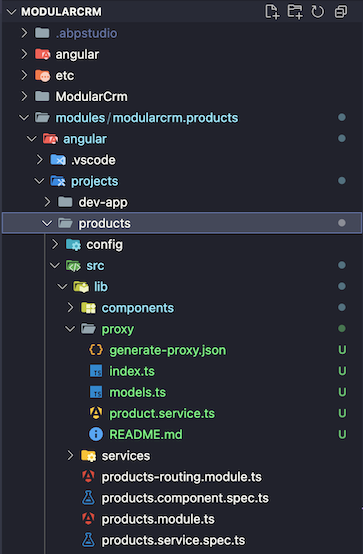 Now I’ve encountered a different problem. I’m following the ABP guide for the Modular Monolith Application template (ModularCrm), and while the proxy for the
 Products module is being generated correctly, I’m running into an issue with how imports are handled in the IDE.
For example, when I auto-import ProductService, the IDE generates:
{ ProductService } from '@proxy';
This used to work fine in a previous project based on ABP version 8. However, in this setup, I get the following compile-time error:
../modules/modularcrm.products/angular/projects/products/src/lib/components/products.component.ts:2:32 - error TS2307: Cannot find module '@proxy' or its corresponding type declarations.
If I manually change the import to:
{ ProductService } from '../proxy';
the application compiles and works as expected.
Is this the expected behavior in the new modular structure?
Do I have to manually adjust the import path for each service or DTO I need to use?
Or is there a configuration I might be missing to make the @proxy alias resolve correctly in this context?
Thanks again for the support!
Kind regards, Gabriel
Hi EngincanV
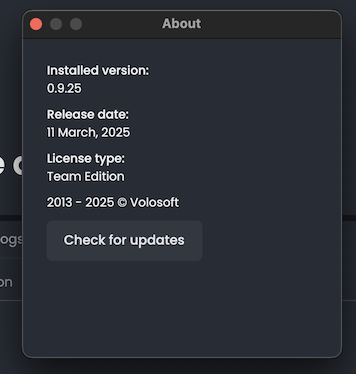
I can confirm I'm using the latest version of ABP Studio and CLI (in MacOS btw) and stil can't see the option for my old project.
Hi EngincanV,
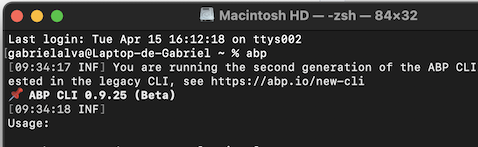
I'm currently using ABP CLI 0.9.25 (Beta), but I still don't see the "Upgrade to Pro" option. Additionally, when I try running abp upgrade -t app, I get an error.
Here's the structure of my existing ABP project (version 8.0.5):
Kuppabit.Kissa
> angular
    > katze
    > kedi
    > neko
    > paka
    > popoki
> aspnet-core
    > src
        > Kissa.Application
        > Kissa.Application.Contracts
        ...
    > modules
        > Katze
            > src
            ...
I understand that the latest ABP CLI introduced changes in the project template structure, so I'm wondering: is there a recommended way to upgrade our current project to Pro, or is it necessary to create a new one using the updated CLI?
Thanks in advance for your help.
Best regards, Gabriel
Hi berkansasmaz,
I tried using the "Upgrade to Pro" option in ABP Studio, but I don’t see it available for any of the projects in our solution.
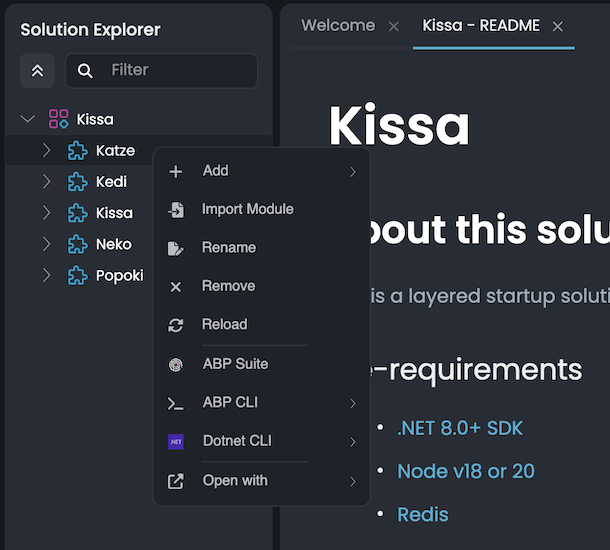
If I'm not mistaken, the screenshots you shared show a project using ABP 9+ being upgraded to Pro. However, our current project is still on version 8.0.5.
Regards, Gabriel









