ABP Suite released a new version. The issues have been resolved when I upgraded the ABP Suite desktop app.
Hi ABP Support Team,
I upgraded my solution from ABP 10.1.1 to 10.2.0 using the ABP Studio built-in upgrade tool (ABP CLI → Upgrade ABP Packages). After the upgrade, I encountered breaking changes on both the backend and frontend.
Environment
Backend Issue
After the upgrade, the project failed to build with:

'WafiAIDbContext' does not implement interface member 'IIdentityProDbContext.UserInvitations'
I resolved this manually by:
WafiAIDbContext:public DbSet<UserInvitation> UserInvitations { get; set; }
The backend is now working. However, this was a breaking change introduced between 10.1.1 and 10.2.0 that abp update did not handle automatically. It would be helpful if the upgrade tool applied these changes automatically or at least documented them in the migration guide.
Frontend Issue — UNRESOLVED
The Angular frontend is completely broken after the upgrade with numerous package errors. I have not been able to resolve these.
Could you please provide:
@abp/* and @volo/* npm packages for ABP 10.2.0package.json, angular.json, or tsconfig.json changes requiredI can share the full Angular error logs if that would help diagnose the issue.
Best regards Ariful
ABP version 9.1.0. In order to fix this, I upgraded to ABP 9.2.1. Still the same error.
Builder Type: "serve": { "builder": "@angular-devkit/build-angular:dev-server", "configurations": { "production": { "buildTarget": "PMS:build:production" }, "development": { "buildTarget": "PMS:build:development" } }, "defaultConfiguration": "development" },
package.json { "name": "PMS", "version": "1.0.0", "scripts": { "ng": "ng", "start": "ng serve --live-reload=true", "build": "ng build", "build:prod": "ng build --configuration production", "watch": "ng build --watch --configuration development", "test": "ng test", "lint": "ng lint" }, "private": true, "dependencies": { "@abp/ng.components": "~9.1.0", "@abp/ng.core": "~9.1.0", "@abp/ng.feature-management": "~9.1.0", "@abp/ng.oauth": "~9.1.0", "@abp/ng.setting-management": "~9.1.0", "@abp/ng.theme.shared": "~9.1.0", "@angular/animations": "~19.1.0", "@angular/common": "19", "@angular/compiler": "~19.1.0", "@angular/core": "19", "@angular/forms": "~19.1.0", "@angular/google-maps": "19.2.8", "@angular/localize": "~19.1.0", "@angular/platform-browser": "19", "@angular/platform-browser-dynamic": "19", "@angular/router": "19", "@fullcalendar/angular": "^6.1.16", "@fullcalendar/core": "^6.1.15", "@fullcalendar/interaction": "^6.1.15", "@fullcalendar/resource": "^6.1.15", "@fullcalendar/resource-timeline": "^6.1.15", "@ng-select/ng-select": "^14.2.4", "@volo/abp.commercial.ng.ui": "~9.1.0", "@volo/abp.ng.account": "~9.1.0", "@volo/abp.ng.audit-logging": "~9.1.0", "@volo/abp.ng.chat": "~9.1.0", "@volo/abp.ng.file-management": "~9.1.0", "@volo/abp.ng.gdpr": "~9.1.0", "@volo/abp.ng.identity": "~9.1.0", "@volo/abp.ng.language-management": "~9.1.0", "@volo/abp.ng.openiddictpro": "~9.1.0", "@volo/abp.ng.payment": "9.1.0", "@volo/abp.ng.saas": "~9.1.0", "@volo/abp.ng.text-template-management": "~9.1.0", "@volosoft/abp.ng.theme.lepton-x": "~4.1.0", "apexcharts": "^4.5.0", "crypto-js": "^4.2.0", "moment": "^2.30.1", "ng-apexcharts": "^1.15.0", "ngx-editor": "^18.0.0", "ngx-papaparse": "^8.0.0", "ngx-print": "^2.0.0", "rxjs": "~7.8.0", "tippy.js": "^6.3.7", "tslib": "^2.0.0", "xlsx": "^0.18.5", "zone.js": "~0.15.0" }, "devDependencies": { "@abp/ng.schematics": "~9.1.0", "@angular-devkit/build-angular": "~19.1.0", "@angular-eslint/builder": "~19.0.0", "@angular-eslint/eslint-plugin": "~19.0.0", "@angular-eslint/eslint-plugin-template": "~19.0.0", "@angular-eslint/schematics": "~19.0.0", "@angular-eslint/template-parser": "~19.0.0", "@angular/cli": "~19.1.0", "@angular/compiler-cli": "~19.1.0", "@angular/language-service": "~19.1.0", "@types/jasmine": "~3.6.0", "@types/node": "^20.0.0", "@typescript-eslint/eslint-plugin": "^7.0.0", "@typescript-eslint/parser": "^7.0.0", "eslint": "^8.0.0", "jasmine-core": "~4.0.0", "karma": "~6.3.0", "karma-chrome-launcher": "~3.1.0", "karma-coverage": "~2.1.0", "karma-jasmine": "~4.0.0", "karma-jasmine-html-reporter": "^1.0.0", "typescript": "~5.6.0" } }
The AI-generated answer doesn't work for us. Please help
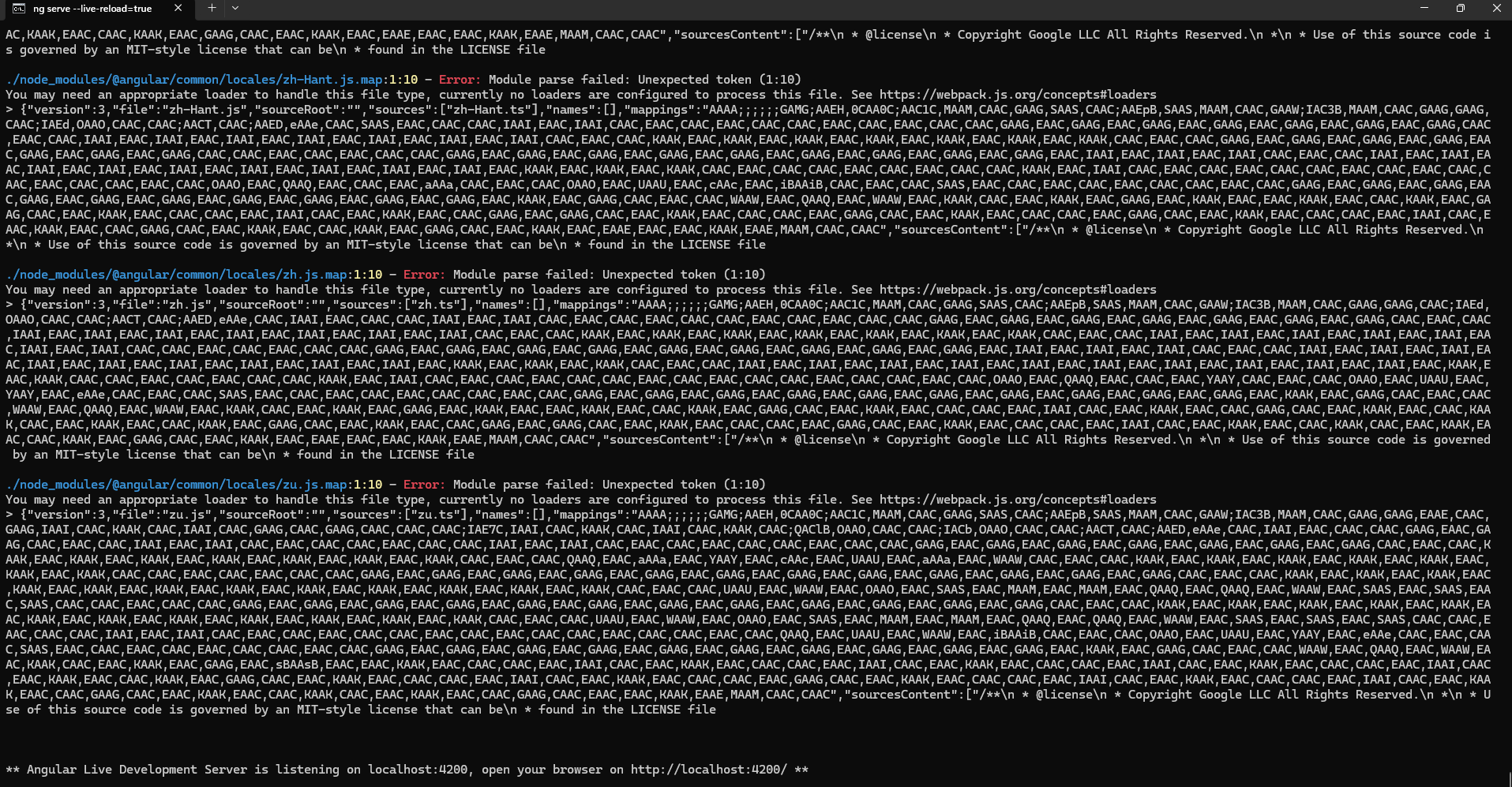
When I run (yarn start) the Angular site, it shows the following error. I uninstalled and installed stable version of Node.js, still not working
./node_modules/@angular/common/locales/zh-Hans-HK.js.map:1:10 - Error: Module parse failed: Unexpected token (1:10) You may need an appropriate loader to handle this file type, currently no loaders are configured to process this file. See https://webpack.js.org/concepts#loaders > {"version":3,"file":"zh-Hans-HK.js","sourceRoot":"","sources":["zh-Hans-HK.ts"],"names":[],"mappings":"AAAA;;;;;;GAMG;AAEH,0CAA0C;AAC1C,MAAM,CAAC,GAAG,SAAS,CAAC;AAEpB,SAAS,MAAM,CAAC,GAAW;IAC3B,MAAM,CAAC,GAAG,GAAG,CAAC;IAEd,OAAO,CAAC,CAAC;AACT,CAAC;AAED,eAAe,CAAC,YAAY,EAAC,CAAC,CAAC,IAAI,EAAC,IAAI,CAAC,EAAC,CAAC,EAAC,CAAC,CAAC,EAAC,CAAC,EAAC,CAAC,CAAC,GAAG,EAAC,GAAG,EAAC,GAAG,EAAC,GAAG,EAAC,GAAG,EAAC,GAAG,EAAC,GAAG,CAAC,EAAC,CAAC,IAAI,EAAC,IAAI,EAAC,IAAI,EAAC,IAAI,EAAC,IAAI,EAAC,IAAI,EAAC,IAAI,CAAC,EAAC,CAAC,KAAK,EAAC,KAAK,EAAC,KAAK,EAAC,KAAK,EAAC,KAAK,EAAC,KAAK,EAAC,KAAK,CAAC,EAAC,CAAC,IAAI,EAAC,IAAI,EAAC,IAAI,EAAC,IAAI,EAAC,IAAI,EAAC,IAAI,EAAC,IAAI,CAAC,CAAC,EAAC,CAAC,EAAC,CAAC,CAAC,GAAG,EAAC,GAAG,EAAC,GAAG,EAAC,GAAG,EAAC,GAAG,EAAC,GAAG,EAAC,GAAG,EAAC,GAAG,EAAC,GAAG,EAAC,IAAI,EAAC,IAAI,EAAC,IAAI,CAAC,EAAC,CAAC,IAAI,EAAC,IAAI,EAAC,IAAI,EAAC,IAAI,EAAC,IAAI,EAAC,IAAI,EAAC,IAAI,EAAC,IAAI,EAAC,IAAI,EAAC,KAAK,EAAC,KAAK,EAAC,KAAK,CAAC,EAAC,CAAC,IAAI,EAAC,IAAI,EAAC,IAAI,EAAC,IAAI,EAAC,IAAI,EAAC,IAAI,EAAC,IAAI,EAAC,IAAI,EAAC,IAAI,EAAC,IAAI,EAAC,KAAK,EAAC,KAAK,CAAC,CAAC,EAAC,CAAC,EAAC,CAAC,CAAC,KAAK,EAAC,IAAI,CAAC,EAAC,CAAC,EAAC,CAAC,CAAC,EAAC,CAAC,EAAC,CAAC,CAAC,EAAC,CAAC,CAAC,EAAC,CAAC,QAAQ,EAAC,QAAQ,EAAC,CAAC,EAAC,YAAY,CAAC,EAAC,CAAC,OAAO,EAAC,UAAU,EAAC,YAAY,EAAC,eAAe,CAAC,EAAC,CAAC,SAAS,EAAC,CAAC,EAAC,CAAC,EAAC,CAAC,CAAC,EAAC,CAAC,GAAG,EAAC,GAAG,EAAC,GAAG,EAAC,GAAG,EAAC,GAAG,EAAC,GAAG,EAAC,GAAG,EAAC,GAAG,EAAC,GAAG,EAAC,GAAG,EAAC,KAAK,EAAC,GAAG,CAAC,EAAC,CAAC,WAAW,EAAC,QAAQ,EAAC,WAAW,EAAC,KAAK,CAAC,EAAC,KAAK,EAAC,KAAK,EAAC,IAAI,EAAC,EAAC,KAAK,EAAC,CAAC,KAAK,EAAC,GAAG,CAAC,EAAC,KAAK,EAAC,CAAC,CAAC,EAAC,IAAI,CAAC,EAAC,KAAK,EAAC,CAAC,KAAK,CAAC,EAAC,KAAK,EAAC,CAAC,KAAK,EAAC,GAAG,CAAC,EAAC,KAAK,EAAC,CAAC,GAAG,EAAC,GAAG,CAAC,EAAC,KAAK,EAAC,CAAC,CAAC,EAAC,GAAG,CAAC,EAAC,KAAK,EAAC,CAAC,CAAC,EAAC,IAAI,CAAC,EAAC,KAAK,EAAC,CAAC,KAAK,CAAC,EAAC,KAAK,EAAC,CAAC,KAAK,EAAC,GAAG,CAAC,EAAC,KAAK,EAAC,EAAE,EAAC,EAAC,KAAK,EAAE,MAAM,CAAC,CAAC","sourcesContent":["/**\n * @license\n * Copyright Google LLC All Rights Reserved.\n *\n * Use of this source code is governed by an MIT-style license that can be\n * found in the LICENSE file
The website is not loading (502 Bad Gateway): https://pms.ntouch.ai/
Error Log: [14:03:43 INF] Initialized all ABP modules. [14:03:44 INF] Initializing UI Database [14:03:45 INF] Saving healthchecks configuration to database [14:03:46 WRN] Overriding HTTP_PORTS '8080' and HTTPS_PORTS ''. Binding to values defined by URLS instead 'http://+:80'. [14:03:46 INF] Now listening on: http://[::]:80 [14:03:46 INF] Start processing HTTP request GET http://pms-dev-web/health-status [14:03:46 INF] Sending HTTP request GET http://pms-dev-web/health-status [14:03:46 INF] Application started. Press Ctrl+C to shut down. [14:03:46 INF] Hosting environment: Production [14:03:46 INF] Content root path: /app [14:03:46 INF] Request starting HTTP/1.1 GET http://pms-dev-web/health-status - null null [14:03:47 WRN] Could not find IdentityClientConfiguration for AbpMvcClient. Either define a configuration for AbpMvcClient or set a default configuration. [14:03:47 INF] Start processing HTTP request GET https://dev-api.ntouch.ai/api/abp/application-configuration?* [14:03:47 INF] Sending HTTP request GET https://dev-api.ntouch.ai/api/abp/application-configuration?* [14:03:47 INF] Received HTTP response headers after 948.8453ms - 200 [14:03:47 INF] End processing HTTP request after 971.818ms - 200
Docker Configuration:
dev-web:
image: xxx/pms-dev-web:latest
container_name: dev-web
hostname: dev-web
environment:
- ASPNETCORE_URLS=http://+:80
- App__SelfUrl=https://xxx.example.com
- App__AngularUrl=https://xxx.example.com
- App__CorsOrigins=https://xxx.example.com,https://xxx-api.example.com
- App__HealthCheckUrl=http://xxx-web/health-status
- AuthServer__RequireHttpsMetadata=false
- AuthServer__IsOnK8s=true
- AuthServer__Authority=https://xxx-authserver.example.com
- AuthServer__ClientId=PMS_Web_Public
- AuthServer__ClientSecret=1q2w3e*
- AuthServer__MetaAddress=https://xxx-authserver.example.com
- RemoteServices__Default__BaseUrl=https://xxx-api.example.com
- RemoteServices__AbpAccountPublic__BaseUrl=https://xxx-example.com
- Redis__Configuration=pms-dev-redis:6379
- ConnectionStrings__Default=User ID=postgres;Password=xxx;Host=postgres;Port=5432;Database=xxxx;Pooling=false;
ports:
- "44365:80"
depends_on:
postgres:
condition: service_healthy
pms-dev-redis:
condition: service_healthy
restart: on-failure
networks:
- pms-dev-network









