Activities of "berkansasmaz"

I saw the mail you sent, but when I clicked on the link of your application, I could not get a meaningful result when it sent a request to localhost, but there is still something I would like you to try.

Can you update the Program class of your MyApp.Blazor project as in the picture below?

Then update your ingress file as in the picture below:


If these do not work, if you can send your project to the drive and send the link from the mail, I think we can get much faster results if it is also suitable for you.

Hello,

We have sample projects for domain tenant resolver. You can compare your own application with the sample application and find out what the problem is.

Sample projects: https://github.com/abpframework/abp-samples/tree/master/DomainTenantResolver/OpenIddict

Hello rsg160,

Can you run abp install-libs in the terminal and try again before deploying the solution? I suspect this step is not working properly when the abp update command is running.


Hello,

Thank you for reporting the problem. This problem seems to be solved in the new version, so you can update your solution by following the steps below:

  1. Run abp update --version 9.1.0-rc.2 command in solution folder
  2. Search Volo.Abp.AspNetCore.Mvc.UI.Theme.LeptonX in all csproj files and change version to 4.1.0-rc.2
  3. You should be getting a build error at this stage in your project. Make the following change where you are getting errors:
  • OpenIddictConstants.Permissions.Endpoints.Logout to OpenIddictConstants.Permissions.Endpoints.EndSession

  • OpenIddictConstants.Permissions.Endpoints.Device to OpenIddictConstants.Permissions.Endpoints.DeviceAuthorization

Hello,

To reproduce the problem I created a Blazor Server project and did what you did. In my case it worked. In this case I think the problem is caused by the dependencies of your modules and host application. If your modules depend on the account module but you don't really need it, you can remove them. Similarly, such repetitive dependencies on both sides should be removed. The end application already depends on them and it should be its responsibility to manage this dependency.

Answer

Hello,

For this purpose, you can create a Blazor component in the Pages folder of the MyApp.Blazor.Client project as follows:

MyGeneralSettings.razor

@using Microsoft.Extensions.Localization
@using Microsoft.Extensions.Options
@using Volo.Abp.AspNetCore.Components.Web.LeptonXTheme.Navigation
@using Volo.Abp.LeptonX.Shared.Localization
@using Volo.Abp.Localization
@using System.Globalization
@using Volo.Abp.AspNetCore.Components.Web.LeptonXTheme.Components.ApplicationLayout.Common
@using Volo.Abp.DependencyInjection

@inherits Volo.Abp.AspNetCore.Components.Web.LeptonXTheme.Components.ApplicationLayout.Common.GeneralSettings
@attribute [ExposeServices(typeof(GeneralSettings))]
@attribute [Dependency(ReplaceServices = true)]

@inject ILanguagePlatformManager LanguagePlatformManager
@inject IStringLocalizer<LeptonXResource> L

<div class="lpx-settings" id="lpx-settings">

	@* @if (HasMultipleStyles) *@
	@* { *@
	@* 	<div id="appearance" class="setting-icon" data-lpx-setting-icon="appearance" *@
	@* 	data-lpx-setting-id="settings-context-menu"> *@
	@* 		<div class="setting"> *@
	@* 			<i class="bi bi-laptop-fill"></i> *@
	@* 		</div> *@
	@* 	</div> *@
	@* } *@

	@* @if (HasContainerWidth) *@
	@* { *@
	@* 	<div id="containerWidth" class="setting-icon" data-lpx-setting-icon="containerWidth" *@
	@* 	data-lpx-setting-id="settings-context-menu"> *@
	@* 		<div class="setting"> *@
	@* 			<i class="bi bi-layout-three-columns"></i> *@
	@* 		</div> *@
	@* 	</div> *@
	@* } *@

	@* @if(Languages.Count > 1) *@
	@* { *@
	@* 	<div id="language" class="setting-icon" data-lpx-setting-icon="language" *@
	@* 		data-lpx-setting-id="settings-context-menu"> *@
	@* 		<div class="setting"> *@
	@* 			@CurrentLanguageTwoLetters *@
	@* 		</div> *@
	@* 	</div> *@
	@* } *@

	@* <div class="setting-icon"> *@
	@* 	<i class="bi bi-gear-wide-connected" aria-hidden="true" data-lpx-ctx-toggle="settings-context-menu"></i> *@
	@* </div> *@
	@* <div class="lpx-context-menu" data-lpx-context-menu="settings-context-menu"> *@
	@* 	<ul class="lpx-nav-menu" id="settings-routes"> *@
	@* 		<li class="outer-menu-item"> *@
	@* 			<a class="lpx-menu-item-link lpx-menu-item"> *@
	@* 				<span class="lpx-menu-item-icon"> *@
	@* 					<i class="lpx-icon outer-icon bi bi-gear-wide-connected" aria-hidden="true"></i> *@
	@* 				</span> *@
	@* 				<span class="lpx-menu-item-text">@L["GeneralSettings"]</span> *@
	@* 				<span data-lpx-close="settings-context-menu"> *@
	@* 					<i class="lpx-icon bi bi-x outer-icon dd-icon" aria-hidden="true"></i> *@
	@* 				</span> *@
	@* 			</a> *@
	@* 		</li> *@
	@* *@
	@* 		@if (HasMultipleStyles) *@
	@* 		{ *@
	@* 			<li class="outer-menu-item"> *@
	@* 				<a class="lpx-menu-item-link lpx-menu-item" data-lpx-setting-group="appearance"> *@
	@* 					<span class="lpx-menu-item-icon"> *@
	@* 						<i class="lpx-icon bi bi-palette-fill" aria-hidden="true"></i> *@
	@* 					</span> *@
	@* *@
	@* 					<span class="lpx-menu-item-text hidden-in-hover-trigger">@L["Appearance"]</span> *@
	@* *@
	@* 					<i class="dd-icon hidden-in-hover-trigger lpx-caret bi-chevron-down" aria-hidden="true"></i> *@
	@* 				</a> *@
	@* *@
	@* 				<ul class="lpx-inner-menu hidden-in-hover-trigger collapsed" data-id="appearance"> *@
	@* 					@foreach (var style in ThemeOptions.Value.Styles) *@
	@* 					{ *@
	@* 						<li class="lpx-inner-menu-item"> *@
	@* 							<a class="lpx-menu-item-link lpx-menu-item" data-lpx-setting="@style.Key"> *@
	@* 								<span class="lpx-menu-item-icon"> *@
	@* 									<i class="lpx-icon @style.Value.Icon" aria-hidden="true"></i> *@
	@* 								</span> *@
	@* *@
	@* 								<span class="lpx-menu-item-text hidden-in-hover-trigger">@style.Value.DisplayName.Localize(LocalizerFactory).Value</span> *@
	@* 							</a> *@
	@* 						</li> *@
	@* 					} *@
	@* 				</ul> *@
	@* 			</li> *@
	@* 		} *@
	@* 		@if (HasContainerWidth) *@
	@* 		{ *@
	@* 			<li class="outer-menu-item"> *@
	@* 				<a class="lpx-menu-item-link lpx-menu-item" data-lpx-setting-group="containerWidth"> *@
	@* 					<span class="lpx-menu-item-icon"> *@
	@* 						<i class="lpx-icon bi bi-aspect-ratio" aria-hidden="true"></i> *@
	@* 					</span> *@
	@* *@
	@* 					<span class="lpx-menu-item-text hidden-in-hover-trigger">@L["ContainerWidth"]</span> *@
	@* *@
	@* 					<i class="dd-icon hidden-in-hover-trigger lpx-caret bi-chevron-down" aria-hidden="true"></i> *@
	@* 				</a> *@
	@* *@
	@* 				<ul class="lpx-inner-menu hidden-in-hover-trigger collapsed" data-id="containerWidth"> *@
	@* 					<li class="lpx-inner-menu-item"> *@
	@* 						<a class="lpx-menu-item-link lpx-menu-item" data-lpx-setting="boxed"> *@
	@* 							<span class="lpx-menu-item-icon"><i class="lpx-icon bi bi-square" *@
	@* 								aria-hidden="true"></i></span> *@
	@* *@
	@* 							<span class="lpx-menu-item-text hidden-in-hover-trigger">@L["ContainerWidth:Boxed"]</span> *@
	@* 						</a> *@
	@* 					</li> *@
	@* *@
	@* 					<li class="lpx-inner-menu-item"> *@
	@* 						<a class="lpx-menu-item-link lpx-menu-item selected" data-lpx-setting="fixed"> *@
	@* 							<span class="lpx-menu-item-icon"> *@
	@* 								<i class="lpx-icon bi bi-layout-three-columns" aria-hidden="true"></i> *@
	@* 							</span> *@
	@* *@
	@* 							<span *@
	@* 							class="lpx-menu-item-text hidden-in-hover-trigger">@L["ContainerWidth:Fixed"]</span> *@
	@* 						</a> *@
	@* 					</li> *@
	@* *@
	@* 					<li class="lpx-inner-menu-item"> *@
	@* 						<a class="lpx-menu-item-link lpx-menu-item selected" data-lpx-setting="full"> *@
	@* 							<span class="lpx-menu-item-icon"> *@
	@* 								<i class="lpx-icon bi bi-code-square" aria-hidden="true"></i> *@
	@* 							</span> *@
	@* *@
	@* 							<span *@
	@* 							class="lpx-menu-item-text hidden-in-hover-trigger">@L["ContainerWidth:Fluid"]</span> *@
	@* 						</a> *@
	@* 					</li> *@
	@* 				</ul> *@
	@* 			</li> *@
	@* 		} *@
	@* *@
	@* 		@if(Languages.Count > 1) *@
	@* 		{ *@
	@* 			<li class="outer-menu-item"> *@
	@* 				<a class="lpx-menu-item-link lpx-menu-item" data-lpx-setting-group="language"> *@
	@* 					<span class="lpx-menu-item-icon"><i class="lpx-icon bi bi-globe" aria-hidden="true"></i></span> *@
	@* *@
	@* 					<span class="lpx-menu-item-text hidden-in-hover-trigger">@L["Language"]</span> *@
	@* *@
	@* 					<i class="dd-icon hidden-in-hover-trigger lpx-caret bi-chevron-down" aria-hidden="true"></i> *@
	@* 				</a> *@
	@* *@
	@* 				<ul class="lpx-inner-menu hidden-in-hover-trigger collapsed" data-id="language"> *@
	@* 					@if (HasLanguages) *@
	@* 					{ *@
	@* 						@foreach (var language in Languages) *@
	@* 						{ *@
	@* 							<li class="lpx-inner-menu-item"> *@
	@* 								<a class="lpx-menu-item-link@(language.CultureName == CurrentLanguage.CultureName ? " selected" : string.Empty)" *@
	@* 							@onclick="() => ChangeLanguageAsync(language)"> *@
	@* 									<span class="lpx-menu-item-text hidden-in-hover-trigger">@language.DisplayName / @(new *@
	@* 								CultureInfo(language.CultureName).TwoLetterISOLanguageName.ToUpper())</span> *@
	@* 								</a> *@
	@* 							</li> *@
	@* 						} *@
	@* 					} *@
	@* 				</ul> *@
	@* 			</li> *@
	@* 		} *@
	@* 	</ul> *@
	@* </div> *@
</div>

Then add the following code block to the ConfigureServices method inside the Module class of the MyApp.Blazor project:

  context.Services.Replace(
            ServiceDescriptor.Transient<
                GeneralSettings,
                MyGeneralSettings
            >());

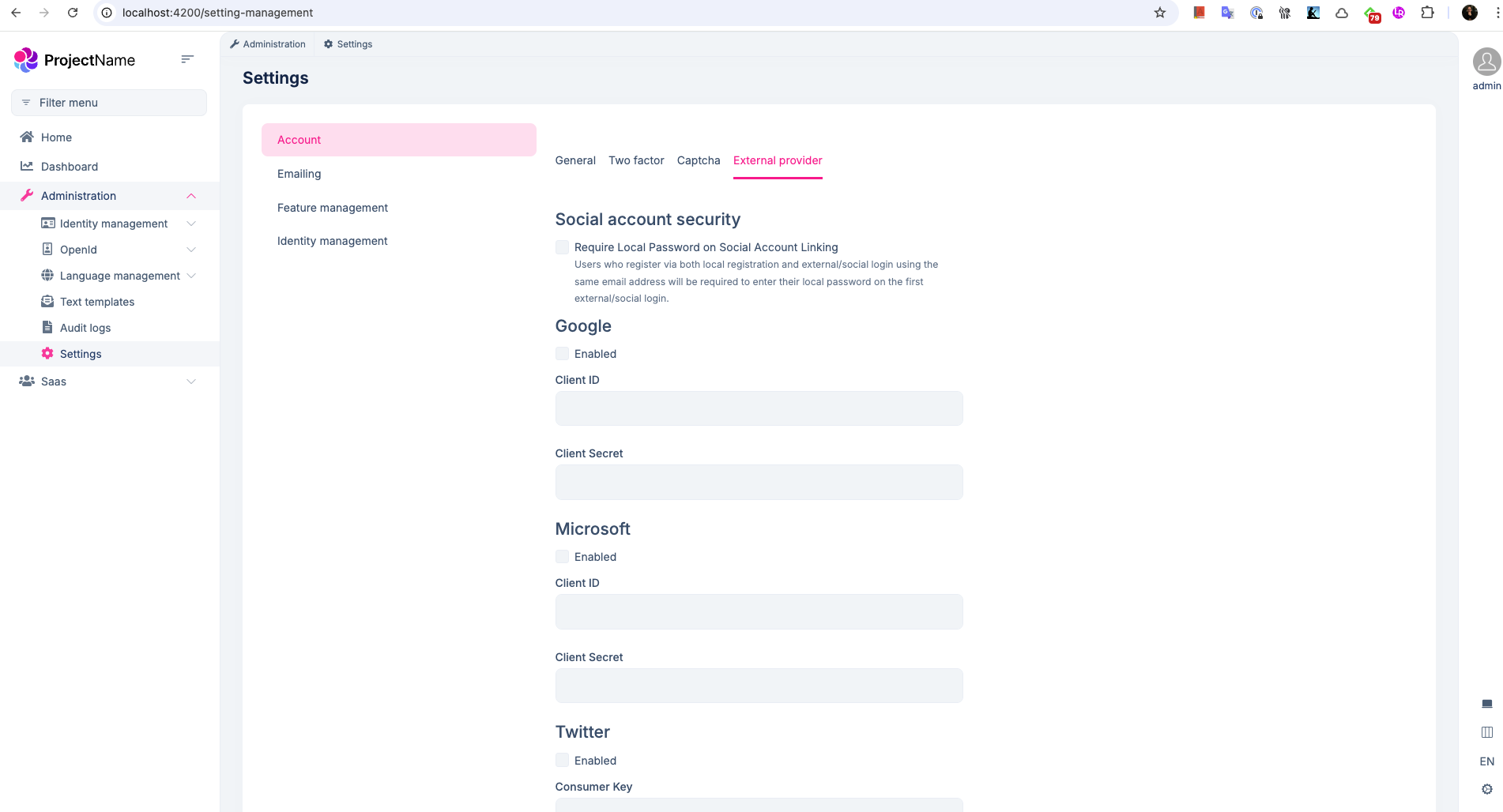
However, we need to able to enable like microsoft, twitter in external provider tab like your image first then will config on host project, right?

Yes, first you need to enable the relevant social login on the host, then on the tenant side, the tenant's administrator can see the relevant settings for the enabled providers.

However, you cannot see the External Provider tab setting on the host side, right? If so, can you send your project to berkan.sasmaz@volosoft.com?

Answer

Can you specify what is the url when you are redirected to the login screen after clicking the login button from your application.

Hello, I examined your project in detail, but I can't say anything because I don't know much about MassTransit. However, I have a few suggestions:

Can you use the UnitOfWorkManager.Current.AddOrReplaceDistributedEvent method where you publish the event? If you can, can you try it like this?

You can see how to use it in the code example here: https://github.com/abpframework/abp/blob/8d1d89ac7fe3082e342add226e97f417e7f9d287/framework/src/Volo.Abp.Ddd.Domain/Volo/Abp/Domain/Entities/Events/EntityChangeEventHelper.cs#L128-L172


Note: By the way, you can use ABP's Inbox/Outbox feature without adding dependencies to your Domain layer. It's almost the same as what you did for MassTransit.

Hello,

For this, you can override the following CreateFilterExpression method in the MyAppDbContext class in the MyApp.EntityFrameworkCore project of your application as follows:

protected override Expression<Func<TEntity, bool>>? CreateFilterExpression<TEntity>(ModelBuilder modelBuilder)
    {
        Expression<Func<TEntity, bool>> expression = null;

        if (typeof(ISoftDelete).IsAssignableFrom(typeof(TEntity)))
        {
            var softDeleteColumnName = modelBuilder.Entity<TEntity>().Metadata.FindProperty(nameof(ISoftDelete.IsDeleted))?.GetColumnName() ?? "IsDeleted";
            expression = e => !IsSoftDeleteFilterEnabled || !EF.Property<bool>(e, softDeleteColumnName);
            if (UseDbFunction())
            {
                expression = e => AbpEfCoreDataFilterDbFunctionMethods.SoftDeleteFilter(((ISoftDelete)e).IsDeleted, true);
                modelBuilder.ConfigureSoftDeleteDbFunction(AbpEfCoreDataFilterDbFunctionMethods.SoftDeleteFilterMethodInfo, this.GetService<AbpEfCoreCurrentDbContext>());
            }
        }

        if (typeof(IMultiTenant).IsAssignableFrom(typeof(TEntity)) && typeof(TEntity) != typeof(LanguageText))
        {
            var multiTenantColumnName = modelBuilder.Entity<TEntity>().Metadata.FindProperty(nameof(IMultiTenant.TenantId))?.GetColumnName() ?? "TenantId";
            Expression<Func<TEntity, bool>> multiTenantFilter = e => !IsMultiTenantFilterEnabled || EF.Property<Guid>(e, multiTenantColumnName) == CurrentTenantId;
            if (UseDbFunction())
            {
                multiTenantFilter = e => AbpEfCoreDataFilterDbFunctionMethods.MultiTenantFilter(((IMultiTenant)e).TenantId, CurrentTenantId, true);
                modelBuilder.ConfigureMultiTenantDbFunction(AbpEfCoreDataFilterDbFunctionMethods.MultiTenantFilterMethodInfo, this.GetService<AbpEfCoreCurrentDbContext>());
            }
            expression = expression == null ? multiTenantFilter : QueryFilterExpressionHelper.CombineExpressions(expression, multiTenantFilter);
        }
        
        return expression;
    }

Then you need to replace the LanguageManagementDbContext from DI Container as in the picture below:

Showing 331 to 340 of 737 entries
Boost Your Development
ABP Live Training
Packages
See Trainings
Mastering ABP Framework Book
The Official Guide
Mastering
ABP Framework
Learn More
Mastering ABP Framework Book
Made with ❤️ on ABP v10.1.0-preview. Updated on December 17, 2025, 07:08
1
ABP Assistant
🔐 You need to be logged in to use the chatbot. Please log in first.