I don't set token lifetime for each Application. Only set this one in AuthServerModule. It will affect for all Application, right?
PreConfigure<OpenIddictServerBuilder>(builder =>
{
    builder.SetAccessTokenLifetime(TimeSpan.FromHours(24));
});
I've sent you access token via email
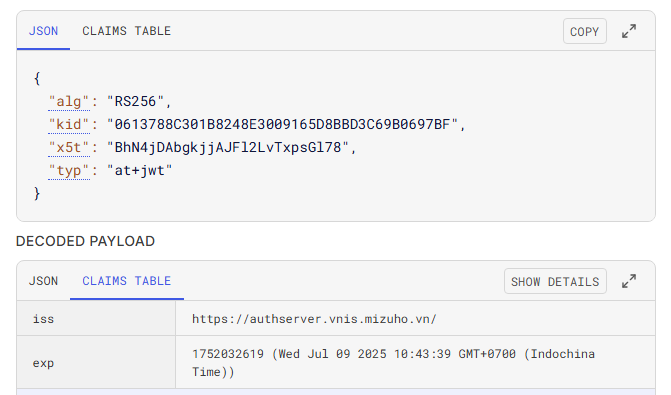
As you can see exp is 24hours, but still unauthorized after 1 hour
Hi,
So, did you already fix the issue of increasing Access Token liftetime in v9.1.3?
Hi,
What is the reason of that issue? I just want to fix only that issue firsrt, because it is on Production. Upgrade to new version will take much time.
Hi,
Is there any specific code that I can change? Because I've just upgraded to v9.1.0 and released on Production, upgrade to new version need to be tested carefully
Hi,
Already sent. Please help to check.
Hi,
The log show message related to GetAccessToken, I got 1 issue related this is: I could not increase Access Token lifetime despire of configuring in AuthServerModule
PreConfigure<OpenIddictServerBuilder>(builder =>
{
    builder.SetAccessTokenLifetime(TimeSpan.FromHours(24));
});
This code worked fine in v7.3.0
Hi,
I found the error. It is due to I add .Net Aspire into my solution. Thank you for your time.
I've just tried your solution but still error. After 3 times retry with timeout 10s the last error message is the same above:
[web_80132ba5-d]: [10:43:56 ERR] ---------- RemoteServiceErrorInfo ----------
[web_80132ba5-d]: {
[web_80132ba5-d]: "code": null,
[web_80132ba5-d]: "message": "An error occurred during the ABP remote HTTP request. (The operation didn't complete within the allowed timeout of '00:00:30'.) See the inner exception for details.",
[web_80132ba5-d]: "details": null,
[web_80132ba5-d]: "data": null,
[web_80132ba5-d]: "validationErrors": null
[web_80132ba5-d]: }
[web_80132ba5-d]:
[web_80132ba5-d]: [10:43:56 ERR] An error occurred during the ABP remote HTTP request. (The operation didn't complete within the allowed timeout of '00:00:30'.) See the inner exception for details.
[web_80132ba5-d]: Volo.Abp.Http.Client.AbpRemoteCallException: An error occurred during the ABP remote HTTP request. (The operation didn't complete within the allowed timeout of '00:00:30'.) See the inner exception for details.
[web_80132ba5-d]: ---> Polly.Timeout.TimeoutRejectedException: The operation didn't complete within the allowed timeout of '00:00:30'.
[web_80132ba5-d]: ---> System.Threading.Tasks.TaskCanceledException: The operation was canceled.
[web_80132ba5-d]: ---> System.IO.IOException: Unable to read data from the transport connection: The I/O operation has been aborted because of either a thread exit or an application request..
[web_80132ba5-d]: ---> System.Net.Sockets.SocketException (995): The I/O operation has been aborted because of either a thread exit or an application request.
[web_80132ba5-d]: --- End of inner exception stack trace ---
I also configure to not retry but it still retry 3 times, so I think the problem here related to Polly library. I don't know where it is configured and how to change it.
PreConfigure<AbpHttpClientBuilderOptions>(options =>
{
    options.ProxyClientActions.Add((remoteServiceName, clientBuilder, client) =>
    {
        client.Timeout = TimeSpan.FromMinutes(60);
    });

    options.ProxyClientBuildActions.Add((remoteServiceName, clientBuilder) =>
    {
        clientBuilder.AddTransientHttpErrorPolicy(policyBuilder =>
            policyBuilder.WaitAndRetryAsync(
                0,
                i => TimeSpan.FromSeconds(Math.Pow(2, i))
            )
        );
    });
});
or comment out the retry config
PreConfigure<AbpHttpClientBuilderOptions>(options =>
{
    options.ProxyClientActions.Add((remoteServiceName, clientBuilder, client) =>
    {
        client.Timeout = TimeSpan.FromMinutes(60);
    });

    //options.ProxyClientBuildActions.Add((remoteServiceName, clientBuilder) =>
    //{
    //    clientBuilder.AddTransientHttpErrorPolicy(policyBuilder =>
    //        policyBuilder.WaitAndRetryAsync(
    //            0,
    //            i => TimeSpan.FromSeconds(Math.Pow(2, i))
    //        )
    //    );
    //});
});
it still retries 3 times
I think this issue related to Polly library but I can't increase Polly timeout with the code above. According to this document: https://www.pollydocs.org/strategies/timeout.html the default timeout is 30s. Can you show me how to increase it in ABP framework?
That ticket is mine also. I already increased timeout of YARP and as I said above, in old version it still works fine, but new version does not.
"gsib-report-service-cluster": {
  "HttpRequest": {
    "ActivityTimeout": "01:00:00"
  },
  "Destinations": {
    "destination1": {
      "Address": "https://localhost:7019"
    }
  }
},









