ABP 7.2.2 Cannot find Volo.Abp.Ddd.Domain.Shared 7.2.2 nuget package. I use abp 7.2.2 but the package was not found.
warning when building: MyModule.Domain.Shared.csproj: Warning NU1603 : MyModule.Domain.Shared depends on Volo.Abp.Ddd.Domain.Shared (>= 7.2.2) but Volo.Abp.Ddd.Domain.Shared 7.2.2 was not found. Volo.Abp.Ddd.Domain.Shared 7.3.0 was resolved instead.
ABP Framework version: v7.2.2
UI Type: Blazor Server
Database System: PostgreSQL
Tiered (for MVC) or Auth Server Separated (for Angular): yes
Exception message and full stack trace:
Steps to reproduce the issue:

 auth 44322 ,claim 有phone_number,但是blazor 和api 都获取不到
Blazor 和Api 添加了引用
auth 44322 ,claim 有phone_number,但是blazor 和api 都获取不到
Blazor 和Api 添加了引用
  <PackageReference Include="Volo.Abp.Http.Client.Web" Version="8.3.4" />
  <PackageReference Include="Volo.Abp.Http.Client.IdentityModel.Web" Version="8.3.4" />
2025-02-10 02:23:13.876 +00:00 [WRN] '.AspNetCore.Correlation.46sDUt15fafe3sWxhr8wSAhTMBdMwKFTXQdLeMMPR6k' cookie not found. 2025-02-10 02:23:13.877 +00:00 [INF] Error from RemoteAuthentication: Correlation failed.. 2025-02-10 02:23:13.879 +00:00 [ERR] An unhandled exception has occurred while executing the request. Microsoft.AspNetCore.Authentication.AuthenticationFailureException: An error was encountered while handling the remote login. ---> Microsoft.AspNetCore.Authentication.AuthenticationFailureException: Correlation failed. --- End of inner exception stack trace --- at Microsoft.AspNetCore.Authentication.RemoteAuthenticationHandler`1.HandleRequestAsync() at Microsoft.AspNetCore.Authentication.AuthenticationMiddleware.Invoke(HttpContext context) at Prometheus.HttpMetrics.HttpRequestDurationMiddleware.Invoke(HttpContext context) at Prometheus.HttpMetrics.HttpRequestCountMiddleware.Invoke(HttpContext context) at Prometheus.HttpMetrics.HttpInProgressMiddleware.Invoke(HttpContext context) at Volo.Abp.AspNetCore.Security.AbpSecurityHeadersMiddleware.InvokeAsync(HttpContext context, RequestDelegate next) at Microsoft.AspNetCore.Builder.UseMiddlewareExtensions.InterfaceMiddlewareBinder.<>c__DisplayClass2_0.<
在http下,有办法解决么
ABP Studio does not support creating projects with a specific version
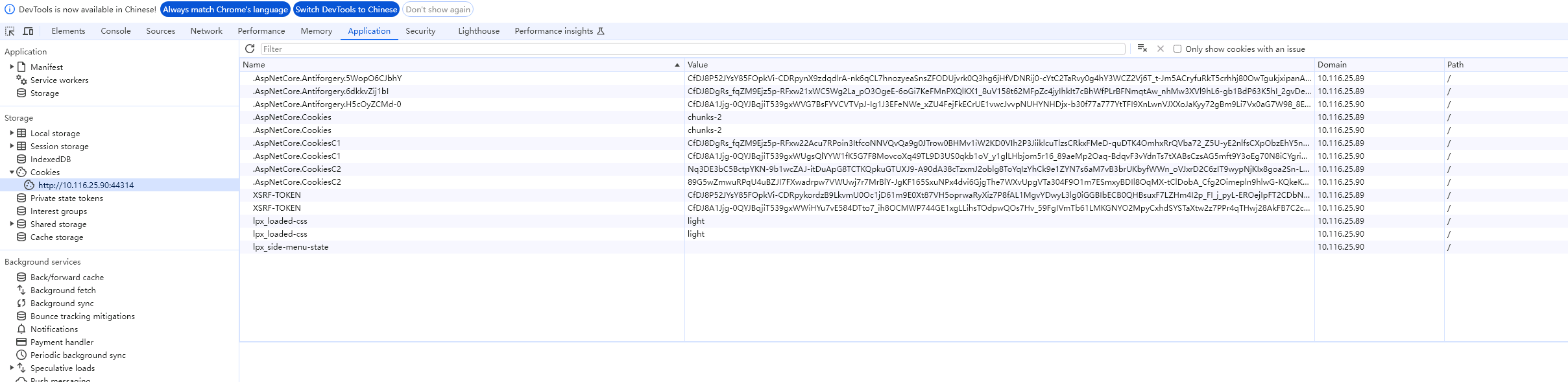

Blazor Cookies Not expired
System.DllNotFoundException: Unable to load shared library 'ldap.so.2' or one of its dependencies. In order to help diagnose loading problems, consider using a tool like strace. If you're using glibc, consider setting the LD_DEBUG environment variable: /usr/share/dotnet/shared/Microsoft.NETCore.App/7.0.10/ldap.so.2.so: cannot open shared object file: No such file or directory /app/ldap.so.2.so: cannot open shared object file: No such file or directory /usr/share/dotnet/shared/Microsoft.NETCore.App/7.0.10/libldap.so.2.so: cannot open shared object file: No such file or directory /app/libldap.so.2.so: cannot open shared object file: No such file or directory /usr/share/dotnet/shared/Microsoft.NETCore.App/7.0.10/ldap.so.2: cannot open shared object file: No such file or directory /app/ldap.so.2: cannot open shared object file: No such file or directory /usr/share/dotnet/shared/Microsoft.NETCore.App/7.0.10/libldap.so.2: cannot open shared object file: No such file or directory /app/libldap.so.2: cannot open shared object file: No such file or directory
at LdapForNet.Native.NativeMethodsLinux.ldap_initialize(IntPtr& ld, String uri) at LdapForNet.Native.LdapNativeLinux.Init(IntPtr& ld, String url) at LdapForNet.LdapConnection.Connect(String url, LdapVersion version) at LdapForNet.LdapConnectExtensions.Connect(ILdapConnection connection, Uri uri, LdapVersion version) at LdapForNet.LdapConnectExtensions.Connect(ILdapConnection connection, String hostname, Int32 port, LdapSchema ldapSchema, LdapVersion version) at Volo.Abp.Identity.ExternalLoginProviders.Ldap.OpenLdapManager.ConnectAsync(ILdapConnection ldapConnection) at Volo.Abp.Ldap.LdapManager.CreateLdapConnectionAsync() at Volo.Abp.Ldap.LdapManager.AuthenticateAsync(String username, String password)
1.IsEnabledAsync(SimpleStateCheckerContext1 context)
at Volo.Abp.SimpleStateChecking.SimpleStateCheckerManager1.InternalIsEnabledAsync(TState state, Boolean useBatchChecker) at Volo.Abp.SimpleStateChecking.SimpleStateCheckerManager1.IsEnabledAsync(TState state)
at Volo.Abp.Authorization.Permissions.PermissionChecker.IsGrantedAsync(ClaimsPrincipal claimsPrincipal, String[] names)
at Volo.Abp.Authorization.Permissions.PermissionChecker.IsGrantedAsync(String[] names)
at Volo.Abp.AspNetCore.Mvc.ApplicationConfigurations.AbpApplicationConfigurationAppService.GetAuthConfigAsync()
at Volo.Abp.AspNetCore.Mvc.ApplicationConfigurations.AbpApplicationConfigurationAppService.GetAsync(ApplicationConfigurationRequestOptions options)
at Castle.DynamicProxy.AsyncInterceptorBase.ProceedAsynchronous[TResult](IInvocation invocation, IInvocationProceedInfo proceedInfo)
at Volo.Abp.Castle.DynamicProxy.CastleAbpMethodInvocationAdapterWithReturnValue1.ProceedAsync() at Volo.Abp.GlobalFeatures.GlobalFeatureInterceptor.InterceptAsync(IAbpMethodInvocation invocation) at Volo.Abp.Castle.DynamicProxy.CastleAsyncAbpInterceptorAdapter1.InterceptAsync[TResult](IInvocation invocation, IInvocationProceedInfo proceedInfo, Func3 proceed) at Castle.DynamicProxy.AsyncInterceptorBase.ProceedAsynchronous[TResult](IInvocation invocation, IInvocationProceedInfo proceedInfo) at Volo.Abp.Castle.DynamicProxy.CastleAbpMethodInvocationAdapterWithReturnValue1.ProceedAsync()
at Volo.Abp.Auditing.AuditingInterceptor.ProceedByLoggingAsync(IAbpMethodInvocation invocation, AbpAuditingOptions options, IAuditingHelper auditingHelper, IAuditLogScope auditLogScope)
at Volo.Abp.Auditing.AuditingInterceptor.InterceptAsync(IAbpMethodInvocation invocation)
at Volo.Abp.Castle.DynamicProxy.CastleAsyncAbpInterceptorAdapter1.InterceptAsync[TResult](IInvocation invocation, IInvocationProceedInfo proceedInfo, Func3 proceed)
at Castle.DynamicProxy.AsyncInterceptorBase.ProceedAsynchronous[TResult](IInvocation invocation, IInvocationProceedInfo proceedInfo)
at Volo.Abp.Castle.DynamicProxy.CastleAbpMethodInvocationAdapterWithReturnValue1.ProceedAsync() at Volo.Abp.Validation.ValidationInterceptor.InterceptAsync(IAbpMethodInvocation invocation) at Volo.Abp.Castle.DynamicProxy.CastleAsyncAbpInterceptorAdapter1.InterceptAsync[TResult](IInvocation invocation, IInvocationProceedInfo proceedInfo, Func3 proceed) at Castle.DynamicProxy.AsyncInterceptorBase.ProceedAsynchronous[TResult](IInvocation invocation, IInvocationProceedInfo proceedInfo) at Volo.Abp.Castle.DynamicProxy.CastleAbpMethodInvocationAdapterWithReturnValue1.ProceedAsync()
at Volo.Abp.Uow.UnitOfWorkInterceptor.InterceptAsync(IAbpMethodInvocation invocation)
at Volo.Abp.Castle.DynamicProxy.CastleAsyncAbpInterceptorAdapter1.InterceptAsync[TResult](IInvocation invocation, IInvocationProceedInfo proceedInfo, Func3 proceed)
at Volo.Abp.AspNetCore.Mvc.ApplicationConfigurations.AbpApplicationConfigurationController.GetAsync(ApplicationConfigurationRequestOptions options)
at lambda_method3602(Closure, Object)
at Microsoft.AspNetCore.Mvc.Infrastructure.ActionMethodExecutor.AwaitableObjectResultExecutor.Execute(ActionContext actionContext, IActionResultTypeMapper mapper, ObjectMethodExecutor executor, Object controller, Object[] arguments)
at Microsoft.AspNetCore.Mvc.Infrastructure.ControllerActionInvoker.<InvokeActionMethodAsync>g__Awaited|12_0(ControllerActionInvoker invoker, ValueTask`1 actionResultValueTask)
at Microsoft.AspNetCore.Mvc.Infrastructure.ControllerActionInvoker.Two appliaction programs, using the same database abp module table, one without file management and one using file management
blazor ->gateway->administrator
http request /api/abp/application-configuration error
The page cannot be loaded
2024-05-20 16:41:35.861 +00:00 [INF] Request starting HTTP/1.1 GET https://192.168.23.81:44367/api/abp/application-configuration?IncludeLocalizationResources=False&api-version=1.0 - 0
2024-05-20 16:41:35.863 +00:00 [ERR] Exception occurred while processing message.
System.InvalidOperationException: IDX20803: Unable to obtain configuration from: '[PII of type 'System.String' is hidden. For more details, see https://aka.ms/IdentityModel/PII.]'.
   at Microsoft.IdentityModel.Protocols.ConfigurationManager`1.GetConfigurationAsync(CancellationToken cancel)
   at Microsoft.AspNetCore.Authentication.JwtBearer.JwtBearerHandler.HandleAuthenticateAsync()
   at Microsoft.AspNetCore.Authentication.JwtBearer.JwtBearerHandler.HandleAuthenticateAsync()
   at Microsoft.AspNetCore.Authentication.AuthenticationHandler`1.AuthenticateAsync()
2024-05-20 16:41:35.864 +00:00 [ERR] Connection id "0HN3OTEB940MK", Request id "0HN3OTEB940MK:0000000C": An unhandled exception was thrown by the application.
System.InvalidOperationException: IDX20803: Unable to obtain configuration from: '[PII of type 'System.String' is hidden. For more details, see https://aka.ms/IdentityModel/PII.]'.
   at Microsoft.IdentityModel.Protocols.ConfigurationManager`1.GetConfigurationAsync(CancellationToken cancel)
   at Microsoft.AspNetCore.Authentication.JwtBearer.JwtBearerHandler.HandleAuthenticateAsync()
   at Microsoft.AspNetCore.Authentication.JwtBearer.JwtBearerHandler.HandleAuthenticateAsync()
   at Microsoft.AspNetCore.Authentication.AuthenticationHandler`1.AuthenticateAsync()
   at Microsoft.AspNetCore.Authentication.AuthenticationService.AuthenticateAsync(HttpContext context, String scheme)
   at Microsoft.AspNetCore.Authentication.AuthenticationMiddleware.Invoke(HttpContext context)
   at Prometheus.HttpMetrics.HttpRequestDurationMiddleware.Invoke(HttpContext context)
   at Prometheus.HttpMetrics.HttpRequestCountMiddleware.Invoke(HttpContext context)
   at Prometheus.HttpMetrics.HttpInProgressMiddleware.Invoke(HttpContext context)
   at Volo.Abp.AspNetCore.Security.AbpSecurityHeadersMiddleware.InvokeAsync(HttpContext context, RequestDelegate next)
   at Microsoft.AspNetCore.Builder.UseMiddlewareExtensions.<>c__DisplayClass6_1.<<UseMiddlewareInterface>b__1>d.MoveNext()
--- End of stack trace from previous location ---
   at Microsoft.AspNetCore.Localization.RequestLocalizationMiddleware.Invoke(HttpContext context)
   at Microsoft.AspNetCore.RequestLocalization.AbpRequestLocalizationMiddleware.InvokeAsync(HttpContext context, RequestDelegate next)
   at Microsoft.AspNetCore.Builder.UseMiddlewareExtensions.<>c__DisplayClass6_1.<<UseMiddlewareInterface>b__1>d.MoveNext()
--- End of stack trace from previous location ---
   at Volo.Abp.AspNetCore.Tracing.AbpCorrelationIdMiddleware.InvokeAsync(HttpContext context, RequestDelegate next)
   at Microsoft.AspNetCore.Builder.UseMiddlewareExtensions.<>c__DisplayClass6_1.<<UseMiddlewareInterface>b__1>d.MoveNext()
--- End of stack trace from previous location ---
   at Microsoft.AspNetCore.Server.Kestrel.Core.Internal.Http.HttpProtocol.ProcessRequests[TContext](IHttpApplication`1 application)
2024-05-20 16:41:35.864 +00:00 [INF] Request finished HTTP/1.1 GET https://192.168.23.81:44367/api/abp/application-configuration?IncludeLocalizationResources=False&api-version=1.0 - 0 - 500 0 - 2.4266ms
ABP Framework version: v7.2.2
UI Type: Blazor WASM
Database System: EF Core ( PostgreSQL.)
Tiered (for MVC) or Auth Server Separated (for Angular): yes
Exception message and full stack trace:
Steps to reproduce the issue:
在 Microsoft.EntityFrameworkCore.DbContext.CheckDisposed()
在 Microsoft.EntityFrameworkCore.DbContext.get_ContextServices()
在 Microsoft.EntityFrameworkCore.DbContext.get_Model()
在 Microsoft.EntityFrameworkCore.Internal.InternalDbSet1.get_EntityType() 在 Microsoft.EntityFrameworkCore.Internal.InternalDbSet1.CheckState()
在 Microsoft.EntityFrameworkCore.Internal.InternalDbSet1.get_EntityQueryable() 在 Microsoft.EntityFrameworkCore.Internal.InternalDbSet1.System.Linq.IQueryable.get_Provider()
在 System.Linq.Queryable.FirstOrDefault[TSource](IQueryable1 source, Expression1 predicate)
在 OneAdmin.BaseManagement.StudentAppService.<<BatchCreateAsync>b__2_0>d.MoveNext() 在 D:\workspace\projects\OneAdmin\src\OneAdmin.Application\BaseManagement\StudentAppService.cs 中: 第 34 行
Error=Cannot access a disposed context instance. A common cause of this error is disposing a context instance that was resolved from dependency injection and then later trying to use the same context instance elsewhere in your application. This may occur if you are calling 'Dispose' on the context instance, or wrapping it in a using statement. If you are using dependency injection, you should let the dependency injection container take care of disposing context instances. Object name: 'OneAdminDbContext'.
 public class StudentAppService : ApplicationService, IStudentAppService
 {
     private readonly IRepository<Student, Guid> _StudentRepository;
     public StudentAppService(IRepository<Student, Guid> studentRepository)
     {
         _StudentRepository = studentRepository;
     }

     [UnitOfWork(false)]
     public async Task<bool> BatchCreateAsync()
     {
         await Task.Factory.StartNew(async () =>
         {
             try
             {
                 for (int index = 1; index <= 10; index++)
                 {
                     await _StudentRepository.InsertAsync(new Student(GuidGenerator.Create())
                     {
                         Name = index.ToString(),
                         No = index
                     }, true);
                     await Task.Delay(TimeSpan.FromSeconds(5));
                     var query = await _StudentRepository.GetQueryableAsync();
                     var data = query.FirstOrDefault(t => t.No == index);
                     Console.WriteLine($"Name={data.Name},No={data.No}");
                 }
             }
             catch (Exception ex)
             {
                 Console.WriteLine($"Error={ex.Message}");

             }
         });
         return true;
     }
 }
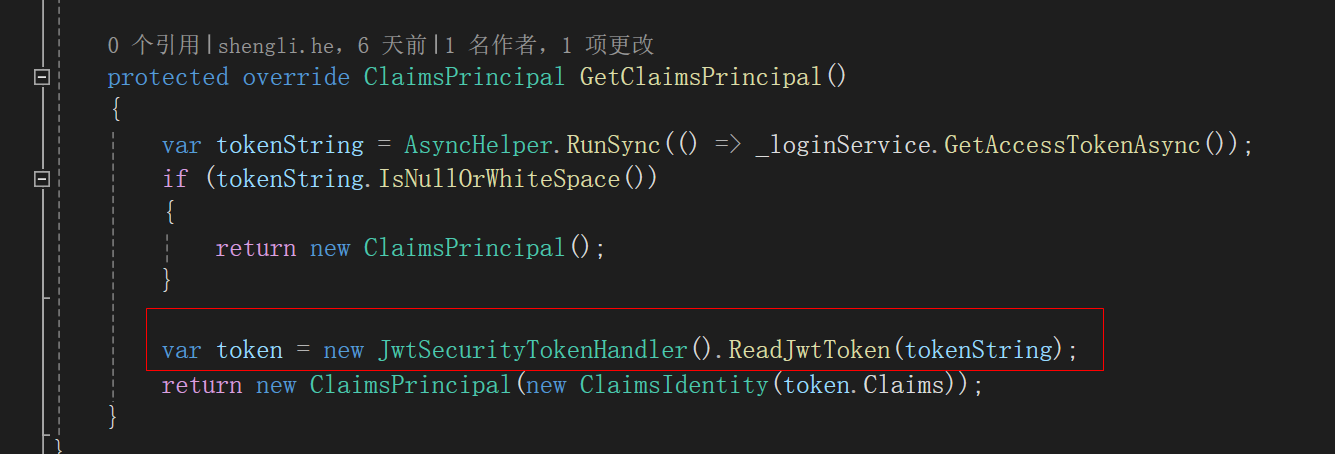
File MauiCurrentPrincipalAccessor.cs