Hi,
You can try to add the @attribute [Authorize] attribute to the index page.
Hi,
Could you provide the full steps to reproduce it?
PS: Localization document: https://docs.abp.io/en/abp/latest/Localization
: )
Hi,
I updated the source code: https://gist.github.com/realLiangshiwei/1f284183284f611fd6fe5bb0890bd781
BTW, you need to add the _ViewImports.cshtml file
@addTagHelper *, Microsoft.AspNetCore.Mvc.TagHelpers
@addTagHelper *, Volo.Abp.AspNetCore.Mvc.UI
@addTagHelper *, Volo.Abp.AspNetCore.Mvc.UI.Bootstrap
@addTagHelper *, Volo.Abp.AspNetCore.Mvc.UI.Bundling
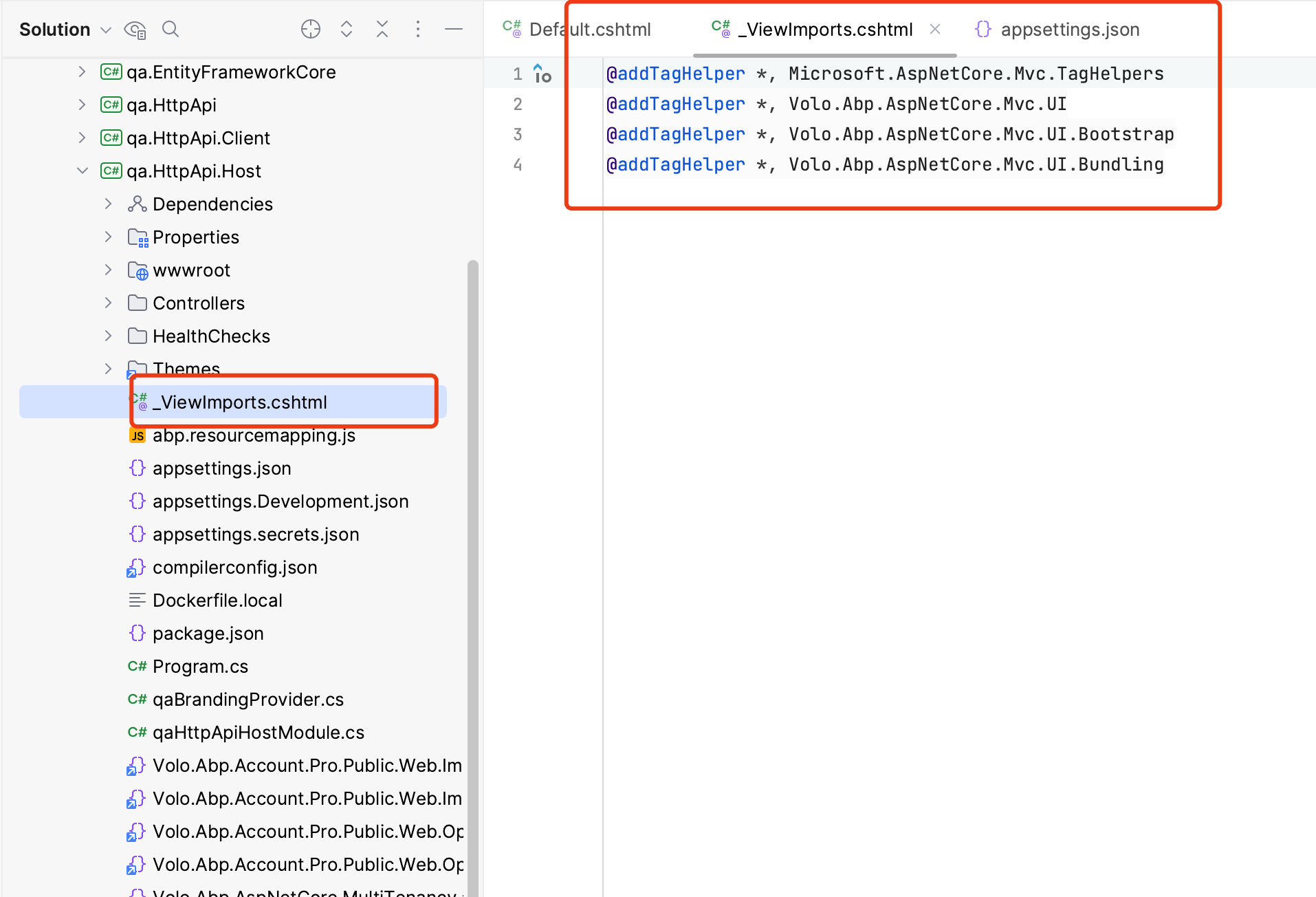
Hi,
Now I want to detect the current tenant based on the domain (url) in the incoming request (not logined)
You need to use the domain resolver: https://docs.abp.io/en/abp/latest/Multi-Tenancy#domain-subdomain-tenant-resolver
I can get the BrandName and BrandLogo to display in the Login page. How can I do this? I have successfully customize SaaS module to add 3 properties
I don't know how you customize it, I assume that you are using the entity extension system.
For example:
Default.cshtml
.....
@inject Volo.Abp.AspNetCore.Mvc.UI.Layout.IPageLayout PageLayout
@inject ITenantAppService TenantAppService

@{
    AbpAntiForgeryManager.SetCookie();
    var langDir = CultureHelper.IsRtl ? "rtl" : string.Empty;
    var title = ViewBag.Title == null ? BrandingProvider.AppName : ViewBag.Title;

    var languageInfo = await ThemeLanguageInfoProvider.GetLanguageSwitchViewComponentModel();
    var returnUrl = System.Net.WebUtility.UrlEncode(Context.Request.GetEncodedPathAndQuery());

    if (CurrentTenant.IsAvailable)
    {
        var tenant = await TenantAppService.GetAsync(CurrentTenant.GetId());
        string logoUrl = tenant.GetProperty<string>("LogoUrl");
        string brandName = tenant.GetProperty<string>("BrandName");
    }


    var logoReverseUrl = BrandingProvider.LogoReverseUrl == null ? null : "--lpx-logo: url(" + Url.Content(BrandingProvider.LogoReverseUrl.EnsureStartsWith('~')) + ");";
    var selectedStyle = await LeptonXStyleProvider.GetSelectedStyleAsync();

    var selectedStyleFileName = CultureHelper.IsRtl ? selectedStyle + ".rtl" : selectedStyle;
}
<!DOCTYPE html>
<html lang="@CultureInfo.CurrentCulture.Name" dir="@langDir">
.....
The document is very detailed, and I recommend you read it completely. I believe it can help you
See: https://docs.abp.io/en/abp/latest/Multi-Tenancy#domain-subdomain-tenant-resolver
There is an example that uses the subdomain to determining the current tenant: https://github.com/abpframework/abp-samples/tree/master/DomainTenantResolver
set it in the current user's claims?
https://docs.abp.io/en/abp/latest/Authorization#claims-principal-factory
I'm using Authentication is not separated module
Sorry, I just noticed it. I didn't see not before
I mean how many minutes does it need to create collections and how many minutes does it need to create initialized data Let say when I create tenant at 14:00, so it takes 5 minutes to create all collection and initialized data, right?
No, it usually completes in seconds, but if there are some collections that are not initialized, don't worry, it won't affect your application running, because it hasn't been used yet. they will be created in actual use.
However, if you care about it, you can try this:
[ExposeServices(typeof(IMongoModelSource))]
public class MyMongoModelSource : MongoModelSource, ITransientDependency
{

}
here is the screen short my solution:
Should be .HttpApi.Host project.









