Hi,
Did you also upgrade the Volo.Abp.AspNetCore.Mvc.UI.Theme.LeptonX package?
<ItemGroup>
    <PackageReference Include="Volo.Abp.AspNetCore.Mvc.UI.Theme.LeptonX" Version="2.1.*-*" />
</ItemGroup>
The LayoutHooks namespace is Volo.Abp.Ui.LayoutHooks. you can try:
using Volo.Abp.Ui.LayoutHooks;
Hi,
Yes, you also need to configure authentication in the service
For example:
private void ConfigureAuthentication(ServiceConfigurationContext context, IConfiguration configuration)
{
    context.Services.AddAuthentication(JwtBearerDefaults.AuthenticationScheme)
        .AddJwtBearer(options =>
        {
            options.Authority = configuration["AuthServer:Authority"];
            options.RequireHttpsMetadata = Convert.ToBoolean(configuration["AuthServer:RequireHttpsMetadata"]);
            options.Audience = "ReportService";
        });
}
Hi,
Please change to:
{
    "version": "1.0.0",
    "name": "my-app",
    "private": true,
    "dependencies": {
    "@volo/abp.aspnetcore.mvc.ui.theme.leptonx": "~2.1.0",
    "@volo/account": "~7.1.1",
    "@volo/aspnetcore.components.server.leptonxtheme": "~2.1.0",
    "@volo/cms-kit-pro.admin": "~7.1.1",
    "@volo/language-management": "~7.1.1"
}
Hi,
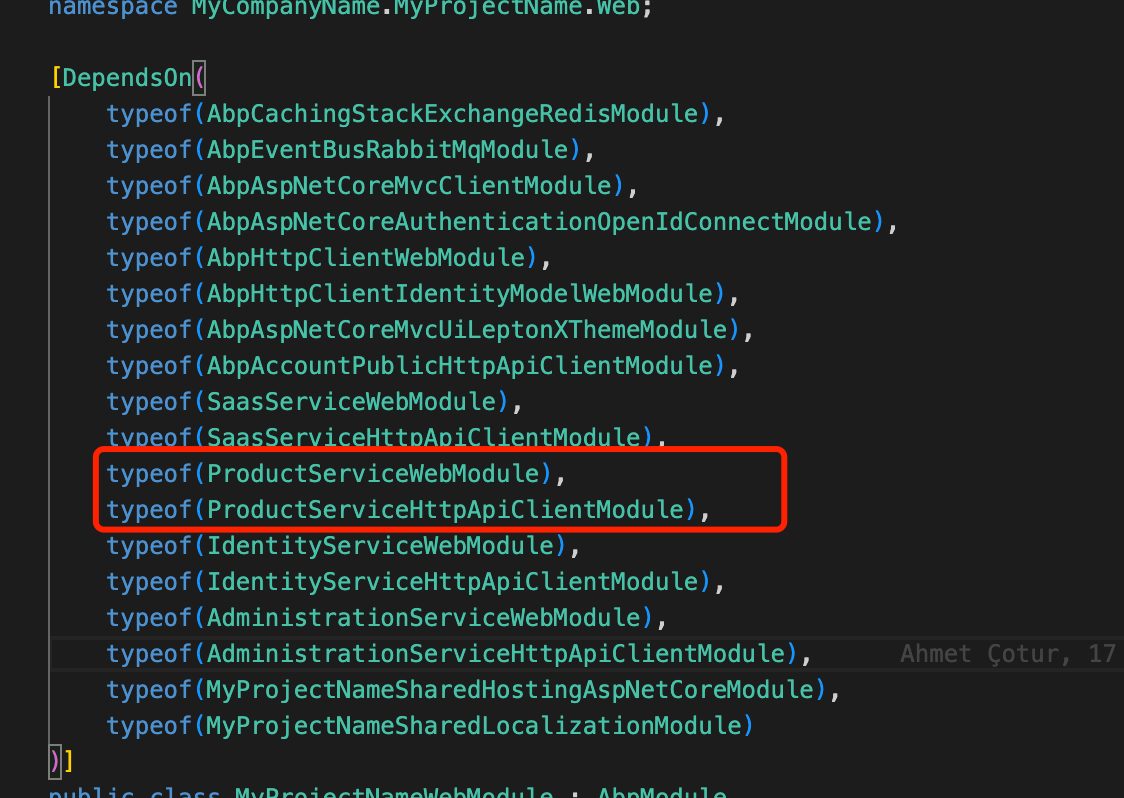
Did you add the UserTaskServiceHttpApiClientModule module dependency to the Web app?
For example:
I can help you remotely if still not working. shiwei.liang@volosoft.com
If you get the following error, you probably logged in 2 different computers and trying to login in the 3rd unique computer. In this case, please send an email to license@abp.io to reset your linked computers.
Hi,
Well, the client proxy you see is actually I think it should be dynamic client proxy.
See: https://docs.abp.io/en/commercial/latest/startup-templates/microservice/add-microservice#updating-administration-microservice
Did you add the module dependency to AdministrationServiceHttpApiHostModule?
Hi,
As I understand you want to generate js client proxy files for services.
abp generate-proxy -t js -m userTaskService -url HttpApi.Host'URLHi,
I think it should work if you use it to generate client proxy files.
You can try
CreateMap<DirectoryDescriptor, DirectoryContentDto>()
            .ForMember(dest => dest.IsDirectory,
                opt => opt.MapFrom(src => true))
            .ForMember(dest => dest.Size,
                opt => opt.MapFrom(src => 0))
            .ForMember(dest => dest.IconInfo,
                opt => opt.Ignore())
            .MapExtraProperties();

        CreateMap<FileDescriptor, DirectoryContentDto>()
            .ForMember(dest => dest.IsDirectory,
                opt => opt.MapFrom(src => false))
            .ForMember(dest => dest.IconInfo,
                opt => opt.Ignore())
            .MapExtraProperties();

[ExposeServices(typeof(IDirectoryDescriptorAppService))]
public class MyDirectoryDescriptorAppService : DirectoryDescriptorAppService
{
    public MyDirectoryDescriptorAppService(IDirectoryManager directoryManager, IFileManager fileManager, IDirectoryDescriptorRepository directoryDescriptorRepository, IFileDescriptorRepository fileDescriptorRepository, IOptions<FileIconOption> fileIconOption) : base(directoryManager, fileManager, directoryDescriptorRepository, fileDescriptorRepository, fileIconOption)
    {
    }

    public override async Task<PagedResultDto<DirectoryContentDto>> GetContentAsync(DirectoryContentRequestInput input)
    {
        var result = new List<DirectoryContentDto>();
        var subDirectoryCount = await DirectoryDescriptorRepository.GetChildrenCountAsync(input.Id, input.Filter);
        var subFileCount = await FileDescriptorRepository.CountDirectoryFilesAsync(input.Id, input.Filter);

        // directory can be orderable for only its name
        var directorySorting =
            input.Sorting?.IndexOf("name asc", StringComparison.OrdinalIgnoreCase) >= 0 ?
                "name asc" :
                input.Sorting?.IndexOf("name desc", StringComparison.OrdinalIgnoreCase) >= 0 ?
                    "name desc" :
                    null;

        var subDirectories = await DirectoryDescriptorRepository.GetChildrenAsync(input.Id, input.Filter, directorySorting, input.MaxResultCount, input.SkipCount);
        result.AddRange(ObjectMapper.Map<List<DirectoryDescriptor>, List<DirectoryContentDto>>(subDirectories));

        if (await AuthorizationService.IsGrantedAsync(FileManagementPermissions.FileDescriptor.Default))
        {
            var fileSkipCount = input.SkipCount <= subDirectoryCount ? 0 : input.SkipCount - subDirectoryCount;
            var fileMaxResultCount = input.MaxResultCount - subDirectories.Count;

            var subFiles = await FileDescriptorRepository.GetListAsync(input.Id, input.Filter, input.Sorting, fileMaxResultCount, fileSkipCount);
            var subFilesDto = ObjectMapper.Map<List<FileDescriptor>, List<DirectoryContentDto>>(subFiles);
            foreach (var fileDto in subFilesDto)
            {
                fileDto.IconInfo = FileIconOption.GetFileIconInfo(fileDto.Name);

                result.Add(fileDto);
            }
        }

        return new PagedResultDto<DirectoryContentDto>(subDirectoryCount + subFileCount, result);
    }
}
Hi,
We will fix the problem and your ticket refunded.









