I think the issue is in this line of the Dockerfile:
COPY --from=builder /app/dist/ventra-hub-structure/browser /usr/share/nginx/html
The Angular build output path doesn’t seem to match this location.
Since the build runs under apps/angular, the actual dist directory is very likely under:
/app/apps/angular/dist/...
Because of this, the Angular build artifacts (including index.html) are not copied into Nginx’s web root, so Nginx falls back to its default page.
Could you please try one of the following changes?
Option 1 (simplest):
COPY --from=builder /app/apps/angular/dist /usr/share/nginx/html
Option 2 (keep the specific project folder):
COPY --from=builder /app/apps/angular/dist/ventra-hub-structure/browser /usr/share/nginx/html
This should make sure index.html is present in /usr/share/nginx/html and allow Nginx to serve the Angular app instead of the default page.
Thanks.
hi
.NET 10 is only officially supported in Visual Studio 2026 and later versions
So you need to use VS 2026 to build and run your app.
Can you try to add a global.json to your solution and specify the NET 10 SDK version?
Run abp clean and dotnet build in your solution, then open it in VS 2026 and test again.
{
  "sdk": {
    "version": "10.0.100",
    "rollForward": "latestFeature",
    "allowPrerelease": true
  }
}
Thanks.
hi
because we have a persistent blazor server connection, it's a long-standing "request" which means it holds on to DB connections. IF a transaction is in flight, until the Blazor server connection is severed, the DB is locked to other pages!
Can you share your code?
I will try to reproduce your problem in a new template project.
Thanks.
hi
You only need the code below in authserver project
public override void ConfigureServices(ServiceConfigurationContext context)
{
    context.Services.AddRazorPages(options =>
    {
        options.Conventions.AddPageApplicationModelConvention("/Account/Login", model =>
        {
            model.Filters.Add(new IgnoreAntiforgeryTokenAttribute());
        });
    });
}
and code below in your web and web.public
var cookieLifetime = TimeSpan.FromMinutes(60);
options.RemoteAuthenticationTimeout = cookieLifetime;
options.CorrelationCookie.Expiration = cookieLifetime;
options.NonceCookie.Expiration = cookieLifetime;

options.ProtocolValidator.NonceLifetime = cookieLifetime;
Thanks.
hi
The Leptonx >= 5.0.3 has fixed it. Can you try to upgrade the packages?
Thanks.
hi
Do you use Redis? If so, please clear the cache.
And using T with NULL is no problem. You can test again
| Id | Name | Value | ProviderName | ProviderKey | |--------------------------------------|----------------------------------------|------|--------------|----------------------------------------| | ED02A171-57B5-1022-232C-3A1F587E0589 | Abp.Identity.Password.RequiredLength | 8 | T | 483ea8fa-cle8-edcb-7a96-3a1f2090c101 | | ED02A171-57B5-1022-232C-3A1F587E0589 | Abp.Identity.Password.RequiredLength | 8 | T | Null |
Thanks.
hi
Try to change second T to G
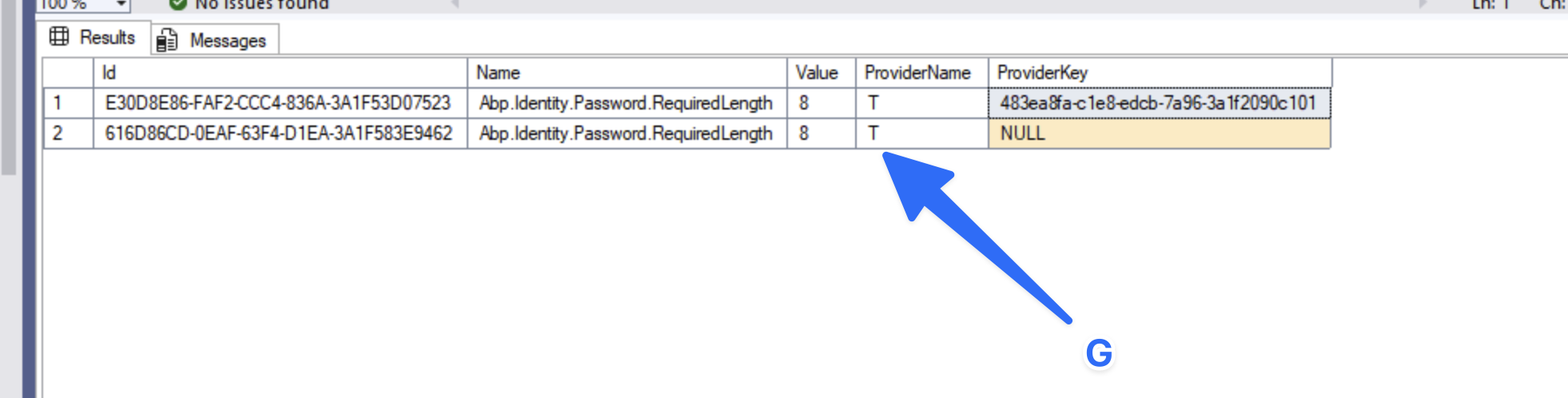
hi
Your password length setting is applied to Tenant(T), not the host.
The ChangePassword page is Host. Can you also set the value on the Host side?

Thanks.
hi
Do you have multiple tenants?
Please share the setting values in AbpSettings tables.
Thanks.
hi
Can you share a high-quality screenshot?
What is your ABP version and UI page?
Thanks.




