hi
Can you zip your UrvinFinance.AuthServer's bin folder and share it?
liming.ma@volosoft.com
Thanks.
hi
Please add the custom middleware after app.UseAuthentication();
And share the debug logs again(https://abp.io/support/questions/9523/Upgraded-Application-from-732-to-90?CurrentPage=1#answer-3a1ad613-31cb-cb2a-6bd3-323b925e6dc0).
I think the AbpClaimTypes does not match the current claims.
Thanks.
app.UseAuthentication();

app.Use(async (httpContext, next) =>
{
    var logger = httpContext.RequestServices.GetRequiredService<ILogger<EmployeeServiceHttpApiHostModule>>();
    var claims = httpContext.User.Claims.Select(x => new { x.Type, x.Value }).ToList();
    logger.LogError("HttpContext.User Claims:");
    logger.LogError(JsonSerializer.Serialize(claims));

    var currentUser = httpContext.RequestServices.GetRequiredService<ICurrentUser>().GetAllClaims().Select(x => new { x.Type, x.Value }).ToList();
    logger.LogError("Current User Claims:");
    logger.LogError(JsonSerializer.Serialize(currentUser));


    var userid = AbpClaimTypes.UserId;
    var username = AbpClaimTypes.UserName;
    var roleClaimType = AbpClaimTypes.Role;

    logger.LogError($"UserId Claim Type: {userid}");
    logger.LogError($"UserName Claim Type: {username}");
    logger.LogError($"Role Claim Type: {roleClaimType}");

    var authorizationHeader = httpContext.Request.Headers["Authorization"];
    logger.LogError(!string.IsNullOrEmpty(authorizationHeader)
        ? $"Authorization Header: {authorizationHeader}"
        : "Authorization Header is missing or empty.");

    await next(httpContext);
});
hi
The Microsoft logs level still not Debug
Please use the log configuration code below.
var loggerConfiguration = new LoggerConfiguration()
    .MinimumLevel.Debug()
    .MinimumLevel.Override("Microsoft.EntityFrameworkCore", LogEventLevel.Warning)
    .Enrich.FromLogContext()
    .WriteTo.Async(c => c.File("Logs/logs.txt"))
2025-06-30 19:52:16.805 +05:30 [INF] Request starting HTTP/1.1 GET http://localhost:44371/api/employee-service/dashboard-pages?PageId=HOMEDASHBOARD&SkipCount=0&MaxResultCount=20000&api-version=1.0 - null 0

2025-06-30 19:52:17.252 +05:30 [INF] Executing endpoint 'Exceego.EHSWatch.AppV3.EmployeeService.Controllers.DashboardPages.DashboardPageController.GetListAsync (Exceego.EHSWatch.AppV3.EmployeeService.HttpApi)'

2025-06-30 19:52:18.685 +05:30 [INF] Authorization failed. These requirements were not met:
PermissionRequirement: EmployeeService.CustomReports

2025-06-30 19:52:19.936 +05:30 [INF] Request finished HTTP/1.1 GET https://localhost:44371/api/employee-service/dashboard-pages?PageId=HOMEDASHBOARD&SkipCount=0&MaxResultCount=20000&api-version=1.0 - 403 0 null 3131.5555ms
These requirements were not met: PermissionRequirement: EmployeeService.CustomReports
Does your current user have EmployeeService.CustomReports permission?
If the 403 error only happened on Exceego.EHSWatch.AppV3.EmployeeService.HttpApi.Host. website.
Please enable the Debug log level and share again.
Also output some info to the logs.
app.UseAuthentication();

app.Use(async (httpContext, next) =>
{
    var logger = httpContext.RequestServices.GetRequiredService<ILogger<EmployeeServiceHttpApiHostModule>>();
    var claims = httpContext.User.Claims.Select(x => new { x.Type, x.Value }).ToList();
    logger.LogError("HttpContext.User Claims:");
    logger.LogError(JsonSerializer.Serialize(claims));

    var currentUser = httpContext.RequestServices.GetRequiredService<ICurrentUser>().GetAllClaims().Select(x => new { x.Type, x.Value }).ToList();
    logger.LogError("Current User Claims:");
    logger.LogError(JsonSerializer.Serialize(currentUser));


    var userid = AbpClaimTypes.UserId;
    var username = AbpClaimTypes.UserName;
    var roleClaimType = AbpClaimTypes.Role;

    logger.LogError($"UserId Claim Type: {userid}");
    logger.LogError($"UserName Claim Type: {username}");
    logger.LogError($"Role Claim Type: {roleClaimType}");

    var authorizationHeader = httpContext.Request.Headers["Authorization"];
    logger.LogError(!string.IsNullOrEmpty(authorizationHeader)
        ? $"Authorization Header: {authorizationHeader}"
        : "Authorization Header is missing or empty.");

    await next(httpContext);
});
Thanks.
hi
Can you share the debug logs of the app that is under IIS?
liming.ma@volosoft.com
Thanks
hi
Request finished HTTP/2 GET https://localhost:44321/api/identity/roles?filter=&sorting=name%20asc&skipCount=0&maxResultCount=10 - 401
The Exceego.EHSWatch.AppV3.Web. use C# HTTP remote proxy to call the Identity/role API.
Can you share the debug logs from Identity/role API website?
By the way, you are not enabled the debug logs for Microsoft namespace. See https://abp.io/support/questions/8622/How-to-enable-Debug-logs-for-troubleshoot-problems
var loggerConfiguration = new LoggerConfiguration()
    .MinimumLevel.Debug()
    .MinimumLevel.Override("Microsoft.EntityFrameworkCore", LogEventLevel.Warning)
    .Enrich.FromLogContext()
    .WriteTo.Async(c => c.File("Logs/logs.txt"))
Thanks.
hi
Does your website work in IIS?
Can you check the application logs in Windows Event Viewer(https://learn.microsoft.com/en-us/shows/inside/event-viewer)?
Thanks.
hi
Only Data Access is affected. You need to use MyRetryDbContext to manage transactions and perform CRUD operations on the entities.
hi
Add it to the project that has forbidden erros
And can you share the debug logs for forbidden erros?
https://abp.io/support/questions/8622/How-to-enable-Debug-logs-for-troubleshoot-problems
Thanks.
If we check the permissions in JS we are able to see the proper permissions but not at backend so getting forbidden erros.
Sorry for that. I missed it.
Can you check the claims value and type by adding a custom middleware after UseAuthentication?
app.UseAuthentication();

app.Use(async (httpContext, next) =>
{
    var claims = httpContext.User.Claims;
    var currentUser = httpContext.RequestServices.GetRequiredService<ICurrentUser>().GetAllClaims();

    var userid = AbpClaimTypes.UserId;
    var username = AbpClaimTypes.UserName;
    var roleClaimType = AbpClaimTypes.Role;

    await next(httpContext);
});
Thanks.
hi
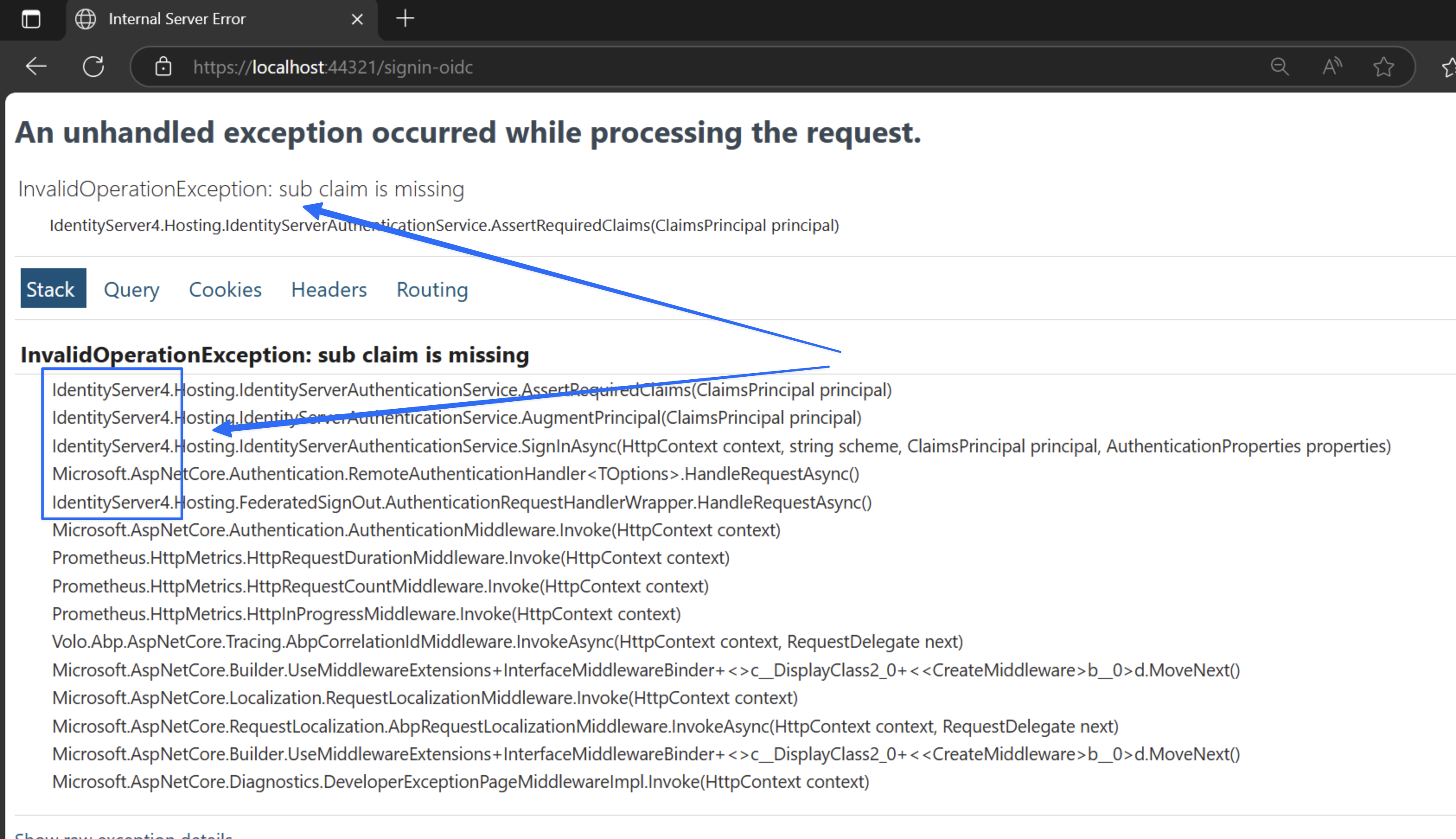
Removing IdentityServer4 from the Back office Web project will fix this error.
As you can see. the IdentityServer4 is used in your Back office Web project