hi
Thanks, I will update the template project. 👍
hi
I have checked your https://demo2.structurecloud.com/Blazor
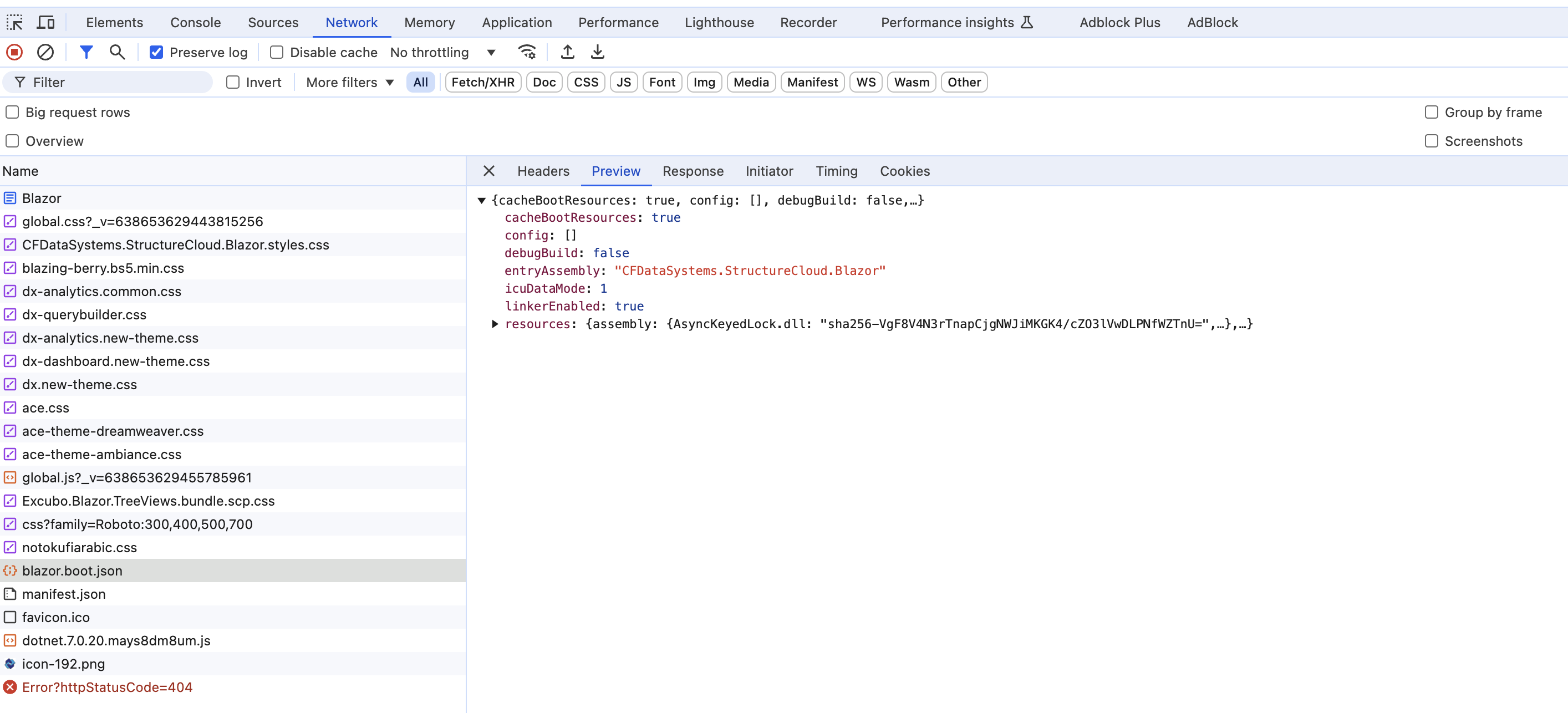
The blazor wasm app can't get the appsettings.json file.
Below are requests of your Blazor app. If you check the docker environment. you should see appsettings.json request.
Do you have appsettings.json file in the wwwroot folder?
You have to have this file during build process.
hi
Can you share the debug logs(https://abp.io/support/questions/8428/All-Organization-Root-Units-deleted-when-deleting-just-one-unit#answer-3a16c0bc-bdcf-b99b-78e3-ad1a6afd5a74) of these steps?
I will check the SQL statement from your logs.
Thanks.
hi
Some versions of Visual Studio may have problem. The same thing can be done using dotnet cli.
If the dotnet publish does not work for you, you can share the source code of your Blazer app project.
I will download and check the code.
liming.ma@volosoft.com
hi
Can you try publishing your Blazer app using the dotnet publish command? Please share the output of this command.
Thanks.
Usage:
  dotnet publish [<PROJECT | SOLUTION>...] [options]
hi
You can use Integration Service to communicate between microservices. No need a access token.
https://abp.io/docs/latest/solution-templates/microservice/communication
hi
I have sent the source code. : )




