By the way, you can try to override the IdentitySessionManager in your Aizanoi.AuthServer project.
using System;
using System.Threading.Tasks;
using Microsoft.Extensions.Logging;
using Volo.Abp.Caching;
using Volo.Abp.Identity.Settings;
using Volo.Abp.Settings;
using Volo.Abp.Uow;
using Volo.Abp.Users;

namespace Volo.Abp.Identity.Pro.DemoApp;

public class MyIdentitySessionManager : IdentitySessionManager
{
    protected IUnitOfWorkManager UnitOfWorkManager { get; }

    public MyIdentitySessionManager(
        IIdentitySessionRepository identitySessionRepository,
        ICurrentUser currentUser, IDistributedCache<IdentitySessionCacheItem> cache,
        ISettingProvider settingProvider,
        IdentityDynamicClaimsPrincipalContributorCache identityDynamicClaimsPrincipalContributorCache,
        IUnitOfWorkManager unitOfWorkManager)
        : base(identitySessionRepository, currentUser, cache, settingProvider, identityDynamicClaimsPrincipalContributorCache)
    {
        UnitOfWorkManager = unitOfWorkManager;
    }

    public async override Task<IdentitySession> CreateAsync(string sessionId, string device, string deviceInfo, Guid userId, Guid? tenantId, string clientId, string ipAddresses)
    {
        Check.NotNullOrWhiteSpace(sessionId, nameof(sessionId));
        Check.NotNullOrWhiteSpace(device, nameof(device));

        var session = await IdentitySessionRepository.FindAsync(sessionId);
        if (session == null)
        {
            using (var uow = UnitOfWorkManager.Begin(requiresNew: true))
            {
                Logger.LogInformation($"Creating identity session for session id: {sessionId}, device: {device}, user id: {userId}, tenant id: {tenantId}, client id: {clientId}");
                session = await IdentitySessionRepository.InsertAsync(new IdentitySession(
                    GuidGenerator.Create(),
                    sessionId,
                    device,
                    deviceInfo,
                    userId,
                    tenantId,
                    clientId,
                    ipAddresses,
                    Clock.Now
                ));

                await uow.SaveChangesAsync();
            }
        }

        var preventConcurrentLoginBehaviour = await IdentityProPreventConcurrentLoginBehaviourSettingHelper.Get(SettingProvider);
        switch (preventConcurrentLoginBehaviour)
        {
            case IdentityProPreventConcurrentLoginBehaviour.LogoutFromSameTypeDevices:
                await RevokeAllAsync(userId, device, session.Id);
                break;

            case IdentityProPreventConcurrentLoginBehaviour.LogoutFromAllDevices:
                await RevokeAllAsync(userId, session.Id);
                break;
        }

        return session;
    }
}
hi
I can log successfully on the https://fa.fintechxxx.net.tr/ website without any exception.
But the logs you shared show the following:
An error occurred using a transaction.
The request was aborted by the client.
Could not find a session
Does this happen every time?
hi
In blazor wasm module.
private static void ConfigureAuthentication(WebAssemblyHostBuilder builder)
{
    builder.Services.AddOidcAuthentication(options =>
    {
        builder.Configuration.Bind("AuthServer", options.ProviderOptions);
        options.UserOptions.NameClaim = OpenIddictConstants.Claims.Name;
        options.UserOptions.RoleClaim = OpenIddictConstants.Claims.Role;

        options.ProviderOptions.DefaultScopes.Add("MyProjectName");
        options.ProviderOptions.DefaultScopes.Add("roles");
        options.ProviderOptions.DefaultScopes.Add("email");
        options.ProviderOptions.DefaultScopes.Add("phone");
    });

    builder.Services.AddAuthorizationCore(options =>
    {
        options.AddPolicy("TenantPolicy", policy =>
        {
            policy.RequireAuthenticatedUser().RequireAssertion(handlerContext =>
            {
                var userId = handlerContext.User.FindUserId();
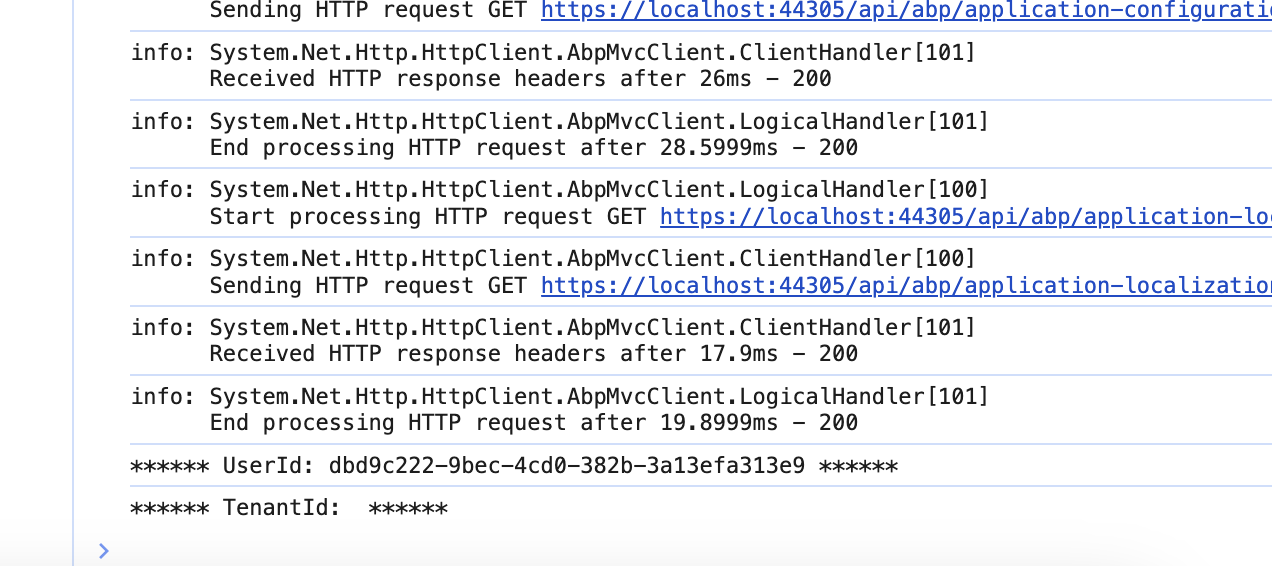
                Console.WriteLine($"****** UserId: {userId} ******");

                var tenantId = handlerContext.User.FindTenantId();
                Console.WriteLine($"****** TenantId: {tenantId} ******");
                return true; // false to skip
            });
        });
    });
}
Index.razor of blazor wasm project
@attribute [Authorize(policy: "TenantPolicy")]
Output:
hi
The logs show that the cors check is successful.
Do you have an online angular URL so I can see the cors error?
Or please share the HTTP request and response of the https://localhost:44371/api/abp/application-configuration , you can view them in Chrome dev-tool.
hi
Can you share a template project with your custom code? https://wetransfer.com/
liming.ma@volosoft.com
Thanks
hi
The problem is the options.CallbackPath = "/signin-oidc";
You can remove it and try again.
https://github.com/Flo3Digital/Flo3BlazorDevSingle/commit/fcf6281c3b09d4e58487213e35b5b07635a3aacd
hi
And I have to replace in all 3 Projects your entire code?
You can do this. Remove all existing Logs.txt files and share again.
Thanks.
hi
The localhost:44371 project.
but you can change code and share the logs of Host and AuthServer at the same time.
hi
I didn't receive your logs. Can you share it via https://wetransfer.com/









