hi
is it best practice to add whole process inside custom grant type?
I tend to do this.
then the token and refresh token are accessible at /connect/token?
Yes, Because your access_token is legal.
You can add some simple logic checks in your custom grant type. and then integrate Telegram.
hi
https://github.com/otised-inc/OtisEd.Synergyz/pull/497
Thanks @all
Good news.
ok.
I will check the OtisEd.Synergyz repo.
Thanks
hi
I need an endpoint to post data: auth_data, id, hash and get token to store it in the client storage and making queries to the API using this token based on their permissions. if received data is valid but requester user is not existed in ABP user db then should create it with default role and not be rejected, then generate and send token.
You can add a custom grant type to your project. then create a user if necessary and generate an access token.
This new grant-type endpoint will authenticate your telegram user.
https://community.abp.io/posts/how-to-add-a-custom-grant-type-in-openiddict.-6v0df94z
As a web framework, it's basically request/response. You can use openiddict's custom grant type or add an API controller to handle requests and respond with data. If you wish to generate an openiddict access token, you'd better create a custom grant type
hi
Though if check database later, the new record is inserted into database successfully.
Is the id in the database same as the inserted.Id ?
You can set a breakpoint here to check the database to see if the record exists.
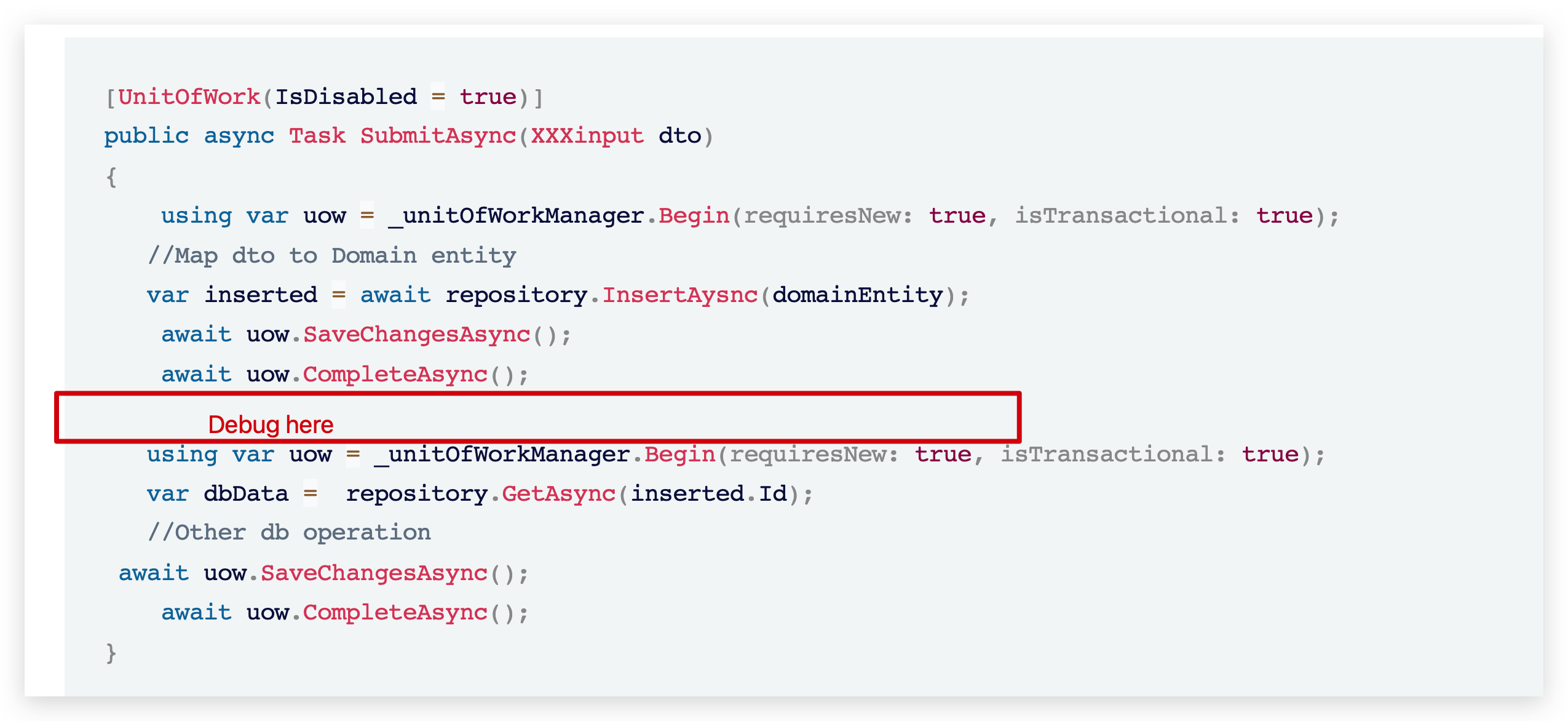
hi @all
We need add <leptonx-theme-appearance /> to _Host.cshtml
_ViewImports.cshtml
@addTagHelper *, Microsoft.AspNetCore.Mvc.TagHelpers
@addTagHelper *, Volo.Abp.AspNetCore.Mvc.UI
@addTagHelper *, Volo.Abp.AspNetCore.Mvc.UI.Bootstrap
@addTagHelper *, Volo.Abp.AspNetCore.Mvc.UI.Bundling
@addTagHelper *, Volo.Abp.AspNetCore.Components.Server.LeptonXTheme
_Host.cshtml
@page "/"
@namespace Yee.Change.ToolKit.Blazor.Server.Host.Pages
@using System.Globalization
@using Volo.Abp.AspNetCore.Components.Server.LeptonXTheme.Bundling
@using Volo.Abp.AspNetCore.Components.Web.LeptonXTheme.Components
@using Volo.Abp.Localization
@{
    Layout = null;
    var rtl = CultureHelper.IsRtl ? "rtl" : string.Empty;
}

<!DOCTYPE html>
<html lang="@CultureInfo.CurrentCulture.Name" dir="@rtl">
<head>
    <meta charset="utf-8" />
    <meta name="viewport" content="width=device-width, initial-scale=1.0" />
    <title>ToolKit</title>
    <base href="~/" />

    <abp-style-bundle name="@BlazorLeptonXThemeBundles.Styles.Global" />

    <leptonx-theme-appearance />

</head>
<body class="abp-application-layout @rtl">
    <component type="typeof(App)" render-mode="Server" />

    <div id="blazor-error-ui">
        <environment include="Staging,Production">
            An error has occurred. This application may no longer respond until reloaded.
        </environment>
        <environment include="Development">
            An unhandled exception has occurred. See browser dev tools for details.
        </environment>
        <a href="" class="reload">Reload</a>
        <a class="dismiss">🗙</a>
    </div>

    <abp-script-bundle name="@BlazorLeptonXThemeBundles.Scripts.Global" />
</body>
</html>
hi
There is no good solution, we can only periodically check in the request if the user has changed the password.
You can override the SecurityStampValidator.ValidatePrincipalAsync method to validate it yourself in other ways.
https://github.com/dotnet/aspnetcore/blob/release/8.0/src/Identity/Core/src/SecurityStampValidator.cs#L129-L163
hi
JobStorage.Current property value has not been initialized. You must set it before using Hangfire Client or Server API.
You can try to use MemoryStorage in unit test.
var jobStorage = new MemoryStorage();
var options = new BackgroundJobServerOptions();
GlobalConfiguration.Configuration.UseStorage(jobStorage);
https://github.com/HangfireIO/Hangfire.InMemory https://github.com/perrich/Hangfire.MemoryStorage









