Hi, can you please confirm that there is a situation as described in this answer or not?
Hi, it seems like very similar case as I was not getting this error earlier. It is happening when load is high, also in my case too we have upgraded the version last year, but my class structure is below
    public class PatientPhoneNumber_TR : FullAuditedAggregateRoot<Guid>
    {
    [CanBeNull]
    public virtual string PhoneNumber { get; set; }
    public long? PhoneTypeId { get; set; }
    public long? EquipmentTypeId { get; set; }
    public long? PatientId { get; set; }

      public PatientPhoneNumber_TR()
    {

    }

    public PatientPhoneNumber_TR(Guid id, string phoneNumber)
    {
        Id = id;
        Check.Length(phoneNumber, nameof(phoneNumber), PatientPhoneNumber_TRConsts.PhoneNumberMaxLength, 0);
        PhoneNumber = phoneNumber;
    }
}
I'm using parent's id as FK in child table.
Please let me know what can I do to fix it?
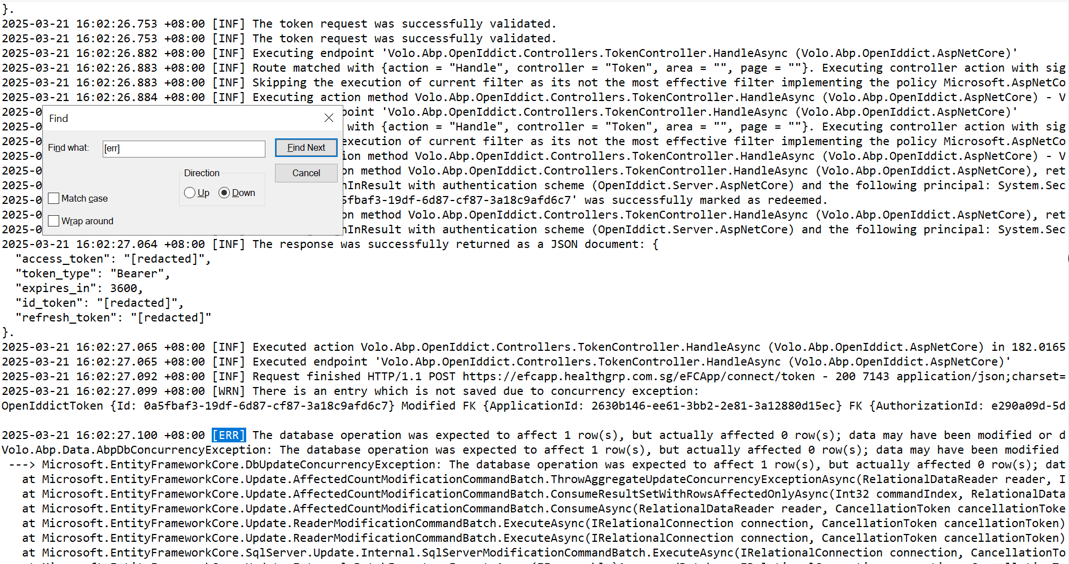
I have noticed same issue on save token too (screenshot of error is attached below), please help to fix both.
but that's not directly related to ABP. it's a certificate that your hosting uses. you can create a console app and create everytime it expires
ok, can we control the issuer, by default for me issuer is localhost
try generating a new certificate, this topic has been discussed at https://abp.io/support/questions/8266/Generating-CRUD-using-abp-suite-for-module#answer-3a163c11-d8c4-b919-6178-9901f37c352e
I generated using
dotnet dev-certs https -v -ep openiddict. pfx -p 00000000-0000-0000-0000-000000000000 command to generate the openiddict. pfx certificate
but I'm looking for solution where I don't need to worry about its expiry, it should generate using code.
Hi,
It store
access_tokenandrefresh_tokento the cookies, It will not affect your application. And the default value isfalse. we usually don't recommend setting it to true.It will be useful when you need to call the Azure AD API(I assume you are using Azure external login).
ok, thank you.
You can consider set
SaveTokenstofalse
Thank you. It is working with this, but may I know the use of it, is there any possibility that it can impact some other functionality ?
SaveTokens
ok, let me try this
Hi,
can we use zoom https://us05web.zoom.us/j/5929668302?pwd=UXl2M2RUeG5PazVSY2ZCOW1NMUxtZz09
sure, Iet me join
Can I check it remotely? my email is shiwei.liang@volosoft.com
sure, let me send you the meeting invite.
Hi,
How do I reproduce the problem?
Or can you share a test project with me? i will check it. shiwei.liang@volosoft.com
Hi, I'll be able to share sample code only, but I cannot assure that you will be able to replicate the issue as in my case, I'm redirecting it to my application from some external application, also I'm using external login. Let me know if it is fine.
below is the error log https://abp.io/support/questions/8635/Bad-Request---Request-Too-Long#answer-3a1775dc-aad6-8d64-4a56-5a23a2169434
I didn't see any error message there.
BTW,will it work if you try this
Configure<IISServerOptions>(options =>
{
    options.MaxRequestBodySize = 209715200;
});

Configure<KestrelServerOptions>(options =>
{
    options.Limits.MaxRequestBodySize = 209715200;
});
yes, error is not there but still I'm getting bad request.
I tried below code, it's not working, I'm still getting bad request.
Configure<IISServerOptions>(options =>
{ options.MaxRequestBodySize = 209715200; });









