We have a case when we want to add extra logic whenever Update ABP user from admin area and press save . But currently seem like this is a built-in method that's not possible to edit. PUT api/identity/users/{id}
We know there is there already event on updated ABP user but it get called a lot. And we cannot use it unless there is a way to compare old data of user entity with the new data so we can take action based on that such as comparing if Surname was changed from old one to new one .
Currently if transaction is rolled back , the job create is not rolled back .
So FE can send telemetries to Azure AppInsights
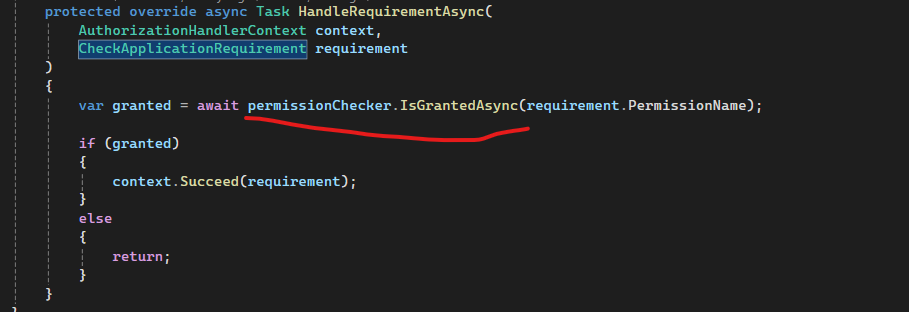
When we add or remove role from user , the roles changes are not immediately reflected to the user , and this cause user to get 403 error when using authorization attribute with claim or even when manually check permission using permissionChecker.IsGrantedAsync , unless the user log out and login.
How can we make the change in roles get reflected immediately to the user access when they get changes without need user to log out and login again .
I want to override some defaults and make all Business Exceptions return as 422 , how can I do that ? I see there is map option but that for a single error code, what I want is by type of exception. thanks
In reference to this thread : https://abp.io/support/questions/9088/API-become-slow-after-enabling-Redis-server
I have overridden the AbpApplicationConfigurationAppService and find the worst offender is : await GetAuthConfigAsync(); As it takes sometimes on intial call 8 seconds, on subsequent calls it get down to around 3 second, which is still have.
So in total GetAsync call takes, I am using local docker Redis and the CPU and others are all look very good, no pressure on the server and no physical network, can you please advise ?
I am trying to create webapplication that consume dynamic proxy , and when I run the app I get this error
System.AggregateException
HResult=0x80131500
Message=Some services are not able to be constructed (Error while validating the service descriptor 'ServiceType: Volo.Abp.Http.ProxyScripting.IProxyScriptManager Lifetime: Transient ImplementationType: Volo.Abp.Http.ProxyScripting.ProxyScriptManager': Unable to resolve service for type 'Volo.Abp.Http.Modeling.IApiDescriptionModelProvider' while attempting to activate 'Volo.Abp.Http.ProxyScripting.ProxyScriptManager'.) (Error while validating the service descriptor 'ServiceType: Volo.Abp.Http.ProxyScripting.ProxyScriptManager Lifetime: Transient ImplementationType: Volo.Abp.Http.ProxyScripting.ProxyScriptManager': Unable to resolve service for type 'Volo.Abp.Http.Modeling.IApiDescriptionModelProvider' while attempting to activate 'Volo.Abp.Http.ProxyScripting.ProxyScriptManager'.)
Source=Microsoft.Extensions.DependencyInjection
StackTrace:
at Microsoft.Extensions.DependencyInjection.ServiceProvider..ctor(ICollection`1 serviceDescriptors, ServiceProviderOptions options)
at Microsoft.Extensions.DependencyInjection.ServiceCollectionContainerBuilderExtensions.BuildServiceProvider(IServiceCollection services, ServiceProviderOptions options)
at Microsoft.Extensions.Hosting.HostApplicationBuilder.Build()
at Microsoft.AspNetCore.Builder.WebApplicationBuilder.Build()
at Program.<<Main>$>d__0.MoveNext() in TestHarness.Api.Host\Program.cs:line 18
This exception was originally thrown at this call stack: [External Code]
Inner Exception 1:
InvalidOperationException: Error while validating the service descriptor 'ServiceType: Volo.Abp.Http.ProxyScripting.IProxyScriptManager Lifetime: Transient ImplementationType: Volo.Abp.Http.ProxyScripting.ProxyScriptManager': Unable to resolve service for type 'Volo.Abp.Http.Modeling.IApiDescriptionModelProvider' while attempting to activate 'Volo.Abp.Http.ProxyScripting.ProxyScriptManager'.
Inner Exception 2:
InvalidOperationException: Unable to resolve service for type 'Volo.Abp.Http.Modeling.IApiDescriptionModelProvider' while attempting to activate 'Volo.Abp.Http.ProxyScripting.ProxyScriptManager'.
program.cs :
using Cao.CatOs.TestHarness.Api.Host.Modules;
using Volo.Abp;
var builder = WebApplication.CreateBuilder(args);
await builder.AddApplicationAsync<CatOsHttpApiClientTestModule>(options =>
{
var configurationBuilder = new ConfigurationBuilder();
configurationBuilder.AddJsonFile("appsettings.json", false);
configurationBuilder.AddJsonFile("appsettings.secrets.json", true);
options.Services.ReplaceConfiguration(configurationBuilder.Build());
options.UseAutofac();
options.ApplicationName = "test";
});
var application = builder.Build();
await application.InitializeAsync();
Console.WriteLine("Press ENTER to stop application...");
Console.ReadLine();
await application.WaitForShutdownAsync();
Module :
public class CatOsHttpApiClientTestModule : AbpModule
{
private readonly string RemoteServiceName = "Default";
public override void ConfigureServices(ServiceConfigurationContext context)
{
context.Services.AddHttpClientProxies(
typeof(CatOsApplicationContractsModule).Assembly,
RemoteServiceName
);
context.Services.AddAutofac();
context.Services.AddControllers();
context.Services.AddEndpointsApiExplorer();
context.Services.AddHttpContextAccessor();
context.Services.AddScoped<ScenarioManager>();
context.Services.AddSwaggerGen(options =>
{
options.AddSecurityDefinition(
"Bearer",
new Microsoft.OpenApi.Models.OpenApiSecurityScheme
{
Name = "Authorization",
Type = Microsoft.OpenApi.Models.SecuritySchemeType.Http,
Scheme = "Bearer",
BearerFormat = "JWT",
In = Microsoft.OpenApi.Models.ParameterLocation.Header,
Description =
"Enter 'Bearer' [space] and then your token in the text input below.\n\nExample: 'Bearer 12345abcdef'",
}
);
options.AddSecurityRequirement(
new Microsoft.OpenApi.Models.OpenApiSecurityRequirement
{
{
new Microsoft.OpenApi.Models.OpenApiSecurityScheme
{
Reference = new Microsoft.OpenApi.Models.OpenApiReference
{
Type = Microsoft.OpenApi.Models.ReferenceType.SecurityScheme,
Id = "Bearer",
},
},
new string[] { }
},
}
);
});
context.Services.AddHttpClient(
"catos",
(sp, client) =>
{
var scenarioManager = sp.GetRequiredService<ScenarioManager>();
var configuration = sp.GetRequiredService<IConfiguration>();
client.BaseAddress = new Uri(
configuration.GetValue<string>("RemoteServices:Default:BaseUrl")
);
var jwtToken = scenarioManager.GetOrCreate().StringData[
ScenarioContext.AccessToken
];
client.DefaultRequestHeaders.Authorization =
new System.Net.Http.Headers.AuthenticationHeaderValue("Bearer", jwtToken);
}
);
}
We have upgraded to v 9.1.1 and we have found the enum is not generating right although in this bug it is marked as resolved, but we have exact same problem , all enum types are just generated as enum instead of their strong type.
https://github.com/abpframework/abp/issues/21995
please advise , this is urgent
When Redis cache is enabled, the urls that use the cache become slow , example is this url, which is a built in ABP method, can you please advise ? https://localhost:44374/api/abp/application-configuration?includeLocalizationResources=false
ABP version : 8.2.1



