@serdar.genc
We've fixed the problem. Now you can add Volo.LeptonTheme module and it will work.
Or you can apply these simple steps to existing code:
Remove Volo.Abp.AspNetCore.Components.Web.LeptonTheme project reference from your solution's *.Web project.
Change Volo.Abp.AspNetCore.Mvc.UI.Theme.Lepton package reference to local project references in your solution's *.Web project.

(Replace <PackageReference Include="Volo.Abp.AspNetCore.Mvc.UI.Theme.Lepton" Version="4.3.0" /> with <ProjectReference Include="..\..\modules\Volo.LeptonTheme\src\Volo.Abp.AspNetCore.Mvc.UI.Theme.Lepton\Volo.Abp.AspNetCore.Mvc.UI.Theme.Lepton.csproj" />)
Hi,
I've run the following commands to recreate your project in my local:
abp new MainProject -t microservice-pro -u angular
abp new SubProject -t microservice-service-pro
Then i navigated to \services\subProject\src\MainProject.SubProject.HttpApi.Host folder and run dotnet run command. I didn't encounter any license error. Please notify me if i missed a step.
Note: It seems like CLI doesn't replace lisence code for microservice-service-pro pro template, we'll fix it in 4.3.1 version. However, this template shouldn't do any license check because it doesn't use any Commercial ABP module. Therefore i didn't encounter any license error. Even it checks, copying your license code from ProductService should clear the error.
Hi,
Public Website uses Lepton Theme too. So, the document is valid if you want to customize css for Public Website.
https://docs.abp.io/en/commercial/latest/themes/customizing-lepton-theme?UI=MVC
Hi,
Blazor UI code generation is currently not supported for module template. We aim to support it in 4.4.0 version.
Hi,
ExtensionProperties are always added to the bottom. There is not a way to order them.
I think you need to override the related Blazor component. See docs: https://docs.abp.io/en/abp/latest/UI/Blazor/Customization-Overriding-Components
You can download the source code of Volo.Saas module to see the component you want to override.
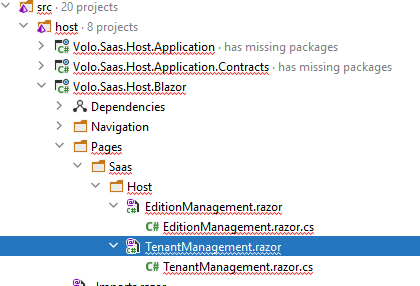
TenantManagement.razor is the file you need.
Hi,
New versions of Cli & Suite may not work with 4.2.0 version.
To install v4.2.0 version of them, run following commands:
dotnet tool uninstall Volo.Abp.Cli -g
dotnet tool install Volo.Abp.Cli -g --version 4.2.0
dotnet tool uninstall Volo.Abp.Suite -g
abp suite install -v 4.2.0
Hi,
Is File Management Angular source code downloaded to projects\file-management directory in your angular project? If so, you can edit related components to customize File Management UI.
If the Angular source code is not downloaded, run abp add-module Volo.FileManagement --with-source-code --add-to-solution-file in aspnet-core folder, with the latest version (v4.3.0) of ABP CLI.
(If you get an error related with Volo.FileManagement.MongoDb.Tests project, simply remove it from solution.)
Hi,
Angular Ui & MongoDB options are not available for microservice-service-pro template yet.
When I try to run the solution using dotnet run after I dotnet build I get License code is not valid error from the terminal.
Which solution (Project) did you try to run?
@Serdar
If you don't want to update your project to v4.3.0, you can run the following Cli commands:
dotnet tool uninstall Volo.Abp.Cli -g
dotnet tool install Volo.Abp.Cli -g --version 4.3.0-rc.2
abp add-module Volo.LeptonTheme --with-source-code --add-to-solution-file (Run in the folder of the .Sln file of your project)
dotnet tool uninstall Volo.Abp.Cli -g
dotnet tool install Volo.Abp.Cli -g
This commands will install ABP CLI with the latest preview version, add LeptonTheme correctly and them switch ABP CLI version back to 4.2.2
@Frontis1 i also tested the way you added the module and there was no error. May your ABP Suite version be outdated?









