






 ABP Contributor Program

.NET 11 in Practice: FullJoin, Async Validation, Cache Metrics, Tracing Rules
Every .NET release ships a long list of changes. Most of them matter to library authors or to people chasing the last few percent of throughput. This article is about four changes in .NET 11 that show up in ordinary application code: a LINQ operator you have probably hand-rolled more than once, validation rules that can finally await, cache metrics you no longer have to write yourself, and a way to turn distributed tracing on and off from configuration.
Each section covers the problem, the API, a runnable example with its output, and the caveats I hit while testing. Everything was run on .NET 11 RC1, and the complete sample application is on GitHub: github.com/ahmetcelik05/dotnet11-features-demo.
Where .NET 11 stands today. .NET 11 RC1 shipped on September 8, 2026 with a go-live license. General availability is planned for November 10, 2026, and .NET 11 is a Standard Term Support (STS) release, supported until November 9, 2028. The APIs below are in RC1, but as you will see in the cache metrics section, details can still move before GA.
Short on time? The whole article in one table:
| Feature | What is new in .NET 11 | The catch I found on RC1 |
|---|---|---|
| LINQ joins | FullJoin, plus Join/GroupJoin overloads without a result selector |
GroupJoin returns IGrouping, not a tuple; value-type default hides "no match" |
| Async validation | AsyncValidationAttribute, IAsyncValidatableObject, Validator.*Async |
Synchronous Validator calls on the same model throw |
| Cache metrics | MemoryCache publishes an OpenTelemetry meter when TrackStatistics is on |
The hit/miss tag name is being renamed before GA |
| Tracing rules | AddTracing with rules from code or configuration, live reload |
Nothing is enabled by default, Sample is mandatory, OpenTelemetry is unaffected |
The sample application
The sample is a small minimal API called OrdersDemo. It has no UI; you drive it with curl and watch the console. Each endpoint exists to demonstrate one feature, and the features also interact: placing an order runs async validation and then produces a traced activity.
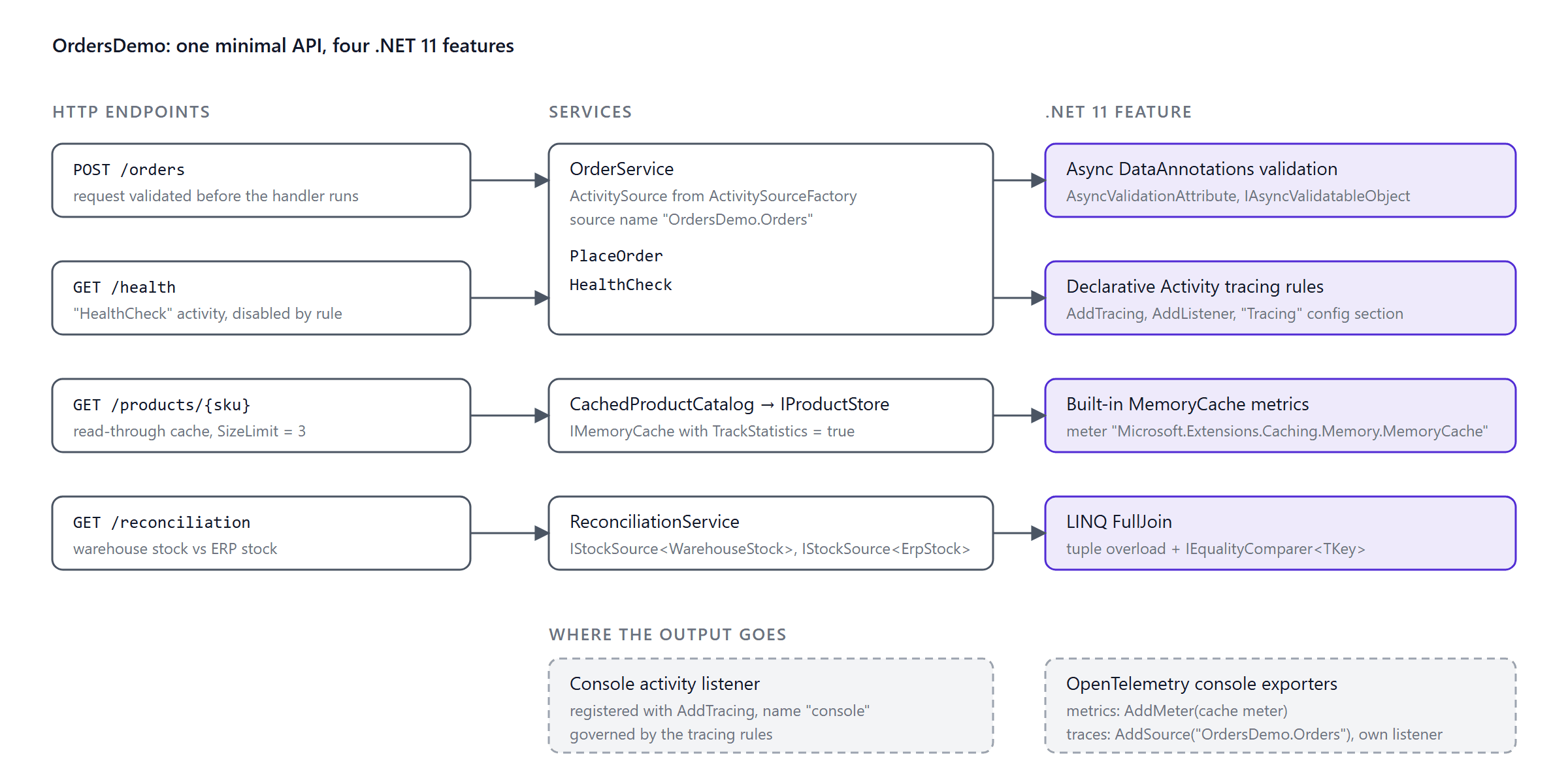
Each feature lives in its own folder under Features and registers itself through Add... and Map...Endpoints extensions, so Program.cs is only a composition root.
1. LINQ FullJoin and selector-less Join/GroupJoin
The problem
.NET 10 added LeftJoin and RightJoin. A full outer join was still missing, so if you needed "everything from both sides, matched where possible" you wrote a left join, a right join, and a Concat or Union, or a GroupJoin/SelectMany/DefaultIfEmpty combination in each direction. Most of us have a FullOuterJoin extension method somewhere in a Utils folder, copied from a Stack Overflow answer. It works, right up until a reconciliation report is wrong.
A smaller annoyance: Join and GroupJoin always required a result selector. In most call sites that selector was (a, b) => (a, b), typed for the hundredth time.
The API
.NET 11 adds FullJoin and selector-less overloads of Join and GroupJoin. They exist on Enumerable, Queryable, and AsyncEnumerable. The new overloads take an optional IEqualityComparer<TKey> as a trailing parameter, and the same optional comparer is available on LeftJoin and RightJoin.
// Full outer join, returning tuples
IEnumerable<(TOuter? Outer, TInner? Inner)> FullJoin<TOuter, TInner, TKey>(
    this IEnumerable<TOuter> outer, IEnumerable<TInner> inner,
    Func<TOuter, TKey> outerKeySelector, Func<TInner, TKey> innerKeySelector,
    IEqualityComparer<TKey>? comparer = null);

// Full outer join with your own projection
IEnumerable<TResult> FullJoin<TOuter, TInner, TKey, TResult>(
    this IEnumerable<TOuter> outer, IEnumerable<TInner> inner,
    Func<TOuter, TKey> outerKeySelector, Func<TInner, TKey> innerKeySelector,
    Func<TOuter?, TInner?, TResult> resultSelector,
    IEqualityComparer<TKey>? comparer = null);
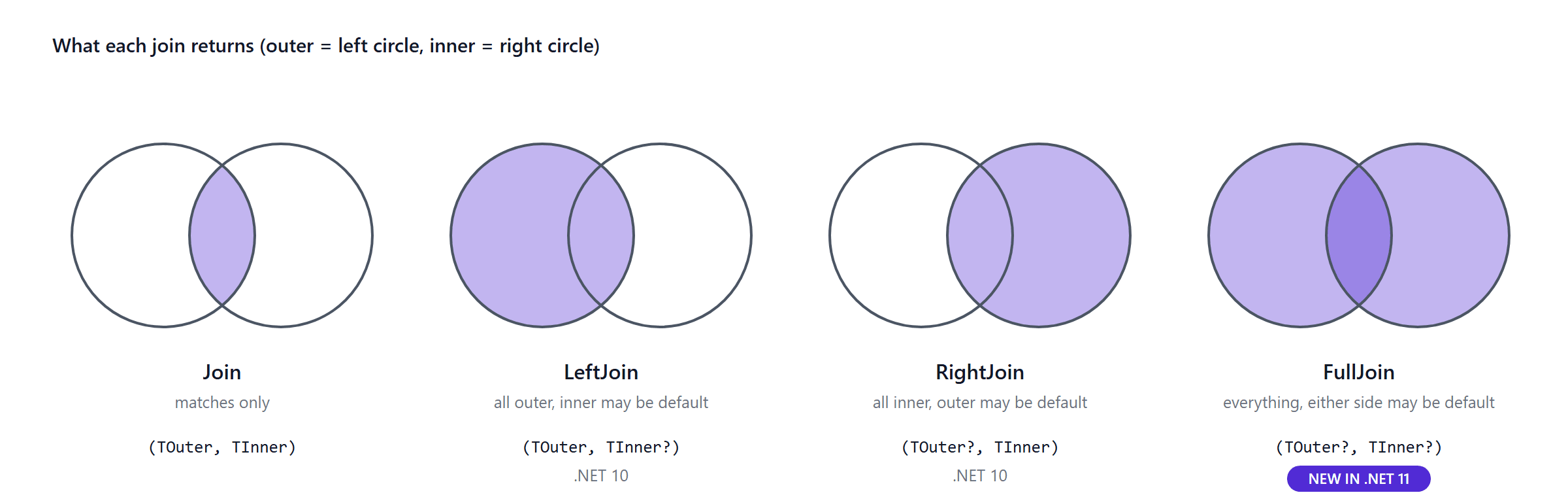
Example: reconciling two stock systems
The reconciliation endpoint compares stock levels reported by a warehouse and by an ERP system. A SKU can exist in either system or both, and when it exists in both the quantities may disagree. Three pair shapes, four statuses, one full outer join, and pattern matching on the tuple expresses all of it directly:
internal sealed class ReconciliationService : IReconciliationService
{
    public IReadOnlyList<ReconciliationRow> Reconcile(IEnumerable<WarehouseStock> warehouse, IEnumerable<ErpStock> erp)
    {
        var pairs = warehouse.FullJoin(
            erp,
            w => w.Sku,
            e => e.Sku,
            StringComparer.OrdinalIgnoreCase);

        return [.. pairs.Select(ToRow)];
    }

    private static ReconciliationRow ToRow((WarehouseStock? Warehouse, ErpStock? Erp) pair) => pair switch
    {
        (null, { } erp) => new ReconciliationRow(erp.Sku, ReconciliationStatus.MissingInWarehouse, null, erp.Quantity),
        ({ } warehouse, null) => new ReconciliationRow(warehouse.Sku, ReconciliationStatus.MissingInErp, warehouse.Quantity, null),
        ({ } warehouse, { } erp) when warehouse.Quantity != erp.Quantity
            => new ReconciliationRow(warehouse.Sku, ReconciliationStatus.QuantityMismatch, warehouse.Quantity, erp.Quantity),
        ({ } warehouse, { } erp) => new ReconciliationRow(warehouse.Sku, ReconciliationStatus.Ok, warehouse.Quantity, erp.Quantity),
        (null, null) => throw new UnreachableException("FullJoin never yields an empty pair."),
    };
}
Calling GET /reconciliation with three warehouse rows (LAPTOP-15, mouse-01, CHAIR-ERG) and three ERP rows (LAPTOP-15, MOUSE-01, DESK-STD) returns four rows:
[
  { "sku": "LAPTOP-15", "status": "Ok",                 "warehouseQuantity": 5,    "erpQuantity": 5 },
  { "sku": "mouse-01",  "status": "QuantityMismatch",   "warehouseQuantity": 0,    "erpQuantity": 3 },
  { "sku": "CHAIR-ERG", "status": "MissingInErp",       "warehouseQuantity": 7,    "erpQuantity": null },
  { "sku": "DESK-STD",  "status": "MissingInWarehouse", "warehouseQuantity": null, "erpQuantity": 2 }
]
Note the second row: mouse-01 and MOUSE-01 matched only because of the StringComparer.OrdinalIgnoreCase argument. Without it they would be two separate "missing" rows, which is exactly what happens in real life when two systems disagree on casing and nobody passes a comparer.
What the tests showed about the semantics
The documentation describes the join operators but not their ordering or null behaviour, so I wrote tests against RC1 to pin down what you can observe today.
Output order follows the outer sequence, with unmatched inner elements appended at the end: for outer = [1, 2, 3] and inner = [3, 4, 2], FullJoin yields (1, 0), (2, 2), (3, 3), (0, 4). Treat that as an implementation detail, not a guarantee. Null keys never match each other; a null key on either side produces an unmatched row, the same way NULL = NULL is false in SQL.
Look at that (1, 0) again. It means "outer 1 had no partner", but 0 is also a perfectly valid inner value, and nothing in the tuple tells you which. When the element type is a struct, use nullable elements or the resultSelector overload so you can tell the two apart.
One more surprise: the selector-less GroupJoin does not return tuples. The "What's new" page calls the new overloads "tuple-returning", which is true for Join, but GroupJoin returns IEnumerable<IGrouping<TOuter, TInner>> with the outer element as the Key and the matching inner elements as the group.
var grouped = customers
    .GroupJoin(orders, c => c.Id, o => o.CustomerId)
    .Select(group => (group.Key.Name, Count: group.Count()));
When to use it
Use FullJoin whenever you need a reconciliation, a diff, or a "who did not show up on the other list" report over two in-memory sequences. Keep the memory profile in mind: the inner sequence is fully materialised into a lookup, so put the smaller sequence on the inner side. Against a database, EF Core 11 translates Queryable.FullJoin to FULL JOIN on SQL Server. EF Core 11 is still in preview at the time of writing, so check the provider you use before relying on it.
That covers combining data that is already in memory. The next feature is about the data on its way in: the order request that arrives at POST /orders and has to be checked against systems you can only reach asynchronously.
2. Asynchronous validation with DataAnnotations
The problem
ValidationAttribute.IsValid is synchronous. Rules that need I/O, such as "is this e-mail registered", "does this VAT number exist in the tax registry", or "is there enough stock", either blocked a thread with .GetAwaiter().GetResult() or moved out of the validation layer entirely. Once they move, their error messages no longer flow through ValidationResult and ValidationProblemDetails, and every consumer of the model has to remember to call them. You know the result: [Required] failures arrive as a tidy 400 with a field name, "customer not found" arrives as a 500 from the service layer, and the front-end team asks why.
The API
.NET 11 adds an async path to System.ComponentModel.DataAnnotations with three pieces:
AsyncValidationAttribute, an abstract base class withIsValidAsync(object?, ValidationContext, CancellationToken)returningTask<ValidationResult?>.IAsyncValidatableObject, withValidateAsync(ValidationContext, CancellationToken)returningIAsyncEnumerable<ValidationResult>.- Async counterparts on
Validator:ValidateObjectAsync,TryValidateObjectAsync,ValidatePropertyAsync,TryValidatePropertyAsync,ValidateValueAsync, andTryValidateValueAsync.
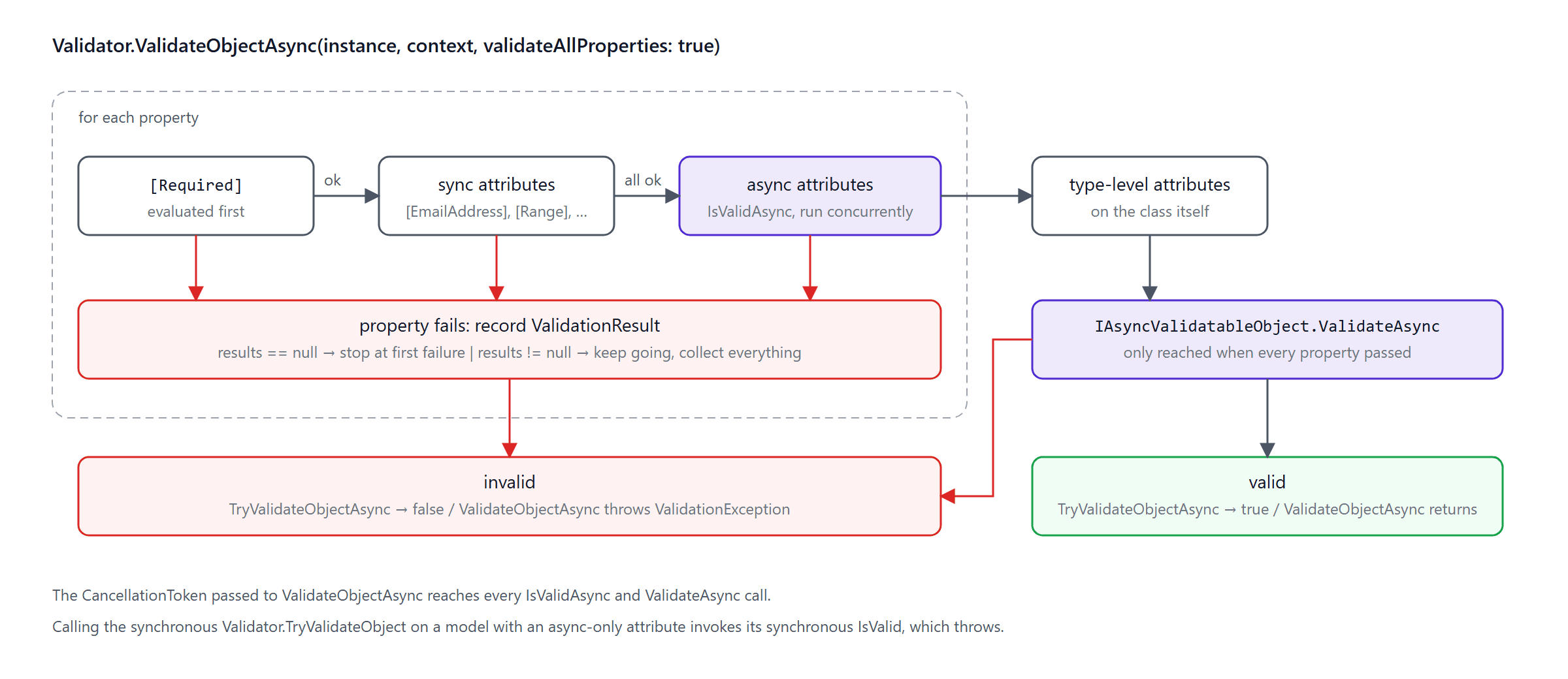
One design point matters before you write your first rule: the synchronous members are still required. IsValid(object?, ValidationContext) is abstract on AsyncValidationAttribute, and IAsyncValidatableObject inherits IValidatableObject.Validate. The framework samples throw from both so that accidental synchronous validation fails loudly instead of silently skipping the rule, and that is the approach I take below.
Example: an async attribute and an async object rule
The order request in the sample uses both mechanisms. The attribute checks that the customer exists in a directory:
[AttributeUsage(AttributeTargets.Property)]
public sealed class RegisteredCustomerAttribute : AsyncValidationAttribute
{
    protected override ValidationResult? IsValid(object? value, ValidationContext validationContext) =>
        throw new InvalidOperationException(
            $"{nameof(RegisteredCustomerAttribute)} only supports asynchronous validation. Use Validator.ValidateObjectAsync.");

    protected override async Task<ValidationResult?> IsValidAsync(
        object? value, ValidationContext validationContext, CancellationToken cancellationToken)
    {
        if (value is not string email || string.IsNullOrWhiteSpace(email))
        {
            return ValidationResult.Success; // [Required] owns the empty-value case
        }

        var directory = validationContext.GetRequiredService<ICustomerDirectory>();

        return await directory.ExistsAsync(email, cancellationToken)
            ? ValidationResult.Success
            : new ValidationResult($"'{email}' is not a registered customer.", [validationContext.MemberName!]);
    }
}
The model itself checks stock for every line, a rule that spans properties:
public sealed class CreateOrderRequest : IAsyncValidatableObject
{
    [Required, EmailAddress, RegisteredCustomer]
    public string CustomerEmail { get; init; } = string.Empty;

    [MinLength(1)]
    public IReadOnlyList<OrderLine> Lines { get; init; } = [];

    public IEnumerable<ValidationResult> Validate(ValidationContext validationContext) =>
        throw new InvalidOperationException($"Validate {nameof(CreateOrderRequest)} with {nameof(ValidateAsync)}.");

    public async IAsyncEnumerable<ValidationResult> ValidateAsync(
        ValidationContext validationContext,
        [EnumeratorCancellation] CancellationToken cancellationToken = default)
    {
        var inventory = validationContext.GetRequiredService<IInventoryService>();

        foreach (var line in Lines)
        {
            var available = await inventory.GetAvailableQuantityAsync(line.Sku, cancellationToken);
            if (available < line.Quantity)
            {
                yield return new ValidationResult(
                    $"Only {available} unit(s) of '{line.Sku}' are in stock.", [nameof(Lines)]);
            }
        }
    }
}
Both rules resolve their dependencies from the ValidationContext, which means the context has to be created with a service provider. Minimal APIs do that for you; when you call Validator yourself, pass one in:
var context = new ValidationContext(request, serviceProvider, items: null);
var results = new List<ValidationResult>();

var isValid = await Validator.TryValidateObjectAsync(
    request, context, results, validateAllProperties: true, cancellationToken);
Running it through a minimal API
builder.Services.AddValidation() has been available since .NET 10; it makes minimal API endpoints validate their parameters before the handler runs. What is new in .NET 11 is that the same call now runs the async rules as well, concurrently where possible. Posting an unknown customer:
curl -X POST http://localhost:5028/orders -H "Content-Type: application/json" \
     -d '{"customerEmail":"nobody@example.com","lines":[{"sku":"MOUSE-01","quantity":2}]}'
{
  "title": "One or more validation errors occurred.",
  "status": 400,
  "errors": { "CustomerEmail": ["'nobody@example.com' is not a registered customer."] }
}
Only the attribute error is reported. That is by design: object-level validation runs after all property rules pass, so the stock check never executed. Post the same order with a registered customer and you get the object-level message instead:
{
  "title": "One or more validation errors occurred.",
  "status": 400,
  "errors": { "Lines": ["Only 0 unit(s) of 'MOUSE-01' are in stock."] }
}
How the pipeline behaves
From reading Validator and confirming with tests, the async path works like this:
[Required]is evaluated first for each property and short-circuits that property on failure.- Synchronous attributes on a property run next. Async attributes run only if all synchronous ones pass, and they run concurrently.
- Type-level attributes follow, then
IAsyncValidatableObject.ValidateAsync. - Pass
nullfor the results collection and validation stops at the first failure; pass a collection and it keeps going and collects everything. - The cancellation token flows into every async rule.
The migration trap
So what happens when an older code path calls the synchronous Validator.TryValidateObject on a model that now carries an async attribute? Does it quietly skip the rule? No. It has no special handling for async attributes at all: it calls your synchronous IsValid, and if you followed the framework guidance, that throws:
System.InvalidOperationException: RegisteredCustomerAttribute only supports asynchronous validation. Use Validator.ValidateObjectAsync.
On purpose, and rightly so. But it makes adding an async attribute a breaking change for every caller that still validates synchronously, so find those callers before you decorate a shared model. Minimal APIs and Blazor forms use the async path in .NET 11; MVC controllers are not listed in the RC1 notes and the public design notes defer them to follow-up work, so treat MVC as a synchronous caller until the docs say otherwise.
Validation decides whether a request gets in. The next two features are about seeing what the application does once it is in, starting with the cache that every request touches.
3. Built-in OpenTelemetry metrics for MemoryCache
The problem
IMemoryCache has had GetCurrentStatistics() for a while, but turning it into metrics meant polling it and publishing your own Meter. Every team wrote a slightly different decorator, and none of them agreed on instrument names. The decorator then quietly stopped being registered after a refactor, and the "cache hit ratio" panel on the dashboard showed a flat line for three weeks before anyone noticed.
The API
Do you need an extra package or an adapter for this? No. In .NET 11, MemoryCache publishes a meter named Microsoft.Extensions.Caching.Memory.MemoryCache as soon as you opt in with TrackStatistics = true. The new MemoryCacheOptions.Name becomes a dotnet.cache.name tag so that multiple caches can share a process, and a new constructor overload accepts an IMeterFactory for per-instance meters. MemoryCacheStatistics gained TotalEvictions to back the new eviction counter.
RC1 publishes these four instruments, captured with a MeterListener in the test suite:
| Instrument | Type | Unit | Tags |
|---|---|---|---|
dotnet.cache.requests |
ObservableCounter | {request} |
dotnet.cache.request.type = hit / miss |
dotnet.cache.evictions |
ObservableCounter | {eviction} |
|
dotnet.cache.entries |
ObservableUpDownCounter | {entry} |
|
dotnet.cache.estimated_size |
ObservableGauge | By |
Example: a read-through product catalog
In most applications the opt-in is a one-liner: services.AddMemoryCache(options => options.TrackStatistics = true). In the demo the cache is configured through an IConfigureOptions<MemoryCacheOptions> instead, so that the demo-specific settings live next to the feature:
public void Configure(MemoryCacheOptions options)
{
    options.TrackStatistics = true;        // opt-in: without this no instruments are published
    options.Name = CacheName;              // becomes the dotnet.cache.name tag
    options.SizeLimit = productCache.Value.SizeLimit;
    options.CompactionPercentage = productCache.Value.CompactionPercentage;
}
internal sealed class CachedProductCatalog(IMemoryCache cache, IProductStore store) : IProductCatalog
{
    public Task<Product?> GetAsync(string sku, CancellationToken cancellationToken) =>
        cache.GetOrCreateAsync(sku, entry =>
        {
            entry.SetSize(1); // required when MemoryCacheOptions.SizeLimit is set
            entry.SetSlidingExpiration(TimeSpan.FromMinutes(5));
            return store.FindAsync(sku, cancellationToken);
        });
}
To export the meter, add it to your OpenTelemetry metrics pipeline:
services.AddOpenTelemetry()
    .WithMetrics(metrics => metrics
        .AddMeter("Microsoft.Extensions.Caching.Memory.MemoryCache")
        .AddConsoleExporter());
After five requests for LAPTOP-15 and one each for three other SKUs, the console exporter prints:
Metric Name: dotnet.cache.requests, Description: Total cache requests., Unit: {request}, Metric Type: LongSum
(...) dotnet.cache.name: products dotnet.cache.request.type: hit   Value: 4
(...) dotnet.cache.name: products dotnet.cache.request.type: miss  Value: 4

Metric Name: dotnet.cache.evictions, Description: Total cache evictions., Unit: {eviction}, Metric Type: LongSum
(...) dotnet.cache.name: products                                   Value: 1

Metric Name: dotnet.cache.entries, Description: Current number of cache entries., Unit: {entry}, Metric Type: LongSumNonMonotonic
(...) dotnet.cache.name: products                                   Value: 2

Metric Name: dotnet.cache.estimated_size, Description: Estimated size of the cache., Unit: By, Metric Type: LongGauge
(...) dotnet.cache.name: products                                   Value: 2
Four misses (one per SKU), four hits, and one eviction because the size limit is three. The hit ratio is hit / (hit + miss), which you can compute in any backend that supports the tag.
A detail that cost me a few minutes (and a brief, unfair suspicion of the runtime): with the default CompactionPercentage of 5 %, a three-entry cache never evicts anything; it just refuses the fourth entry. The demo uses 50 % so the counter moves; real caches are large enough that the default is fine.
Caveats
- The tag name is changing. RC1 emits
dotnet.cache.request.typeand unitBy; therelease/11.0branch already hasdotnet.cache.request.resultand unit1, becauseSizeLimitis an application-defined number, not bytes. Re-check any dashboard or alert that references the tag at GA. TrackStatisticsis not free. It adds interlocked increments on every hit and miss. That is cheap, but measure it on a hot cache before enabling it everywhere.- All four instruments are observable. The hot path only increments the counters it already kept for
GetCurrentStatistics(); values are read when a collector asks.MeterListenerusers therefore have to callRecordObservableInstruments(). The same release moved the HTTPopen_connectionsandactive_requestsmetrics to observable instruments, so this applies to more than the cache.
Metrics tell you how often the cache is hit. They do not tell you what a single slow order did along the way. For that you need traces, and the last feature is about deciding which traces you actually want, without a redeploy.
4. Declarative Activity tracing rules
The problem
ActivitySource.StartActivity returns null unless some ActivityListener has said it is interested in that source. Deciding which sources are interesting has always happened in code: either an ActivityListener with a ShouldListenTo callback, or OpenTelemetry's AddSource. Changing the decision meant a redeploy. If you have ever watched a noisy health-check span flood a trace backend because nobody could turn it off in production, you know the feeling. Logging solved the equivalent problem years ago with Logging:LogLevel in appsettings.json, and metrics got MetricsBuilder.EnableMetrics in .NET 8. Tracing had nothing.
The API
Microsoft.Extensions.Diagnostics in .NET 11 adds a tracing builder with the same shape as the metrics one:
services.AddTracing(tracing =>
{
    tracing.AddListener("console", listener => { /* ActivityListenerBuilder */ });
    tracing.EnableTracing(sourceName: "OrdersDemo.Orders");
    tracing.DisableTracing(sourceName: "OrdersDemo.Orders", operationName: "HealthCheck");
    tracing.AddConfiguration(configuration.GetSection("Tracing"));
});
AddListener(name, configure)registers a namedActivityListener. TheActivityListenerBuilderexposesSample,SampleUsingParentId,ActivityStarted,ActivityStopped, andExceptionRecorder.EnableTracing/DisableTracingadd aTracingRule.sourceNameis an exact name, a prefix, or a pattern with a single*;operationNameandlistenerNameare exact matches;nullmatches everything.AddConfigurationreads rules from anIConfigurationsection and re-applies them when the configuration reloads.- The same release adds
ActivitySourceFactoryfor creating sources through DI and unsealsActivitySource.
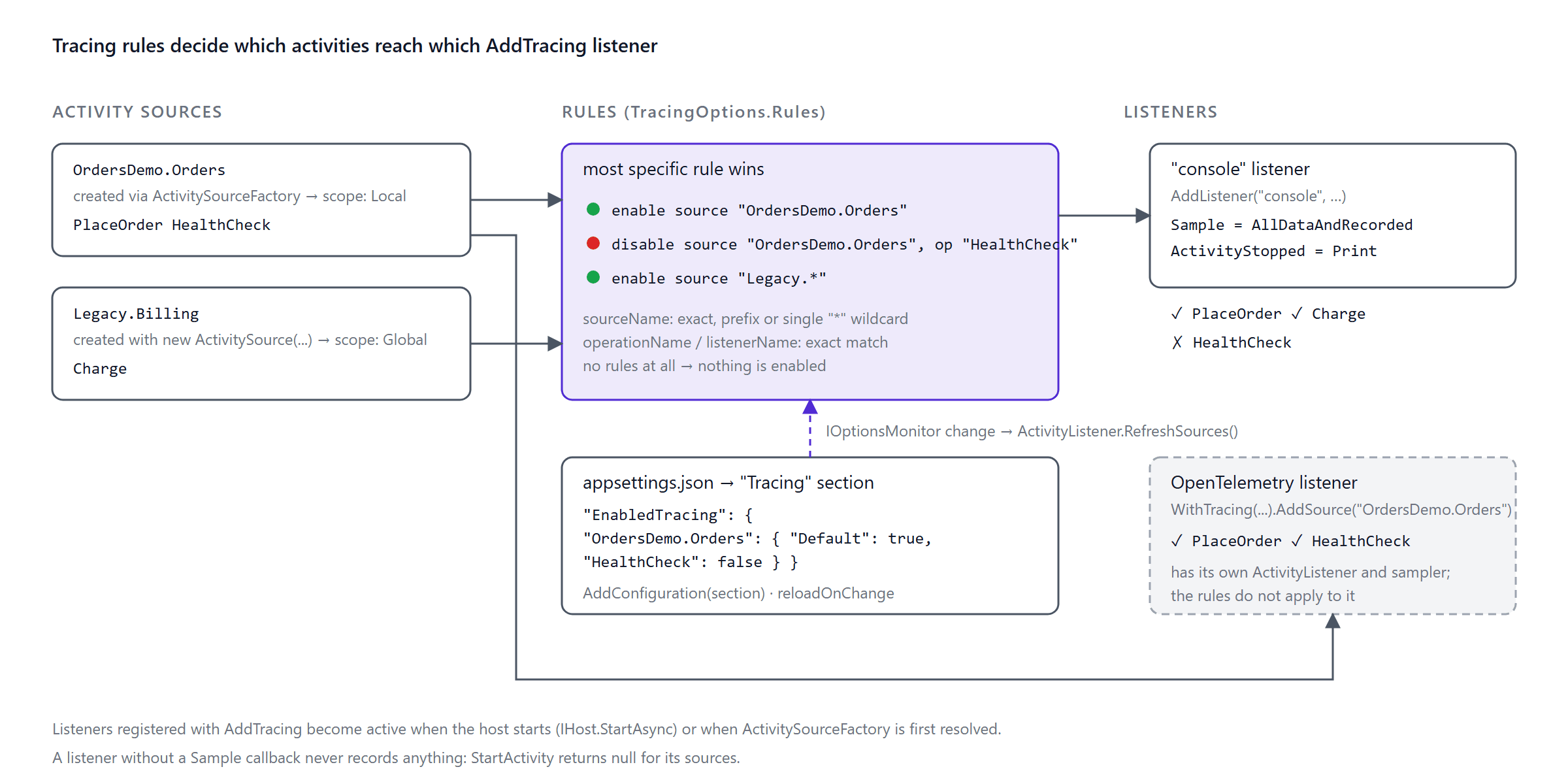
The configuration shape mirrors logging. This is the sample's appsettings.json:
{
  "Tracing": {
    "EnabledTracing": {
      "OrdersDemo.Orders": {
        "Default": true,
        "HealthCheck": false
      }
    }
  }
}
EnabledTracing applies to all listeners; EnabledGlobalTracing and EnabledLocalTracing target only sources created with new ActivitySource(...) or through ActivitySourceFactory, respectively; any other key under Tracing is a listener name with its own nested block. Inside a source, Default is the source-level rule, every other key is an operation name, and a bare boolean ("OrdersDemo.*": true) is shorthand for Default.
Example: a console listener driven by configuration
In the demo there is one named listener, registered with AddListener, and the rules come from AddConfiguration alone, no code-based rules. The listener itself:
internal static class ConsoleActivityListener
{
    public const string Name = "console";

    public static void Configure(ActivityListenerBuilder listener)
    {
        // The rules API makes no sampling decision for you: without Sample, StartActivity returns null.
        listener.Sample = static (ref _) => ActivitySamplingResult.AllDataAndRecorded;
        listener.ActivityStopped = Print;
    }

    private static void Print(Activity activity)
    {
        // Activity.Tags only yields string-valued tags; TagObjects includes numbers such as order.lines.
        var tags = string.Join(' ', activity.TagObjects.Select(tag => $"{tag.Key}={tag.Value}"));
        Console.WriteLine($"[trace] {activity.Source.Name}/{activity.OperationName} {activity.Duration.TotalMilliseconds:F1} ms {tags}");
    }
}
OrderService creates its source through ActivitySourceFactory and starts two activities, PlaceOrder and HealthCheck:
private readonly ActivitySource _activitySource =
    activitySourceFactory.Create(new ActivitySourceOptions("OrdersDemo.Orders"));

// in PlaceOrderAsync
using var activity = _activitySource.StartActivity("PlaceOrder");   // enabled by rule

// in CheckHealthAsync
using var activity = _activitySource.StartActivity("HealthCheck");  // disabled by rule
Place an order and call the health endpoint. Only the order shows up:
[trace] OrdersDemo.Orders/PlaceOrder 10.2 ms order.customer=ada@example.com order.lines=1 order.id=ORD-6067
Now change "HealthCheck": false to true in appsettings.json while the app is running. The configuration reloads, the listener refreshes its filters, and the next two health calls print:
[trace] OrdersDemo.Orders/HealthCheck 16.0 ms
[trace] OrdersDemo.Orders/HealthCheck 6.6 ms
Set it back to false and the lines stop. No restart, no redeploy.
What I learned by running it
The documentation for this feature is currently one paragraph and a five-line snippet, so most of the following comes from the source and from tests:
- Nothing is enabled by default.
AddTracing()without rules enables no source. - You must set
Sample. A listener without a sampling callback never records anything, andStartActivityreturnsnullfor its sources. The snippet in the release notes omits this, which is why my first attempt produced no output at all. - Listeners activate when the host starts. Rules are wired up during
IHost.StartAsync(or whenActivitySourceFactoryis first resolved). Building the service provider is not enough, which matters for tests and for tools that never start a host. - Rules cover sources created with
new ActivitySource(...)too. Those are "global" scope; factory-created sources are "local". A rule forLegacy.*picks up activities from a plainnew ActivitySource("Legacy.Billing"). - Rules resolve like CSS selectors. The most specific one wins: a listener name beats none, a longer source pattern beats a shorter one, an operation name beats none. Between equally specific rules the last one registered wins; avoid overlapping rules rather than relying on that.
Rules and OpenTelemetry
The question everyone asks first: does AddTracing replace OpenTelemetry's AddSource? No. OpenTelemetry registers its own ActivityListener, and the rules only govern listeners registered through AddTracing. I confirmed this with an OpenTelemetry TracerProvider and a rule that disables HealthCheck: OpenTelemetry still received HealthCheck, and the rule-driven listener did not.
There is one interaction worth knowing about. ASP.NET Core's hosting layer creates a request activity even when no listener samples it, so that parent is unrecorded, and OpenTelemetry's default ParentBased(AlwaysOn) sampler follows the parent and drops the child spans. Sampling decisions are combined across listeners with the most permissive winning, so in my first run the rule-driven listener's AllDataAndRecorded decision is what got PlaceOrder exported, while HealthCheck looked as if the rule had suppressed it in OpenTelemetry too. It had not; the sampler had. The demo uses SetSampler(new AlwaysOnSampler()) to keep the two mechanisms independent; in production, ASP.NET Core instrumentation samples the parent properly.
So where does this API fit? Use it for listeners you own: a console or file listener for local debugging, an in-process collector, a diagnostic listener you want operators to toggle in a running service. Keep your OpenTelemetry pipeline as it is.
Four features down. Here is how to run the application and the tests behind them yourself.
Running the sample
The repository pins the SDK in global.json (11.0.100-rc.1.26425.128); the README shows how to install RC1 into a private folder without making it your machine's default SDK. Then, from the repository root:
dotnet test
dotnet run --project src/OrdersDemo   # listens on http://localhost:5028 (from launchSettings.json)
The test project uses xUnit v3 on Microsoft.Testing.Platform, and the run I used for this article looked like this:
OrdersDemo.Tests.dll (net11.0|x64) passed [+28/x0/?0] (1s 461ms)
Test run summary: Passed!
  failed: 0
  skipped: 0
  duration: 1s 896ms
Every observed behaviour listed in the feature sections above is backed by a test with a matching name.
Preview and RC caveats
- RC1 is go-live, not GA. Names and units can still change; the cache tag rename (
request.type→request.result, unitBy→1) is already merged for release/11.0. - Async validation in MVC controllers is not covered by the RC1 documentation; assume synchronous validation there.
- Tracing rules have minimal documentation. The behaviours above were verified against RC1 source and tests, not a specification; re-verify against the GA docs. EF Core 11's
FullJointranslation is likewise still in preview.
Adoption checklist
- Target
net11.0, pin the SDK inglobal.jsonwithrollForward: latestFeature. - Replace hand-written full outer joins with
FullJoin; test null keys and decide how value types represent "no match". - Convert
(a, b) => (a, b)selectors to the selector-lessJoin/GroupJoinoverloads; rememberGroupJoinreturnsIGrouping. - Move I/O-bound rules to
AsyncValidationAttributeorIAsyncValidatableObject; decide whether the synchronous members throw or fall back. - Find every synchronous caller of those models (
Validator.*, MVC model binding, custom pipelines) and switch it, or keep async attributes off shared models. - Call
AddValidation()in minimal API projects and passHttpContext.RequestAbortedthrough. - Enable
TrackStatistics, setMemoryCacheOptions.Name, add the meter to OpenTelemetry, build a hit-ratio panel; re-check the tag name at GA. - If you use
MeterListener, callRecordObservableInstruments()on your collection interval. - Move custom
ActivityListenercode toAddTracingwith a named listener and aTracingsection; always setSample; leave OpenTelemetry'sAddSourcealone. - Prefer
ActivitySourceFactoryover staticActivitySourcefields in new code.
Closing thoughts
None of these four features will headline the .NET 11 launch keynote, and that is exactly why they are worth knowing: they are the changes you will use on a Tuesday afternoon, not the ones you will benchmark. Good luck with the upgrade, keep the tests from this article close, and treat every "it obviously works like this" moment with a little suspicion until GA. Hit a surprise I did not cover? The sample repository is the place to open an issue.
References
- What's new in .NET 11
- What's new in .NET libraries for .NET 11 (LINQ joins, async validation, cache metrics, tracing configuration)
- What's new in ASP.NET Core for .NET 11 (async validation in minimal APIs and Blazor)
- .NET diagnostics overview and Collect a distributed trace
- Announcing .NET 11 Release Candidate 1
- dotnet/runtime #100317: Tracing configuration API proposal and PR #129380
- dotnet/runtime #124140: Metrics for MemoryCache API proposal and PR #133151: tag and unit fix
- Async validation design notes (dotnet/aspnetcore) (MVC support deferred)
- What's new in EF Core 11 (FullJoin translation)


Comments
No one has commented yet, be the first to comment!