






 ABP Contributor Program

QuickGrid in .NET 11: Sorting and Paging That Live in the URL
Release status. Everything in this article was built and tested on .NET 11 RC1 (SDK
11.0.100-rc.1.26425.128,Microsoft.AspNetCore.Components.QuickGrid11.0.0-rc.1.26425.128, released September 8, 2026). RC1 ships with a go-live license, but it is not the final release. Query parameter names and defaults described here are the RC1 behavior — they were renamed once during the previews (details below), so recheck them when you move to RC2 or GA, planned for .NET Conf in November 2026.
QuickGrid has always been a good data grid with one structural limitation: its sort column, sort direction, and page index lived only in component memory, and its controls were <button>s wired to @onclick. On statically server-side rendered pages — pages with no interactive render mode — sorting and paging simply did nothing. On interactive pages, the state was still unshareable: you couldn't bookmark page 4, send a colleague a link to "the error logs sorted by time, descending", or press Back and land where you were.
.NET 11 moves that state into the query string. Sortable column headers and the Paginator now render as ordinary <a> links whose href is the URL of the next state — ?sort=Name&direction=desc&page=2. Because the state is in the request, it works identically in static SSR, during prerendering, and after the circuit or WebAssembly runtime takes over. I built a small static-SSR-only Blazor app to try it, and this article walks through what actually renders — including a few rough edges I hit on RC1.
TL;DR
- Static SSR works. Sorting and paging are functional on pages with no interactivity at all — headers and the paginator are
<a>links carryingsort,direction, andpagequery parameters. - The URL is the state store. Refresh, Back/Forward, bookmarks, and "copy link" all preserve the grid state because the state is the address.
- Your own parameters coexist. A
[SupplyParameterFromQuery]filter like?country=Germanyis preserved inside QuickGrid's generated links; your own links decide whether to keep the grid's. - Multiple grids need distinct parameter names. The new
QueryParameterNameOptionsparameter renamessort/direction/pageper grid (e.g.?c_sort=Name&c_page=2). Two grids sharing the defaults fight over the same keys. pageis 1-based in the URL even thoughPaginationState.CurrentPageIndexstays 0-based.- Renamed during previews. Preview 5–6 shipped
QueryParameterNamePrefixand anorderparameter; Preview 7 replaced it withQueryParameterNameOptionsand renamedorder→direction. Code written against Preview 5/6 articles won't compile unchanged on RC1. - Breaking markup change:
button.col-titlebecomesa.col-title. CSS and E2E selectors targetingbuttonneed updating. AnAppContextswitch reverts to buttons — but then the controls are dead in SSR again. - RC1 rough edge: with
GridItemsProvider, a?page=request invokes the provider twice — the second call is a duplicate. Details in Server-side paging.
Why the URL, and why it matters architecturally
Before the markup, it's worth being clear about what problem this solves. A data grid has three pieces of mutable view state — which column sorts, which direction, which page — and only a few places that state can live:
| Where state lives | Shareable/bookmarkable | Survives refresh | Back/Forward | Works in static SSR | Server resources |
|---|---|---|---|---|---|
| Component memory (.NET ≤ 10) | No | No | No | No (controls dead) | Circuit per user |
Session/TempData |
No | Yes | No | Yes, but per-user | Server store + cookies |
| Query string (.NET 11) | Yes | Yes | Yes | Yes | None |
The query string is the only option that's shareable, refresh-safe, history-friendly, SSR-compatible, and stateless on the server all at once. Every state transition is just a GET: no session affinity, no circuit to hold open, no memory to expire. It's also what the rest of the web already does for list views — search results and e-commerce category pages have encoded ?sort=&page= in the address bar for decades.
The mechanism, per request:
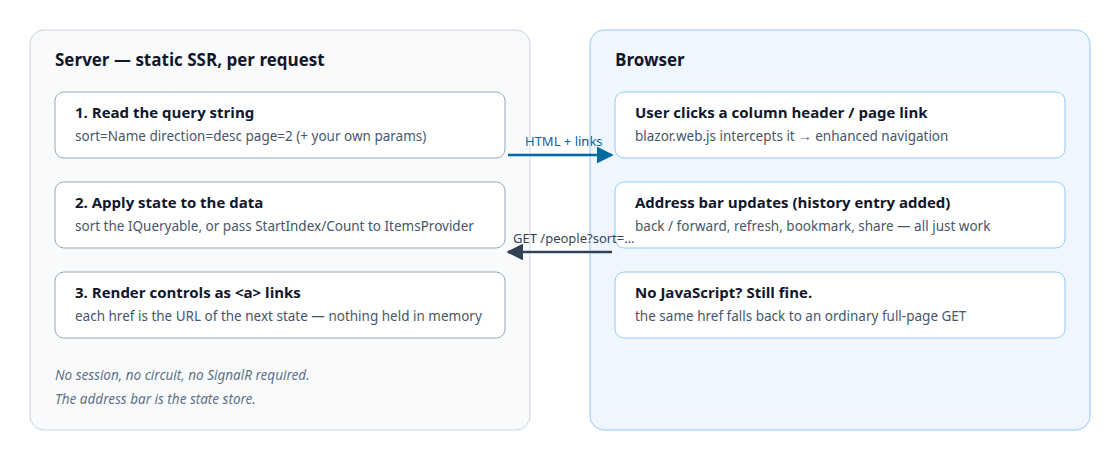
- On each request the grid reads
sort,direction, andpagefrom the query string. - It applies them to the data — sorting the
IQueryableitself forItems, or passingStartIndex/Count/sort descriptors to yourGridItemsProvider. - It renders every state-changing control as an
<a>whosehrefis the URL that produces the next state. Clicking "Name" while it sorts descending produces thedirection=ascURL; clicking "next" producespage=3.
In the browser, blazor.web.js intercepts these clicks as enhanced navigations — a fetch plus a DOM patch plus a pushState, so the address bar updates without a full reload. With JavaScript disabled or absent, the same href performs an ordinary full-page GET. Both paths land on identical markup, which is what makes the feature progressive enhancement rather than a JS dependency.
The sample app
The sample is a Blazor Web App whose main pages are static SSR — no interactive render mode — the scenario that was impossible before .NET 11. (One page later opts into InteractiveServer to compare behavior.)
dotnet new blazor -n QuickGridUrlState --interactivity None --empty
cd QuickGridUrlState
dotnet add package Microsoft.AspNetCore.Components.QuickGrid --version 11.0.0-rc.1.26425.128
dotnet run --urls http://localhost:5055
The runnable project, including the integration tests, is salihozkara/quickgrid-url-state. Clone that repository to run the pages and dotnet test without reassembling the snippets below.
The data layer is 247 deterministically generated Person rows (fixed seed, so results are reproducible), exposed through a singleton store:
public sealed record Person(int Id, string Name, string Country, int Age, DateOnly StartDate);

public sealed class PersonStore
{
    private static readonly string[] FirstNames = [ "Amelia", "Oliver", "Salih", /* ... */ ];
    private static readonly string[] LastNames  = [ "Smith", "Yilmaz", "Tiurina", /* ... */ ];
    private static readonly string[] Countries  = [ "United Kingdom", "Türkiye", "Germany", /* ... */ ];

    public IReadOnlyList<Person> People { get; }

    public PersonStore()
    {
        var rng = new Random(Seed: 20260923); // fixed seed: same 247 rows on every run
        People = Enumerable.Range(1, 247)
            .Select(id => new Person(
                Id: id,
                Name: $"{FirstNames[rng.Next(FirstNames.Length)]} {LastNames[rng.Next(LastNames.Length)]}",
                Country: Countries[rng.Next(Countries.Length)],
                Age: rng.Next(21, 68),
                StartDate: DateOnly.FromDayNumber(rng.Next(
                    DateOnly.FromDateTime(DateTime.Today.AddYears(-6)).DayNumber,
                    DateOnly.FromDateTime(DateTime.Today).DayNumber))))
            .ToList();
    }
}
Program.cs is the stock template plus one registration and — for the interactive page used later — the usual interactive-server lines:
builder.Services.AddRazorComponents()
    .AddInteractiveServerComponents();
builder.Services.AddSingleton<PersonStore>();
// ...
app.MapRazorComponents<App>()
    .AddInteractiveServerRenderMode();
The page that matters is Components/Pages/People.razor:
@page "/people"
@using Microsoft.AspNetCore.Components.QuickGrid
@using QuickGridUrlState.Data
@inject PersonStore Store
@inject NavigationManager Nav
<PageTitle>People — QuickGrid URL state</PageTitle>
<h1>People</h1>
<p class="lede">
Sortable columns and the paginator are ordinary <code><a></code> links.
Current address: <code>@Nav.Uri</code>
</p>
<div class="filters">
Filter:
<a href="@FilterHref(null)">All</a>
@foreach (var c in Store.People.Select(p => p.Country).Distinct().Order())
{
<a href="@FilterHref(c)" class="@(c == Country ? "active" : null)">@c</a>
}
</div>
<QuickGrid Items="@FilteredPeople" Pagination="@pagination" Class="people-grid">
<PropertyColumn Property="@(p => p.Id)" Sortable="true" Title="Id" />
<PropertyColumn Property="@(p => p.Name)" Sortable="true" Title="Name" />
<PropertyColumn Property="@(p => p.Country)" Sortable="true" Title="Country" />
<PropertyColumn Property="@(p => p.Age)" Sortable="true" Title="Age" />
<PropertyColumn Property="@(p => p.StartDate)" Sortable="true" Title="Start date" Format="yyyy-MM-dd" />
</QuickGrid>
<Paginator State="@pagination" />
@code {
private readonly PaginationState pagination = new() { ItemsPerPage = 10 };
[SupplyParameterFromQuery(Name = "country")]
public string? Country { get; set; }
private IQueryable<Person> FilteredPeople => Store.People
.Where(p => Country is null || p.Country == Country)
.AsQueryable();
private string FilterHref(string? country) =>
country is null ? "/people" : $"/people?country={Uri.EscapeDataString(country)}";
}
Nothing in this page is new code — that's the point. The same QuickGrid/Paginator/PaginationState trio that needed interactivity in .NET 10 now works on a static page in .NET 11, because the controls render as links and the state arrives via the URL.
The URL contract
Here's a real URL the app produces, with the parts labeled:
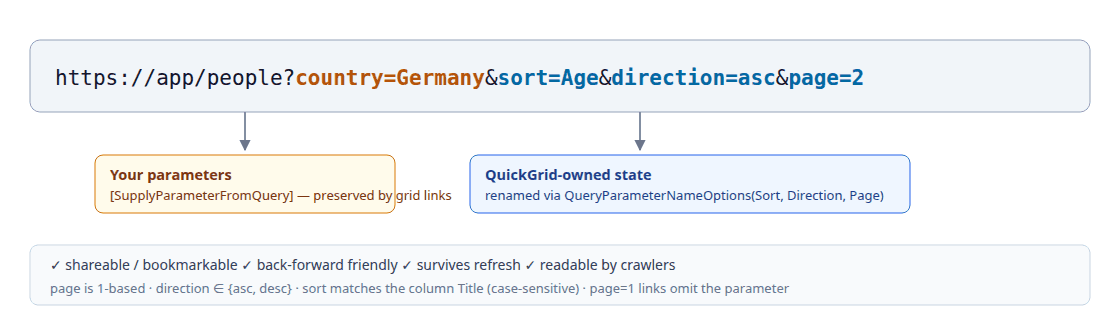
| Parameter | Default name | Values | Notes |
|---|---|---|---|
| Sort column | sort |
The column's Title, URL-encoded |
Case-sensitive match against Title. ?sort=Start%20date sorts the "Start date" column; ?sort=name matches nothing and is ignored. |
| Sort direction | direction |
asc, desc |
Case-insensitive (DESC works). asc/desc are the only valid values — Ascending, none, or empty are ignored. |
| Page | page |
1-based integer | ?page=2 is the second page. Page 1 links omit the parameter entirely, so the canonical first-page URL stays clean. Out-of-range values clamp; garbage falls back to page 1. |
A few rules worth remembering:
- The sort key is the column
Title, not the property name.Titleis also what users see, which keeps URLs readable (?sort=Start%20date). The cost: renaming a column title invalidates existing bookmarks, and aTemplateColumnwithSortBybut noTitlerenders a non-linked, unsortable header in URL mode — give sortable template columns aTitle. PropertyColumninfersTitlefrom the member name when you don't set one, soProperty="p => p.Name"is already URL-sortable as?sort=Name.- Both
sortanddirectionmust be present for a URL sort to take effect.?sort=Namealone is ignored (the grid treats it as "no sort instruction"), and?direction=descalone does nothing. QuickGrid's own links always emit the pair.
What actually renders
Requesting /people?sort=Name&direction=desc&page=2 produces this markup (abridged — Blazor's internal b-* attributes omitted):
<table theme="default" aria-rowcount="11" class="quickgrid people-grid">
<thead>
<tr>
<th class="col-justify-start" aria-sort="none" scope="col">
<div class="col-header-content">
<a class="col-title" href="http://localhost:5055/people?sort=Id&direction=asc&page=2">
<div class="col-title-text">Id</div>
<div class="sort-indicator" aria-hidden="true"></div>
</a>
</div>
</th>
<th class="col-justify-start col-sort-desc" aria-sort="descending" scope="col">
<div class="col-header-content">
<a class="col-title" href="http://localhost:5055/people?sort=Name&direction=asc&page=2">
<div class="col-title-text">Name</div>
<div class="sort-indicator" aria-hidden="true"></div>
</a>
</div>
</th>
<!-- ... -->
</tr>
</thead>
<!-- tbody rows: Zeynep Brown, Yunus Thomas, ... -->
</table>
<div class="paginator">
<div class="summary"><strong>247</strong> items</div>
<nav role="navigation">
<a class="go-first" href=".../people?sort=Name&direction=desc" aria-label="Go to first page">«</a>
<a class="go-previous" href=".../people?sort=Name&direction=desc" aria-label="Go to previous page">‹</a>
<div class="pagination-text">Page <strong>2</strong> of <strong>25</strong></div>
<a class="go-next" href=".../people?sort=Name&direction=desc&page=3" aria-label="Go to next page">›</a>
<a class="go-last" href=".../people?sort=Name&direction=desc&page=25" aria-label="Go to last page">»</a>
</nav>
</div>
A few things stand out in that markup:
- The hrefs are absolute (
http://localhost:5055/people?...), built from the currentNavigationManagerURI. - Every control preserves the rest of the state. On page 2 sorted by name descending, the "Id" header links to
?sort=Id&direction=asc&page=2— changing the sort does not reset the page. Paginator links likewise keepsort/direction. - The active column's link toggles. Sorted
desc, the Name header offersdirection=asc. The cycle is asc → desc → asc…; there's no "unsorted" link target — removing the sort means editing the URL. aria-sortis correct on the<th>(descendinghere,noneon the others), plusscope="col", anaria-hiddenindicator glyph,aria-label/titleon paginator links, andaria-disabled="true"+tabindex="-1"on the disabled first/previous links.- "Go to first/previous" from page 2 omit
page— the default state needs no parameter.
And in the browser:
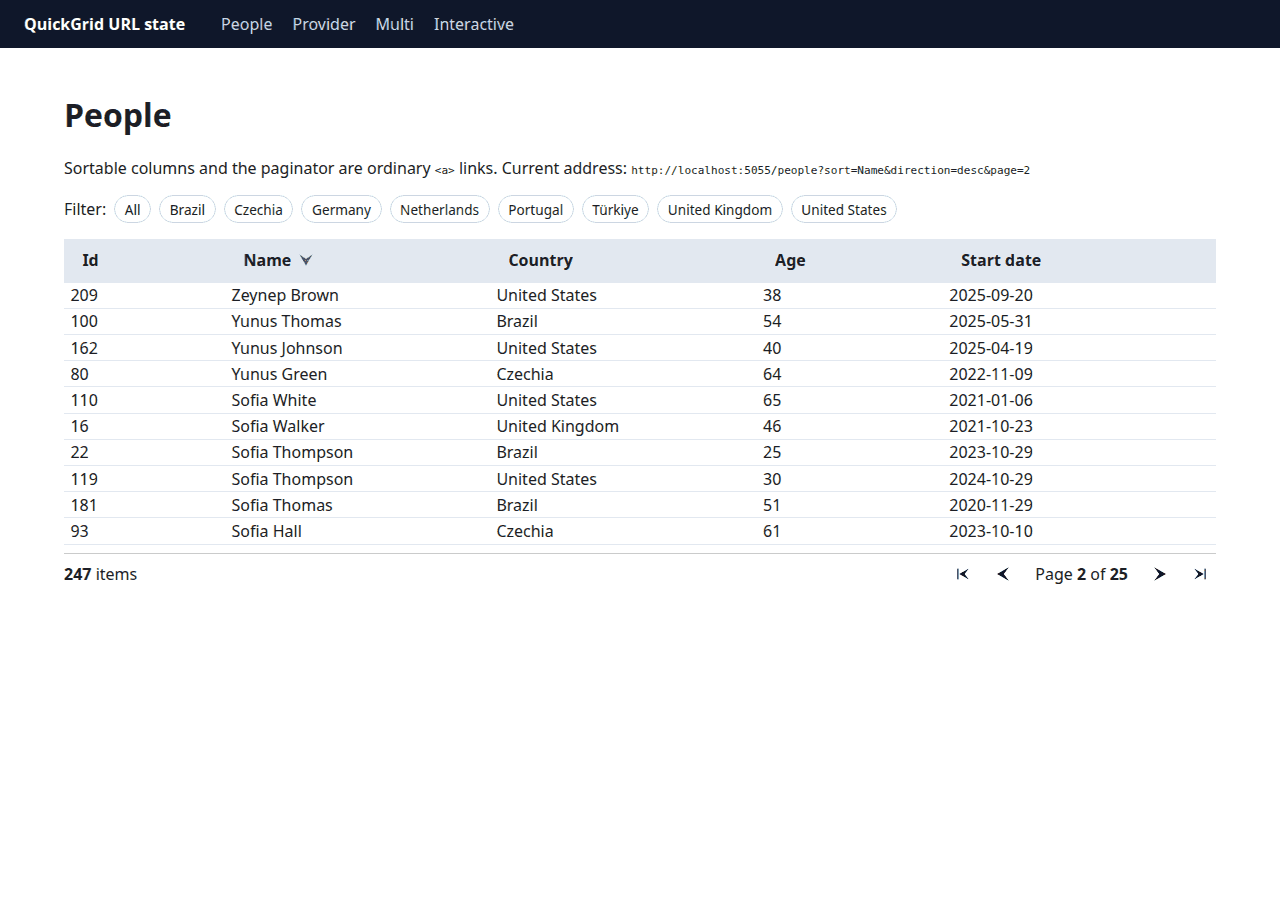
Figure: /people?sort=Name&direction=desc&page=2. The in-page "Current address" line is the sample's NavigationManager.Uri — the same string a user can copy and share.
Your own parameters are first-class citizens
The filter chips in the sample set ?country= — a parameter QuickGrid knows nothing about, bound via [SupplyParameterFromQuery] on the page. Two behaviors make this work nicely:
- QuickGrid links preserve foreign parameters. On
/people?country=Germany, the Name header renders?country=Germany&sort=Name&direction=asc— the grid merges its state into the existing query string rather than replacing it. - Your links can drop grid state on purpose. The filter chips link to
/people?country=Xwith nosort/direction/page, which resets the grid to page 1 unsorted — usually what you want when the result set changes. If you wanted the filter to keep sorting, you'd copy the grid params into your own links the same way.
/people?country=Germany&sort=Age&direction=asc&page=2:
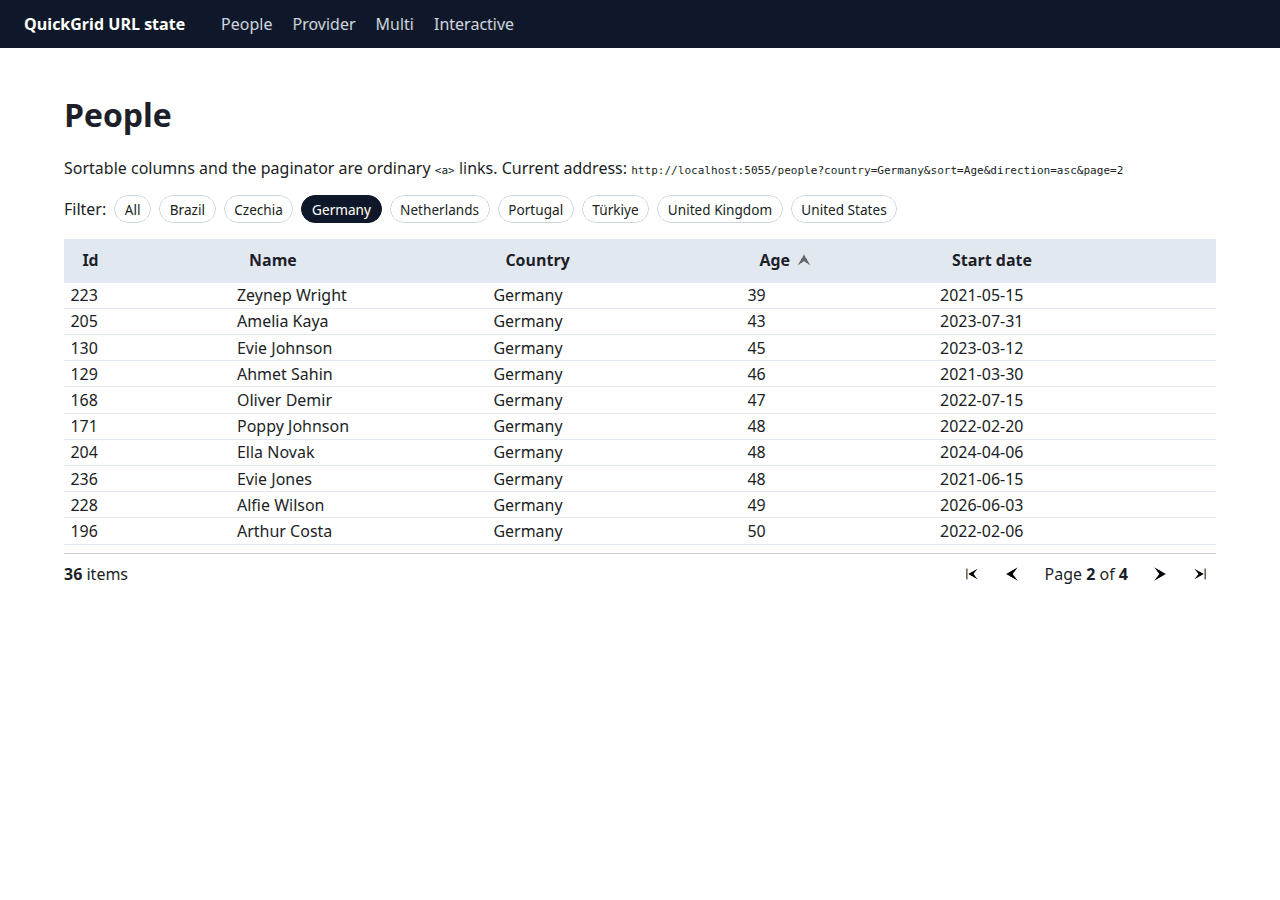
Figure: app-owned country filter combined with grid-owned sort/direction/page in one URL — fully bookmarkable.
That composability is the quiet win here: QuickGrid owns three parameters, you own the rest of the query string, and nobody needs a shared state container or an event bus to coordinate them.
Two grids on one page
Default parameter names are only safe when there is exactly one grid. The /multi page mounts a second grid with a prefix:
<QuickGrid Items="@Countries" Pagination="@countryPagination"
           QueryParameterNameOptions="@(new QueryParameterNameOptions("c_"))" Class="people-grid">
    <PropertyColumn Property="@(c => c.Name)" Sortable="true" Title="Name" />
    <PropertyColumn Property="@(c => c.People)" Sortable="true" Title="People" />
</QuickGrid>
<Paginator State="@countryPagination" />
The constructor argument is the prefix including its own separator — new QueryParameterNameOptions("c_") yields c_sort, c_direction, c_page. Each name is also settable independently:
new QueryParameterNameOptions { Page = "p2" } // sort, direction stay default; page becomes p2
Both grids operate independently in one URL — /multi?sort=Name&direction=desc&page=2&c_sort=People&c_direction=desc&c_page=2:
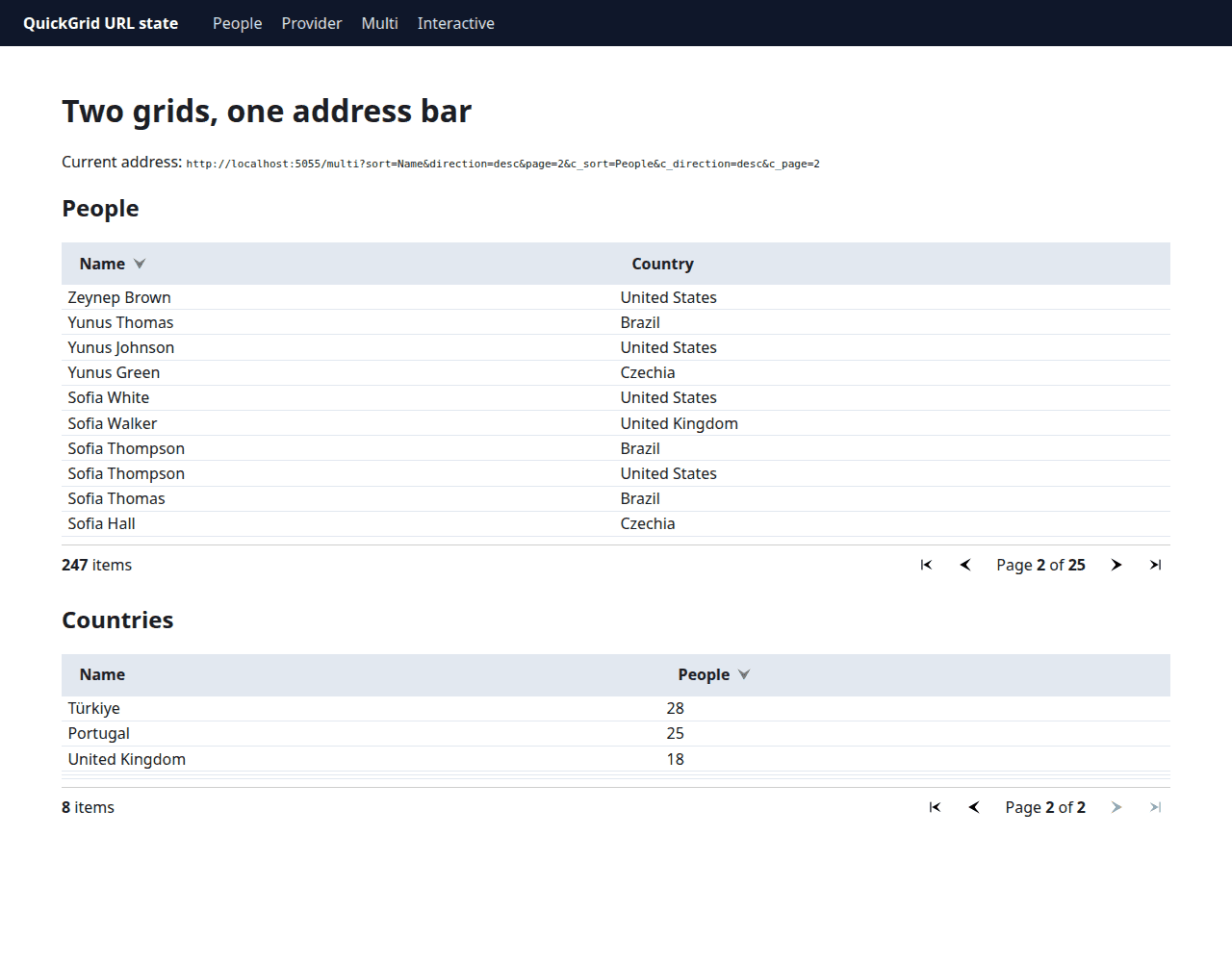
Two traps to know about:
- No prefix = shared state. Two grids with the default names both read
?page=/?sort=and interfere with each other (the API proposal calls this out as a pit-of-failure). If you add a second grid to a page, prefix it. QueryParameterNameOptionsis per-QuickGrid. ThePaginatorpicks up the page parameter name through its linkedPaginationState, so the<Paginator>tag needs no extra attribute — as long as it's bound to that grid'sPaginationState.
Server-side paging with GridItemsProvider
Items keeps everything in memory; real apps page at the database. With ItemsProvider, the resolved state arrives per request:
peopleProvider = async request =>
{
    Logger.LogInformation(
        "ItemsProvider called: StartIndex={StartIndex} Count={Count} Sort=[{Sort}]",
        request.StartIndex, request.Count,
        string.Join(", ", request.GetSortByProperties().Select(s => $"{s.PropertyName} {s.Direction}")));

    var sorted = request.ApplySorting(Store.People.AsQueryable());
    var slice = sorted.Skip(request.StartIndex).Take(request.Count ?? 10).ToList();
    await Task.Delay(150, request.CancellationToken); // pretend this was a database
    return GridItemsProviderResult.From(slice, Store.People.Count);
};
In an EF Core app, ApplySorting + Skip/Take translate to ORDER BY/OFFSET/FETCH, so the URL state reaches the database query directly. Requesting four URLs in a row produced this log — and one surprise:
GET /provider                                      → StartIndex=0  Count=10 Sort=[]
GET /provider?page=2                               → StartIndex=10 Count=10 Sort=[]
                                                     StartIndex=10 Count=10 Sort=[]   ← again
GET /provider?sort=Name&direction=asc              → StartIndex=0  Count=10 Sort=[Name Ascending]
GET /provider?sort=Name&direction=desc&page=4      → StartIndex=30 Count=10 Sort=[]
                                                     StartIndex=30 Count=10 Sort=[Name Descending]
On RC1, any request with page in the URL invokes the provider twice. With page alone the second call is an identical duplicate; with sort+page, the first call has the page applied but not the sort, and the second adds it. A sort-only URL issues a single call with the sort already applied, so the double fetch is specific to the pagination path. (Probably related to dotnet/aspnetcore#69381, which tracks duplicate ItemsProvider lifecycles elsewhere in QuickGrid on RC1.) In practice that means every paged SSR request currently runs the provider twice — two count + page queries if that's how your provider is written. Until it's fixed: use Items for modest tables, or cache inside the provider.
Interactive pages keep the same contract
PeopleInteractive.razor is the same grid with @rendermode InteractiveServer. Two things worth noting:
- The prerendered HTML already reflects the URL.
/people-interactive?sort=Name&direction=ascrendersaria-sort="ascending"and the sorted rows in the initial document — no flash of unsorted content while the circuit connects, because the static pass reads the URL the same way. - Controls stay
<a>links once interactive. Clicks go through Blazor's router/enhanced navigation instead of a full GET, but the state still round-trips through the address bar — so Back/Forward, refresh, and link sharing keep working interactively too.
That second point is the real upgrade: even in interactive apps, grid state isn't trapped in the component anymore. A user can lose the circuit, reload, and land on the same sorted page — something in-memory state could never give you.
Edge cases I tested
All by plain HTTP requests against the running RC1 app:
| Request | Result |
|---|---|
?sort=Name&direction=desc |
Name desc, aria-sort="descending" |
?page=3 |
Rows 21–30 — page is 1-based |
?page=999 |
Last page (25), HTTP 200 — clamps, no redirect |
?page=0, ?page=-1, ?page=abc |
Page 1 — invalid values fall back silently |
?sort=BogusColumn |
Ignored — grid renders unsorted |
?sort=name |
Ignored — sort matching is case-sensitive on Title |
?sort=Name (no direction) |
Ignored — the pair is required |
?direction=desc (no sort) |
Ignored |
?direction=DESC |
Works — direction matching is case-insensitive |
?direction=Ascending / none / empty |
Ignored — only asc/desc are valid |
?sort=Age&sort=Name&direction=asc |
First value wins (Age asc) |
?sort=Start%20date&direction=desc |
Works — URL-decoded Title matches |
?page=2 on a grid without Pagination |
Ignored, no error |
Bare URL on a grid with IsDefaultSortColumn |
Default sort applies; an explicit ?sort= overrides it |
None of these throw — the grid treats the query string as untrusted input and falls back to defaults, which is the right behavior for parameters anyone can paste into the address bar.
Accessibility and SEO
Because everything is real markup, most of the accessibility story comes free:
<a>vs<button>. Sort headers are true links now (they navigate), which is the right element for the job — screen readers announce "link", and open-in-new-tab works. Disabled paginator links carryaria-disabled="true"andtabindex="-1".aria-sortshows up on the sorted<th>(ascending/descending,noneelsewhere) andscope="col"on all headers — table semantics are intact.- Focus stays put.
FocusOnNavigateonly moves focus toh1when the path changes (it compares origin + pathname, per RC1'sblazor.web.js), and sort/page links only change the query string — so focus stays on the clicked link instead of being yanked to the heading on every click. That's what keyboard users want here; just keep the link text/aria-labels meaningful, since there's no separate announcement of the new state. - SEO/no-JS. The full sorted, paged table is in the HTML response — crawlers and link unfurlers see real rows, and every sort/page permutation is a crawlable URL. Two things to watch:
?page=999returns 200 with clamped content rather than a redirect (add acanonicallink if soft-duplicates worry you), andIsDefaultSortColumnmakes the bare URL and?sort=X&direction=Yrender identical content, so pick one canonical form for links you publish.
Opting out
URL navigation is on by default. This reverts to the .NET 10-style <button> controls:
AppContext.SetSwitch(
    "Microsoft.AspNetCore.Components.QuickGrid.EnableUrlBasedQuickGridNavigationAndSorting",
    false);
I verified this on RC1: with the switch off, headers and paginator render <button type="button"> again — but the URL state is still read. /people?sort=Name&direction=desc&page=2 still renders sorted page 2; the buttons just can't change it in SSR. So the switch is a compatibility escape hatch for interactive apps with custom button.col-title/nav button CSS or JS, not a way to turn URL state off — and it doesn't undo the Paginator lifecycle change covered below. In static SSR it leaves you with dead controls.
.NET 10 vs .NET 11, and the preview trail
| .NET 10 | .NET 11 RC1 | |
|---|---|---|
| Sort/page state | Component memory only | URL query string (default) |
| Controls | <button> + @onclick |
<a href> — <button> via AppContext opt-out |
| Static SSR sorting/paging | Not functional | Works |
| Shareable/bookmarkable grid state | No | Yes |
| Back/Forward restores grid | No | Yes |
| Multi-grid param isolation | n/a | QueryParameterNameOptions per grid |
Feature timeline, checked against the published NuGet packages:
| Preview | API |
|---|---|
| Preview 5 (PR #65451) | Feature lands: QueryParameterNamePrefix string parameter, ?sort/?order/?page |
| Preview 7 (PR #67733) | QueryParameterNamePrefix → QueryParameterNameOptions; order → direction; per-name overrides |
| RC1 | Same surface as Preview 7 — QueryParameterNameOptions, direction |
The public surface on RC1, dumped from the assembly:
Microsoft.AspNetCore.Components.QuickGrid 11.0.0-rc.1.26425.128

QuickGrid<TGridItem>
  [Parameter] QueryParameterNameOptions QueryParameterNameOptions   // new
  [Parameter] PaginationState Pagination
  ... (Items, ItemsProvider, Virtualize, AnchorMode, ItemKey, RowClass, OnRowClick, ...)

QueryParameterNameOptions (sealed)
  ctor(string prefix = "")
  string Sort, Direction, Page                                      // settable
Reading older preview-era content? The QuickGrid docs were updated mid-September and describe the current API — but blog posts written against Preview 5/6 still show
QueryParameterNamePrefixand?order=. On RC1 that parameter doesn't exist andorderis ignored — useQueryParameterNameOptionsanddirection.
Known issues and production readiness
- Go-live, not GA. RC1 is production-supported under Microsoft's go-live license (window ends October 13, 2026 — plan to move to RC2/GA). .NET 11 is an STS release (support through November 9, 2028); .NET 10 remains LTS (November 14, 2028). The support windows end in the same month, so choose on features and risk, not longevity.
- Duplicate provider calls on
?page=requests (observed above) — budget for it or useItemsfor small tables. See also dotnet/aspnetcore#69381. - Markup breaking change.
button.col-title→a.col-titleand paginatorbutton→a. CSS selectors and Playwright/Selenium locators targetingbuttonneed updating;aria-disabledreplaces:disabledfor the disabled paginator state. Paginator's own work moved intoOnParametersSetAsync. SyncOnParametersSetoverrides in subclasses still run —ComponentBaseinvokes both callbacks on every parameter set — but they now run before the paginator readspagefrom the URL, so ordering changes if your override depends onCurrentPageIndex. And if you overrideOnParametersSetAsync, callawait base.OnParametersSetAsync()or the URL sync is skipped entirely.sortusesTitle. Renaming a column title breaks published/bookmarked URLs; giveTemplateColumns aTitleto make them URL-sortable.- Sorting does not reset the page — sorting while on page 12 keeps page 12 (with clamping). If your UX expects "back to page 1 on re-sort," note the behavior.
Build and verification results
Everything above ran against the RC1 SDK and QuickGrid package from the release note at the top — the sample is the dotnet new blazor --interactivity None app described earlier, plus one InteractiveServer page and a small WebApplicationFactory test suite.
| Check | Result |
|---|---|
dotnet build (app + tests) |
0 warnings, 0 errors |
dotnet test — 12 integration tests |
12/12 passed |
| Manual HTTP matrix (sort/page/malformed/multi-grid/opt-out) | Every row in the edge-case table verified |
The tests assert the contract directly: sort headers are <a> links, ?sort=Name&direction=desc&page=2 renders descending order with aria-sort="descending" and "Page 2 of 25", the country filter survives inside generated links, ?page=999 clamps to the last page, prefixed parameters drive the second grid, and the interactive page's prerendered HTML already carries URL state.
Adoption checklist
- On .NET 11 RC1+: add/update
Microsoft.AspNetCore.Components.QuickGridto11.0.0-rc.1.*— no code changes needed for single grids. - Verify sortable columns have meaningful
Titles — they become the public?sort=values and bookmark identifiers. - Set
QueryParameterNameOptionsprefixes on every grid after the first on a page. - Update CSS/JS/E2E selectors from
button.col-title/nav buttontoa.col-title/nav a; checkaria-disabledinstead of:disabled. - If you subclass
Paginator: syncOnParametersSetoverrides still run, but before the URL sync — overrideOnParametersSetAsyncandawait basewhen you need the resolved page. - Decide deliberately whether sorting should reset the page — it doesn't, out of the box.
- Keep filter/search params in the query string (
[SupplyParameterFromQuery]) — the grid preserves them for free. - For
GridItemsProvider, measure the duplicate?page=invocation on RC1 and re-check after upgrading. - Only use the
EnableUrlBasedQuickGridNavigationAndSortingopt-out for interactive pages with a concrete compatibility need. - Add
rel="canonical"(or equivalent) if out-of-range pages and default-sort duplicates matter for SEO.
References
- What's new in ASP.NET Core in .NET 11
- QuickGrid component — current docs describe
QueryParameterNameOptions; beware pre-Preview-7 blog posts showingQueryParameterNamePrefix/order - ASP.NET Core Blazor routing and enhanced navigation
- dotnet/aspnetcore: PR #65451 (SSR support), issue #66830 (API proposal), PR #67733 (API rename), issue #69381 (duplicate provider requests)
- .NET 11 downloads and the .NET support policy
- Sample application: quickgrid-url-state


Comments
No one has commented yet, be the first to comment!