






 ABP Contributor Program

Blazor .NET 11: What's New in Virtualize, AnchorMode, and CSP Support
Release status. Everything in this article was built and tested on .NET 11 RC1 (SDK
11.0.100-rc.1.26425.128, runtime11.0.0-rc.1.26425.128, released September 8, 2026). RC1 has a go-live license, but it isn't the final release. APIs, generated markup, defaults, and browser behavior can still change before .NET 11 GA, which is planned for .NET Conf in November 2026. Rerun the sample's tests against each new SDK before you ship.
.NET 11 makes Virtualize<TItem> a viable choice for dynamic feeds, chats, logs, and variable-height collections. Before, it was mostly a component for predictable, uniform lists. It also works under a strict Content Security Policy for the first time. This article covers the changes behind that. It shows them in a runnable sample app, and it reports what I measured in Chrome, Firefox, and WebKit, including the rough edges that RC1 still has.
TL;DR
Variable heights:
Virtualizenow measures rendered items and keeps a running average item height.ItemSizeis only the starting estimate.Scroll anchoring: When something above the viewport changes height, what you're reading now normally stays put. Lists built from
divs use the browser's native CSS scroll anchoring.<table>layouts, and browsers withoutoverflow-anchor, use aResizeObserver-based fallback.AnchorMode: A new parameter of the[Flags]enumVirtualizeAnchorMode.Start, the default, shows new items when you're at the top.Endfollows new items when you're at the bottom.Nonedoes neither. Away from the edges, every mode keeps the content you're reading in place when items are inserted.Scroll APIs:
InitialItemIndexandScrollToItemAsyncfinally let you open a list at a given item and jump to any item.Overscan: The
OverscanCountdefault went from 3 to 15. That means more DOM, and biggerItemsProviderrequests.CSP: Spacer heights now travel in
data-blazor-virtualize-*attributes and are applied through CSSOM, sostyle-src 'self'no longer breaks virtualization. On .NET 10, the same policy collapsed a 100,000-item list to a 1,227 px scroll range.RC1 caveats I measured:
<table>rows that grow right after scrolling are only partly compensated.- The first render after
InitialItemIndexcan move the content by 53–82 px. AnchorMode.Endsometimes stops 29–77 px short of the bottom after an append. In Playwright's WebKit build that happened in 10 of 30 checks; in Chrome and Firefox, in 1–2 of 30.- In Playwright's WebKit build, a
Startlist jumps when items are appended at the very end. - The docs'
AnchorMode="Start"shorthand doesn't compile.
Details and workarounds are below.
Large lists are not just a rendering problem
Picture an operations dashboard that shows 100,000 events. New events arrive every second and descriptions vary in length. Users have to be able to inspect older entries without being yanked back to the newest one every time something happens.
A naive @foreach over those events runs into trouble on several fronts at once:
- DOM size. In the sample, 100,000 simple three-cell rows produced 400,078 DOM elements. Layout, style recalculation, and memory all grow with that number, and richer rows are worse.
- Render cost. Blazor has to diff and describe every row. On Blazor Server, that description is a render batch sent over SignalR. On Blazor WebAssembly, it runs on the browser's main thread.
- Prerendered HTML. With prerendering, which the Blazor Web App template has on by default, every row is also rendered into the initial HTML document. The
foreachversion of the sample's 100,000-item list produced a 28.6 MB HTML response, compared with 11.7 KB for the virtualized version. Theforeachpage also took almost two minutes to become interactive (section 12). - Constant change. Feeds, chats, and log viewers change while people read them. Prepending an item or expanding a card above the viewport moves the content under the reader's eyes.
Three separate ideas are at play here. Real apps usually need all three, but they solve different problems:
| Concept | What it solves | Blazor feature |
|---|---|---|
| Virtualization | Only render what's (nearly) visible | Virtualize<TItem> |
| Incremental loading | Only fetch what's (nearly) visible | ItemsProvider + ItemsProviderRequest |
| Scroll anchoring | Keep what the user is reading still while data changes | .NET 11 anchoring + AnchorMode |
What Virtualize<TItem> actually does
Virtualize<TItem> renders a window of items inside a scroll container. It stands in for everything outside that window with two spacer elements.
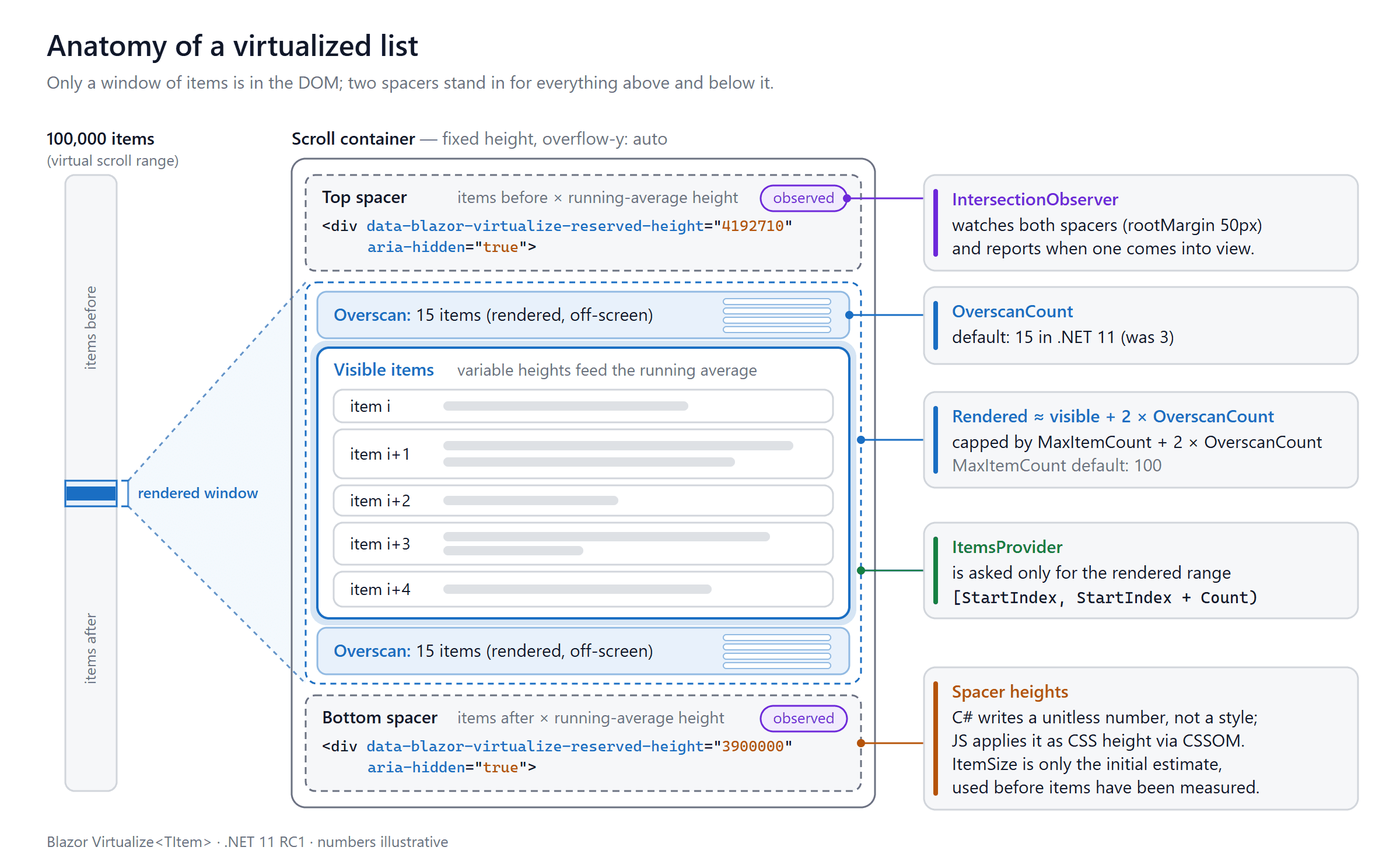
Figure 1. The two spacers reserve the height of the items that aren't rendered. An IntersectionObserver watches the spacers and tells .NET when one of them scrolls into view.
Here's how it works:
- It finds the closest scrollable ancestor. In RC1, that's the first ancestor whose
overflow-yis notvisible,hidden, orclip. If there's none, it uses the document itself. - It renders the visible items plus
OverscanCountextra items before and after them. - It renders a spacer before and after the window. Each spacer's height is number of items it replaces × average item height.
- An
IntersectionObserver(50 px root margin) watches both spacers. When one becomes visible, JavaScript reports the sizes to .NET, which computes a new window and renders it.
This foreach:
<div class="stream-viewport">
    @foreach (var item in items)
    {
        <ActivityCard @key="item.Id" Item="item" />
    }
</div>
becomes this:
<div class="stream-viewport" tabindex="0">
    <Virtualize Items="items" Context="item">
        <ActivityCard @key="item.Id" Item="item" />
    </Virtualize>
</div>
Virtualize doesn't require the whole collection to be in memory:
Itemstakes an in-memoryICollection<TItem>. The component slices it directly.ItemsProvidertakes a delegate. It receives anItemsProviderRequest(StartIndex,Count,CancellationToken) and returns anItemsProviderResult<TItem>(the slice plusTotalItemCount). Only the requested range needs to be loaded from the backend.
Prerendering emits (almost) no items. During static prerendering, Virtualize normally emits only its spacers. Real items appear once the component becomes interactive, which is why the virtualized HTML above was only 11.7 KB.
- With
Items, the prerendered trailing spacer is item count ×ItemSize. - With an
ItemsProvider, the provider isn't called during prerendering, so both spacers are 0 px. The sample's/feedand/gridpages prerenderdata-blazor-virtualize-reserved-height="0"twice. - One exception in RC1: with in-memory
ItemsandInitialItemIndexgreater than 0, the window moves to the target before the first render. Up to2 × OverscanCount + 1items around it are then prerendered. The sample's/chatpage prerenders messages #99,985–#100,000.
If you need all items in the initial HTML, for SEO or for no-JS clients, virtualization isn't the right tool. See section 20.
What changed in .NET 11
| .NET 10 | .NET 11 RC1 | Introduced in | |
|---|---|---|---|
| Variable-height items | Assumed uniform height (ItemSize) |
Running average of measured heights | Preview 3 |
Default OverscanCount |
3 | 15 (QuickGrid stays at 3) | Preview 3 |
| Content stability when items above resize | Native scroll anchoring disabled, so content jumped | Native CSS anchoring or ResizeObserver compensation |
Preview 4 |
| Edge pinning | Hand-written JS | AnchorMode (None, Start, End, combinable) |
Preview 4 (renamed in Preview 7) |
| Prepend/append detection for providers | — | ItemComparer (defaults to EqualityComparer<T>.Default) |
Preview 4 / Preview 7 |
| Open at / jump to an item | Hand-written JS | InitialItemIndex, ScrollToItemAsync |
Preview 6 (renamed in Preview 7) |
Strict style-src 'self' |
Spacers render style="height:…", which the policy blocks |
Spacer sizes rendered as data-* attributes and applied via CSSOM |
Preview 6 |
To avoid relying only on the docs, I dumped the public surface from the RC1 shared framework with reflection, using a small file-based C# app. Abridged output, with TItem shown generically:
Assembly: Microsoft.AspNetCore.Components.Web 11.0.0-rc.1.26425.128
[Parameter] VirtualizeAnchorMode AnchorMode = Start
[Parameter] Int32 InitialItemIndex = 0
[Parameter] IEqualityComparer`1 ItemComparer = (EqualityComparer<TItem>.Default)
[Parameter] Single ItemSize = 50
[Parameter] Int32 MaxItemCount = 100
[Parameter] Int32 OverscanCount = 15
[Parameter] String SpacerElement = div
method Task ScrollToItemAsync(Int32 itemIndex, CancellationToken cancellationToken = default)
enum VirtualizeAnchorMode [Flags]  None = 0, Start = 1, End = 2
Reading older preview blog posts? Preview 7 renamed three APIs:
VirtualizeAnchorMode.Beginning→Start,InitialIndex→InitialItemIndex, andScrollToIndexAsync→ScrollToItemAsync. Code from Preview 4–6 posts won't compile on RC1 until you apply those renames.
Variable-height items
Earlier versions assumed that every item had the height given by ItemSize. In .NET 11, ItemSize is only the initial estimate. Once items render, the JavaScript side measures the total height of everything rendered between the two spacers, using a DOM Range. It sends that total to .NET along with the spacer and container sizes. .NET adds it to a running total and uses totalMeasuredHeight / measuredItemCount for every spacer calculation after that. Measurements are only taken when no placeholders are on screen, so placeholder heights don't distort the average.
You can see this in the sample. The activity feed starts with ItemSize="96" and 100,000 items, so the first scroll range is 100,000 × 96 ≈ 9.6 million px. After the first measurements it settles at about 8.4 million px, an average of about 84 px per card.
Two consequences:
Virtualizedoesn't know the exact height of each item. It estimates the unrendered ones from the average. When you jump by dragging the scrollbar far into an unmeasured region, the first position is an estimate and may be corrected slightly.- A better
ItemSizestill helps, because it makes the first render and the first scroll range closer to reality.
3.2 Hybrid scroll anchoring
In .NET 10, Virtualize turned off the browser's native scroll anchoring, because spacer resizes could otherwise start a feedback loop. As a result, content jumped whenever an item above the viewport changed height. .NET 11 uses one of two paths instead:
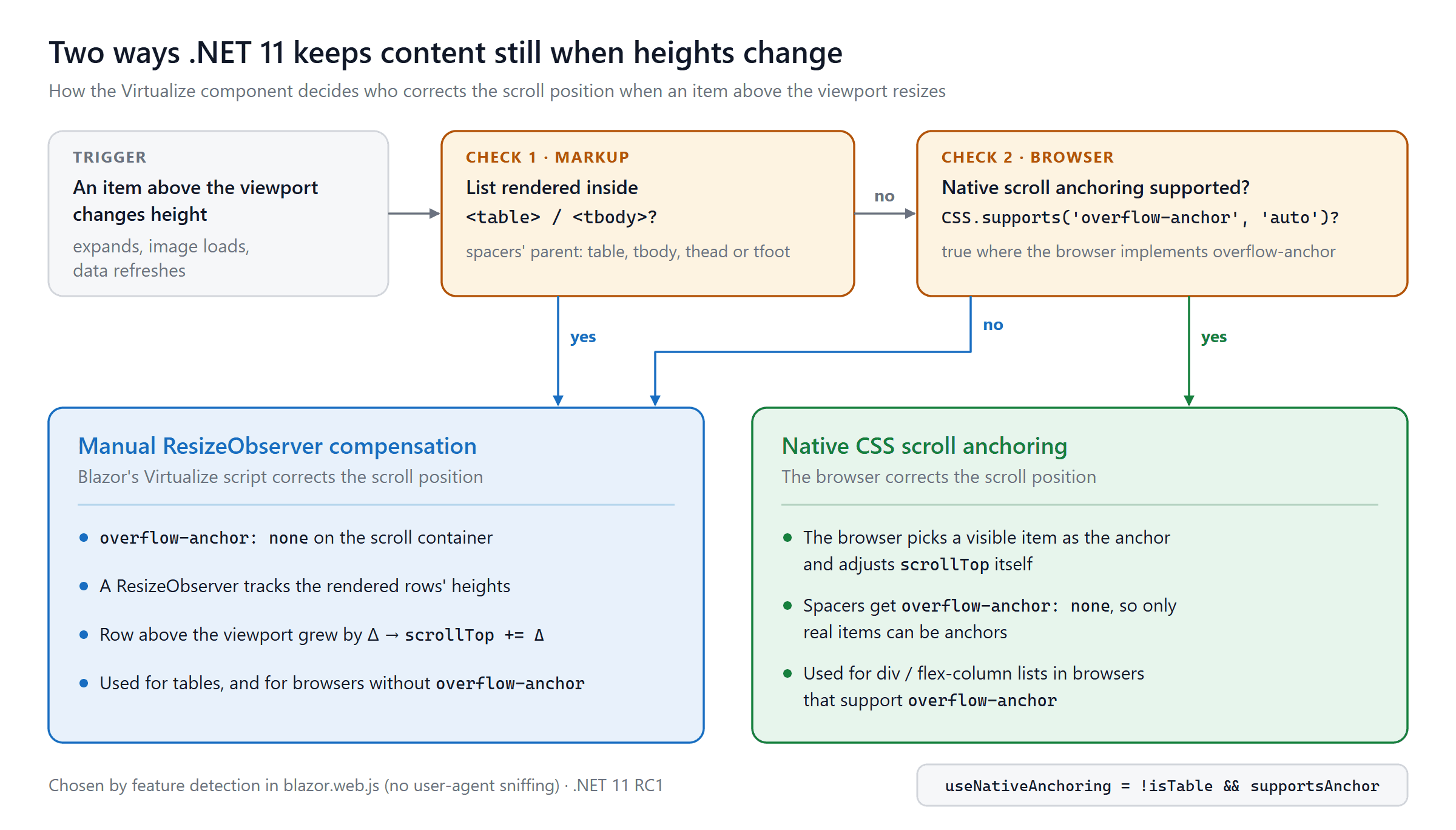
Figure 2. The path is chosen by feature detection (CSS.supports('overflow-anchor', 'auto')) and by whether the spacers' parent is a table section. RC1 does no user-agent sniffing.
You can see the choice in the DOM:
- In the sample's
div-based feed, the scroll container keepsoverflow-anchor: autoand only the spacers getoverflow-anchor: none. - In the
<table>grid, the container itself getsoverflow-anchor: noneand the manual path takes over.
Chrome, Firefox, and Playwright's WebKit build all behaved this way, and all three report overflow-anchor support. Real Safari is a different story: according to MDN's compatibility data it supports overflow-anchor only from Safari 27. On older Safari and iOS versions, even div lists take the manual path. Playwright's WebKit build doesn't exercise that path.
The OverscanCount default changed from 3 to 15
More overscan means fewer blank moments during fast scrolling and more items to average heights over. It also means:
- More DOM. The sample's feed renders 37–38 cards at the top of a 100,000-item list, compared with about 7 visible ones.
- Bigger
ItemsProviderrequests. With 15 items before and after the visible range, a request asks for roughlyvisible + 30items instead ofvisible + 6. - No breaking-change notice. The change isn't listed on the .NET 11 or ASP.NET Core 11 breaking-changes pages, so check for it yourself when you upgrade.
QuickGrid deliberately keeps OverscanCount = 3, because grid rows are heavier. See section 13 for how to choose.
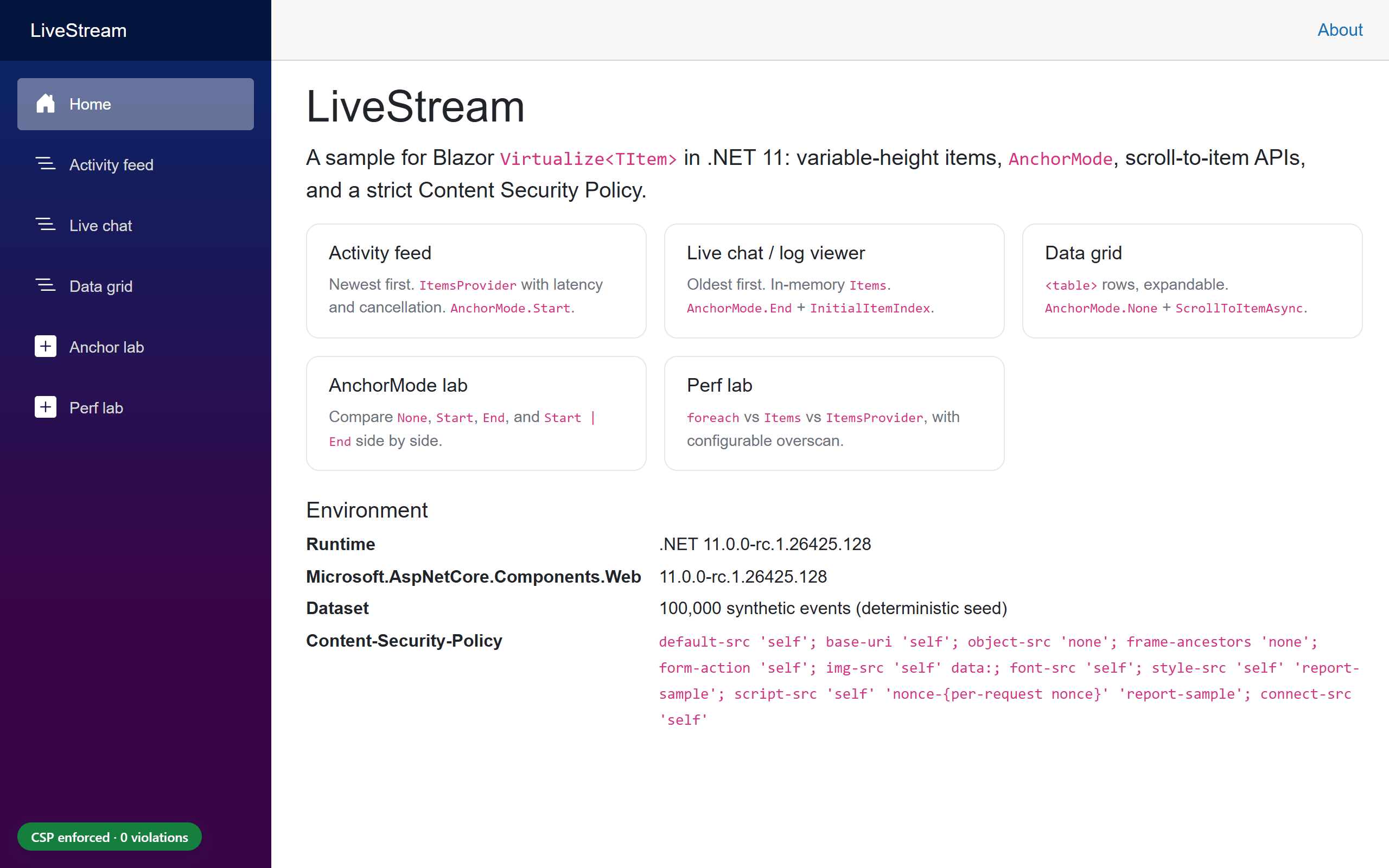
The sample application: LiveStream
The sample is a Blazor Web App (Interactive Server) that renders a deterministic dataset of 100,000 synthetic events. Every scenario in this article is a page in it. The sample isn't published with this article. The code blocks below are excerpts from it, and the layout shows where each excerpt lives.
LiveStream/
├── global.json                      # pins the .NET 11 RC1 SDK
├── src/LiveStream/
│   ├── Components/
│   │   ├── Pages/ActivityFeed.razor  # ItemsProvider + AnchorMode.Start
│   │   ├── Pages/LiveChat.razor      # Items + AnchorMode.End + InitialItemIndex
│   │   ├── Pages/DataGrid.razor      # <table> + ScrollToItemAsync
│   │   ├── Pages/Labs/AnchorLab.razor
│   │   ├── Pages/Labs/PerfLab.razor
│   │   └── Stream/                   # ActivityCard, ChatMessage, StatsBar, ReadyMarker
│   ├── Models/StreamItem.cs
│   ├── Services/SyntheticDataset.cs  # shared, immutable 100k items
│   ├── Services/ActivityFeedStore.cs # per-circuit view + ItemsProvider
│   ├── Security/ContentSecurityPolicy.cs
│   └── wwwroot/js/                   # csp-monitor.js, stream-interop.js
├── baseline/CspBaseline.Net10/       # same CSP on .NET 10, for comparison
├── tests/LiveStream.Tests/           # xUnit + WebApplicationFactory
├── tools/ApiSurface.cs              # dumps the Virtualize API (section 3)
└── e2e/                              # Playwright tests, measurement scripts, results/
Technical choices:
- Interactive Server keeps the sample easy to run. The virtualization code is the same on WebAssembly. Section 17 covers the differences.
net11.0, with the SDK pinned inglobal.json.- 100,000 records, with messages ranging from one to six lines. About 18% have an expandable diagnostics block.
- 150–400 ms simulated latency in the feed's provider, with cancellation.
- A strict CSP header on every page:
style-src 'self'and a per-request nonce for the one inline script (the import map). A badge in the corner counts violations live.
To try the ideas yourself, start from the Blazor Web App template on the .NET 11 SDK:
dotnet new blazor --interactivity Server --all-interactive -o LiveStream
cd LiveStream
dotnet run
Then add the pieces from the excerpts: the model and provider (next section), the feed and chat pages, and the CSP middleware (Content Security Policy).
The data model and the ItemsProvider
The model is a record:
public sealed record StreamItem(
    long Id,
    string Author,
    string Message,
    string? Details,
    DateTimeOffset CreatedAt,
    StreamItemKind Kind)
{
    /// <summary>
    /// Identity by key. Virtualize uses ItemComparer to tell whether items were prepended
    /// or appended between ItemsProvider calls. The default (record value equality) compares
    /// every field, so an edited item would look like a different item; the Id doesn't change.
    /// </summary>
    public static IEqualityComparer<StreamItem> ById { get; } =
        EqualityComparer<StreamItem>.Create((a, b) => a?.Id == b?.Id, item => item.Id.GetHashCode());
}
Why a comparer, when records already have value equality? When data comes from an ItemsProvider and the total count grows, Virtualize compares the first item it rendered before with the first item of the new result. A mismatch means "items were inserted above". Record equality works until that first rendered item is edited in a refresh where the count also grew, which happens constantly in a live feed. The old and new versions then compare unequal, and an edit looks like a prepend. A key-based comparer avoids that.
The RC1 SDK agrees. Building the sample without a comparer produced a new analyzer warning:
warning BL0011: Virtualize uses 'ItemsProvider' without 'ItemComparer'.
Set ItemComparer to an IEqualityComparer that identifies items by a unique key.
(With in-memory Items, Virtualize ignores ItemComparer and uses EqualityComparer<TItem>.Default.)
The provider is the store method that Virtualize calls:
private async ValueTask<ItemsProviderResult<StreamItem>> GetAsync(ItemsProviderRequest request, bool newestFirst)
{
    Interlocked.Increment(ref _providerCalls);
    LastRequest = (request.StartIndex, request.Count);

    try
    {
        var (min, max) = Latency;
        if (max > 0)
        {
            // Simulated network + database time. Virtualize cancels this token
            // when the user scrolls on before the response arrives.
            await Task.Delay(Random.Shared.Next(min, max + 1), request.CancellationToken);
        }
    }
    catch (OperationCanceledException)
    {
        Interlocked.Increment(ref _canceledCalls);
        throw;
    }

    return GetRange(request.StartIndex, request.Count, newestFirst);
}
request.StartIndexis the index of the first item to return.request.Countcovers the visible range plus overscan on both sides. It's larger in .NET 11 because of the new default.request.CancellationTokenis canceled when a newer request replaces this one. In the browser test, scrolling quickly through the feed produced canceled provider calls in all three engines. Pass the token all the way down to your database or HTTP call.TotalItemCount(the second constructor argument of the result) sets the spacer sizes. It has to be accurate and cheap.
Offset pagination gets expensive.
Skip(n).Take(m)is fine for a demo. Deep offsets can be slow in relational databases, and runningCOUNT(*)on every request adds up. For production feeds, consider keyset (cursor) pagination behind a layer that maps virtual indexes to stable cursors, and cache the total count.
One design detail in the sample is worth copying. The 100,000 base records are a shared, immutable singleton. Each circuit keeps only its own new events in a small list, so adding an item costs O(1) and a new circuit costs a few hundred bytes instead of a copy of the dataset.
Scenario 1: an activity feed with AnchorMode.Start
New activity arrives at the top of the feed. It's newest first, and index 0 is the newest event.
<div class="stream-viewport" tabindex="0" @ref="viewport" aria-label="Activity feed, newest first">
    <Virtualize @ref="virtualize" TItem="StreamItem" ItemsProvider="provider" ItemComparer="StreamItem.ById"
                Context="item" ItemSize="96" AnchorMode="VirtualizeAnchorMode.Start">
        <ItemContent>
            <ActivityCard @key="item.Id" Item="item" Expanded="expanded.Contains(item.Id)" OnToggle="ToggleDetails" />
        </ItemContent>
        <Placeholder>
            <div class="activity-card activity-card--placeholder" aria-hidden="true">…</div>
        </Placeholder>
        <EmptyContent>
            <p class="stream-empty">No activity has been recorded yet.</p>
        </EmptyContent>
    </Virtualize>
</div>
provider is assigned once in OnInitialized (provider = Store.GetNewestFirstAsync;), so every render passes the same delegate instance. New events, whether from the simulated live stream or the "+5 events" button, aren't pushed to the UI one at a time. They go into a queue, and a 250 ms PeriodicTimer flushes them in batches:
private async Task FlushAsync()
{
    List<StreamItem> batch = [];
    while (pending.TryDequeue(out var item))
    {
        batch.Add(item);
    }

    if (batch.Count == 0 || virtualize is null)
    {
        return;
    }

    Store.Add(batch);

    if (!atTop)
    {
        unseen += batch.Count;
        announcement = $"{unseen} new events above.";
    }

    // ItemsProvider data changed outside of Virtualize: ask it to re-request the visible range.
    await virtualize.RefreshDataAsync();
    StateHasChanged();
}
atTop comes from a small JS helper, shown in the next section, that reports when the user reaches or leaves the top edge. It uses the same definition as AnchorMode.Start in RC1: scrollTop < 1. A looser threshold would create a gap. The page would think the user was at the top and skip the pill, while Virtualize would already be keeping the new events out of view.
Expected UI behavior, and what I measured
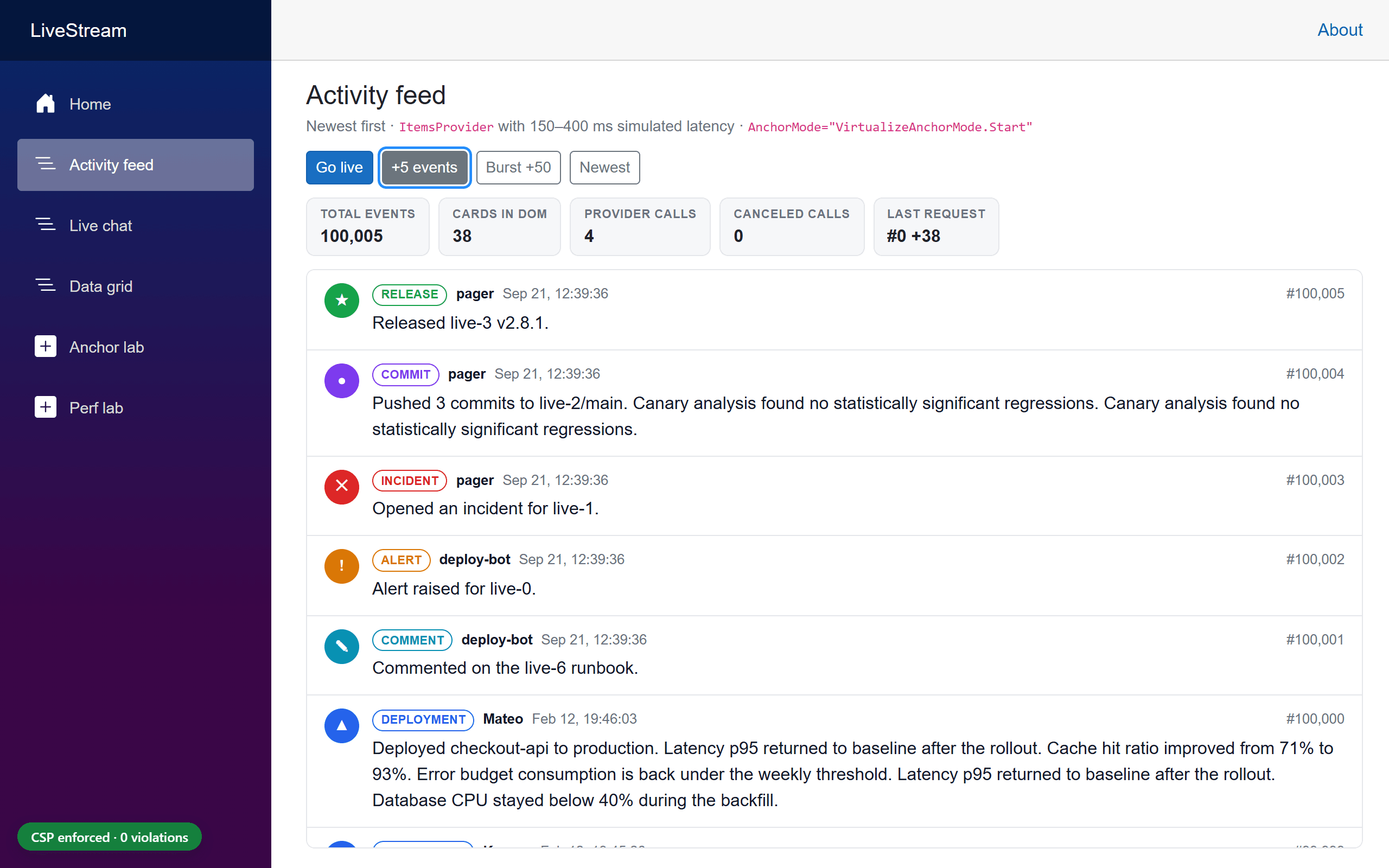
| Situation | Expected | Measured (Chrome, Firefox, WebKit) |
|---|---|---|
| At the top, 5 events arrive | The view stays at the top and shows the new events | scrollTop stays 0; the first visible card is the newest |
| Reading older events, 5 events arrive | What you're reading doesn't move; an "↑ 5 new events" pill appears | Same first visible card, offset changed by ≤ 1 px |
| A card above the viewport expands | Visible content stays put | 0 px shift (wheel scrolling, 6/6 runs per engine) |
| DOM size | Only a window of the 100,000 events | 37–38 cards rendered |
| Fast scrolling with 150–400 ms latency | Stale requests are canceled | Canceled provider calls > 0 in every run of the test |
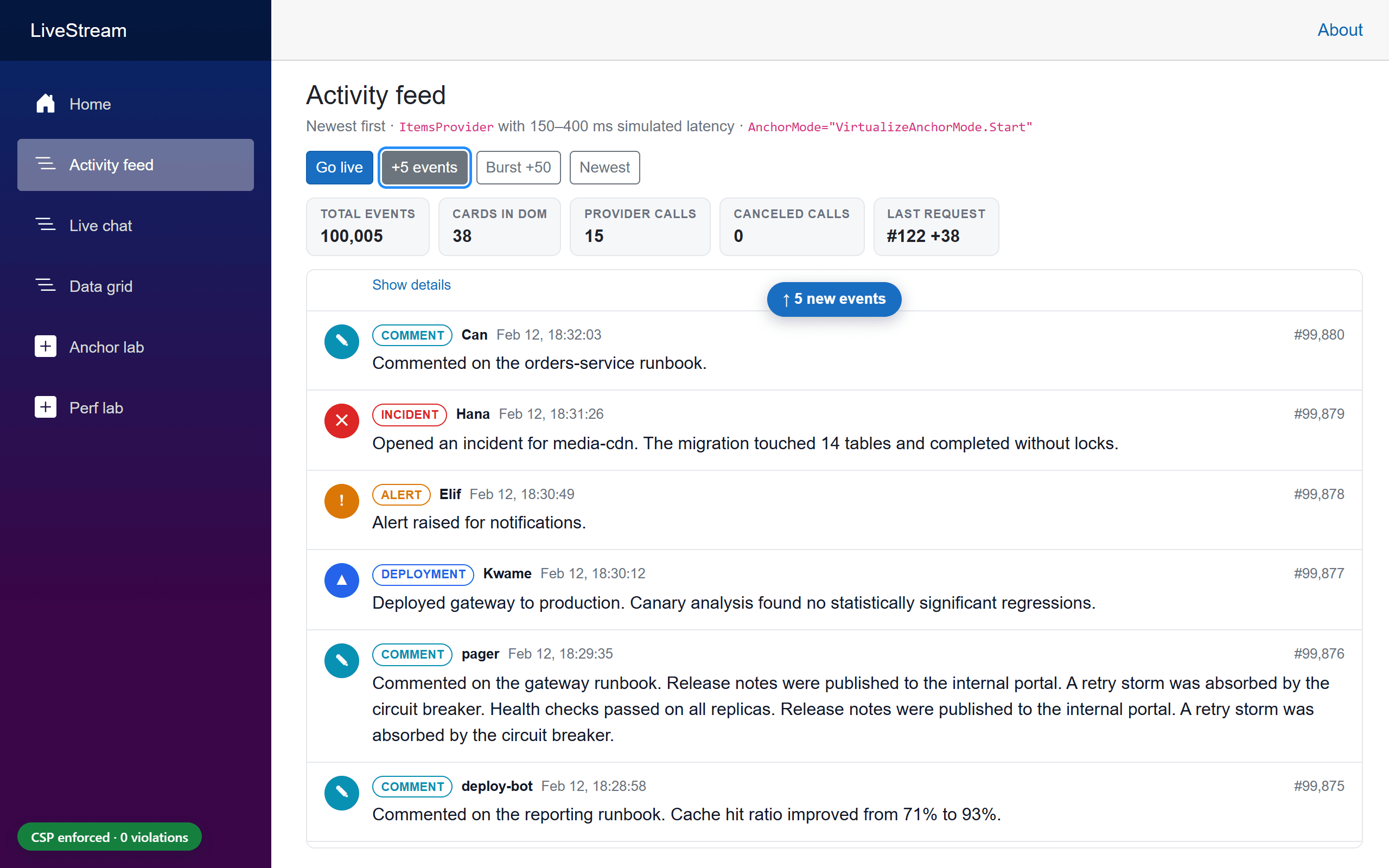
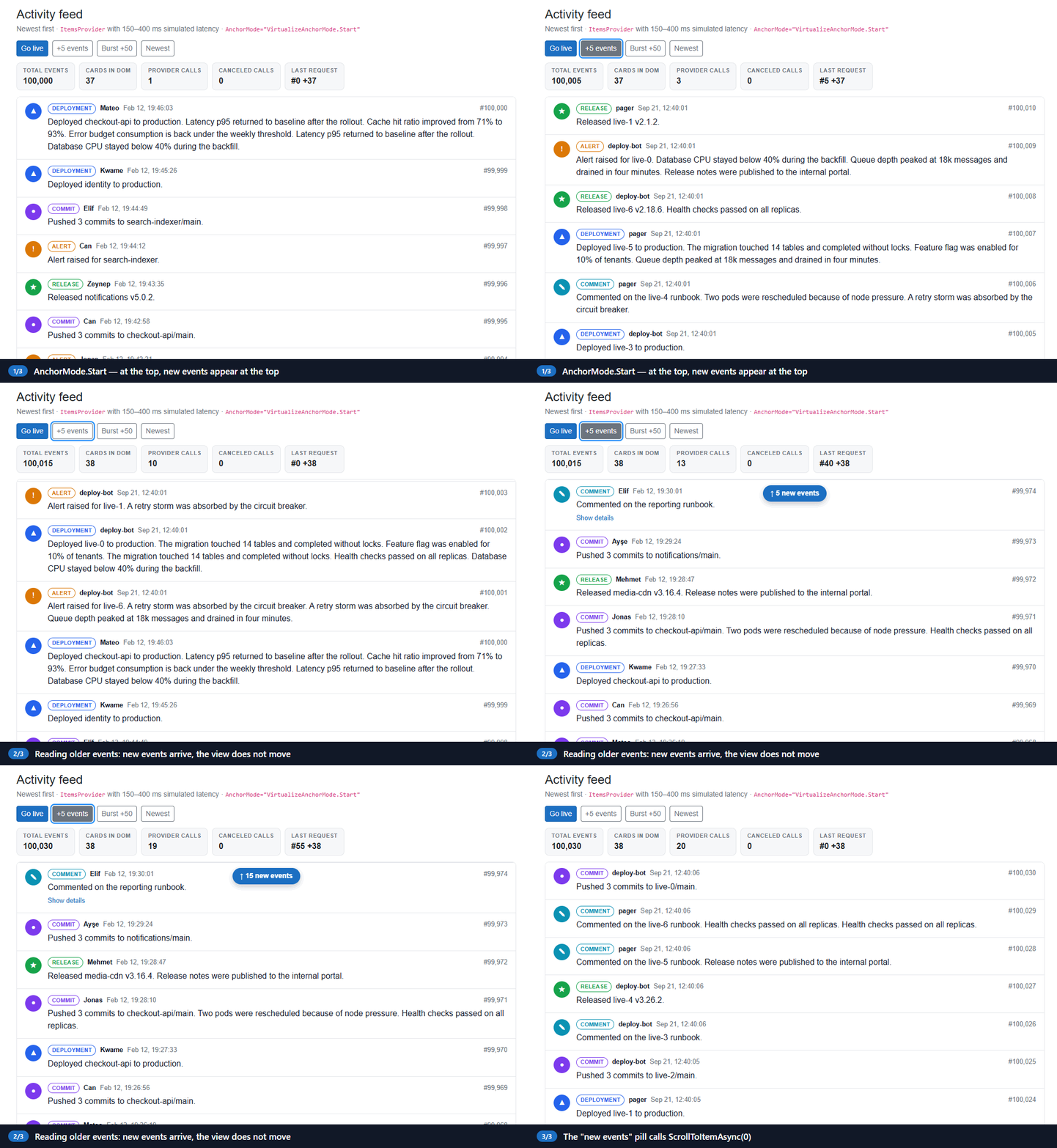
The pill calls ScrollToItemAsync(0). The GIF is a screen recording of the sample in Chrome.
Scenario 2: a chat or log viewer with AnchorMode.End
In a chat or log viewer, new items arrive at the bottom, and the list should open there too:
<div class="stream-viewport stream-viewport--chat" tabindex="0" @ref="viewport" aria-label="Chat messages, oldest first">
    <Virtualize @ref="virtualize" Items="messages" Context="message"
                ItemSize="72" AnchorMode="VirtualizeAnchorMode.End"
                InitialItemIndex="@(messages.Count - 1)">
        <ChatMessage @key="message.Id" Message="message" Mine="@(message.Author == Me)" />
    </Virtualize>
</div>
Itemsis aList<StreamItem>. With in-memoryItems,Virtualizere-reads the collection on every render, so appending is justmessages.Add(...)followed byStateHasChanged(). You don't needRefreshDataAsync.InitialItemIndex="@(messages.Count - 1)"opens the list at the latest message. It's applied once, on the first interactive render.AnchorMode.Endfollows new messages only while the user is at the bottom. In RC1, "at the bottom" means less than 2 px away.
The core UX rule for chat UIs is to follow new messages only while the user is already following the live edge. AnchorMode.End implements that rule. The sample adds the other half: an unread counter and a way back to the bottom. A tiny JS module reports when the user leaves or reaches an edge, using the same thresholds as Virtualize (1 px for the top, 2 px for the bottom). It calls .NET only when that state flips, not on every scroll event:
export function watchEdge(element, dotNetRef, edge, threshold) {
    let atEdge = null;
    let frame = 0;

    const check = () => {
        frame = 0;
        const distance = edge === 'end'
            ? element.scrollHeight - element.clientHeight - element.scrollTop
            : element.scrollTop;
        const now = distance < threshold;
        if (now !== atEdge) {
            atEdge = now;
            dotNetRef.invokeMethodAsync('OnEdgeChanged', now);
        }
    };
    // … a scroll listener and a ResizeObserver schedule check() once per animation frame
}
@if (unread > 0)
{
    <button type="button" class="new-items-pill new-items-pill--bottom" @onclick="JumpToLatestAsync">
        ↓ @unread new @(unread == 1 ? "message" : "messages")
    </button>
}
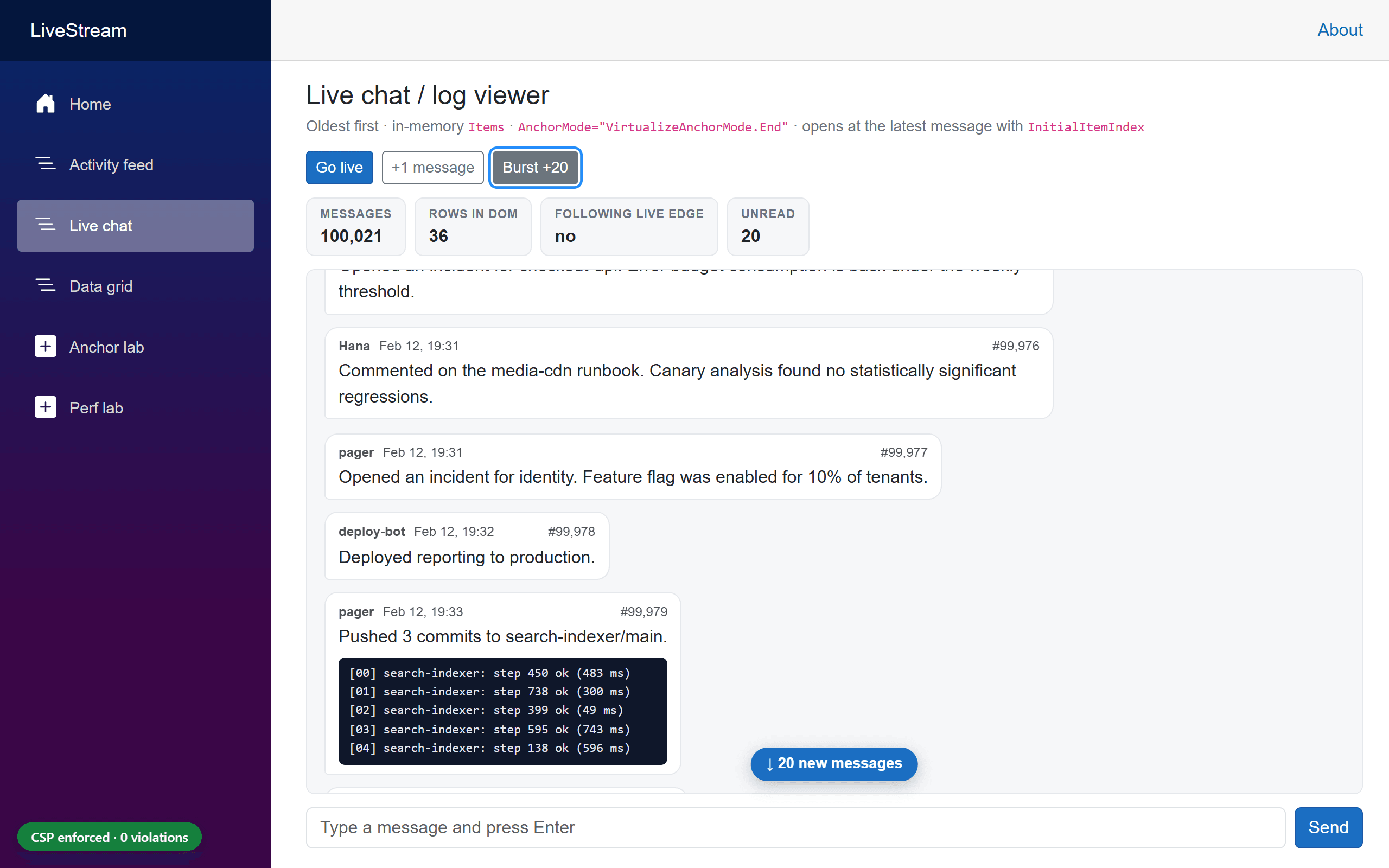
Expected UI behavior, and what I measured
| Situation | Expected | Measured |
|---|---|---|
| Page opens | At the bottom, message #100,000 visible | ✔ all engines (InitialItemIndex) |
| At the bottom, a message arrives | Scrolls to show it | With the sample's guard: ✔ 30/30 follow checks per engine. AnchorMode.End alone: Chrome 29/30, Firefox 28/30, WebKit 20/30 (see below) |
| Scrolled up, 20 messages arrive | View stays put; "↓ 20 new messages" pill | ✔ all engines, scrollTop unchanged |
| User returns to the bottom | Following resumes | ✔ all engines |
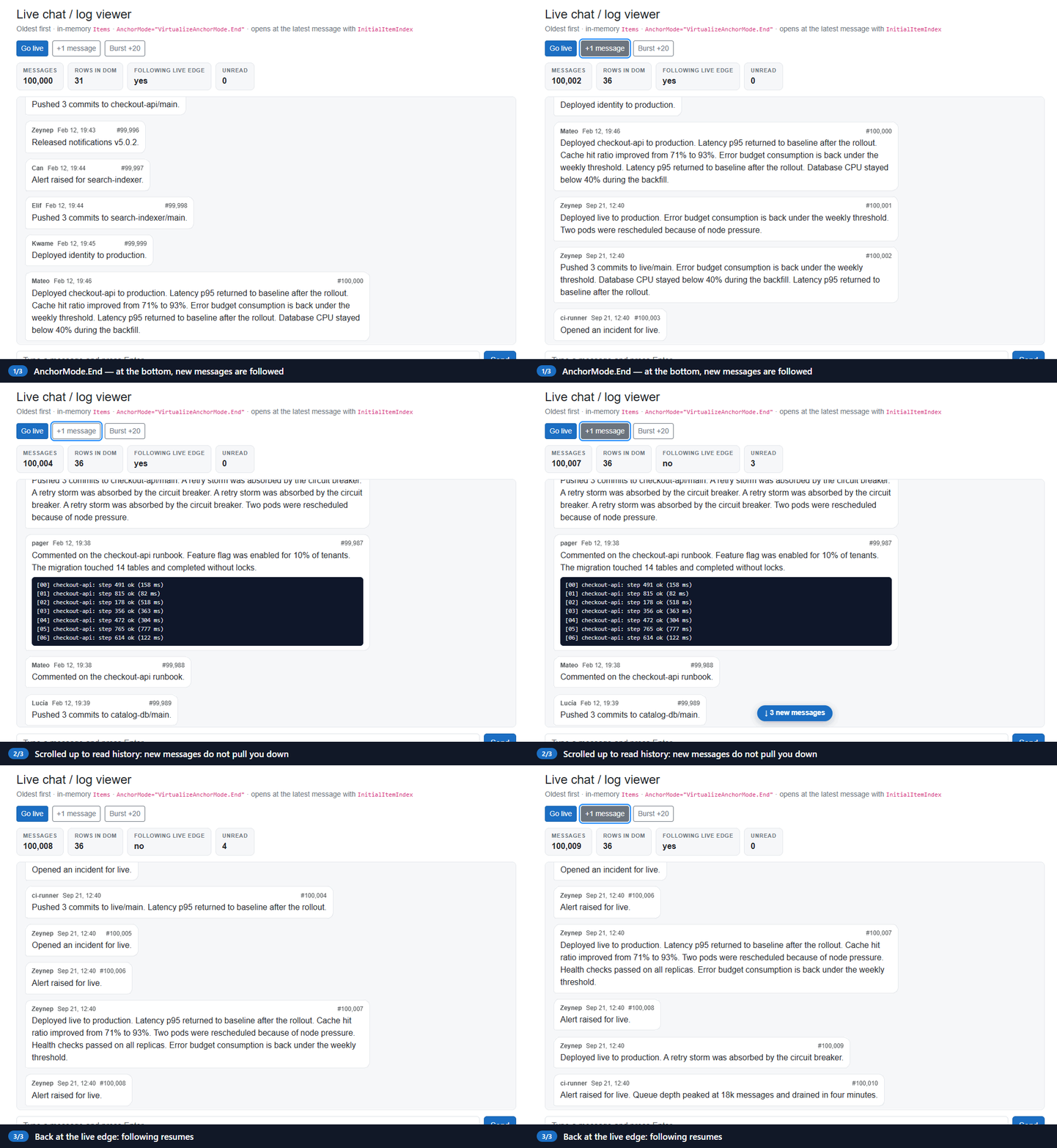
An RC1 caveat: End-follow sometimes stops short
I ran the chat tests 10 times per engine with the sample's safety net turned off. Each run contains three checks that depend on AnchorMode.End following an append: a new message, a message sent from the composer, and a new message after returning to the bottom. They passed 29/30 in Chrome, 28/30 in Firefox, and 20/30 in Playwright's WebKit. In every failure, the list ended 29–77 px short of the bottom 600 ms after the append (Chrome 72 px, Firefox 61 px, WebKit 29–77 px), so the new message was only partly visible. Outside the test suite the miss was rare: in isolated WebKit runs.
The sample therefore adds a small, explicit safety net. It only acts if the page's edge watcher considered the user to be at the live edge (less than 2 px, the same as AnchorMode.End) when the message arrived, and the list then ended up between 1 and 120 px short of the bottom:
export function stickToBottom(element, tolerance) {
    requestAnimationFrame(() => {
        const distance = element.scrollHeight - element.clientHeight - element.scrollTop;
        if (distance > 1 && distance <= tolerance) {
            element.scrollTop = element.scrollHeight;
        }
    });
}
With the guard on (the sample's default), the same 10× run passed all 40 chat tests, including 30/30 follow checks, in every engine. The guard-off numbers above were measured with the guard disabled, to observe AnchorMode.End on its own. An End-anchoring fix is already merged for RC2 (dotnet/aspnetcore#69388). It changes exactly the condition that decides when to pin, so retest before you keep or remove a workaround like this. Playwright's WebKit on Windows is also not Safari on macOS or iOS, so test on real devices too.
Understanding every AnchorMode, measured
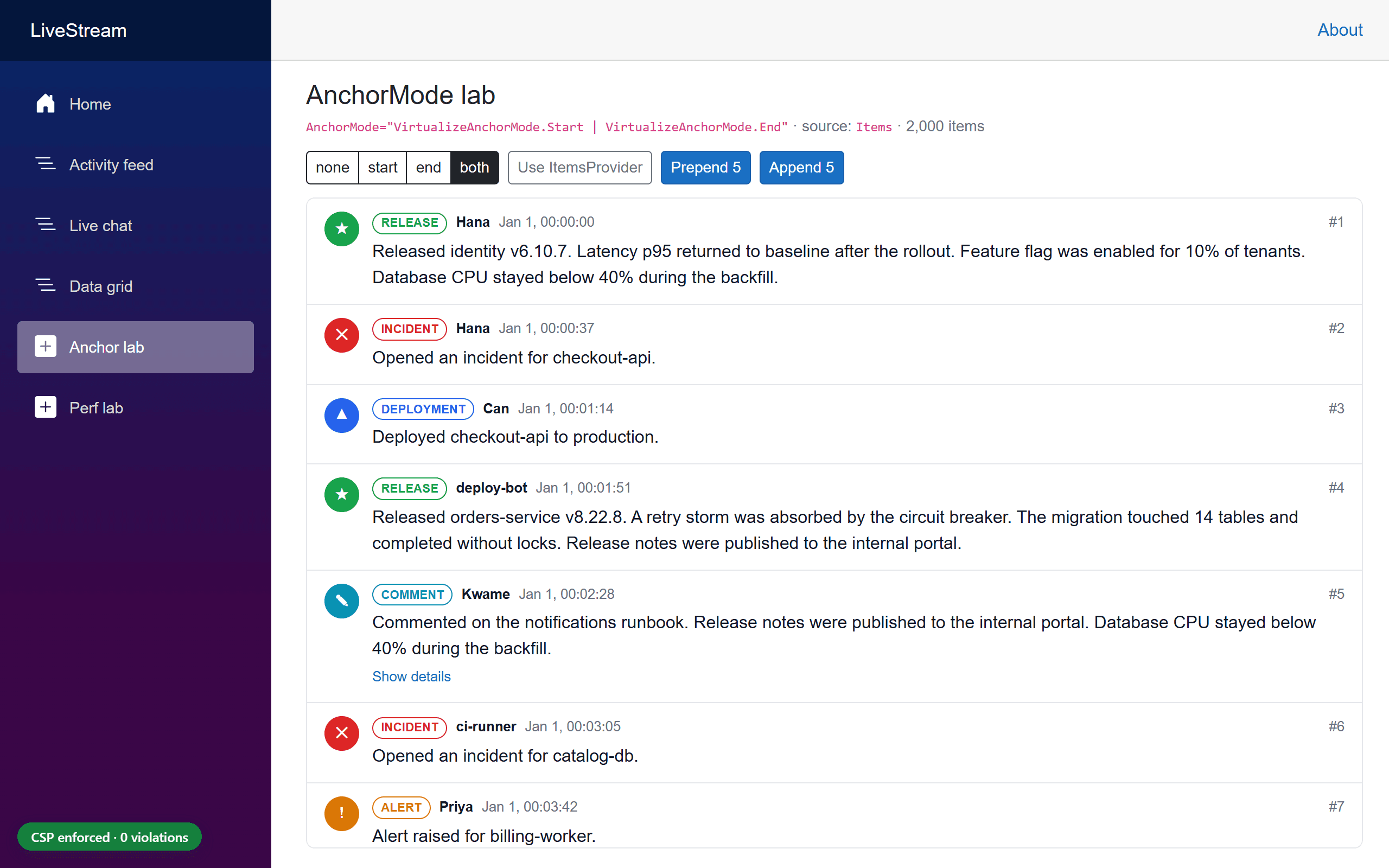
The docs describe the modes in terms of scroll position. To find out what they actually do, the sample's AnchorMode lab (/lab/anchor) prepends or appends 5 items at the top, middle, and bottom of a 2,000-item variable-height list. It runs every mode with both Items and ItemsProvider, in Chrome, Firefox, and WebKit.
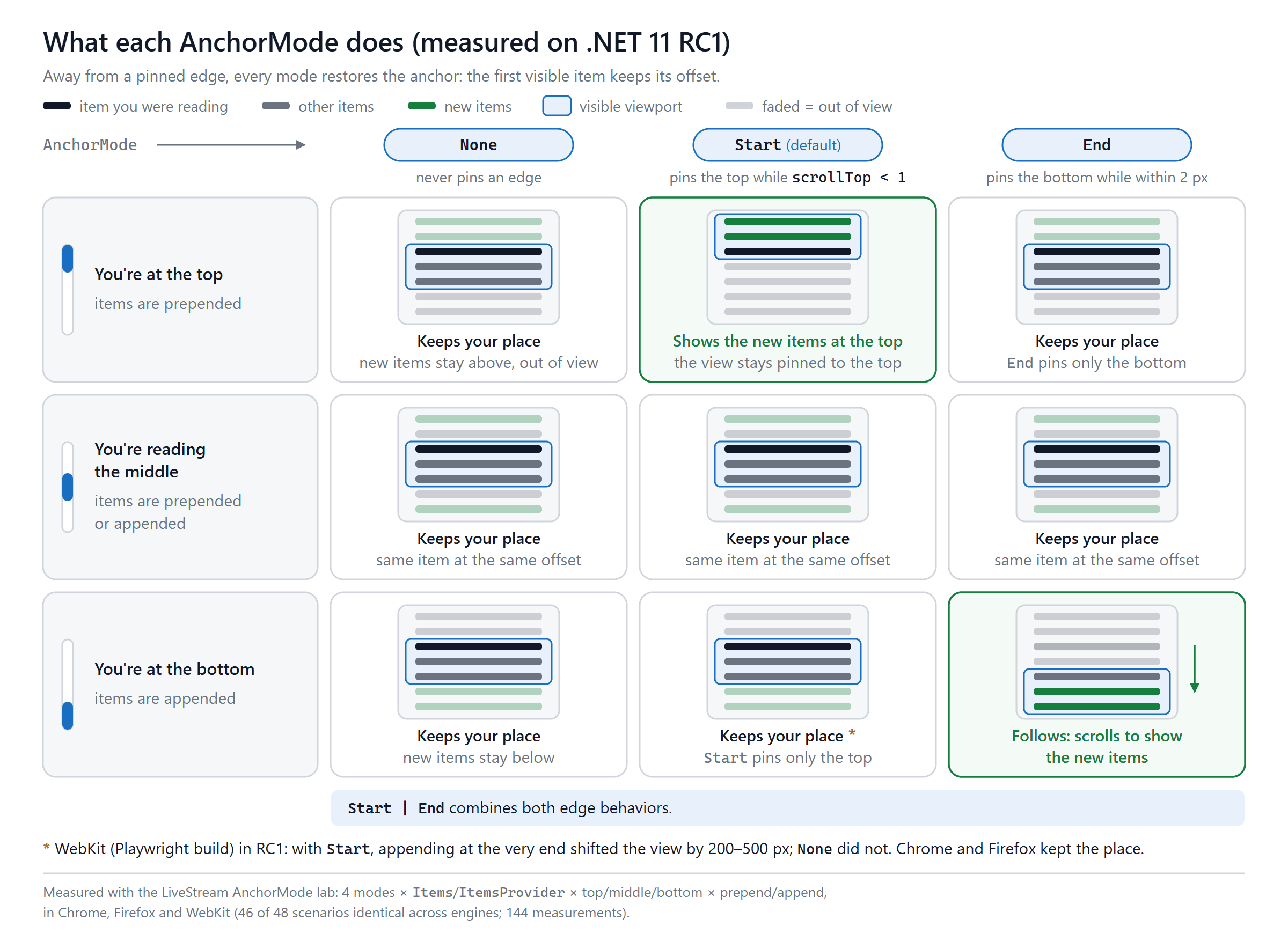
| Where the user is | What arrives | None |
Start (default) |
End |
Start \| End |
|---|---|---|---|---|---|
| At the top | 5 items prepended | Keeps place | Shows the new items | Keeps place | Shows the new items |
| At the top | 5 items appended | Keeps place | Keeps place | Keeps place | Keeps place |
| In the middle | 5 items prepended | Keeps place | Keeps place | Keeps place | Keeps place |
| In the middle | 5 items appended | Keeps place | Keeps place | Keeps place | Keeps place |
| At the bottom | 5 items prepended | Keeps place | Keeps place | Keeps place | Keeps place |
| At the bottom | 5 items appended | Keeps place | Keeps place ⚠️ | Follows the new items | Follows the new items |
"Keeps place" means the item that was first visible before the change was still the first visible item afterward. The matrix records which item that was, not its pixel offset; sections 6 and 10 report pixel shifts. Items and ItemsProvider fell into the same category in every cell. 46 of the 48 scenarios gave the same result in Chrome, Firefox, and WebKit (144 measurements in total). The ⚠️ cell covers both exceptions, which were WebKit with Start, for Items and for ItemsProvider.
Three conclusions:
- Keeping your place is the default everywhere.
AnchorModedoesn't turn anchoring on or off. It decides what happens at the edges:Startshows new items when you're at the very top (scrollTop < 1), andEndfollows new items when you're at the very bottom (within 2 px). Nonekeeps the content still, not thescrollTopnumber. The docs sayNonekeeps "the current scroll position". WithNone, though, prepending 5 items at the top increasedscrollTopby about 400 px, so that the same item stayed in view. If you want new items at the top to become visible, that'sStart.- Between the edges, all four modes behave the same.
⚠️ WebKit and infinite lists. In Playwright's WebKit build, appending items while the user was at the very end of a Start list (the default) moved the visible content. It moved 214 px with Items and 366–486 px with ItemsProvider, in 3 of 3 runs. With AnchorMode.None it moved 0 px, and Chrome and Firefox moved 0 px in both modes. That's exactly the classic infinite-scroll pattern: reach the end, and more items load. If a list only ever grows at the end and doesn't need top pinning, set AnchorMode="VirtualizeAnchorMode.None" and test on real Safari.
Gotcha: the docs' Razor shorthand doesn't compile
The release notes and the virtualization docs show this:
<Virtualize AnchorMode="Start" ...> @* from the docs *@
On RC1, that fails with CS0103: The name 'Start' does not exist in the current context. Razor treats non-string component parameters as C# expressions, so write the enum out in full:
<Virtualize AnchorMode="VirtualizeAnchorMode.Start" ...>
<Virtualize AnchorMode="VirtualizeAnchorMode.Start | VirtualizeAnchorMode.End" ...>
Other details worth knowing
- Upgraded lists get
Startautomatically. It's the default because it matches how lists behaved before. If a list shouldn't pin to anything, such as a sortable grid or an infinite list that grows at the end, setNoneexplicitly. AnchorModecan change at runtime.Virtualizesends the new value to JavaScript after the next render.- Keyboard: Pressing End in the scroll container turns on bottom-following even when
Endisn't set, and Home clears it.ScrollToItemAsyncalso clears it. - Deletions above the viewport are not anchored. Inserts and height changes are, but removing items above the reader still moves content. That's an open backlog request (dotnet/aspnetcore#66509).
Start | Endis allowed, but the design discussion admits there's no known real use case for it.
Refreshing virtualized data without thrashing
With an ItemsProvider, Virtualize can't know that your data changed. Call RefreshDataAsync(). When the change comes from outside Blazor's event pipeline, such as a timer, a SignalR client, or a message-bus handler, marshal it onto the renderer first. The handler below is illustrative. The sample does the same thing with its PumpAsync loop, which calls InvokeAsync(FlushAsync) (section 6):
// Called from a timer, a SignalR client, or a message-bus handler, not from a Blazor event.
private Task OnEventsArrivedAsync(IReadOnlyList<StreamItem> batch) => InvokeAsync(async () =>
{
    Store.Add(batch);

    if (virtualize is not null)
    {
        await virtualize.RefreshDataAsync(); // re-requests the current window
    }

    StateHasChanged(); // RefreshDataAsync doesn't render by itself
});
Rules that matter in practice:
- Get back onto the renderer's synchronization context with
InvokeAsync, as above.RefreshDataAsyncmust run there too. - Call
StateHasChanged()afterwards when the refresh doesn't come from a Blazor event handler.RefreshDataAsyncfetches, but it doesn't render. - Batch. In RC1,
RefreshDataAsync()also resets the running average item height, so every refresh starts measuring from scratch. Refreshing on every message of a busy stream means more provider calls, more renders, and less accurate spacer estimates. The sample drains its queue with a 250 msPeriodicTimer, so the list refreshes at most four times per second, however fast events arrive. - Clean up. Implement
IAsyncDisposable: cancel timers and loops, disposeDotNetObjectReferences and JS module references, and catchJSDisconnectedExceptionwhen the circuit is already gone. The RC1 SDK nudges you here too, with a new analyzer warning: BL0016: JS interop call 'InvokeAsync' is not guarded with a try/catch block. - Pass the cancellation token through. When a newer request supersedes an older one, the older token is canceled. Ignoring it just wastes backend work.
Variable heights and expansion
Every card in the sample's feed has a different height, and about 18% can expand a diagnostics block. Three rules make that work well:
- Keep per-item UI state in the parent, not in the item component.
Virtualizedisposes item components that scroll out of the window. AnExpandedfield insideActivityCardwould be lost as soon as the card scrolled away. The sample keeps aHashSet<long>of expanded IDs in the page and passesExpandeddown as a parameter. - Give each item one root element, and no vertical margins. Heights are measured from the rendered content between the spacers, and collapsing margins between siblings make that fragile. Use padding and borders inside the item instead.
- Reserve space for content that loads later. An image without
widthandheight(oraspect-ratio) changes the row height after it loads. Anchoring compensates, but it's better not to cause the shift in the first place.
How stable is it? Measurements
In this test I scrolled with real mouse-wheel input, then expanded an item rendered just above the viewport, and recorded how far the first visible item moved. Six runs per cell:
| Layout (anchoring path) | Chrome | Firefox | WebKit |
|---|---|---|---|
div feed (native CSS anchoring) |
0 px ×6 | 0 px ×6 | 0 px ×6 |
<table> grid (manual ResizeObserver) |
41–42 px ×4, 222 px ×1, 0 px ×1 | 41–42 px ×4, 0 px ×2 | 0–1 px ×5, 42 px ×1 |
<table> grid, after ordinary renders first |
≤ 1 px ×6 | 0 px ×6 | ≤ 1 px ×6 |
What's behind the table numbers:
- Tables have a gap in RC1. On the manual path, rows are added to the
ResizeObserverafter ordinary renders but not after scroll-triggered renders. A row that changes height right after a scroll can be observed for the first time with its new height already applied, so there's nothing to compensate against. When I triggered ordinary renders first (expanding and collapsing another row), the shift was ≤ 1 px in 6/6 runs in every engine. Right after scrolling, Chrome and Firefox usually shifted by one row line (41–42 px; 16 of 24 runs), and Chrome occasionally by about 220 px (2 of 12 runs). WebKit shifted 42 px in 1 of 12 runs and ≤ 1 px otherwise. - Programmatic jumps are harder than wheel scrolling. I also set
scrollTopdirectly, let the list settle, and then expanded an item above the viewport. In Chrome and WebKit, thedivfeed didn't move in any run. Firefox moved it 168 px in 1 of 7 runs, and 132–186 px in 3 of 7 runs in an earlier session. The grid moved 41–132 px in Chrome, 0–42 px in Firefox, and 0 px in WebKit. If your app scrolls programmatically and then changes content above the viewport, test that combination.
Data grids: tables, jumping to rows, and QuickGrid
The sample's grid virtualizes <tr> elements inside <tbody>. The visible column header lives in a separate table outside the scroll container:
@* The visible header sits outside the scroll container. A sticky <thead> inside it would cover the
   row that InitialItemIndex / ScrollToItemAsync align to the container's top edge. *@
<div class="grid-frame">
    <div class="grid-header" aria-hidden="true">
        <table class="event-grid"><colgroup>…</colgroup><thead>…</thead></table>
    </div>

    <div class="stream-viewport grid-viewport" tabindex="0" aria-label="Event log">
        <table class="event-grid">
            <colgroup>…</colgroup>
            <thead class="visually-hidden">…</thead> @* column headers for assistive technology *@
            <tbody>
                <Virtualize @ref="virtualize" TItem="StreamItem" ItemsProvider="provider" ItemComparer="StreamItem.ById"
                            Context="row" SpacerElement="tr" ItemSize="62" AnchorMode="VirtualizeAnchorMode.None"
                            InitialItemIndex="@(StartRow is int start ? start - 1 : 0)">
                    <ItemContent>
                        <tr @key="row.Id" data-id="@row.Id" @onclick="() => Toggle(row.Id)">…</tr>
                    </ItemContent>
                </Virtualize>
            </tbody>
        </table>
    </div>
</div>
/* Same <colgroup> and table-layout: fixed in both tables; scrollbar-gutter keeps the columns aligned. */
.grid-header { flex: none; overflow-y: hidden; scrollbar-gutter: stable; }
.grid-frame .grid-viewport { flex: 1 1 0; scrollbar-gutter: stable; }
.event-grid { width: 100%; table-layout: fixed; }
private async Task JumpAsync()
{
    if (virtualize is not null && jumpTo is int row)
    {
        await virtualize.ScrollToItemAsync(row - 1);
    }
}
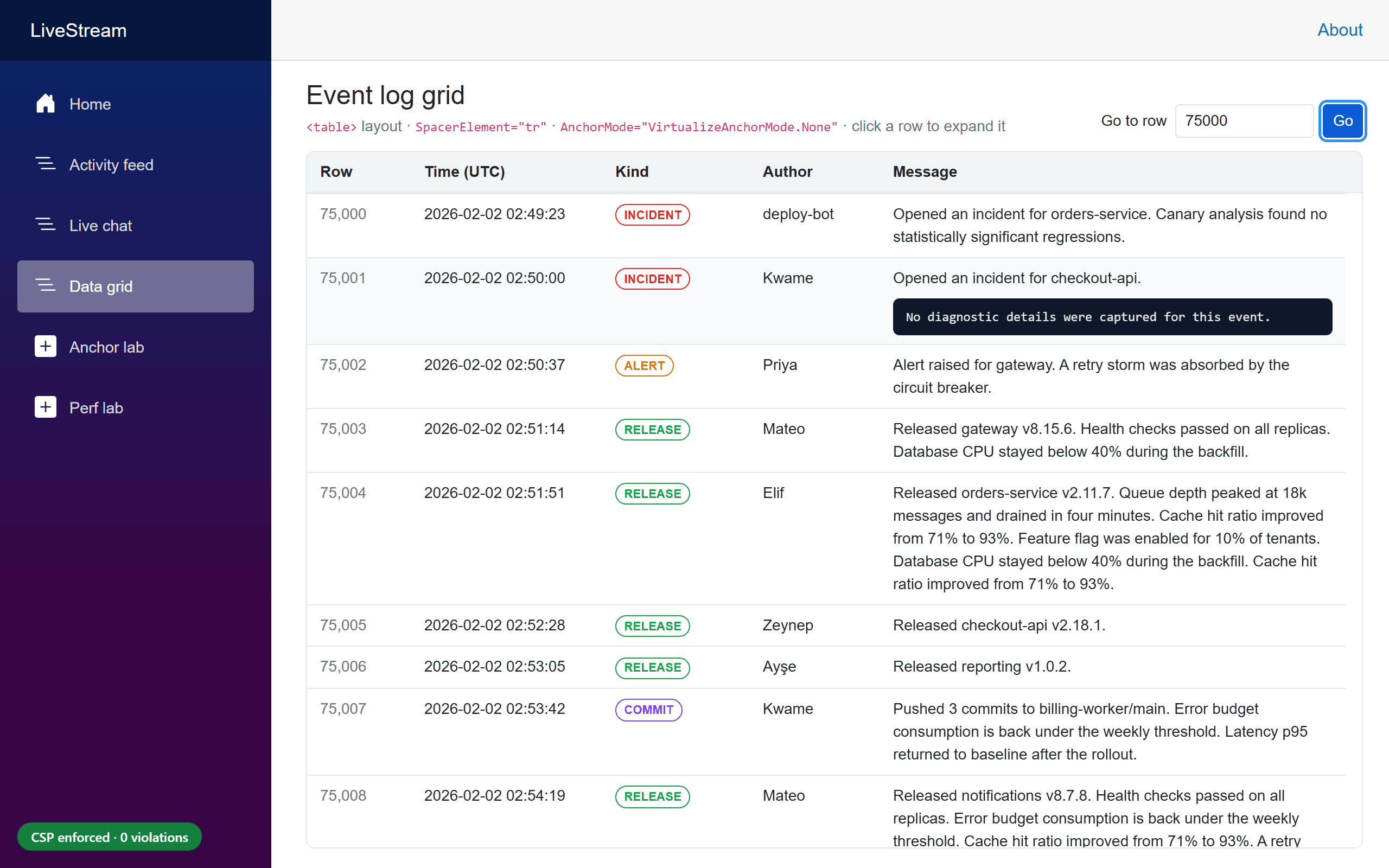
SpacerElement="tr"keeps the markup valid.Virtualizegives the spacer rowsdisplay: table-rowitself.AnchorMode.Noneis set explicitly, because a grid that users sort and filter shouldn't pin to an edge.ScrollToItemAsync("Go to row") andInitialItemIndex(/grid?row=500) put the requested row at the top of the viewport in every engine. Keep in mind:ScrollToItemAsyncscrolls instantly (no smooth scrolling). It aligns the item with the top edge of the scroll container and cancels any earlier call that's still running (the last call wins).- A sticky
<thead>inside the scroll container would cover exactly that row. That's why the sample keeps the header outside the container, as shown above. - It throws
InvalidOperationExceptionif called before the first interactive render. UseInitialItemIndexfor the starting position. - The index is a position in the list, not a database identity. If your provider's ordering isn't stable, the jump can land on a different record.
- An RC1 issue with
InitialItemIndex: When the grid opened with?row=75000, the next ordinary render (expanding a visible row) moved the rows by 82 px in Chrome, −53 px in Firefox, and 63 px in WebKit, in 3/3 runs each, whilescrollTopstayed the same. The top spacer is recomputed once positioning ends. AfterScrollToItemAsyncthe same action moved them 0 px. RC2 freezes the spacer item size during initial positioning (dotnet/aspnetcore#69170). - Size
ItemSizefor the real rows. The grid's rows average about 62 px (38.6–122 px), because messages wrap. The sample keeps the short columns on one line (white-space: nowrap) so that only the message column wraps. <table>layouts use the manual compensation path. See the measurements in section 10.
QuickGrid forwards InitialItemIndex and ScrollToItemAsync in .NET 11. Its AnchorMode and ItemComparer parameters are marked [Experimental("ASP0030")] in RC1, and that attribute has already been removed for RC2. It keeps OverscanCount = 3. Two QuickGrid issues filed against RC1 are still open: Start anchoring drifts after prepends in Server render modes, and the grid sends duplicate provider requests (#69380, #69381). If you rely on QuickGrid anchoring, test it specifically.
Performance: what I measured
I didn't want illustrative numbers here, so the sample's Perf lab (/lab/perf) renders the same row markup in three ways: a plain foreach, Virtualize with Items, and Virtualize with an ItemsProvider. A Playwright script measured each variant three times in fresh Chrome contexts and took the median.
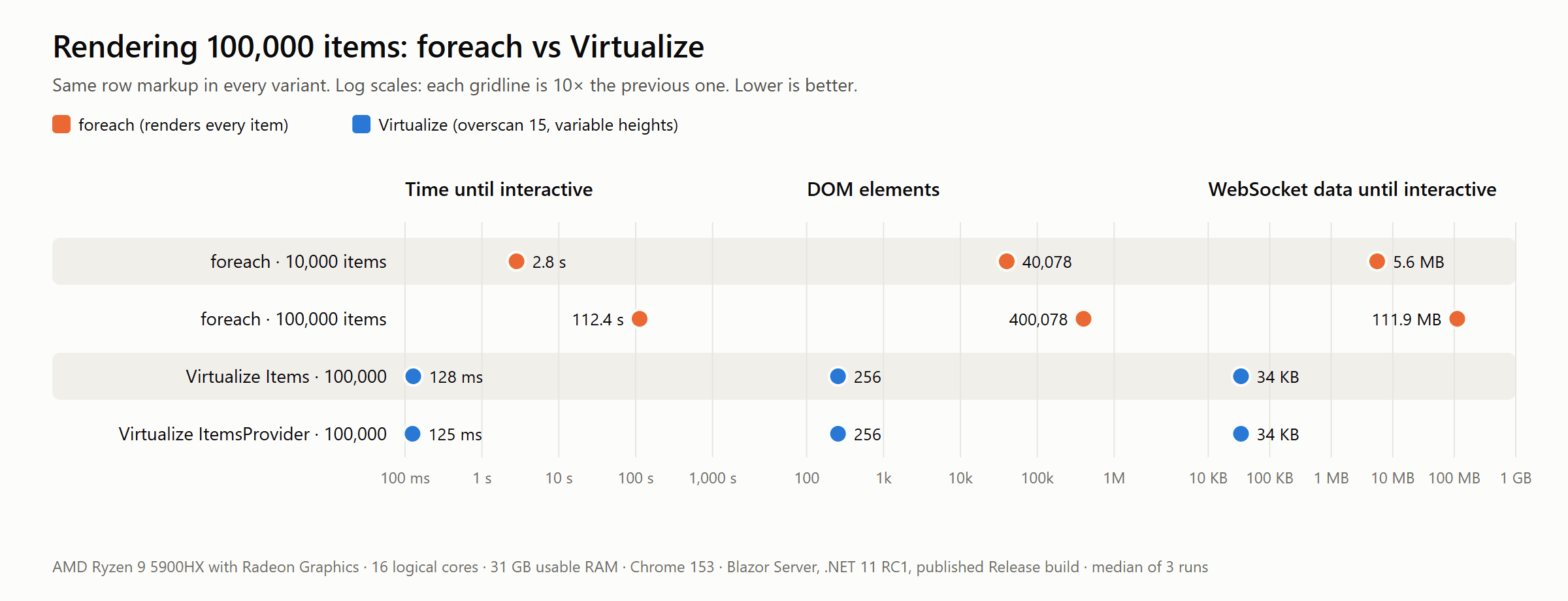
| Variant (100,000 items unless noted) | HTML | First row painted | Interactive | DOM elements | Rows rendered | JS heap | WebSocket until interactive |
|---|---|---|---|---|---|---|---|
foreach, 10,000 items |
2.9 MB | 77 ms | 2.8 s | 40,078 | 10,000 | 21.2 MB | 5.6 MB |
foreach |
28.6 MB | 248 ms | 112.4 s | 400,078 | 100,000 | 189.5 MB | 111.9 MB |
Virtualize Items, fixed heights, overscan 15 |
11.7 KB | 106 ms | 125 ms | 288 | 52 | 2.7 MB | 39 KB |
Virtualize Items, variable heights, overscan 15 |
11.7 KB | 109 ms | 128 ms | 256 | 44 | 2.7 MB | 34 KB |
Virtualize ItemsProvider, variable heights, overscan 15 |
11.7 KB | 108 ms | 125 ms | 256 | 44 | 2.7 MB | 34 KB |
Published Release build, Production environment, Blazor Server on localhost. Chrome 153 on an AMD Ryzen 9 5900HX. Median of 3 fresh browser contexts per variant. "Interactive" is the time from navigation until the first interactive render batch was applied. JS heap is in MiB; HTML and WebSocket sizes use decimal units (1 MB = 1,000,000 bytes).
What the numbers say:
- Prerendering hides the problem for a moment. The
foreachpage painted its first row after 248 ms, because the rows are in the HTML. It then took 112 seconds to become interactive. The circuit had to send 112 MB of render batches for 100,000 rows, and the browser recorded 92 seconds of long tasks on the main thread. Even at 10,000 items it took 2.8 s. - With
Virtualize, the rendered window sets the cost, not the list length. For 100,000 items it took about 125 ms to become interactive, with 256–288 DOM elements, 2.7 MB of JS heap, and 34–39 KB over the WebSocket. ItemsandItemsProvidercost the same on the UI side. The difference is on the server:Itemsneeds the collection in memory, while a provider fetches only the window.
The overscan trade-off
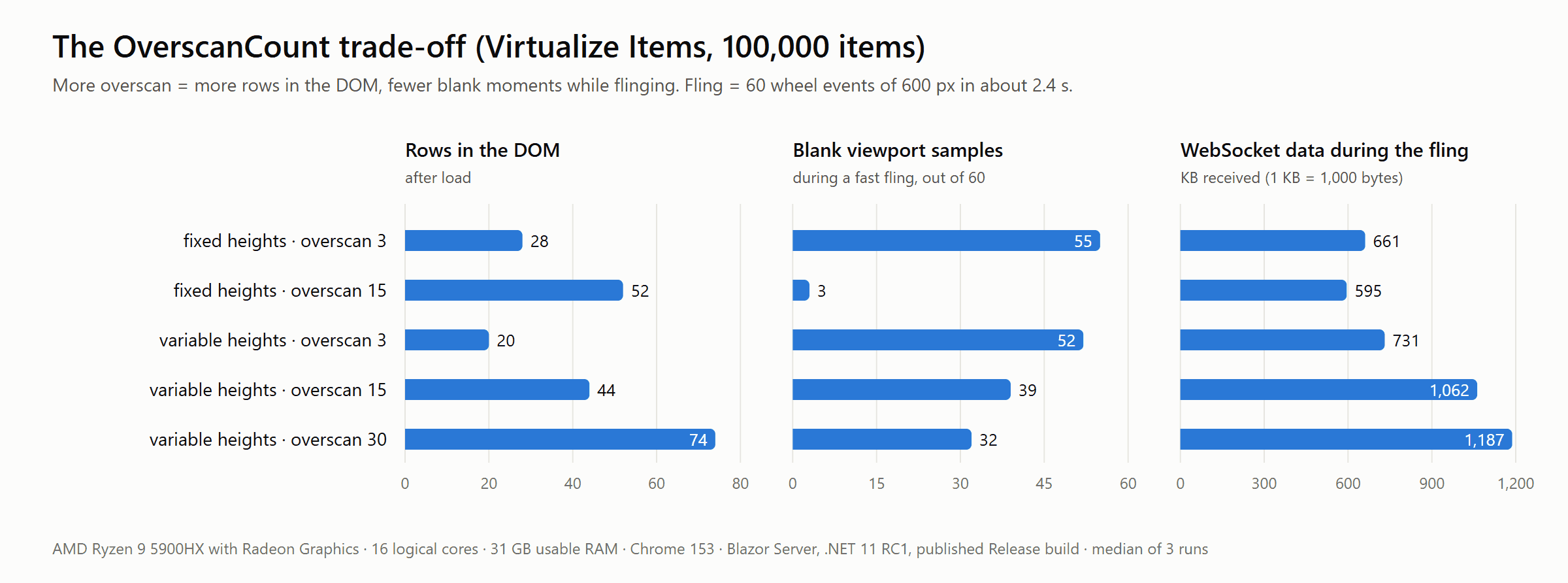
To stress each configuration, the harness "flings" the list: 60 mouse-wheel events of 600 px each in about 2.4 seconds (≈ 15,000 px/s). After each event it checks whether the center of the viewport shows a row or an empty spacer.
- Fixed heights: Moving from overscan 3 to 15 cut blank samples from 55 to 3 out of 60, at the cost of 52 instead of 28 rendered rows.
- Variable heights: Overscan helps less here: 52, 39, and 32 blank samples for overscan 3, 15, and 30. Every window change must be measured and rendered, and the running average is still converging while you fling through unmeasured regions.
- Server traffic while scrolling was 0.6–1.2 MB per fling on Blazor Server. That's the render batches for each new window, and it grows with overscan and row complexity.
Treat these numbers as a relative comparison, taken on one machine with the server on localhost. Over a real network, Blazor Server adds a round trip to every window change, which makes overscan more valuable. On WebAssembly there's no round trip, but rendering competes with everything else on the main thread.
The main message: Virtualize limits how much UI you render. It doesn't make your data access faster. If your provider runs an expensive COUNT(*) on every request, slows down at deep offsets, returns far more columns than the row needs, or ignores the cancellation token, virtualization won't hide that.
Choosing ItemSize and OverscanCount
ItemSize
- It's the starting estimate.
Virtualizeuses it before any measurements exist and for the first scroll range. - Set it close to your real average item height. Measure it in the browser, as the sample did for its grid (about 62 px). A value that's far off makes the first layout and scrollbar noticeably wrong until measurements arrive.
- Variable-height support doesn't make it irrelevant. Changing
ItemSizeat runtime resets the measured average.
OverscanCount
| Lower (e.g. 3) | Higher (e.g. 15–30) |
|---|---|
| Fewer DOM nodes and components | Fewer blank moments during fast scrolling |
| Smaller render batches and provider requests | More items to average variable heights over |
| More risk of placeholders or empty space when scrolling fast | More DOM, more component instances, bigger batches |
Start with the .NET 11 default of 15, then profile with your real row template on the slowest devices you support. Heavy rows, such as grids with many cells or rich cards, may justify going back down. QuickGrid stays at 3 for exactly that reason. MaxItemCount (default 100) still caps how many items are rendered, plus 2 × OverscanCount. Don't set it lower than what a tall window can show.
Content Security Policy: why virtualization used to break
A strict policy like the following blocks inline style attributes:
Content-Security-Policy: default-src 'self'; style-src 'self'
That applies both to attributes in the server-rendered markup and to attributes set with element.setAttribute('style', …). Browsers report them as style-src-attr violations. Nonces don't help, because they never apply to attributes, and 'unsafe-hashes' doesn't scale to values that change on every scroll.
Up to .NET 10, Virtualize rendered its spacers like this (captured from the sample's .NET 10.0.10 baseline):
<div style="height: 0px; flex-shrink: 0;" aria-hidden="true"></div>
<div aria-hidden="true" style="height: 9598560px; flex-shrink: 0;"></div>
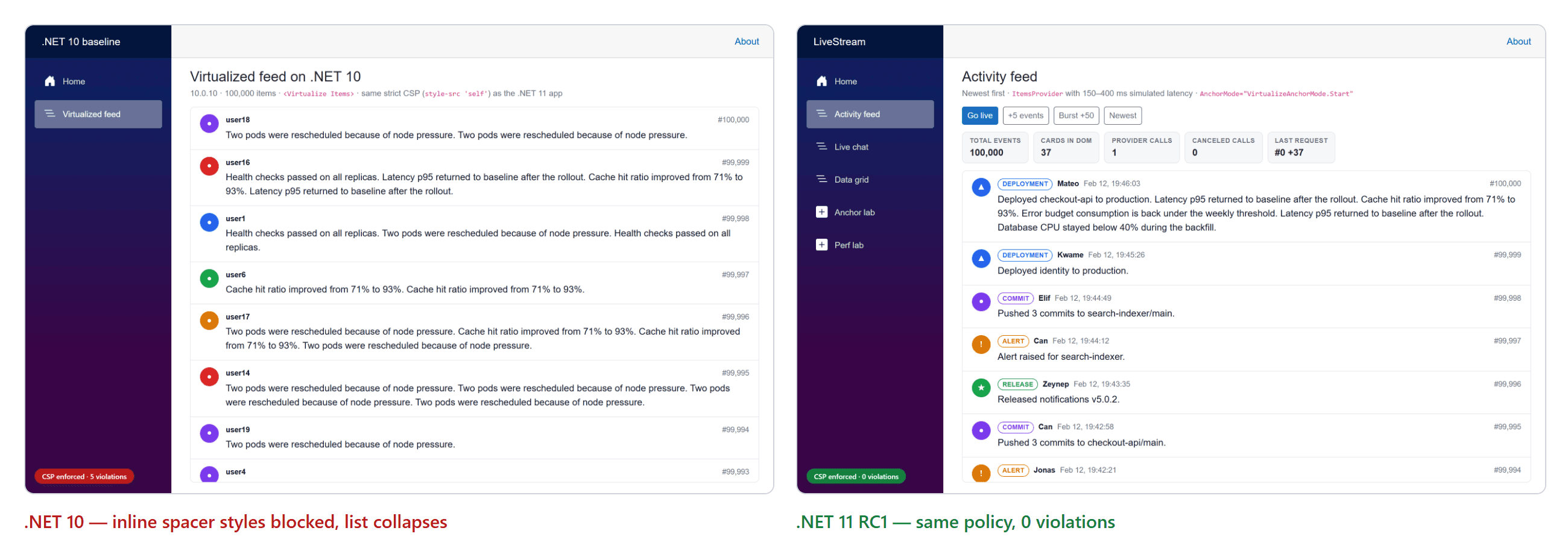
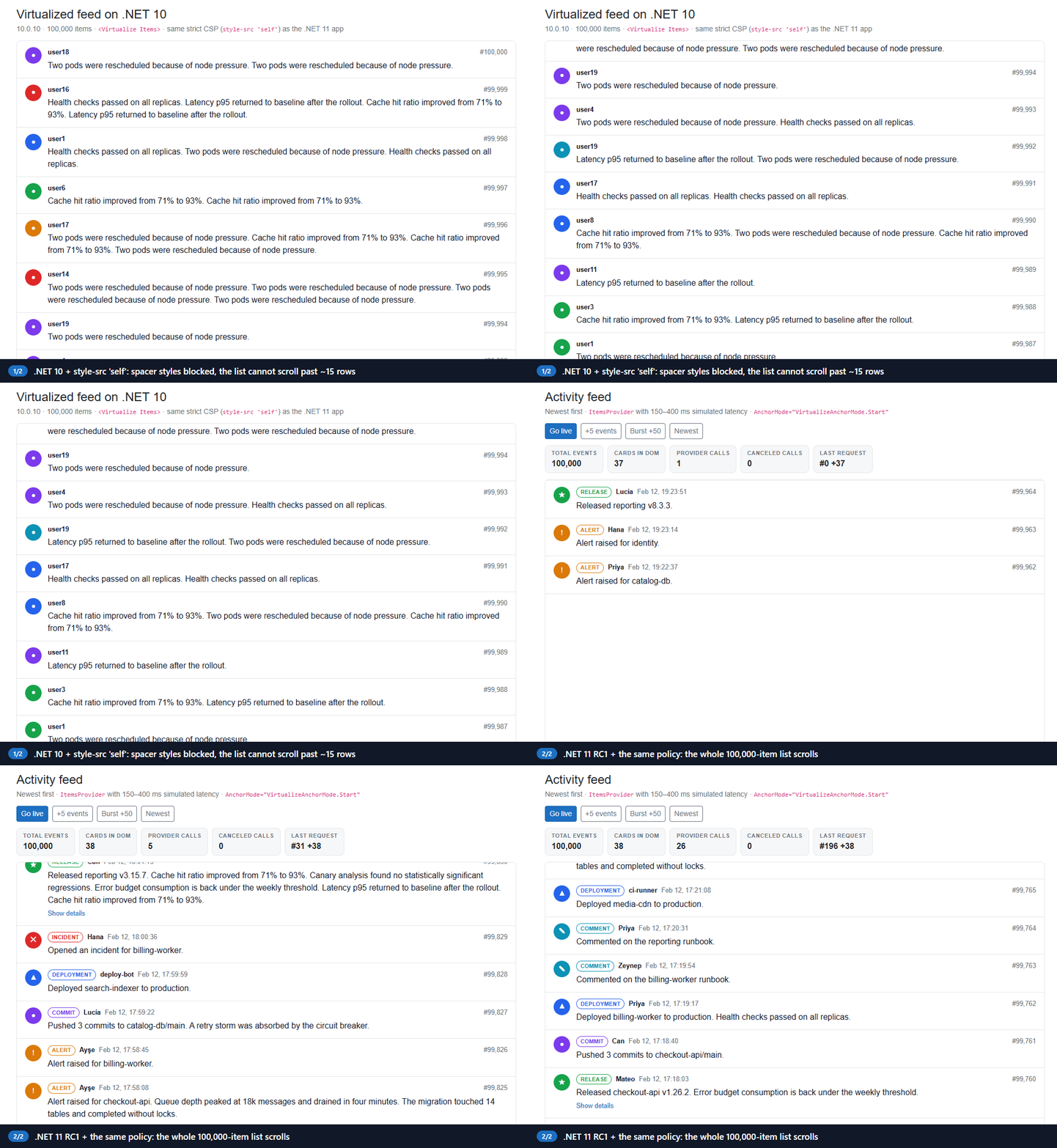
With the same strict policy as the .NET 11 app, the baseline logged 5 style-src-attr violations, with samples such as height: 9600000px; flex-shrink: 0;. They came from both the prerendered HTML and blazor.web.js. Worse, the list collapsed. The spacers had no height, so a 100,000-item list had a scroll range of 1,227 px, and about 15 rows were all anyone could reach. Chrome, Firefox, and WebKit gave identical results.
What .NET 11 does instead
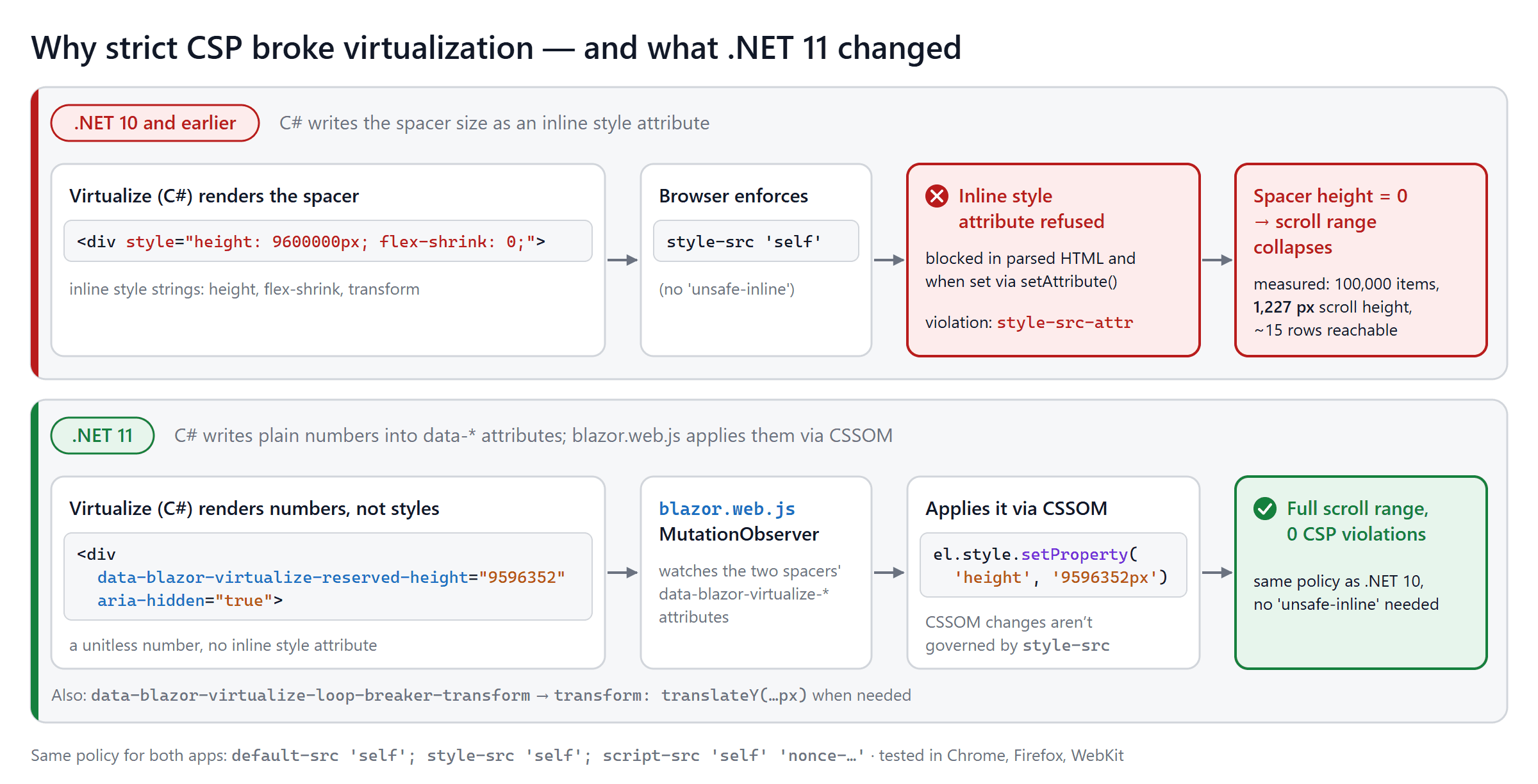
In .NET 11, the C# side renders numbers, not styles:
<!-- prerendered by .NET 11 RC1 (/lab/perf?mode=items: 100,000 items × ItemSize 64) -->
<div data-blazor-virtualize-reserved-height="0" aria-hidden="true"></div>
<div aria-hidden="true" data-blazor-virtualize-reserved-height="6400000"></div>
data-blazor-virtualize-reserved-heightholds the height as a unitless number, for both spacers and default placeholders.data-blazor-virtualize-loop-breaker-transformholds a vertical offset for the trailing spacer, when one is needed.- A
MutationObserverinblazor.web.jswatches those two attributes on the spacers. It parses each value, accepts only finite numbers, and applies it through the CSS Object Model, withelement.style.setProperty('height', …)ortranslateY(…).
Browsers don't apply style-src to properties set through an element's style object. MDN documents this, and the web-platform-tests confirm it for current Chrome, Firefox, and Safari. If you explain this to your security team, be precise: the CSP specification doesn't formally exempt CSSOM. It even describes gating some CSSOM setters on 'unsafe-eval'. The guarantee is how browsers actually behave, and that's what the framework relies on.
Don't test for "no
styleattribute in the DOM". After hydration, the .NET 11 spacers do show astyleattribute in DevTools:<div aria-hidden="true" data-blazor-virtualize-reserved-height="9596352" style="flex-shrink: 0; height: 9.59635e+06px; overflow-anchor: none;"></div>That's the serialization of the properties set through CSSOM, and it's allowed. The .NET 10 spacers show a
styleattribute too, but there it's inert, because the browser refused it. Instead, check for violations, and check that the computed height equals the reserved height.
Sending a strict CSP from a Blazor Web App
Send the policy as an HTTP response header, not a <meta> tag. Only a header supports frame-ancestors, report-to, and Content-Security-Policy-Report-Only. The sample generates a nonce per request, because the Blazor Web App's <ImportMap /> is an inline <script>:
public static string Build(string nonce) => string.Join("; ",
    "default-src 'self'",
    "base-uri 'self'",
    "object-src 'none'",
    "frame-ancestors 'none'",
    "form-action 'self'",
    "img-src 'self' data:",
    "font-src 'self'",
    "style-src 'self' 'report-sample'",
    $"script-src 'self' 'nonce-{nonce}' 'report-sample'",
    "connect-src 'self'");

public static IApplicationBuilder UseStrictContentSecurityPolicy(this IApplicationBuilder app, CspMode mode)
{
    // …
    return app.Use(async (context, next) =>
    {
        // UseStatusCodePagesWithReExecute and UseExceptionHandler run the rest of the pipeline
        // again for the same HttpContext. Create the nonce and register the header callback once,
        // or the header and the re-rendered <ImportMap /> end up with different nonces.
        if (!context.Items.ContainsKey(NonceKey))
        {
            var nonce = Convert.ToBase64String(RandomNumberGenerator.GetBytes(16));
            context.Items[NonceKey] = nonce;

            context.Response.OnStarting(() =>
            {
                if (context.Response.ContentType?.StartsWith("text/html", StringComparison.OrdinalIgnoreCase) == true)
                {
                    context.Response.Headers[headerName] = Build(nonce);
                }

                return Task.CompletedTask;
            });
        }

        await next();
    });
}
@* App.razor (abridged) *@
<ImportMap nonce="@nonce" />

@code {
    private string? nonce;

    [CascadingParameter]
    private HttpContext? HttpContext { get; set; }

    protected override void OnInitialized() => nonce = HttpContext.GetCspNonce();
}
The ContainsKey guard fixes a real bug that the article review caught in the first version of this middleware. Without it, a 404 page re-executed by UseStatusCodePagesWithReExecute got one nonce in the header and a different one in the import map, so the import map was blocked on error pages. The sample now has an integration test for exactly that case.
Notes on the directives:
'report-sample'doesn't relax anything. It only adds the first 40 characters of a blocked inline style or script to violation reports. That's how the .NET 10 samples above were captured.img-src 'self' data:is needed because the template's Bootstrap and navigation icons usedata:SVGs in CSS.connect-src 'self'covers the Blazor Server WebSocket. Under CSP Level 3,'self'matches same-hostws:/wss:, and current browsers implement that. Very old browsers needed explicitws:/wss:sources.- The template's
<ReconnectModal />is CSP-friendly. Apps created before .NET 10 that still use the built-in JS reconnect UI get an injected<style>element, which violatesstyle-src 'self'. - The .NET 11 template no longer puts an inline
onclickonNavMenu. It uses a collocatedNavMenu.razor.jsmodule instead. (The .NET 10 template still has the inline handler; the sample's baseline removes it so that onlyVirtualizeis compared.) In RC1, that module binds to the prerendered menu element, which interactive render modes replace, so the mobile menu stays open after navigation. RC2 fixes this (dotnet/aspnetcore#68951, a backport of #68768). Because the sample is fully interactive, it keeps the menu's open/closed state in the component instead. - Blazor WebAssembly also needs
'wasm-unsafe-eval'inscript-src. Microsoft's Blazor CSP docs give a starting policy for each render mode. - Nonces must be unique per response. Don't let a CDN or output cache serve one nonce to many users.
- Roll out with
Content-Security-Policy-Report-Onlyfirst. Addreport-to csp-endpointto the policy and declare the endpoint in aReporting-Endpoints: csp-endpoint="https://…/csp-reports"response header. Also addreport-uri https://…/csp-reportsfor browsers that don't supportreport-toyet. Switch to enforcing once the reports are clean.
Security framing
.NET 11 removes an important source of CSP incompatibility from Virtualize, but it doesn't make an application "CSP-secure". Your complete policy still depends on your render mode, scripts, styles, third-party components, and hosting. CSP reduces the impact of XSS and clickjacking. It doesn't replace output encoding, CSRF protection, or authorization. Virtualize decides which records are rendered; your backend still has to decide which records a user may see.
Testing strict CSP compatibility
A test plan that catches real problems:
- Enable
style-src 'self'(and a nonce-basedscript-src) as an HTTP header, in every environment you test in. - Don't add
'unsafe-inline'. - Listen for
securitypolicyviolationevents from the very start of the page. The sample loads a tinycsp-monitor.jsfrom'self'as the first script in<head>, so it also sees violations raised while the prerendered HTML is parsed. - Load every virtualized page, then scroll to the start, middle, and end.
- Prepend and append items, and expand variable-height items.
- Assert zero violations, and assert that each spacer's computed height matches its
data-blazor-virtualize-reserved-height. - Include error pages (404, 500), which render through a re-executed pipeline.
- Run the tests in Chromium, Firefox, and WebKit, and check real Safari/iOS manually.
The sample's Playwright test is short:
test(`${path}: no CSP violations while loading and scrolling`, async ({ page }) => {
    await page.goto(APP + path);
    await waitForList(page, row);
    for (const f of [0.25, 0.75, 1, 0]) {
        await scrollViewportTo(page, f);
        await settle(page, 300);
    }

    expect(await cspViolations(page)).toEqual([]);
});
The integration tests also check the prerendered HTML without a browser, using WebApplicationFactory. They verify that the HTML of every page contains no style=", that the import map carries the response's nonce, and that a re-executed 404 page uses the same nonce in its header and its markup.
Accessibility and UX
- Make the scroll container focusable. Since Chrome 132, Chromium makes a scroll container keyboard-focusable automatically only when it has no focusable children. Lists whose items contain buttons or links, like the feed's "Show details", don't qualify. Give the container
tabindex="0"and anaria-label, as the sample does. If there's notabindex, RC1 addstabindex="-1"so the container can receive Home/End, but that doesn't make it reachable with Tab. - Don't force-scroll readers.
AnchorMode.Endalready follows new items only at the live edge. Pair it with a visible "N new messages" control. - Announce summaries, not every item. Use a single polite live region with an updating count ("12 new messages below.") rather than announcing each message. A busy log would flood a screen reader.
- Keep placeholders close to real item heights, so loading states don't shift the layout.
- Use stable
@keys (the item ID, never the loop index). - Watch focus. If a focused row scrolls out of the window, it's removed from the DOM and focus is lost. Keep focus on the container, or scroll the focused item into view before changing data.
- Keep table semantics when you split the header. The sample's visible grid header is
aria-hidden, and the body table keeps a visually hidden<thead>, so screen readers still announce the column names. - Respect
prefers-reduced-motionin skeleton animations. The sample turns its shimmer off.
Browser and layout caveats
- The scroll container needs a real height and
overflow-y: autoorscroll. In a flex layout, give the listflex: 1; min-height: 0. If a sibling (like a header) sits in the same flex column, give that siblingflex: none. The list's flex basis is its virtual height, which can be millions of pixels, so flexbox would otherwise shrink the sibling to nothing. That happened to the sample's grid header during development. - Single column only. Variable-height support assumes a vertical stack. Items that share a row (
flex-wrap, CSS grid with several columns, horizontal lists) aren't supported. - Don't style the spacers. No borders, margins, or
::before/::aftercontent on them. - Tables and
divs behave differently. They use different anchoring paths (section 3.2), so test the layout you actually ship. - Safari and iOS: Safari 26 and earlier don't support
overflow-anchor, so they take the manual path even fordivlists. Playwright's WebKit build doesn't exercise that path. Test on devices. - Lazy-loaded media changes row heights after render. Reserve its space.
- Very uneven height distributions (a few rows 100× taller than the rest) make the running average less representative, so expect the scrollbar to be approximate.
- Nested scroll containers and document-level scrolling both work, but the scroll container is detected as the first scrollable ancestor. Check that it's the one you expect.
- WebAssembly. The same component and markup apply. Spacer styles are applied by a
MutationObservercallback, which runs asynchronously in every render mode. On WebAssembly, though, the .NET side can refresh synchronously before that callback has run. That's why the RC2 End-anchoring fix (#69388, a backport of #69310) also flushes pending spacer styles before readingscrollHeight. Your CSP also needs'wasm-unsafe-eval'.
Preview/RC status and production readiness
Tested against: .NET SDK
11.0.100-rc.1.26425.128· ASP.NET Core11.0.0-rc.1.26425.128· Microsoft.AspNetCore.Components.Web11.0.0-rc.1.26425.128
Support facts
- RC1 ships with a go-live license, which means Microsoft supports it in production. The go-live support window for RC1 ends October 13, 2026, and you're expected to move to RC2 and then GA.
- .NET 11 is an STS release with two years of support. The dotnet/core release notes currently give November 10, 2026 – November 9, 2028. So far, the support-policy page lists only the RC1 go-live release, not .NET 11's GA support dates.
- .NET 10 is LTS and is supported until November 14, 2028. That's the same month .NET 11 support ends, because STS releases are now supported for 24 months. Upgrading doesn't meaningfully change your support window (the published end dates are five days apart), so decide based on features and risk.
Known RC1 issues relevant to this article (as of September 21, 2026)
| Issue | Status |
|---|---|
AnchorMode.End stays at the top after the initial ItemsProvider load (#69302) |
Fixed for RC2 (#69388). The RC1 workaround is a small initial fetch followed by the regular one |
InitialItemIndex positioning can oscillate or finish at the wrong item; in the sample, the next render moved rows by 53–82 px |
Fixed for RC2 (#69170). Observed in section 11 |
False-positive prepend detection causes backward scroll jumps with ItemsProvider and ongoing updates (#69362) |
Open PR, RC2 milestone |
User scrolling doesn't reliably cancel an in-flight ScrollToItemAsync (#69288) |
Open PR |
| QuickGrid: Start anchoring in Server modes, and duplicate provider requests (#69380, #69381) | Open |
| Deleting items above the viewport isn't anchored (#66509) | Backlog |
The template's mobile NavMenu stays open after navigation in interactive render modes (#68951, a backport of #68768) |
Fixed for RC2 |
<table> rows that grow right after scrolling are only partly compensated: usually 41–42 px in Chrome and Firefox, sometimes ~220 px in Chrome |
Observed in this sample (section 10) |
AnchorMode.End sometimes stops 29–77 px short of the bottom after an append. WebKit: 20/30 checks passed; Chrome and Firefox: 1–2 misses in 30 |
Observed in this sample (section 7). Playwright WebKit 26.6 on Windows, not verified in Safari |
A Start list moves 214–486 px when items are appended at the very end; None doesn't |
Observed in this sample (section 8). Playwright WebKit 26.6 on Windows only, not verified in Safari |
Docs inconsistencies to be aware of in RC1
- The docs and release notes use
AnchorMode="Start", which doesn't compile in Razor. UseVirtualizeAnchorMode.Start. - The "Advanced styles" section of the virtualization docs still says all items must have identical height. That text predates variable-height support.
- The .NET 10 version of the virtualization docs suggests using
data-blazor-virtualize-reserved-heightfor CSP compliance. .NET 10 doesn't read that attribute: the sample's .NET 10.0.10 baseline renders and needs inline styles.
Build and verification results
Test environment
| .NET SDK | 11.0.100-rc.1.26425.128 (installed side by side with dotnet-install.ps1 in ~/.dotnet11) |
| Runtime | .NET 11.0.0-rc.1.26425.128; baseline: .NET 10.0.10 (SDK 10.0.301) |
| App model | Blazor Web App, Interactive Server, prerendering on |
| Builds | Debug (dotnet run) for tests and probes; published Release build in the Production environment for the perf numbers |
| OS / hardware | Windows 11 Pro (build 26200), AMD Ryzen 9 5900HX (8 cores / 16 threads), 32 GB RAM |
| Browsers | Google Chrome 153.0.8010.50, Playwright Firefox, Playwright WebKit 26.6 (Playwright 1.63.0) |
| Dataset | 100,000 generated records (deterministic seed) |
How it was verified
The sample was checked at three levels:
dotnet buildfor the app and the test project.- xUnit tests (
dotnet test), includingWebApplicationFactoryintegration tests that inspect the prerendered HTML and the CSP headers. - Playwright browser tests in Chrome, Firefox, and WebKit against the running .NET 11 app and the .NET 10 baseline. The baseline ran on the .NET 10 SDK.
Results
| Check | Result |
|---|---|
dotnet build (Debug and Release) |
0 warnings, 0 errors |
dotnet test |
17/17 passed, 3 consecutive runs |
npx playwright test (Chrome, Firefox, WebKit) |
72 tests: 65 passed, 0 failed, 0 flaky, 7 skipped. The skipped tests are fixme markers for the RC1 issues below: the table gap and the InitialItemIndex shift in each engine, plus AnchorMode.End without the guard in WebKit |
| Test | Expected result | Actual result |
|---|---|---|
| Initial activity feed render | Only viewport items are rendered | Pass: 37–38 of 100,000 cards in the DOM (all engines) |
| Prepend at the top | The viewport stays pinned to the start and shows the new items | Pass (all engines) |
| Prepend while reading older items | Visible content doesn't move; a pill appears | Pass: ≤ 1 px (all engines) |
| Append at the chat bottom | The new message is followed | Pass with the sample's guard (30/30 follow checks per engine). AnchorMode.End alone: Chrome 29/30, Firefox 28/30, WebKit 20/30 |
| Append while reading history | The user isn't pulled to the bottom | Pass (all engines) |
Expand a variable-height item above the viewport (div list) |
No disruptive jump | Pass: 0 px (18/18 wheel runs) |
Expand a row above the viewport (<table>) |
No disruptive jump | Partial: ≤ 1 px after an ordinary render. Right after scrolling: usually 41–42 px in Chrome and Firefox (occasionally ~220 px in Chrome), and ≤ 1 px in 11 of 12 WebKit runs |
| Open at a row / jump to a row | The target row is at the top | Pass for both. RC1: after InitialItemIndex, the next render moves the rows by 53–82 px |
Append at the end of a Start list (infinite scroll) |
No movement | Pass in Chrome and Firefox; fail in Playwright WebKit (214–486 px). With None: pass everywhere |
Strict CSP (style-src 'self') |
No virtualization style violations | Pass: 0 violations, 5 pages × 3 engines; error pages keep the header and markup nonces in sync |
| Same CSP on .NET 10.0.10 | (baseline for comparison) | 5 style-src-attr violations; the list collapsed to 1,227 px (all engines) |
| Fast scrolling with latency | Stale provider calls are canceled | Pass: canceled calls > 0 (all engines) |
| Performance, 100,000 items | Virtualize ≪ foreach |
125 ms vs 112.4 s to interactive; 256 vs 400,078 DOM elements (section 12) |
When not to use Virtualize
Virtualization is a trade-off. It's not the right choice when:
- The list has only 20–50 simple rows. The overhead isn't worth it.
- The full content must be in the initial HTML for SEO or no-JS clients.
Virtualizeprerenders at most a small window of items, and usually none. - Users need the browser's find-in-page (Ctrl+F) across all rows. Unrendered rows can't be found.
- All rows must print or export from the page. Do that on the server instead.
- The layout isn't a single vertical stack (masonry, multi-column wraps, horizontal carousels).
- Classic pagination gives users a clearer mental model, as with "page 3 of the invoices".
Virtualization and pagination can also work together. Large data grids often combine server-side paging, filtering, and sorting with viewport virtualization inside the current result set.
References
- What's new in ASP.NET Core in .NET 11
- ASP.NET Core Razor component virtualization
- Enforce a Content Security Policy for ASP.NET Core Blazor
- ASP.NET Core Blazor security overview
- .NET 11 downloads and the .NET support policy
- dotnet/aspnetcore pull requests: #64964 (variable heights), #65951 (hybrid anchoring), #66262 (AnchorMode), #66680 (CSP), #66753 (scroll to item), #67934 (anchoring regression fix)
- MDN: CSP
style-src,style-src-attr, andoverflow-anchor - W3C Content Security Policy Level 3
- Chrome for Developers: Keyboard-focusable scrollers


Comments
No one has commented yet, be the first to comment!