Web Application Development Tutorial - Part 9: Authors: User Interface
Introduction
This part explains how to create a CRUD page for the Author entity introduced in the previous parts.
The Author Management Page
Authors Razor Component
Create a new Razor Component Page, /Pages/Authors.razor, in the Acme.BookStore.Blazor project with the following content:
@page "/authors"
@using Acme.BookStore.Authors
@using Acme.BookStore.Localization
@inherits BookStoreComponentBase
@inject IAuthorAppService AuthorAppService

<MudCard>
    <MudCardHeader>
        <CardHeaderContent>
            <MudText Typo="Typo.h4">@L["Authors"]</MudText>
        </CardHeaderContent>
        <CardHeaderActions>
            @if (CanCreateAuthor)
            {
                <MudButton Variant="Variant.Filled"
                           Color="Color.Primary"
                           OnClick="OpenCreateAuthorDialogAsync">
                    @L["NewAuthor"]
                </MudButton>
            }
        </CardHeaderActions>
    </MudCardHeader>
    <MudCardContent>
        <MudDataGrid T="AuthorDto"
                     ServerData="OnDataGridReadAsync"
                     RowsPerPage="@PageSize">
            <Columns>
                <TemplateColumn T="AuthorDto" Title="@L["Actions"]" Sortable="false">
                    <CellTemplate>
                        <MudMenu Icon="@Icons.Material.Filled.MoreVert"
                                 AriaLabel="@L["Actions"]"
                                 Dense="true">
                            @if (CanEditAuthor)
                            {
                                <MudMenuItem OnClick="@(() => OpenEditAuthorDialogAsync(context.Item))">
                                    @L["Edit"]
                                </MudMenuItem>
                            }
                            @if (CanDeleteAuthor)
                            {
                                <MudMenuItem OnClick="@(() => DeleteAuthorAsync(context.Item))">
                                    @L["Delete"]
                                </MudMenuItem>
                            }
                        </MudMenu>
                    </CellTemplate>
                </TemplateColumn>
                <PropertyColumn Property="x => x.Name" Title="@L["Name"]" />
                <PropertyColumn Property="x => x.BirthDate" Title="@L["BirthDate"]">
                    <CellTemplate>
                        @context.Item.BirthDate.ToShortDateString()
                    </CellTemplate>
                </PropertyColumn>
            </Columns>
        </MudDataGrid>
    </MudCardContent>
</MudCard>

<MudDialog @ref="CreateAuthorDialog" Options="@(new DialogOptions { MaxWidth = MaxWidth.Medium, FullWidth = true })">
    <TitleContent>
        <MudText Typo="Typo.h6">@L["NewAuthor"]</MudText>
    </TitleContent>
    <DialogContent>
        <MudForm @ref="@CreateFormRef" Model="@NewAuthor">
            <MudStack Spacing="3">
                <MudTextField @bind-Value="@NewAuthor.Name"
                              Label="@L["Name"]"
                              For="@(() => NewAuthor.Name)"
                              Required="true" />
                <MudDatePicker @bind-Date="@NewAuthorBirthDate"
                               Label="@L["BirthDate"]" />
                <MudTextField @bind-Value="@NewAuthor.ShortBio"
                              Label="@L["ShortBio"]"
                              Lines="5" />
            </MudStack>
        </MudForm>
    </DialogContent>
    <DialogActions>
        <MudButton OnClick="CloseCreateAuthorDialogAsync">@L["Cancel"]</MudButton>
        <MudButton Variant="Variant.Filled" Color="Color.Primary" OnClick="CreateAuthorAsync">
            @L["Save"]
        </MudButton>
    </DialogActions>
</MudDialog>

<MudDialog @ref="EditAuthorDialog" Options="@(new DialogOptions { MaxWidth = MaxWidth.Medium, FullWidth = true })">
    <TitleContent>
        <MudText Typo="Typo.h6">@EditingAuthor.Name</MudText>
    </TitleContent>
    <DialogContent>
        <MudForm @ref="@EditFormRef" Model="@EditingAuthor">
            <MudStack Spacing="3">
                <MudTextField @bind-Value="@EditingAuthor.Name"
                              Label="@L["Name"]"
                              For="@(() => EditingAuthor.Name)"
                              Required="true" />
                <MudDatePicker @bind-Date="@EditingAuthorBirthDate"
                               Label="@L["BirthDate"]" />
                <MudTextField @bind-Value="@EditingAuthor.ShortBio"
                              Label="@L["ShortBio"]"
                              Lines="5" />
            </MudStack>
        </MudForm>
    </DialogContent>
    <DialogActions>
        <MudButton OnClick="CloseEditAuthorDialogAsync">@L["Cancel"]</MudButton>
        <MudButton Variant="Variant.Filled" Color="Color.Primary" OnClick="UpdateAuthorAsync">
            @L["Save"]
        </MudButton>
    </DialogActions>
</MudDialog>
- This code is similar to the
Books.razor, except it doesn't inherit from theAbpCrudPageBase/AbpMudCrudPageBase, but uses its own implementation. - Injects the
IAuthorAppServiceto consume the server side HTTP APIs from the UI. We can directly inject application service interfaces and use just like regular method calls by the help of Dynamic C# HTTP API Client Proxy System, which performs REST API calls for us. See theAuthorsclass below to see the usage.
Create a new code behind file, Authors.razor.cs, under the Pages folder, with the following content:
using System;
using System.Collections.Generic;
using System.Linq;
using System.Threading.Tasks;
using Acme.BookStore.Authors;
using Acme.BookStore.Permissions;
using Microsoft.AspNetCore.Authorization;
using MudBlazor;
using Volo.Abp.Application.Dtos;

namespace Acme.BookStore.Blazor.Pages;

public partial class Authors
{
    private IReadOnlyList<AuthorDto> AuthorList { get; set; }

    private int PageSize { get; } = LimitedResultRequestDto.DefaultMaxResultCount;
    private int CurrentPage { get; set; }
    private string CurrentSorting { get; set; }
    private int TotalCount { get; set; }

    private bool CanCreateAuthor { get; set; }
    private bool CanEditAuthor { get; set; }
    private bool CanDeleteAuthor { get; set; }

    private CreateAuthorDto NewAuthor { get; set; }

    private Guid EditingAuthorId { get; set; }
    private UpdateAuthorDto EditingAuthor { get; set; }

    private MudDialog CreateAuthorDialog { get; set; }
    private MudDialog EditAuthorDialog { get; set; }

    private MudForm CreateFormRef;
    private MudForm EditFormRef;

    // MudDatePicker requires nullable DateTime, while AuthorDto.BirthDate is non-nullable.
    // Bind to a nullable wrapper and sync back to the DTO before saving.
    private DateTime? NewAuthorBirthDate
    {
        get => NewAuthor?.BirthDate;
        set { if (NewAuthor != null && value.HasValue) NewAuthor.BirthDate = value.Value; }
    }

    private DateTime? EditingAuthorBirthDate
    {
        get => EditingAuthor?.BirthDate;
        set { if (EditingAuthor != null && value.HasValue) EditingAuthor.BirthDate = value.Value; }
    }

    public Authors()
    {
        NewAuthor = new CreateAuthorDto();
        EditingAuthor = new UpdateAuthorDto();
    }

    protected override async Task OnInitializedAsync()
    {
        await SetPermissionsAsync();
        await GetAuthorsAsync();
    }

    private async Task SetPermissionsAsync()
    {
        CanCreateAuthor = await AuthorizationService
            .IsGrantedAsync(BookStorePermissions.Authors.Create);

        CanEditAuthor = await AuthorizationService
            .IsGrantedAsync(BookStorePermissions.Authors.Edit);

        CanDeleteAuthor = await AuthorizationService
            .IsGrantedAsync(BookStorePermissions.Authors.Delete);
    }

    private async Task GetAuthorsAsync()
    {
        var result = await AuthorAppService.GetListAsync(
            new GetAuthorListDto
            {
                MaxResultCount = PageSize,
                SkipCount = CurrentPage * PageSize,
                Sorting = CurrentSorting
            }
        );

        AuthorList = result.Items;
        TotalCount = (int)result.TotalCount;
    }

    private async Task<GridData<AuthorDto>> OnDataGridReadAsync(GridState<AuthorDto> state)
    {
        CurrentSorting = state.SortDefinitions
            .Where(s => !string.IsNullOrWhiteSpace(s.SortBy?.ToString()))
            .Select(s => $"{s.SortBy}{(s.Descending ? " DESC" : "")}")
            .JoinAsString(",");
        CurrentPage = state.Page;

        await GetAuthorsAsync();

        return new GridData<AuthorDto> { Items = AuthorList, TotalItems = TotalCount };
    }

    private async Task OpenCreateAuthorDialogAsync()
    {
        NewAuthor = new CreateAuthorDto();
        if (CreateFormRef != null) await CreateFormRef.ResetAsync();
        await InvokeAsync(() => CreateAuthorDialog.ShowAsync());
    }

    private Task CloseCreateAuthorDialogAsync()
    {
        return InvokeAsync(() => CreateAuthorDialog.CloseAsync());
    }

    private async Task OpenEditAuthorDialogAsync(AuthorDto author)
    {
        EditingAuthorId = author.Id;
        EditingAuthor = ObjectMapper.Map<AuthorDto, UpdateAuthorDto>(author);
        if (EditFormRef != null) await EditFormRef.ResetAsync();
        await InvokeAsync(() => EditAuthorDialog.ShowAsync());
    }

    private Task CloseEditAuthorDialogAsync()
    {
        return InvokeAsync(() => EditAuthorDialog.CloseAsync());
    }

    private async Task DeleteAuthorAsync(AuthorDto author)
    {
        try
        {
            var confirmMessage = L["AuthorDeletionConfirmationMessage", author.Name];
            if (!await Message.Confirm(confirmMessage))
            {
                return;
            }

            await AuthorAppService.DeleteAsync(author.Id);
            await GetAuthorsAsync();
        }
        catch(Exception ex)
        {
            await HandleErrorAsync(ex);
        }
    }

    private async Task CreateAuthorAsync()
    {
        try
        {
            await CreateFormRef.Validate();
            if (CreateFormRef.IsValid)
            {
                await AuthorAppService.CreateAsync(NewAuthor);
                await GetAuthorsAsync();
                await InvokeAsync(() => CreateAuthorDialog.CloseAsync());
            }
        }
        catch(Exception ex)
        {
            await HandleErrorAsync(ex);
        }
    }

    private async Task UpdateAuthorAsync()
    {
        try
        {
            await EditFormRef.Validate();
            if (EditFormRef.IsValid)
            {
                await AuthorAppService.UpdateAsync(EditingAuthorId, EditingAuthor);
                await GetAuthorsAsync();
                await InvokeAsync(() => EditAuthorDialog.CloseAsync());
            }
        }
        catch(Exception ex)
        {
            await HandleErrorAsync(ex);
        }
    }
}
This class typically defines the properties and methods used by the Authors.razor page.
Object Mapping
Authors class uses the IObjectMapper in the OpenEditAuthorModal method. So, we need to define this mapping.
Open the BookStoreBlazorMappers.cs in the Acme.BookStore.Blazor project and add the following mappings in the class:
using Riok.Mapperly.Abstractions;
using Volo.Abp.Mapperly;
using Acme.BookStore.Authors;

//...

[Mapper]
public partial class AuthorDtoToUpdateAuthorDtoMapper : MapperBase<AuthorDto, UpdateAuthorDto>
{
    public override partial UpdateAuthorDto Map(AuthorDto source);

    public override partial void Map(AuthorDto source, UpdateAuthorDto destination);
}
Add to the Main Menu
Open the BookStoreMenuContributor.cs in the Acme.BookStore.Blazor project and add the following code to the end of the ConfigureMainMenuAsync method:
context.Menu.AddItem(new ApplicationMenuItem(
        "BooksStore.Authors",
        l["Menu:Authors"],
        url: "/authors"
    ).RequirePermissions(BookStorePermissions.Books.Default));
Localizations
We should complete the localizations we've used above. Open the en.json file under the Localization/BookStore folder of the Acme.BookStore.Domain.Shared project and add the following entries:
"Menu:Authors": "Authors",
"Authors": "Authors",
"AuthorDeletionConfirmationMessage": "Are you sure to delete the author '{0}'?",
"BirthDate": "Birth date",
"NewAuthor": "New author"
Run the Application
Run and login to the application. If you don't see the Authors menu item under the Book Store menu, that means you don't have the permission yet. Go to the identity/roles page, click to the Actions button and select the Permissions action for the admin role:
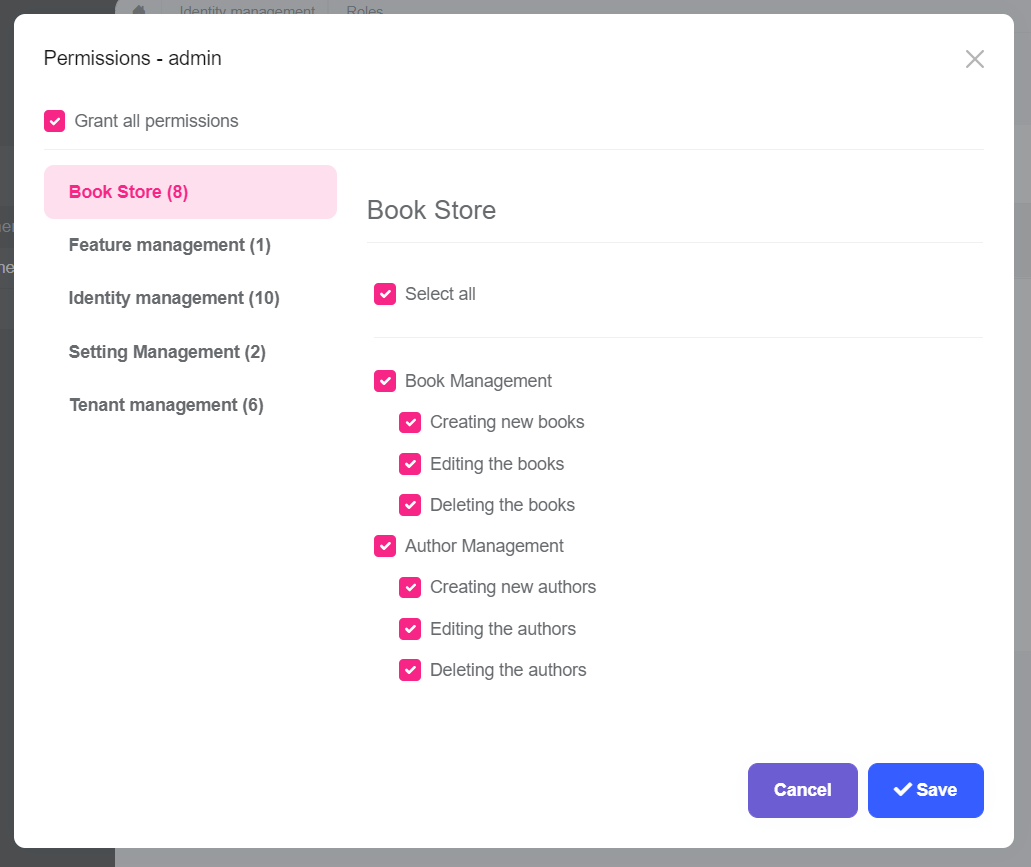
As you see, the admin role has no Author Management permissions yet. Click to the checkboxes and save the modal to grant the necessary permissions. You will see the Authors menu item under the Book Store in the main menu, after refreshing the page:
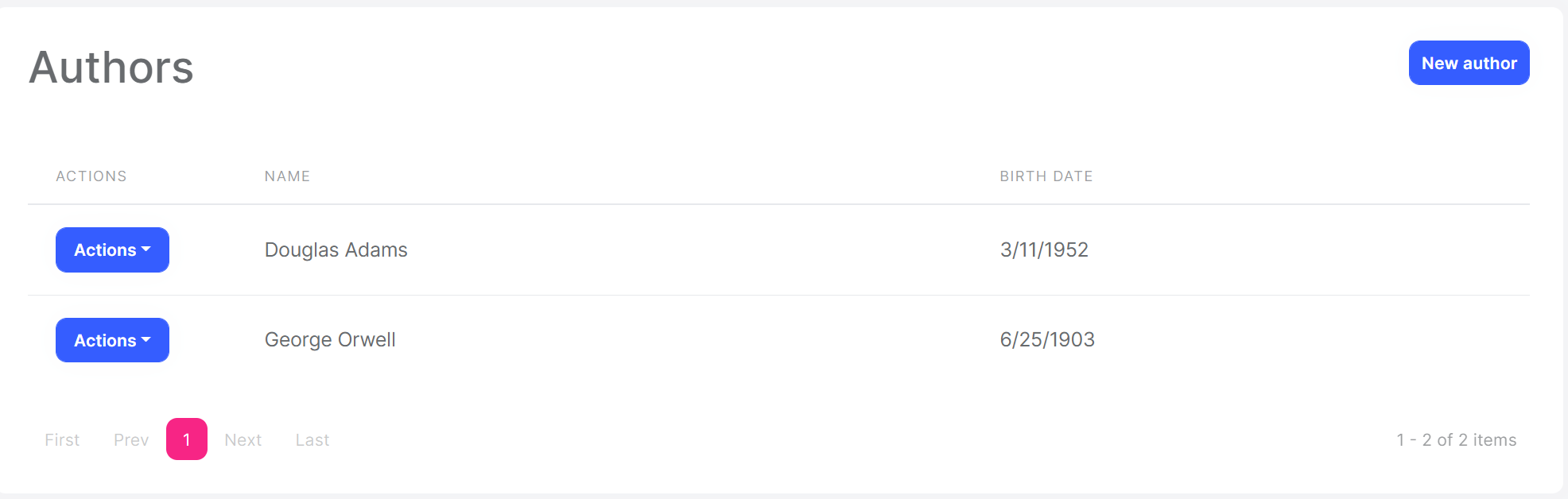
That's all! This is a fully working CRUD page, you can create, edit and delete the authors.
Tip: If you run the
.DbMigratorconsole application after defining a new permission, it automatically grants these new permissions to the admin role and you don't need to manually grant the permissions yourself.