I update the solution to use Volo.Abp.Identity.Pro.Application 5.0.1 and it now compiles, except for a missing method used by one of the tests: AbpApplicationFactory.CreateAsync
However, I experience the same issue building a docker image with this patch version as I did with version 5.1.2: https://support.abp.io/QA/Questions/2459/Docker-build-failure
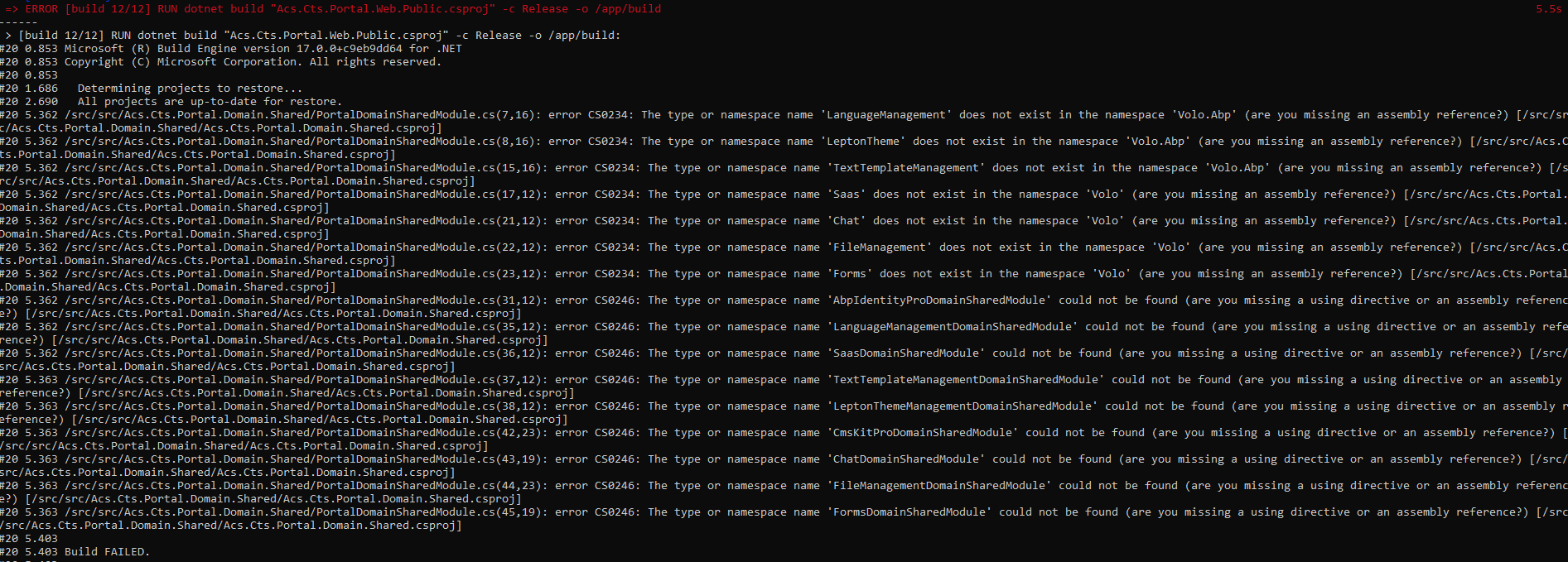
Thank you for the tip.
I updated the CLI and SUITE to 5.0.2 and I am unable to build my solution, due to missing framework packages.
C:\Users\Jamie\Source\Repos\CTS_Portal2\apps\acs-portal\aspnet-core>dotnet restore Determining projects to restore... Restored C:\Users\Jamie\Source\Repos\CTS_Portal2\apps\acs-portal\aspnet-core\src\Acs.Cts.Portal.DbMigrator\Acs.Cts.Portal.DbMigrator.csproj (in 13.75 sec). Restored C:\Users\Jamie\Source\Repos\CTS_Portal2\apps\acs-portal\aspnet-core\src\Acs.Cts.Portal.Web.Public\Acs.Cts.Portal.Web.Public.csproj (in 17.79 sec). C:\Users\Jamie\Source\Repos\CTS_Portal2\apps\acs-portal\aspnet-core\src\Acs.Cts.Portal.Application\Acs.Cts.Portal.Application.csproj : warning NU1603: Acs.Cts.Portal.Application depends on Volo.Abp.Account.Pro.Admin.Application (>= 5.0.2) but Volo.Abp.Account.Pro.Admin.Application 5.0.2 was not found. An approximate best match of Volo.Abp.Account.Pro.Admin.Application 5.1.1 was resolved. [C:\Users\Jamie\Source\Repos\CTS_Portal2\apps\acs-portal\aspnet-core\Acs.Cts.Portal.sln] C:\Users\Jamie\Source\Repos\CTS_Portal2\apps\acs-portal\aspnet-core\src\Acs.Cts.Portal.Application\Acs.Cts.Portal.Application.csproj : error NU1605: Detected package downgrade: Volo.Abp.Identity.Pro.Application from 5.1.1 to 5.0.2. Reference the package directly from the project to select a different version. [C:\Users\Jamie\Source\Repos\CTS_Portal2\apps\acs-portal\aspnet-core\Acs.Cts.Portal.sln] C:\Users\Jamie\Source\Repos\CTS_Portal2\apps\acs-portal\aspnet-core\src\Acs.Cts.Portal.Application\Acs.Cts.Portal.Application.csproj : error NU1605: Acs.Cts.Portal.Application -> Volo.Abp.Account.Pro.Admin.Application 5.1.1 -> Volo.Abp.Account.Pro.Shared.Application 5.1.1 -> Volo.Abp.Identity.Pro.Application (>= 5.1.1) [C:\Users\Jamie\Source\Repos\CTS_Portal2\apps\acs-portal\aspnet-core\Acs.Cts.Portal.sln] C:\Users\Jamie\Source\Repos\CTS_Portal2\apps\acs-portal\aspnet-core\src\Acs.Cts.Portal.Application\Acs.Cts.Portal.Application.csproj : error NU1605: Acs.Cts.Portal.Application -> Volo.Abp.Identity.Pro.Application (>= 5.0.2) [C:\Users\Jamie\Source\Repos\CTS_Portal2\apps\acs-portal\aspnet-core\Acs.Cts.Portal.sln] Failed to restore C:\Users\Jamie\Source\Repos\CTS_Portal2\apps\acs-portal\aspnet-core\src\Acs.Cts.Portal.Application\Acs.Cts.Portal.Application.csproj (in 19.01 sec). C:\Users\Jamie\Source\Repos\CTS_Portal2\apps\acs-portal\aspnet-core\test\Acs.Cts.Portal.Application.Tests\Acs.Cts.Portal.Application.Tests.csproj : warning NU1603: Acs.Cts.Portal.Application depends on Volo.Abp.Account.Pro.Admin.Application (>= 5.0.2) but Volo.Abp.Account.Pro.Admin.Application 5.0.2 was not found. An approximate best match of Volo.Abp.Account.Pro.Admin.Application 5.1.1 was resolved. [C:\Users\Jamie\Source\Repos\CTS_Portal2\apps\acs-portal\aspnet-core\Acs.Cts.Portal.sln] C:\Users\Jamie\Source\Repos\CTS_Portal2\apps\acs-portal\aspnet-core\test\Acs.Cts.Portal.Application.Tests\Acs.Cts.Portal.Application.Tests.csproj : error NU1605: Detected package downgrade: Volo.Abp.Identity.Pro.Application from 5.1.1 to 5.0.2. Reference the package directly from the project to select a different version. [C:\Users\Jamie\Source\Repos\CTS_Portal2\apps\acs-portal\aspnet-core\Acs.Cts.Portal.sln] C:\Users\Jamie\Source\Repos\CTS_Portal2\apps\acs-portal\aspnet-core\test\Acs.Cts.Portal.Application.Tests\Acs.Cts.Portal.Application.Tests.csproj : error NU1605: Acs.Cts.Portal.Application.Tests -> Acs.Cts.Portal.Application -> Volo.Abp.Account.Pro.Admin.Application 5.1.1 -> Volo.Abp.Account.Pro.Shared.Application 5.1.1 -> Volo.Abp.Identity.Pro.Application (>= 5.1.1) [C:\Users\Jamie\Source\Repos\CTS_Portal2\apps\acs-portal\aspnet-core\Acs.Cts.Portal.sln] C:\Users\Jamie\Source\Repos\CTS_Portal2\apps\acs-portal\aspnet-core\test\Acs.Cts.Portal.Application.Tests\Acs.Cts.Portal.Application.Tests.csproj : error NU1605: Acs.Cts.Portal.Application.Tests -> Acs.Cts.Portal.Application -> Volo.Abp.Identity.Pro.Application (>= 5.0.2) [C:\Users\Jamie\Source\Repos\CTS_Portal2\apps\acs-portal\aspnet-core\Acs.Cts.Portal.sln] Failed to restore C:\Users\Jamie\Source\Repos\CTS_Portal2\apps\acs-portal\aspnet-core\test\Acs.Cts.Portal.Application.Tests\Acs.Cts.Portal.Application.Tests.csproj (in 25.11 sec). C:\Users\Jamie\Source\Repos\CTS_Portal2\apps\acs-portal\aspnet-core\src\Acs.Cts.Portal.HttpApi.Host\Acs.Cts.Portal.HttpApi.Host.csproj : warning NU1603: Acs.Cts.Portal.Application depends on Volo.Abp.Account.Pro.Admin.Application (>= 5.0.2) but Volo.Abp.Account.Pro.Admin.Application 5.0.2 was not found. An approximate best match of Volo.Abp.Account.Pro.Admin.Application 5.1.1 was resolved. [C:\Users\Jamie\Source\Repos\CTS_Portal2\apps\acs-portal\aspnet-core\Acs.Cts.Portal.sln] C:\Users\Jamie\Source\Repos\CTS_Portal2\apps\acs-portal\aspnet-core\src\Acs.Cts.Portal.HttpApi.Host\Acs.Cts.Portal.HttpApi.Host.csproj : error NU1605: Detected package downgrade: Volo.Abp.Identity.Pro.Application from 5.1.1 to 5.0.2. Reference the package directly from the project to select a different version. [C:\Users\Jamie\Source\Repos\CTS_Portal2\apps\acs-portal\aspnet-core\Acs.Cts.Portal.sln] C:\Users\Jamie\Source\Repos\CTS_Portal2\apps\acs-portal\aspnet-core\src\Acs.Cts.Portal.HttpApi.Host\Acs.Cts.Portal.HttpApi.Host.csproj : error NU1605: Acs.Cts.Portal.HttpApi.Host -> Acs.Cts.Portal.Application -> Volo.Abp.Account.Pro.Admin.Application 5.1.1 -> Volo.Abp.Account.Pro.Shared.Application 5.1.1 -> Volo.Abp.Identity.Pro.Application (>= 5.1.1) [C:\Users\Jamie\Source\Repos\CTS_Portal2\apps\acs-portal\aspnet-core\Acs.Cts.Portal.sln] C:\Users\Jamie\Source\Repos\CTS_Portal2\apps\acs-portal\aspnet-core\src\Acs.Cts.Portal.HttpApi.Host\Acs.Cts.Portal.HttpApi.Host.csproj : error NU1605: Acs.Cts.Portal.HttpApi.Host -> Acs.Cts.Portal.Application -> Volo.Abp.Identity.Pro.Application (>= 5.0.2) [C:\Users\Jamie\Source\Repos\CTS_Portal2\apps\acs-portal\aspnet-core\Acs.Cts.Portal.sln] Failed to restore C:\Users\Jamie\Source\Repos\CTS_Portal2\apps\acs-portal\aspnet-core\src\Acs.Cts.Portal.HttpApi.Host\Acs.Cts.Portal.HttpApi.Host.csproj (in 28.23 sec). 12 of 17 projects are up-to-date for restore.
I manually updated the project references from 5.0.0 to 5.0.2, as it appears that the abp update command updates to the latest version, rather than the installed version of the cli and suite, which seems counterintuitive.
Is there a command that can update to a specified version?
Thanks
I was able to create a version 5.0.0 project using the CLI:
abp new MyApp -t app-pro --version 5.0.0 --ui mvc --tiered
Is ABP Suite working as intended or is this a bug?
Thanks
I am having issues with version 5.1 of the framework and these issues are causing delays in our project. Consequently, I am trying to revert to 5.0.0 and I am experiencing difficulties in doing that.
I need to baseline the generated project using v5.0.0 to manually compare the code with our v5.1.2 version and revert the code.
I uninstalled abp cli and suite: dotnet tool uninstall --global Volo.Abp.Suite dotnet tool uninstall --global Volo.Abp.Cli
I then reinstalled v5.0.0: dotnet tool install -g volo.abp.cli --version 5.0.0 dotnet tool install -g Volo.Abp.Suite --add-source https://nuget.abp.io/XXXXXXXXXXX/v3/index.json --version 5.0.0 abp login XXXXX --organization XXXXXX -p XXXXXX
Console:
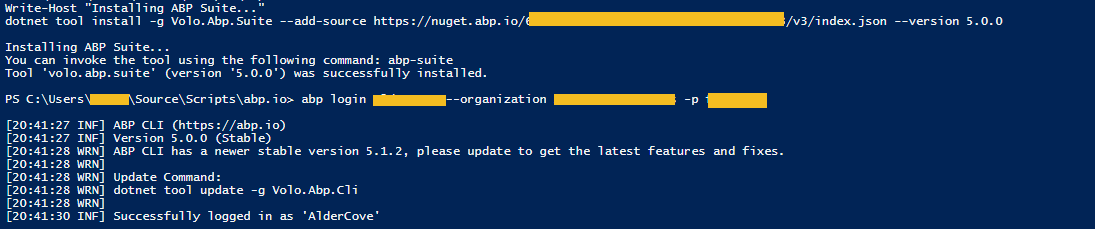
When I start abp suite, it indicates 5.0.0:

When I create a new solution, abp suite creates it as 5.1.2:

Package references are all 5.1.2:
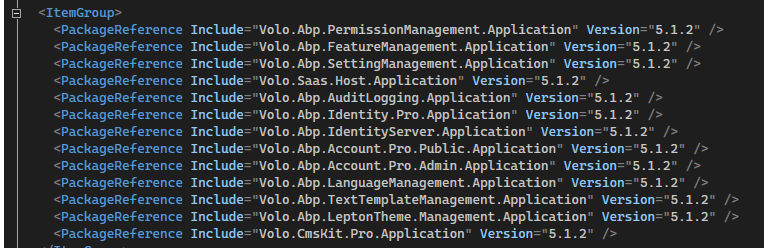
I am under the impression that installing specific versions of the cli & suite will generate based on that version template?
Can you please help get me back to 5.0.0?
Thanks Jamie
Check the samples, to seea the basic tasks: https://docs.abp.io/en/commercial/latest/samples/index The exact solution to yoaur question may have been answered before, please use the search on the homepage.
If you're creating a bug/problem report, please include followings:
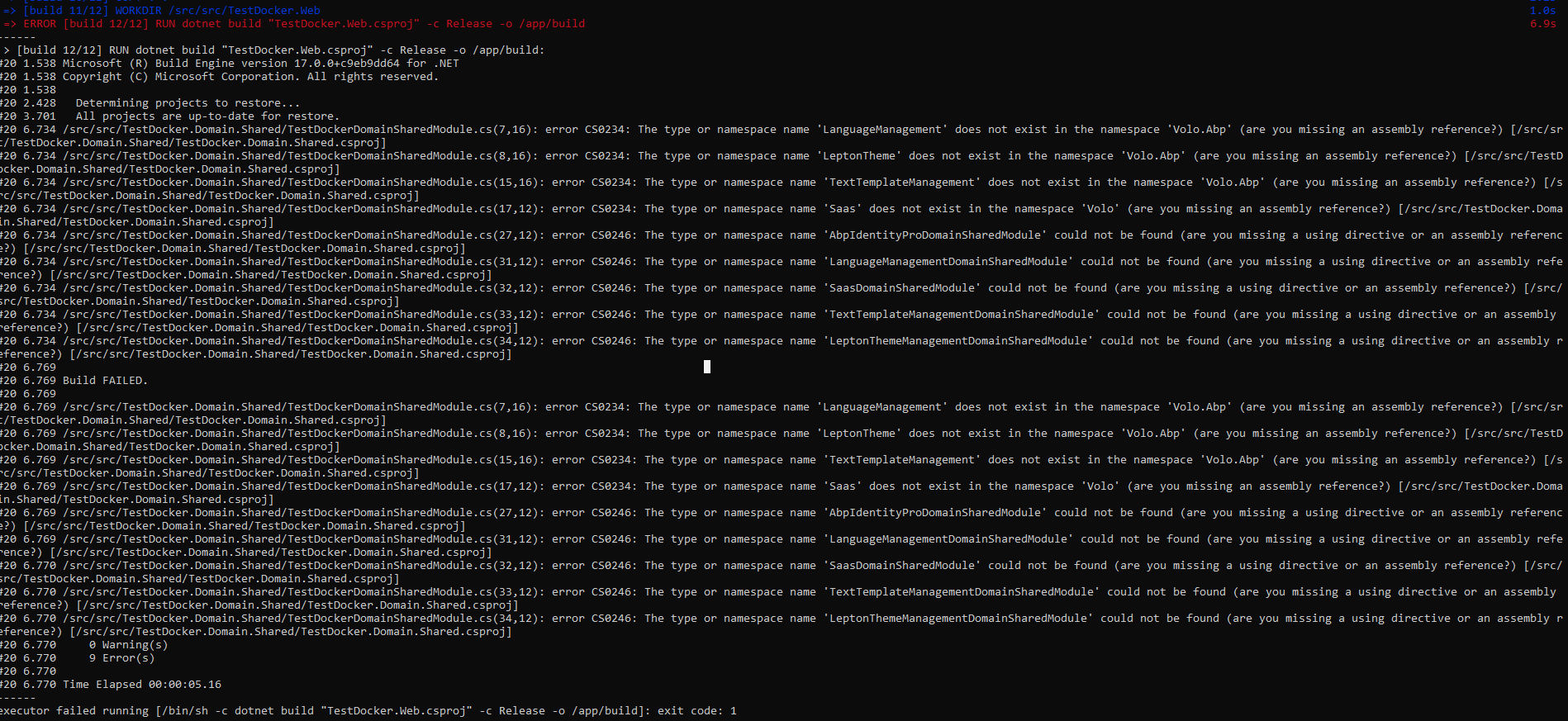
Create a new application using ABP suite, add docker support and try to build the image from the command line (docker build -f ./src/TestDocker.Web/Dockerfile . -t testdocker512:latest)
Dockerfile
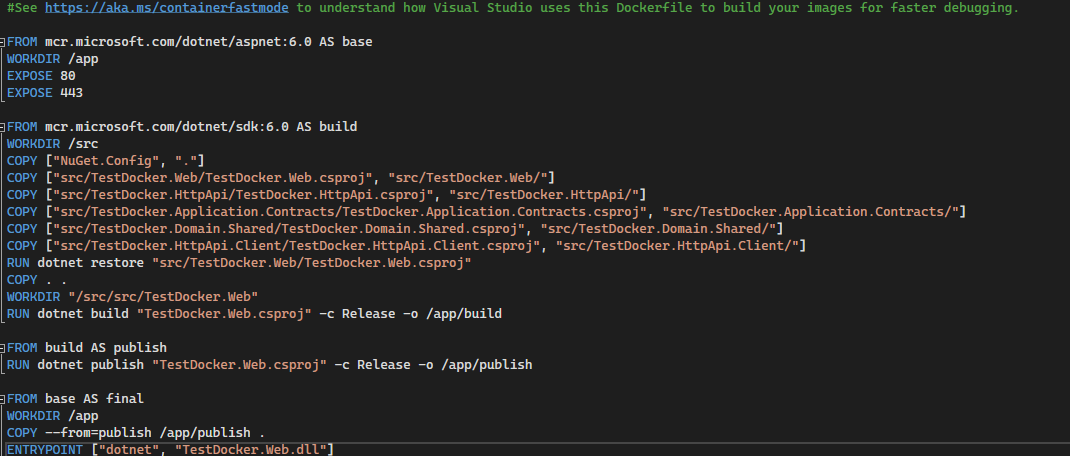
The NuGet.Config has an entry for ABP Commercial with the API key.

This was working for me prior to updating to 5.1.1 and 5.1.2.
Thanks.
That fixed the problem, but is this a bug and should the script contributor be automatically configured by way of my Web module having a dependency on the ChatWebModule?
Or, is this the typical approach for making the module scripts available in the Web projects?
jquery.js?_v=637774598147390000:4059 Uncaught TypeError: Cannot read properties of undefined (reading 'users') at HTMLDocument. (chatMessageReceiving…2743500000000:12:31) at mightThrow (jquery.js?_v=637774598147390000:3766:29) at process (jquery.js?_v=637774598147390000:3834:12)

Please help me to understand the Dynamic JavaScript API Client Proxies, the architecture a little better and that I am taking the correct steps for accessing the proxies from the Web application.
In order to access module proxy scripts from the Web project, I did the following:
I notice though that all of these proxy scripts are available from the HttpApi (https://localhost:44308/Abp/ServiceProxyScript) project and wonder why the Web project doesn't utilize the HttpApi scripts directly?
I also noticed that some of the framework modules are available already in the HttpApi.Client (abp, cms-kit and cms-kit-pro module), while some of the other ones I am using are not.
Thanks - appreciate the help.
ABP Version 5.1.1
The profile picture does not seem to be working properly. It shows properly on the account page, but not in the web or public web applications. Doesn't make a difference if changing to Avatar/Gravatar or uploaded file, still shows:

Error in the browser on get of the picture:

With an Id that corresponds with the Admin user Id:

thank you









