Hi
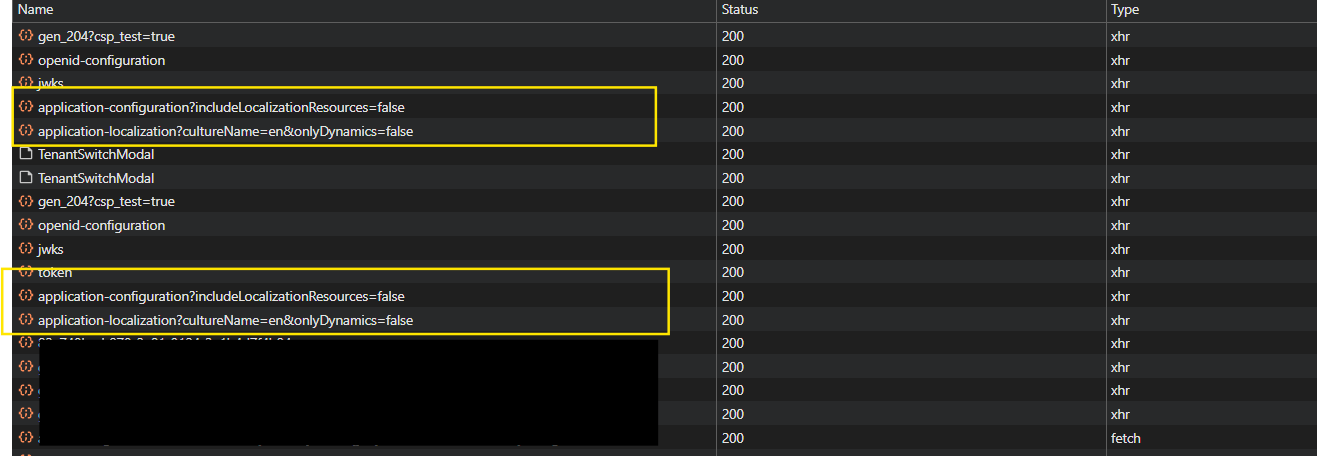
Currently, these two API calls are being triggered twice — once before login and again after login.
Since we do not require these API calls before the user is authenticated, could you please suggest a way to prevent them from being executed prior to login?
 I will also review the logs from my side and share the details with you shortly.
Thank you for your guidance. Thanks.
I completely understand your point. However, I have already disabled Redis, and the database server load is almost zero. In most cases, the application loads quickly, but occasionally the page still takes some time to load — and this happens before the user logs in.
Since I am directly redirecting the user to the authentication server before login, I am considering whether this particular API call is actually necessary at that stage. It seems we may not need to trigger this API before the user is authenticated.
I am open to splitting the en.json file if required. However, I am not entirely sure how this approach would work consistently across other languages. I would appreciate your guidance on how best to handle this scenario.
Thank you for your support.
Hello
Thank you for your valuable suggestions.
I would appreciate it if you could kindly provide some additional clarification on the following points:
Thank you in advance for your guidance.
Yes, private data is not included. However, as the product grows, the JSON size will also increase.
The Login and Register pages are served from the Auth Server, which is an MVC application, so I don’t think an API call is required for that.
It would be better to have proper control over when and where this API is called to retrieve localized text.
Thank you.
Hi,
I have a question regarding localization. Why are we receiving all the localization JSON files even before user login? Could you please suggest an approach to prevent loading all localization data without authentication?
Thank you.
Hi, Thank you for your help.
I have noticed that the highlighted APIs sometimes take a very long time to respond — around 41.4 seconds. However, occasionally they load much faster, around 350 ms, especially after restarting the application or during the first load. For the first time I can understand but Sometimes the delay also occurs on a simple refresh.
I understand that these APIs handle large amounts of data, but the response time is still too high.
Please suggest the proper approach to reduce the load time and improve performance.

Thanks
[maliming] said: hi
Maybe the
VM environmentis IIS?Can you share more info about your
VM environment?Thanks.
Hi,
Yes, we are using IIS. Please find the VM environment details below: Operating System: Windows Server 2022 (64-bit), Version 21H2 Database: Microsoft SQL Server VM Configuration: Processor: Intel® Xeon® CPU v4 Installed RAM: 16.0 GB IIS Version: 10
Please let me know if you need any additional details.
Thank you.
Hi
We are hosting the application on a Virtual Machine (VM).
It is not hosted on Nginx; the application is deployed directly on the VM environment.
Thank you
Hi,
The issue is that the highlighted JS and CSS files are being requested on every page load. On my side, they are taking approximately 3–4 seconds to load each time.
Why are these files being called even before login and on every page refresh? Ideally, once they are loaded, they should be served from the browser cache instead of being requested again.
Additionally, comparing an empty project with a fully developed ERP application is not appropriate. Please ask your team to re-verify this behavior in the proper context and provide a fix.

Thank you.
[maliming] said: hi
Yes, it is also slow during local development on the first load.
We need to reproduce this in the local environment.
Thanks.
Hi
I have shared the demo project via email. Please let me know if you are able to reproduce the issue.
Thanks









