Hi,
I have done as you explained but when i press the logout button now it gives me the following error:
error:invalid_request
error_description:The specified 'post_logout_redirect_uri' is invalid.
error_uri:https://documentation.openiddict.com/errors/ID2052
It looks like in the url 'post_logout_redirect_uri' is still the old PostLoginRedirectUrl. How can i fix this?
You should also configure the OpenIddictServerBuilder in the *HttpApi.Host module (add the following code in your preconfigureservices method):
        PreConfigure<OpenIddictServerBuilder>(serverBuilder =>
        {
            serverBuilder.SetLogoutEndpointUris("<your-blazor-root-url>");
        });
how can i add this and this is built in component and not ability to customize its functionality
i am using pickup model of select
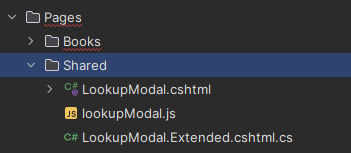
Hi, under the Pages/Shared folder, there is a LookupModal.cshtml file, you can edit this file and implement it for your case:
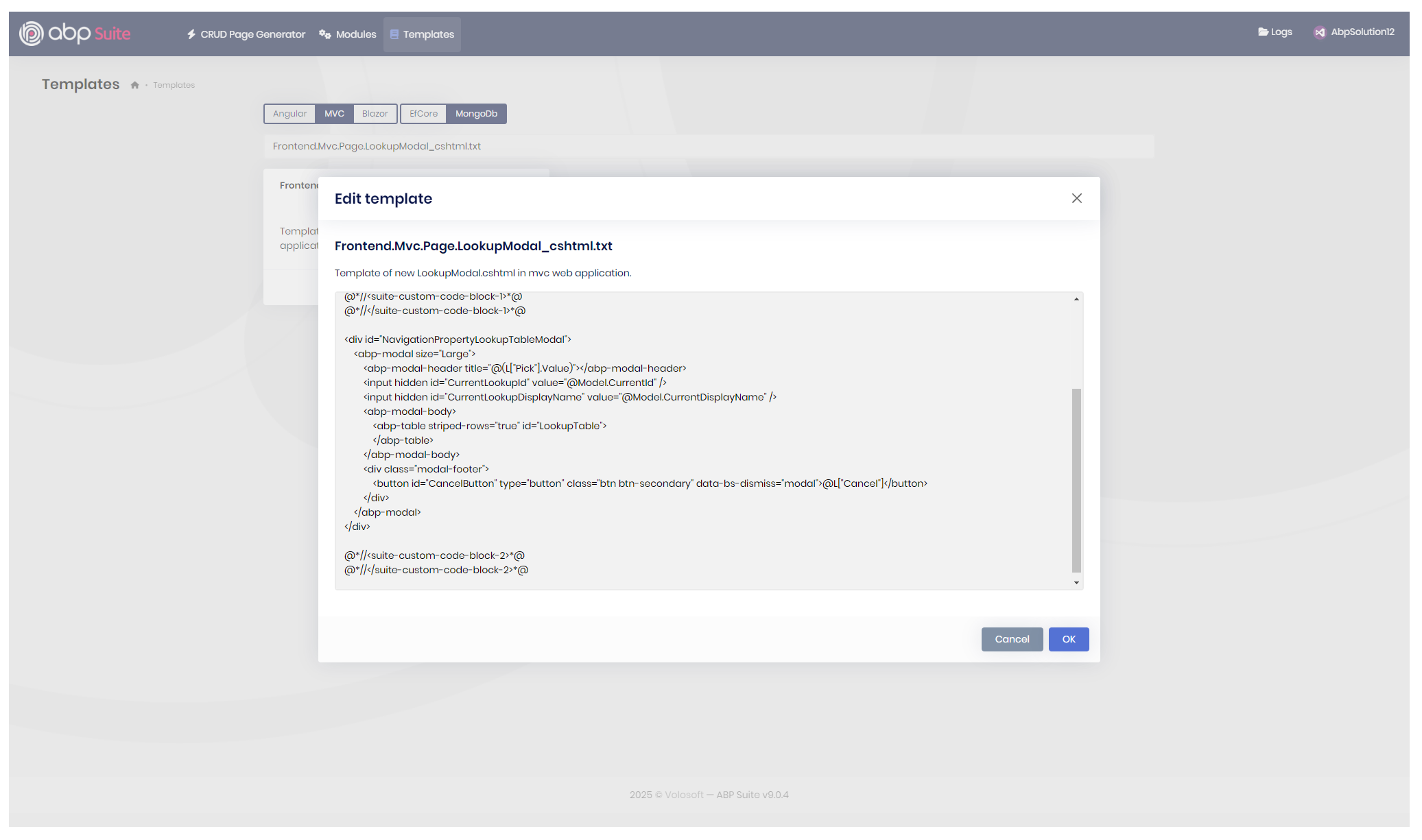
You can edit the template in the ABP Suite, and then it will not be overridden by ABP Suite (Frontend.Mvc.Page.LookupModal_cshtml.txt):
Here are the related documents that you should check:
Hi, I have assigned an angular team member to answer your question. She will better assist you in your problem (since https://abp.io/support/questions/8665/Issue-Creating-Proxies#answer-3a17aa1c-73ab-db44-8941-f6c140b82fc4 this did not fix your problem).
Regards.
Good morning, the entity structure has no effect. Since the error appeared Ive tested minimal entities with just a single property for Name, no relationships. Most CRUD checkmarks work fine until I mark the 'Create backend' flag. The UI blazor pages are generated correctly if the flag is not marked.
The recent solutions were removed after reinstalling the Studio/Suite, I have also tested to remove the project from suite, clean and rebuild, re added the project.
Ive uninstalled the Studio, the cli and the suite. Removed the UserProfile/.abp folder. And tested any kind of compatibility between the Cli from versions 0.9.23-0.9.19 and Suite 9.0.1-9.0.4, all having the same error.Today I setup a new partition with a new windows, Ive reinstalled all dependencies once to the most recent versions and came up to the same error.
Edit: Checking our repo history, I had been able to generate a CRUD 2 weeks ago. However, I only needed part of the generation files so I made removed and made some changes to the generated files. My teammate successfully added many entities after this change I made. Today I checkout the version of my project before I generated my last CRUD change and this time the process failed with the same error.
Hi again, it's really weird to hear that. I will try to reproduce the problem with different combinations and also check the code side to see why it might be happening. I will let you know ASAP.
Regards.
Hi! I apologize for the broken link. I've shared a new by mail.
Let me know if you need anything.
Hi, thanks for updating the link. I will examine your project today and write back to you asap.
Regards.
Hi sir, it's still err like that. I don't know why if I using version 8 then it's ok. Could you give me another solution?
Can you share your application via email to support@abp.io (with ticket number), so I can quickly check and fix the problem?
Regards.
Hi, I have tried to reproduce the error as well, without success. I will continue to try to find the issue why this is happening in our specific project, I will get back to you regarding this if there are any progress. Thanks for your help!
Thanks. We will wait for a response from you. Regards.
Hi EngincanV, Here is DbContextFactory file. Could you help me to check?
using System;
using System.IO;
using Microsoft.EntityFrameworkCore;
using Microsoft.EntityFrameworkCore.Design;
using Microsoft.Extensions.Configuration;

namespace Eduverse.EntityFrameworkCore;

/* This class is needed for EF Core console commands
 * (like Add-Migration and Update-Database commands) */
public abstract class EduverseDbContextFactoryBase<TDbContext> : IDesignTimeDbContextFactory<TDbContext>
    where TDbContext : DbContext
{
    public TDbContext CreateDbContext(string[] args)
    {
        // https://www.npgsql.org/efcore/release-notes/6.0.html#opting-out-of-the-new-timestamp-mapping-logic
        AppContext.SetSwitch("Npgsql.EnableLegacyTimestampBehavior", true);

        var configuration = BuildConfiguration();

        EduverseEfCoreEntityExtensionMappings.Configure();

        var builder = new DbContextOptionsBuilder<TDbContext>()
            .UseNpgsql(configuration.GetConnectionString("Default"));

        return CreateDbContext(builder.Options);
    }

    protected abstract TDbContext CreateDbContext(DbContextOptions<TDbContext> dbContextOptions);

    protected IConfigurationRoot BuildConfiguration()
    {
        var builder = new ConfigurationBuilder()
            .SetBasePath(Path.Combine(Directory.GetCurrentDirectory(), "../Eduverse.DbMigrator/"))
            .AddJsonFile("appsettings.json", optional: false);

        return builder.Build();
    }
}
Hi again, can you make the following change and let me know if it fix your problem:
- .SetBasePath(Path.Combine(Directory.GetCurrentDirectory(), "../Eduverse.DbMigrator/"))
+ .SetBasePath(Path.Combine(Directory.GetCurrentDirectory(), @"..\Eduverse.DbMigrator\"))
How can i redirect a user to the homepage after logout rather then the "You have been logged out" page?
There should be an OpenIddictDataSeedContributor class under your domain project, you should open it and update the postLogoutRedirectUri:
                // postLogoutRedirectUri: $"{blazorRootUrl}/authentication/logout-callback",
                postLogoutRedirectUri: $"{blazorRootUrl}",
Then, run the dbmigrator project to update your database. (since you already have a database, this change will not be applied, so you can manually update in database for now - or delete the OpenIddictApplication table records and run the dbmigrator)
Hi, please see this thread. This was a known-issue and we fixed with https://github.com/abpframework/abp/pull/21797









