I have done it like this: Reference Code below
  public virtual async Task<SaasTenantDto> CreateSiteTenanatAsync(SaasTenantCreateDto input)
  {
      input.ConnectionStrings = await NormalizedConnectionStringsAsync(input.ConnectionStrings);

      Tenant tenant = null;

      async Task CreateTenantAsync()
      {
          tenant = await TenantManager.CreateAsync(input.Name, input.EditionId);

          if (!input.ConnectionStrings.Default.IsNullOrWhiteSpace())
          {
              tenant.SetDefaultConnectionString(input.ConnectionStrings.Default);
          }

          if (input.ConnectionStrings.Databases != null)
          {
              foreach (var database in input.ConnectionStrings.Databases)
              {
                  tenant.SetConnectionString(database.DatabaseName, database.ConnectionString);
              }
          }

          await CheckConnectionStringAsync(tenant);

          input.MapExtraPropertiesTo(tenant);

          tenant.SetActivationState(input.ActivationState);
          if (tenant.ActivationState == TenantActivationState.ActiveWithLimitedTime)
          {
              tenant.SetActivationEndDate(input.ActivationEndDate);
          }
          /* Auto saving to ensure TenantCreatedEto handler can get the tenant! */
          await TenantRepository.InsertAsync(tenant, autoSave: true);
      }

      if (input.ConnectionStrings.Default.IsNullOrWhiteSpace() &&
          input.ConnectionStrings.Databases.IsNullOrEmpty())
      {
          /* Creating the tenant in the current UOW */
          await CreateTenantAsync();
      }
      else
      {
          /* Creating the tenant in a separate UOW to ensure it is created
           * before creating the database.
           * TODO: We should remove inner UOW once https://github.com/abpframework/abp/issues/6126 is done
           */
          using (var uow = UnitOfWorkManager.Begin(requiresNew: true))
          {
              await CreateTenantAsync();
              await uow.CompleteAsync();
          }
      }
      var adminName = "admin"; // default
      if (input.ExtraProperties.TryGetValue("adminName", out var nameObj) && nameObj is string nameStr && !string.IsNullOrWhiteSpace(nameStr))
      {
          adminName = nameStr;
      }


      await DistributedEventBus.PublishAsync(
          new TenantCreatedEto
          {
              Id = tenant.Id,
              Name = tenant.Name,
              Properties =
              {
                      {"AdminEmail", input.AdminEmailAddress},
                      {"AdminPassword", input.AdminPassword},
                 **     { "AdminName", adminName}** Added this line still not working
              }
          }
      );

      return ObjectMapper.Map<Tenant, SaasTenantDto>(tenant);
  }
We are programmatically creating directories and uploading files from another part of our application. The directories and files appear correctly in the ABP File Management module, confirming successful storage However, we are experiencing issues when trying to download these files from abp file management module.
Reference Code: private async Task<FileDescriptor> UploadFileAsync(SiteFile file, Guid directoryId) { if (file == null) throw new UserFriendlyException("Invalid file provided.");
      // Convert the byte array to a Base64 string
      string fileContentBase64 = Convert.ToBase64String(file.Content);

      byte[] fileBytes = Convert.FromBase64String(fileContentBase64);

      var fileDescriptor = new FileDescriptor(
          id: GuidGenerator.Create(),
          name: file.Name,
          mimeType: file.MimeType,
          directoryId: directoryId,
          size: fileBytes.Length,
          tenantId : _currentTenant?.Id
      );

      await _fileDescriptorRepository.InsertAsync(fileDescriptor);

      using var stream = new MemoryStream(fileBytes);
      await _blobContainer.SaveAsync(fileDescriptor.Id.ToString(), stream);

      return fileDescriptor;
  }
public class SiteFile : FullAuditedEntity<Guid> {
public Guid Id { get; set; }
public string? planType { get; set; }
public string Name { get; set; }
public string MimeType { get; set; }
public long Size { get; set; }
public byte[] Content { get; set; }
}
I want to read the time zone of the user from setting in abp. where can i get those setting or configure those setting to the user so that i can use it to convert UTC to user local time

**When I created a Tenant in the Angular UI It is creating a tenant in the saastenant table and User in AbpUser Table the Both **
When I am creating the Tenant through the swagger Post API,i It is creating a tenant in the saastenant table but not the User in AbpUser Table
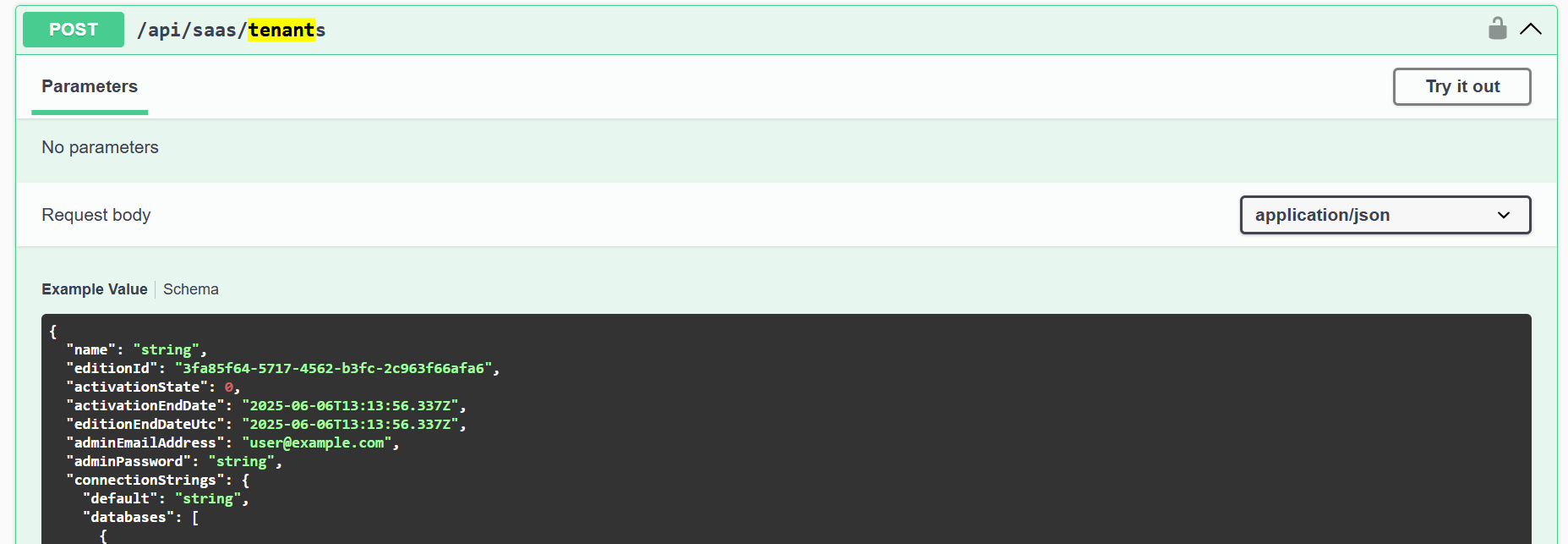
To create an user and tenants do we have other api's need's to invoked




