I did this

Now it gives
>gulp build
Error [ERR_REQUIRE_ESM]: require() of ES Module M:\Bookstore\Bookstore\aspnet-core\src\Bookstore.Web\node_modules\globby\index.js from M:\Bookstore\Bookstore\aspnet-core\src\Bookstore.Web\gulpfile.js not supported.
Instead change the require of index.js in M:\Bookstore\Bookstore\aspnet-core\src\Bookstore.Web\gulpfile.js to a dynamic import() which is available in all CommonJS modules.
    at Object.<anonymous> (M:\Bookstore\Bookstore\aspnet-core\src\Bookstore.Web\gulpfile.js:7:14) {
  code: 'ERR_REQUIRE_ESM'
}
Can you give me the process at the beginning because i couldn't solve the problem. What should I delete and what should I create?
It gives this error also i am using mvc not angular version
>gulp build
Error: Cannot find module 'globby'
Require stack:
- M:\Bookstore\Bookstore\aspnet-core\src\Bookstore.Web\gulpfile.js
- C:\Users\Monster\AppData\Roaming\npm\node_modules\gulp-cli\lib\shared\require-or-import.js
- C:\Users\Monster\AppData\Roaming\npm\node_modules\gulp-cli\lib\versioned\^4.0.0\index.js
- C:\Users\Monster\AppData\Roaming\npm\node_modules\gulp-cli\index.js
- C:\Users\Monster\AppData\Roaming\npm\node_modules\gulp-cli\bin\gulp.js
    at Module._resolveFilename (node:internal/modules/cjs/loader:1077:15)
    at Module._load (node:internal/modules/cjs/loader:922:27)
    at Module.require (node:internal/modules/cjs/loader:1143:19)
    at require (node:internal/modules/cjs/helpers:110:18)
    at Object.<anonymous> (M:\DormenProjeler\OBINEX\aspnet-core\src\Bookstore.Web\gulpfile.js:7:14)
    at Module._compile (node:internal/modules/cjs/loader:1256:14)
    at Module._extensions..js (node:internal/modules/cjs/loader:1310:10)
    at Module.load (node:internal/modules/cjs/loader:1119:32)
    at Module._load (node:internal/modules/cjs/loader:960:12)
    at Module.require (node:internal/modules/cjs/loader:1143:19) {
  code: 'MODULE_NOT_FOUND',
  requireStack: [
    'M:\\Bookstore\\Bookstore\\aspnet-core\\src\\Bookstore.Web\\gulpfile.js',
    'C:\\Users\\Monster\\AppData\\Roaming\\npm\\node_modules\\gulp-cli\\lib\\shared\\require-or-import.js',
    'C:\\Users\\Monster\\AppData\\Roaming\\npm\\node_modules\\gulp-cli\\lib\\versioned\\^4.0.0\\index.js',
    'C:\\Users\\Monster\\AppData\\Roaming\\npm\\node_modules\\gulp-cli\\index.js',
    'C:\\Users\\Monster\\AppData\\Roaming\\npm\\node_modules\\gulp-cli\\bin\\gulp.js'
  ]
}```
No i don't have gulpfile.js in my root folder.
{ "version": "1.0.0", "name": "my-app", "private": true, "dependencies": { "@volo/abp.aspnetcore.mvc.ui.theme.leptonx": "~2.3.1", "@volo/account": "~7.3.2", "@volo/audit-logging": "~7.3.2", "@volo/chat": "~7.3.2", "@volo/identity": "~7.3.2", "@volo/language-management": "~7.3.2", "@volo/saas": "~7.3.2", "gulp": "^4.0.2", "inputmask": "^5.0.8", "libs": "^0.1.2", "touch": "^3.1.0" } }
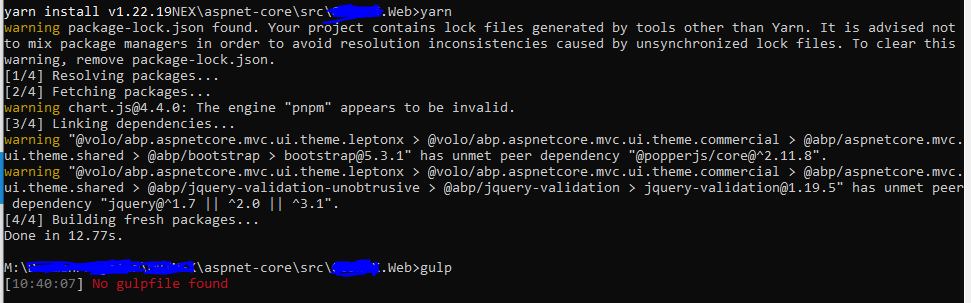 as you can see i deleted my node.modules and i give the yarn & gulp command but it couldn't find gulp file.
thanks a lot
Thanks for your answer. the second issue
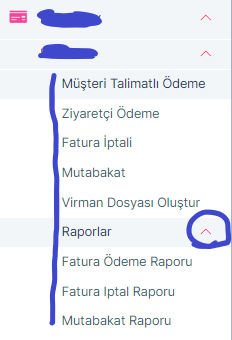 as you can see the image we have 1 dropdown an it has also 1 dropdown inside the menu. the second one doesnt have margin left property. i give the margin left with its id.is there any way solve this problem because i dont want to give each second dropdown
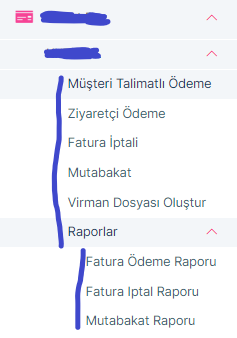
this is what i want for all menu
Hi, We are using Lepton X. As you can see the screenshot our menu item name doesn't fit the menu. It has 3 dot end of the line.









