Hi, thanks for the suggestion.
Sadly no change, added the decorator to the entity class and/or the base, both.
[DisableAuditing]
public abstract class CurrentOrderBase : Entity<string>
The error is in the query itself for sure .
SELECT COUNT_BIG(*) FROM [app_prodman].[CurrentOrders] AS [c] WHERE [c].[T21_G_AFMONTSP] <= @__t21_G_AFMONTSPMax_Value_0<<<====== should not be here!
There should NOT be a WHERE clause. I think above 128 filter objects being passed the filterarray in the framework is being dirtied somehow and injecting this filter comparison that just shouldn't even be in the Count nor Select logic, then crashes out completely. Remind this is the initial load on the page and as evidenced above when the filter count is below 100 or 120 it works, when above, weird things start happening.
I have also now verified this against SQL EDGE (original) and SQL Server (WINDOWS) .
Same behavior.
hereby also found when stepping through the foreced-breakpoints:
items [List] = Error processing 'variables' request. The operation was canceled.
Check the docs before asking a question: https://abp.io/docs/latest --> Couldn't find anything
Check the samples to see the basic tasks: https://abp.io/docs/latest/samples --> Couldn't find anything
The exact solution to your question may have been answered before, and please first use the search on the homepage. --> Couldn't find anything
Provide us with the following info: Solution Configuration button. --> Not available for my solution. Further, the "Initialize Existing Solution" feature in Studio crashes.
First case 135 Properties/Fields in my table:
[14:32:56 INF] Executed DbCommand (15ms) [Parameters=[@__aaa128Max_Value_0='?' (DbType = Int32)], CommandType='Text', CommandTimeout='30'] SELECT COUNT_BIG(*) FROM [AppCurrentOrderTwos] AS [a] WHERE [a].[Aaa128] <= @__aaa128Max_Value_0 [14:32:56 DBG] Closing data reader to 'ProductionMan' on server '127.0.0.1'. [14:32:56 DBG] A data reader for 'ProductionMan' on server '127.0.0.1' is being disposed after spending 0ms reading results. [14:32:56 DBG] Closing connection to database 'ProductionMan' on server '127.0.0.1'. [14:32:56 DBG] Closed connection to database 'ProductionMan' on server '127.0.0.1' (0ms). The program '[26203] ProductionMan.Blazor' has exited with code 0 (0x0).
no information is percolated up to the debug logs even through i've tried everything to enable more logging.
Critically -- I see that there is an error at passing a variable: WHERE [a].[Aaa128] <= @__aaa128Max_Value_0
Aaa128 is interesting as 128 is an interesting number. As this is a fresh load to the page, there are no filtersl. yet Aaa128 is passing a variable? or is that a bug in the framework? the statement should just read: SELECT COUNT_BIG(*) FROM [AppCurrentOrderTwos] AS [a] .. with no where clause if there are no variables passed. is the magic number 128 causing issues?
What is or is there a limit of the parameters that can be passed. and how to i increase it? It is my understanding that the MSSQL parameter limit is 2100. The reason for this project was due to 256 column limits in Access. Now to hit this is going to kill a very critical project for which i chose this abp.io platform. is this bug platform or ef? the 128 is odd.
SECOND CASE: 7) I INCREASED back up to 127... and i get all new errors.
7.1) First. Repository.GetCountAsync() ran okay and produced the following. [15:08:23 INF] Executed DbCommand (2ms) [Parameters=[], CommandType='Text', CommandTimeout='30'] SELECT COUNT_BIG(*) FROM [AppCurrentOrderTwos] AS [a]
This is the expected result.
7.2) But this time (with and OrdinalIndex of 126 in my json file for the crud generator) ... we die at the ....Repository.GetListAsync() call in the service. Before we died on the count when the field count was 135.
And we finally get an Exception returned!
[15:09:18 DBG] Executing DbCommand [Parameters=[@__p_0='?' (DbType = Int32), @__p_1='?' (DbType = Int32)], CommandType='Text', CommandTimeout='30'] SELECT [a].[Id], [a].[Aaa1], [a].[Aaa10], [a].[Aaa100], [a].[Aaa101], [a].[Aaa102], [a].[Aaa103], [a].[Aaa104], [a].[Aaa105], [a].[Aaa106], [a].[Aaa107], [a].[Aaa108], [a].[Aaa109], [a].[Aaa11], [a].[Aaa110], [a].[Aaa111], [a].[Aaa112], [a].[Aaa113], [a].[Aaa114], [a].[Aaa115], [a].[Aaa116], [a].[Aaa117], [a].[Aaa118], [a].[Aaa119], [a].[Aaa12], [a].[Aaa120], [a].[Aaa121], [a].[Aaa122], [a].[Aaa123], [a].[Aaa124], [a].[Aaa125], [a].[Aaa126], [a].[Aaa127], [a].[Aaa13], [a].[Aaa14], [a].[Aaa15], [a].[Aaa16], [a].[Aaa17], [a].[Aaa18], [a].[Aaa19], [a].[Aaa2], [a].[Aaa20], [a].[Aaa21], [a].[Aaa22], [a].[Aaa23], [a].[Aaa24], [a].[Aaa25], [a].[Aaa26], [a].[Aaa27], [a].[Aaa28], [a].[Aaa29], [a].[Aaa3], [a].[Aaa30], [a].[Aaa31], [a].[Aaa32], [a].[Aaa33], [a].[Aaa34], [a].[Aaa35], [a].[Aaa36], [a].[Aaa37], [a].[Aaa38], [a].[Aaa39], [a].[Aaa4], [a].[Aaa40], [a].[Aaa41], [a].[Aaa42], [a].[Aaa43], [a].[Aaa44], [a].[Aaa45], [a].[Aaa46], [a].[Aaa47], [a].[Aaa48], [a].[Aaa49], [a].[Aaa5], [a].[Aaa50], [a].[Aaa51], [a].[Aaa52], [a].[Aaa53], [a].[Aaa54], [a].[Aaa55], [a].[Aaa56], [a].[Aaa57], [a].[Aaa58], [a].[Aaa59], [a].[Aaa6], [a].[Aaa60], [a].[Aaa61], [a].[Aaa62], [a].[Aaa63], [a].[Aaa64], [a].[Aaa65], [a].[Aaa66], [a].[Aaa67], [a].[Aaa68], [a].[Aaa69], [a].[Aaa7], [a].[Aaa70], [a].[Aaa71], [a].[Aaa72], [a].[Aaa73], [a].[Aaa74], [a].[Aaa75], [a].[Aaa76], [a].[Aaa77], [a].[Aaa78], [a].[Aaa79], [a].[Aaa8], [a].[Aaa80], [a].[Aaa81], [a].[Aaa82], [a].[Aaa83], [a].[Aaa84], [a].[Aaa85], [a].[Aaa86], [a].[Aaa87], [a].[Aaa88], [a].[Aaa89], [a].[Aaa9], [a].[Aaa90], [a].[Aaa91], [a].[Aaa92], [a].[Aaa93], [a].[Aaa94], [a].[Aaa95], [a].[Aaa96], [a].[Aaa97], [a].[Aaa98], [a].[Aaa99] FROM [AppCurrentOrderTwos] AS [a] ORDER BY [a].[Aaa1] OFFSET @__p_0 ROWS FETCH NEXT @__p_1 ROWS ONLY [15:09:18 DBG] Closing connection to database 'ProductionMan' on server '127.0.0.1'. [15:09:18 DBG] Closed connection to database 'ProductionMan' on server '127.0.0.1' (0ms). Exception thrown: 'Microsoft.Data.SqlClient.SqlException' in System.Private.CoreLib.dll
[15:09:18 ERR] An exception occurred while iterating over the results of a query for context type 'ProductionMan.EntityFrameworkCore.ProductionManDbContext'.
Microsoft.Data.SqlClient.SqlException (0x80131904): The number of rows provided for a FETCH clause must be greater then zero.
at Microsoft.Data.SqlClient.SqlConnection.OnError(SqlException exception, Boolean breakConnection, Action1 wrapCloseInAction) at Microsoft.Data.SqlClient.SqlInternalConnection.OnError(SqlException exception, Boolean breakConnection, Action1 wrapCloseInAction)
at Microsoft.Data.SqlClient.TdsParser.ThrowExceptionAndWarning(TdsParserStateObject stateObj, Boolean callerHasConnectionLock, Boolean asyncClose)
at Microsoft.Data.SqlClient.TdsParser.TryRun(RunBehavior runBehavior, SqlCommand cmdHandler, SqlDataReader dataStream, BulkCopySimpleResultSet bulkCopyHandler, TdsParserStateObject stateObj, Boolean& dataReady)
at Microsoft.Data.SqlClient.SqlDataReader.TryHasMoreRows(Boolean& moreRows)
at Microsoft.Data.SqlClient.SqlDataReader.TryReadInternal(Boolean setTimeout, Boolean& more)
at Microsoft.Data.SqlClient.SqlDataReader.ReadAsyncExecute(Task task, Object state)
at Microsoft.Data.SqlClient.SqlDataReader.InvokeAsyncCall[T](SqlDataReaderBaseAsyncCallContext1 context) --- End of stack trace from previous location --- at Microsoft.EntityFrameworkCore.Query.Internal.BufferedDataReader.BufferedDataRecord.InitializeAsync(DbDataReader reader, IReadOnlyList1 columns, CancellationToken cancellationToken)
2
at Microsoft.EntityFrameworkCore.Query.Internal.BufferedDataReader.InitializeAsync(IReadOnlyList1 columns, CancellationToken cancellationToken) 2 at Microsoft.EntityFrameworkCore.Storage.RelationalCommand.ExecuteReaderAsync(RelationalCommandParameterObject parameterObject, CancellationToken cancellationToken) at Microsoft.EntityFrameworkCore.Query.Internal.SplitQueryingEnumerable1.AsyncEnumerator.InitializeReaderAsync(AsyncEnumerator enumerator, CancellationToken cancellationToken)
at Microsoft.EntityFrameworkCore.SqlServer.Storage.Internal.SqlServerExecutionStrategy.ExecuteAsync[TState,TResult](TState state, Func4 operation, Func4 verifySucceeded, CancellationToken cancellationToken)
at Microsoft.EntityFrameworkCore.Query.Internal.SplitQueryingEnumerable1.AsyncEnumerator.MoveNextAsync() ClientConnectionId:601f5230-7e14-41e3-ac18-dee4ce8acce3 Error Number:10744,State:1,Class:15 Microsoft.Data.SqlClient.SqlException (0x80131904): The number of rows provided for a FETCH clause must be greater then zero. at Microsoft.Data.SqlClient.SqlConnection.OnError(SqlException exception, Boolean breakConnection, Action1 wrapCloseInAction)
at Microsoft.Data.SqlClient.SqlInternalConnection.OnError(SqlException exception, Boolean breakConnection, Action1 wrapCloseInAction) at Microsoft.Data.SqlClient.TdsParser.ThrowExceptionAndWarning(TdsParserStateObject stateObj, Boolean callerHasConnectionLock, Boolean asyncClose) at Microsoft.Data.SqlClient.TdsParser.TryRun(RunBehavior runBehavior, SqlCommand cmdHandler, SqlDataReader dataStream, BulkCopySimpleResultSet bulkCopyHandler, TdsParserStateObject stateObj, Boolean& dataReady) at Microsoft.Data.SqlClient.SqlDataReader.TryHasMoreRows(Boolean& moreRows) at Microsoft.Data.SqlClient.SqlDataReader.TryReadInternal(Boolean setTimeout, Boolean& more) at Microsoft.Data.SqlClient.SqlDataReader.ReadAsyncExecute(Task task, Object state) at Microsoft.Data.SqlClient.SqlDataReader.InvokeAsyncCall[T](SqlDataReaderBaseAsyncCallContext1 context)
--- End of stack trace from previous location ---
at Microsoft.EntityFrameworkCore.Query.Internal.BufferedDataReader.BufferedDataRecord.InitializeAsync(DbDataReader reader, IReadOnlyList1 columns, CancellationToken cancellationToken) 2 at Microsoft.EntityFrameworkCore.Query.Internal.BufferedDataReader.InitializeAsync(IReadOnlyList1 columns, CancellationToken cancellationToken)
2
at Microsoft.EntityFrameworkCore.Storage.RelationalCommand.ExecuteReaderAsync(RelationalCommandParameterObject parameterObject, CancellationToken cancellationToken)
at Microsoft.EntityFrameworkCore.Query.Internal.SplitQueryingEnumerable1.AsyncEnumerator.InitializeReaderAsync(AsyncEnumerator enumerator, CancellationToken cancellationToken) at Microsoft.EntityFrameworkCore.SqlServer.Storage.Internal.SqlServerExecutionStrategy.ExecuteAsync[TState,TResult](TState state, Func4 operation, Func4 verifySucceeded, CancellationToken cancellationToken) at Microsoft.EntityFrameworkCore.Query.Internal.SplitQueryingEnumerable1.AsyncEnumerator.MoveNextAsync()
2
at Microsoft.EntityFrameworkCore.EntityFrameworkQueryableExtensions.ToListAsync[TSource](IQueryable`1 source, CancellationToken cancellationToken)
ClientConnectionId:601f5230-7e14-41e3-ac18-dee4ce8acce3
Error Number:10744,State:1,Class:15 Exception thrown: 'Microsoft.Data.SqlClient.SqlException' in System.Private.CoreLib.dll [15:09:19 ERR] ---------- RemoteServiceErrorInfo ---------- { "code": null, "message": "An internal error occurred during your request!", "details": null, "data": null, "validationErrors": null }
15:09:19 ERR] The number of rows provided for a FETCH clause must be greater then zero.
Microsoft.Data.SqlClient.SqlException (0x80131904): The number of rows provided for a FETCH clause must be greater then zero.
at Microsoft.Data.SqlClient.SqlConnection.OnError(SqlException exception, Boolean breakConnection, Action1 wrapCloseInAction) at Microsoft.Data.SqlClient.SqlInternalConnection.OnError(SqlException exception, Boolean breakConnection, Action1 wrapCloseInAction)
at Microsoft.Data.SqlClient.TdsParser.ThrowExceptionAndWarning(TdsParserStateObject stateObj, Boolean callerHasConnectionLock, Boolean asyncClose)
at Microsoft.Data.SqlClient.TdsParser.TryRun(RunBehavior runBehavior, SqlCommand cmdHandler, SqlDataReader dataStream, BulkCopySimpleResultSet bulkCopyHandler, TdsParserStateObject stateObj, Boolean& dataReady)
at Microsoft.Data.SqlClient.SqlDataReader.TryHasMoreRows(Boolean& moreRows)
at Microsoft.Data.SqlClient.SqlDataReader.TryReadInternal(Boolean setTimeout, Boolean& more)
at Microsoft.Data.SqlClient.SqlDataReader.ReadAsyncExecute(Task task, Object state)
at Microsoft.Data.SqlClient.SqlDataReader.InvokeAsyncCall[T](SqlDataReaderBaseAsyncCallContext`1 context)
2
at Microsoft.EntityFrameworkCore.Storage.RelationalCommand.ExecuteReaderAsync(RelationalCommandParameterObject parameterObject, CancellationToken cancellationToken)
at Microsoft.EntityFrameworkCore.Query.Internal.SplitQueryingEnumerable1.AsyncEnumerator.InitializeReaderAsync(AsyncEnumerator enumerator, CancellationToken cancellationToken) at Microsoft.EntityFrameworkCore.SqlServer.Storage.Internal.SqlServerExecutionStrategy.ExecuteAsync[TState,TResult](TState state, Func4 operation, Func4 verifySucceeded, CancellationToken cancellationToken) at Microsoft.EntityFrameworkCore.Query.Internal.SplitQueryingEnumerable1.AsyncEnumerator.MoveNextAsync()
2
at Microsoft.EntityFrameworkCore.EntityFrameworkQueryableExtensions.ToListAsync[TSource](IQueryable1 source, CancellationToken cancellationToken) at ProductionMan.CurrentOrderTwosNs.EfCoreCurrentOrderTwoRepositoryBase.GetListAsync(String filterText, String aaa1, Nullable1 aaa2Min, Nullable1 aaa2Max, Nullable1 aaa3Min, Nullable1 aaa3Max, Nullable1 aaa4Min, Nullable1 aaa4Max, Nullable1 aaa5Min, Nullable1 aaa5Max, Nullable1 aaa6Min, Nullable1 aaa6Max, Nullable1 aaa7Min, Nullable1 aaa7Max, Nullable1 aaa8Min, Nullable1 aaa8Max, Nullable1 aaa9Min, Nullable1 aaa9Max, Nullable1 aaa10Min, Nullable1 aaa10Max, Nullable1 aaa11Min, Nullable1 aaa11Max, Nullable1 aaa12Min, Nullable1 aaa12Max, Nullable1 aaa13Min, Nullable1 aaa13Max, Nullable1 aaa14Min, Nullable1 aaa14Max, Nullable1 aaa15Min, Nullable1 aaa15Max, Nullable1 aaa16Min, Nullable1 aaa16Max, Nullable1 aaa17Min, Nullable1 aaa17Max, Nullable1 aaa18Min, Nullable1 aaa18Max, Nullable1 aaa19Min, Nullable1 aaa19Max, Nullable1 aaa20Min, Nullable1 aaa20Max, Nullable1 aaa21Min, Nullable1 aaa21Max, Nullable1 aaa22Min, Nullable1 aaa22Max, Nullable1 aaa23Min, Nullable1 aaa23Max, Nullable1 aaa24Min, Nullable1 aaa24Max, Nullable1 aaa25Min, Nullable1 aaa25Max, Nullable1 aaa26Min, Nullable1 aaa26Max, Nullable1 aaa27Min, Nullable1 aaa27Max, Nullable1 aaa28Min, Nullable1 aaa28Max, Nullable1 aaa29Min, Nullable1 aaa29Max, Nullable1 aaa30Min, Nullable1 aaa30Max, Nullable1 aaa31Min, Nullable1 aaa31Max, Nullable1 aaa32Min, Nullable1 aaa32Max, Nullable1 aaa33Min, Nullable1 aaa33Max, Nullable1 aaa34Min, Nullable1 aaa34Max, Nullable1 aaa35Min, Nullable1 aaa35Max, Nullable1 aaa36Min, Nullable1 aaa36Max, Nullable1 aaa37Min, Nullable1 aaa37Max, Nullable1 aaa38Min, Nullable1 aaa38Max, Nullable1 aaa39Min, Nullable1 aaa39Max, Nullable1 aaa40Min, Nullable1 aaa40Max, Nullable1 aaa41Min, Nullable1 aaa41Max, Nullable1 aaa42Min, Nullable1 aaa42Max, Nullable1 aaa43Min, Nullable1 aaa43Max, Nullable1 aaa44Min, Nullable1 aaa44Max, Nullable1 aaa45Min, Nullable1 aaa45Max, Nullable1 aaa46Min, Nullable1 aaa46Max, Nullable1 aaa47Min, Nullable1 aaa47Max, Nullable1 aaa48Min, Nullable1 aaa48Max, Nullable1
.......
Any reports about "IsEnhancedModelMetadataSupported" errors after the 9.0 upgrade?
CLI:0.9.14 Suite 9.0.1 ABP references: 9.0.1 in app Type: Blazor Hybrid
Can resolve with : "Microsoft.AspNetCore.Mvc.ApiExplorer.IsEnhancedModelMetadataSupported": true in ProductionMan.Blazor.runtimeconfig.json. is this correct? or any other changes to make?
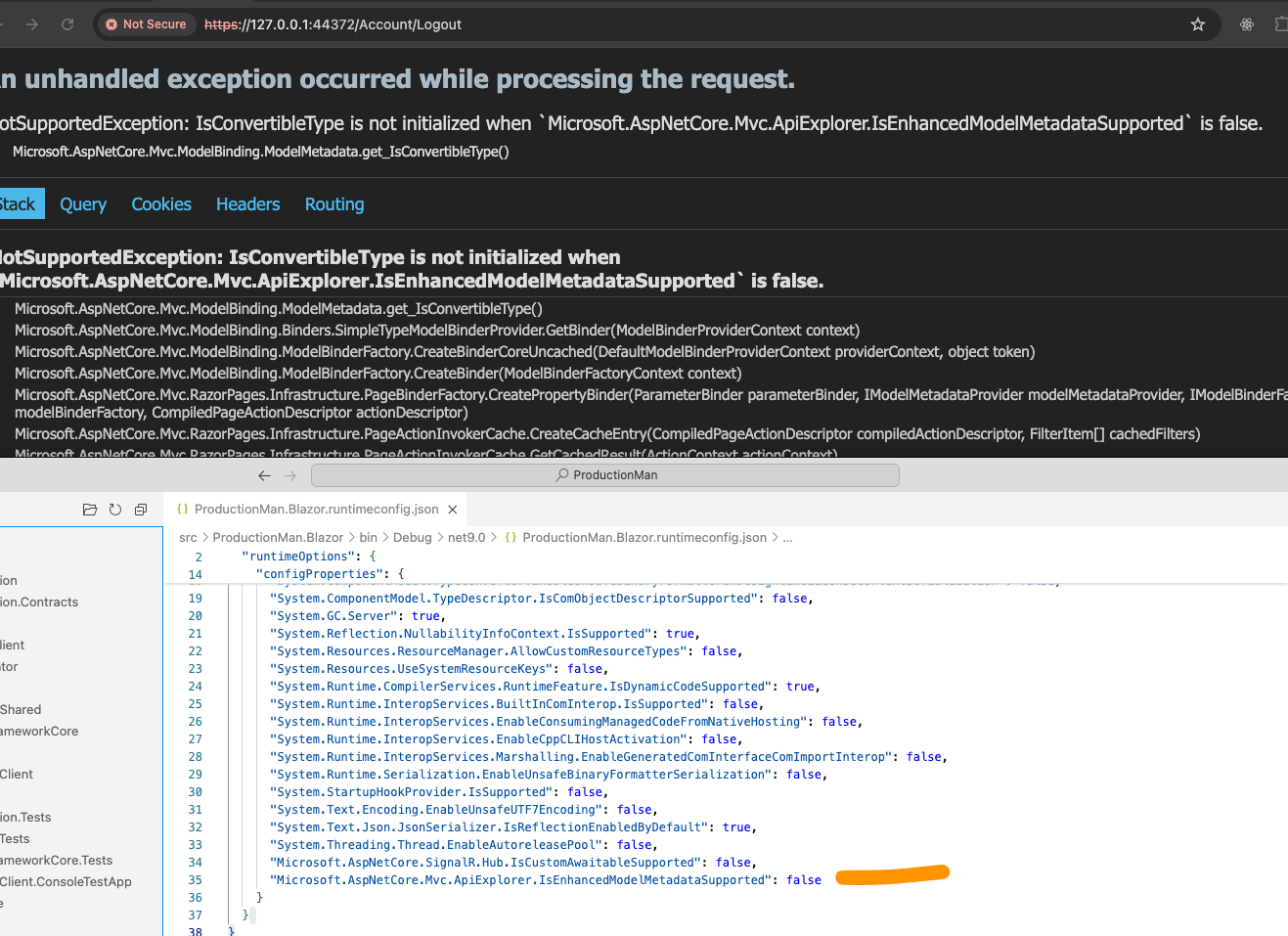
EDIT:
just found this: https://github.com/dotnet/aspnetcore/issues/58926
Verions:** 8.3.2** Blazor Web App / Hybrid MASTER > CHILD Templating : 2 problems 1-N and N-N Relation
Building a 1-N and N-N Relation is fine. If you add a relation to the master after the child is built you get a series of errors. In a recent version i'm confident I was able to do this with only the Blazor template error, not DTO error. The DTO error seems new. (maybe I need to reboot, i dunno.. buti've tested 3 times now)
ISSUE 1: BLAZOR TEMPLATE missing closing /Content and /Tabs tags
ISSUE 2: DTO not being generated correctly.
These behaviors ONLY happen when you create the 1-N/N-N AFTER the child relation.
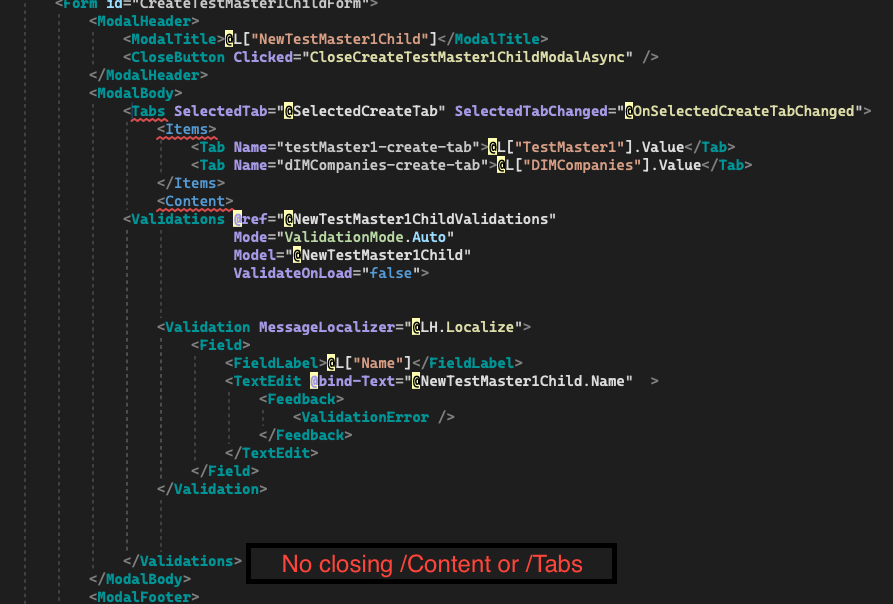
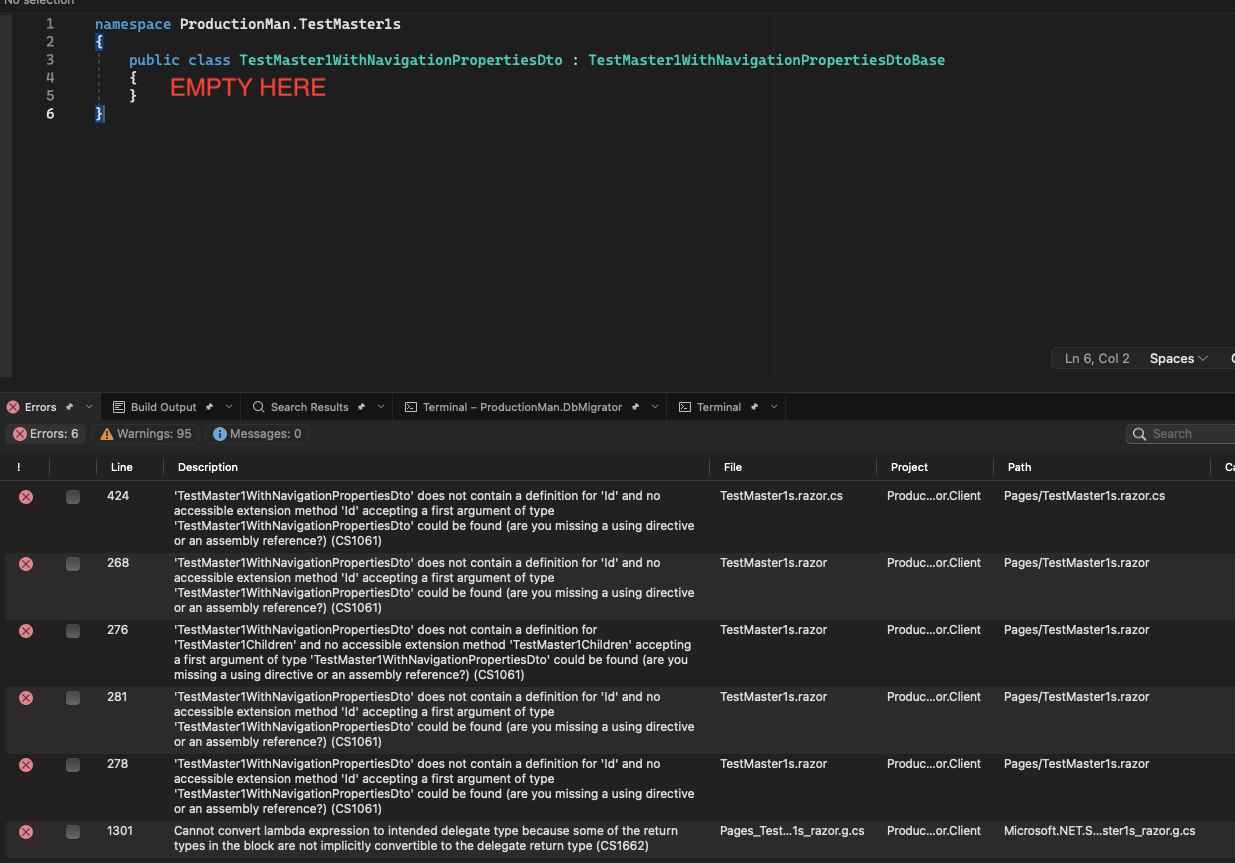
For me is 3) Web App/ Hybrid which i think the original poster of this ticket @DHILL is asking.
UI Type: Blazor WebApp(hybrid server and wasm)
Ability to set template for CRUD N-N Navigation collections -- so that may define <select> (versus the Autocomplete that is currently default).
Without it: it means it means will cost a lot of manual labor to go and override the control at the last minute. And means that for every CRUD refresh, we loose the UI fix and have to go-re-fix it interrupting flow and losing fluidity.
Can i get some +1 upvotes on this?
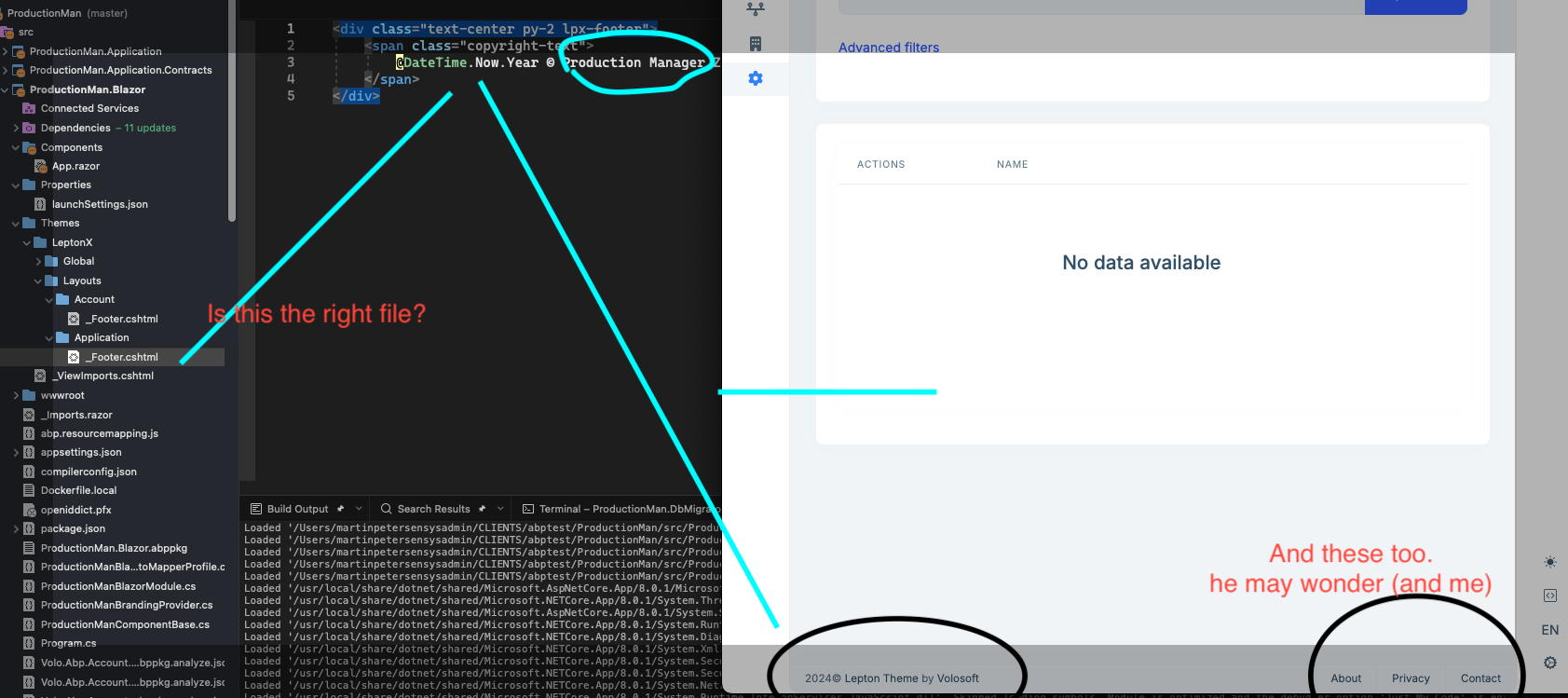
Is this about the lower menu bar ? Copyright, About, Privacy, Contact links? I have been unable to modify those templates as well, nor find them in the codebase.
Neither of the _Footer.cshtml files in /Themese/Leptonx/Layouts/Account or /Application have any affect on the application. I remain with the standard copyright footer. The templates are not in affect.
Perhaps this is what DHILL asks? @DHILL??









