ABP Auth Server Integration Issue
The problem description : I have an ABP Auth Server application with MSSQL database. My ABP HostApi created in another solution with PostgreSQL database. I am trying to link the Host Api with the Auth server by add the connection string of auth app in the Appsetting file of host Api , after adjust the link of the Auth server inside the appsetting file. the behavior of the api always use the PostgreSQL source as shown in image . Note: Auth Server using ABP 9.0.0 , and API Host using ABP 9.1.0
 How I implemented it: 1- add the modules connection strings in appsettings as shown
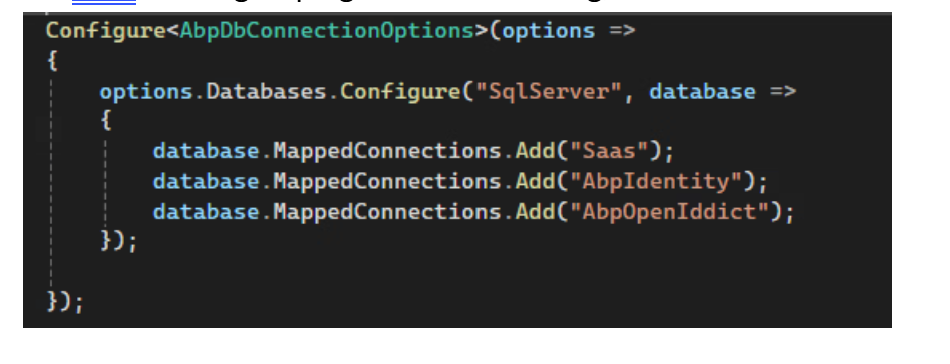
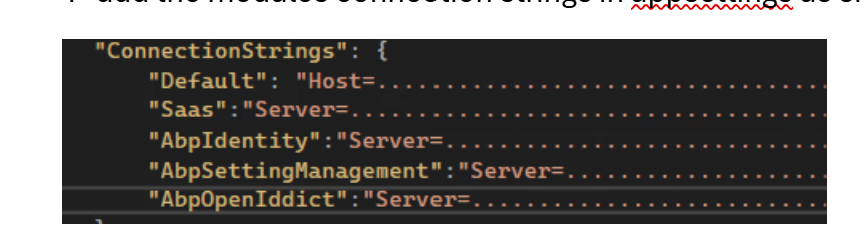 with out any changes in EntityFrameWorkCore module, the result not work.
2- Override the dB context with specific SQL provider , also not work
with out any changes in EntityFrameWorkCore module, the result not work.
2- Override the dB context with specific SQL provider , also not work
 3- I tired to use grouping connection string, also not work
Dear ABP Team,
We kindly request your assistance and an update regarding this request.
Thank you.
Hi ABP Support,
We are enterprise subscribers, and we’ve invested in the ABP platform to build a distributed microservice system. However, we are currently finding that the default microservice template promotes tight coupling through shared libraries, project references, and centralized DB access—particularly regarding the Identity module.
We need your architectural guidance and possibly a working sample for:
How can we fully decouple all services so that each microservice is independently buildable, testable, package, and deployable, using only REST/gRPC or messaging for communication?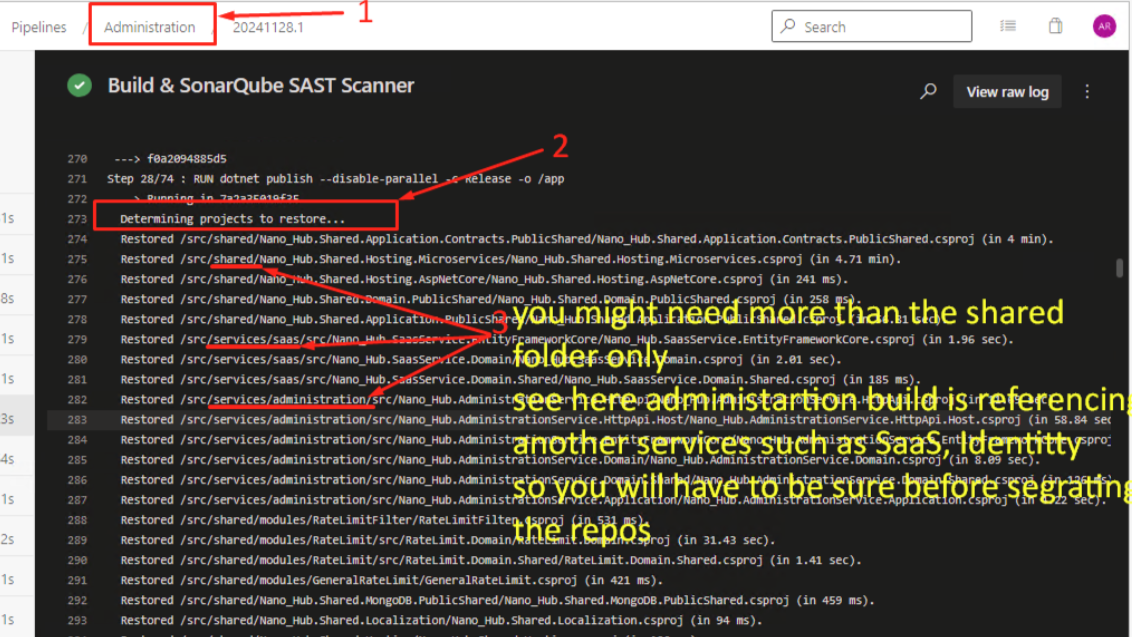
Dear ABP Support Team,
I hope this message finds you well.
I would like to inquire about best practices for implementing a microservices architecture using the ABP framework. Specifically, I am planning to design the system with the following requirements:
Could you please guide me on:
Note: Some of the microservices will use mongodb, some will use postgres, some will use MSSQL Thank you very much for your assistance. I look forward to your recommendations.
Distributed **event outbox ** for MongoDB not Added records to database
I enable both inbox and outbox events and set all configuration related with them when I publish the event and received by consumer new record is added to inbox collection in database but outbox is always empty
I try to publish from application service and also from domain but both not working
this is from application service: await _priorRequestRepository.InsertAsync(new PriorRequest()); await _distributedEventBus.PublishAsync( new PriorRequestPostedEto { PriorRequestInput = input.PriorRequest, TransactionID = output.TransactionID, } );
this is from domain public PriorRequest() { AddDistributedEvent(new PriorRequestPostedEto1());
}
this is my db context: [ConnectionStringName(PriorRequestServiceDbProperties.ConnectionStringName)] public class PriorRequestServiceMongoDbContext : AbpMongoDbContext, IPriorRequestServiceMongoDbContext, IHasEventInbox, IHasEventOutbox { public IMongoCollection<IncomingEventRecord> IncomingEvents => Collection<IncomingEventRecord>(); public IMongoCollection<OutgoingEventRecord> OutgoingEvents => Collection<OutgoingEventRecord>(); public IMongoCollection<PriorRequest> PriorRequests => Collection<PriorRequest>();
protected override void CreateModel(IMongoModelBuilder modelBuilder)
{
    base.CreateModel(modelBuilder);
    modelBuilder.Entity<PriorRequest>(b => { b.CollectionName = PriorRequestServiceDbProperties.DbTablePrefix + "PriorRequests"; });

    modelBuilder.ConfigurePriorRequestService();
    modelBuilder.ConfigureEventInbox();
    modelBuilder.ConfigureEventOutbox();
}
}
and this is the module configuration private void ConfigureDistributedEventBus() { Configure<AbpDistributedEventBusOptions>(options => { options.Inboxes.Configure(config => { config.UseMongoDbContext<PriorRequestServiceMongoDbContext>(); });
     options.Outboxes.Configure(config =>
     {
         config.UseMongoDbContext<PriorRequestServiceMongoDbContext>();
     });
 });
}
the event is working and consumed from other service but the problem just in the outbox event not working
I already disabled redis in both project (my project and template) and this option was working in v8 before upgrade
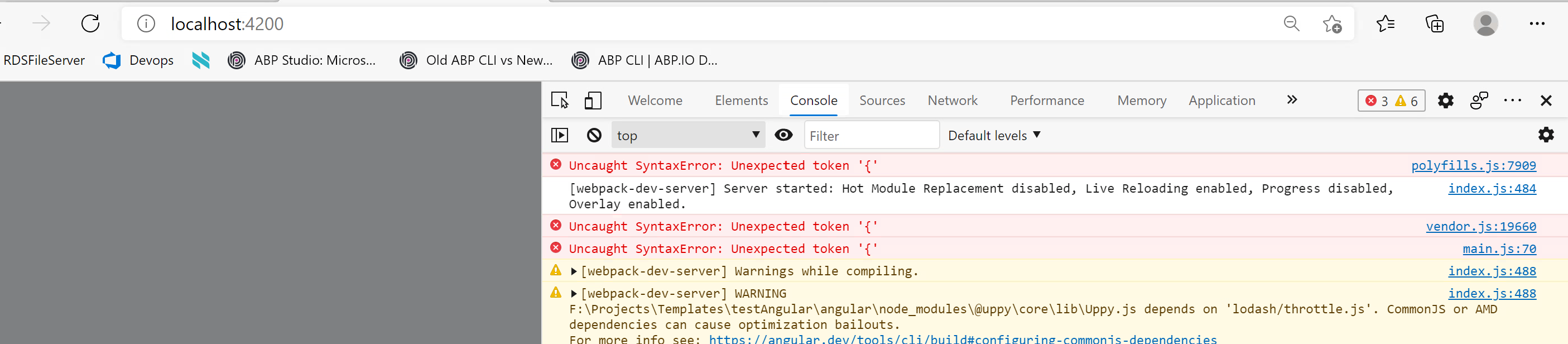
Hello dear, After searching it was a browser compatibility issue I updated the browser version to the latest version and it is working now
I built it using the Abp studio with commercial license also old projects now facing the same problem after upgrade the packages so I don't think it is related with how to create the app I am using Edge browser version 89.0.774.68 (64-bit)
this is the Packages dependencies": { "@abp/ng.components": "~9.0.2", "@abp/ng.core": "~9.0.2", "@abp/ng.feature-management": "~9.0.2", "@abp/ng.oauth": "~9.0.2", "@abp/ng.setting-management": "~9.0.2", "@abp/ng.theme.shared": "~9.0.2", "@angular/animations": "~18.1.0", "@angular/common": "~18.1.0", "@angular/compiler": "~18.1.0", "@angular/core": "~18.1.0", "@angular/forms": "~18.1.0", "@angular/localize": "~18.1.0", "@angular/platform-browser": "~18.1.0", "@angular/platform-browser-dynamic": "~18.1.0", "@angular/router": "~18.1.0", "@ctrl/tinycolor": "^4.1.0", "@volo/abp.commercial.ng.ui": "~9.0.2", "@volo/abp.ng.account": "~9.0.2", "@volo/abp.ng.audit-logging": "~9.0.2", "@volo/abp.ng.chat": "~9.0.2", "@volo/abp.ng.file-management": "~9.0.2", "@volo/abp.ng.gdpr": "~9.0.2", "@volo/abp.ng.identity": "~9.0.2", "@volo/abp.ng.language-management": "~9.0.2", "@volo/abp.ng.openiddictpro": "~9.0.2", "@volo/abp.ng.saas": "~9.0.2", "@volo/abp.ng.text-template-management": "~9.0.2", "@volosoft/abp.ng.theme.lepton-x": "~4.0.3", "rxjs": "~7.8.0", "tslib": "^2.0.0", "zone.js": "~0.14.0" }, "devDependencies": { "@abp/ng.schematics": "~9.0.2", "@angular-devkit/build-angular": "~18.1.0", "@angular-eslint/builder": "~18.1.0", "@angular-eslint/eslint-plugin": "~18.1.0", "@angular-eslint/eslint-plugin-template": "~18.1.0", "@angular-eslint/schematics": "~18.1.0", "@angular-eslint/template-parser": "~18.1.0", "@angular/cli": "~18.1.0", "@angular/compiler-cli": "~18.1.0", "@angular/language-service": "~18.1.0", "@types/jasmine": "~3.6.0", "@types/node": "^20.0.0", "@typescript-eslint/eslint-plugin": "^7.0.0", "@typescript-eslint/parser": "^7.0.0", "eslint": "^8.0.0", "jasmine-core": "~4.0.0", "karma": "~6.3.0", "karma-chrome-launcher": "~3.1.0", "karma-coverage": "~2.1.0", "karma-jasmine": "~4.0.0", "karma-jasmine-html-reporter": "^1.0.0", "typescript": "~5.5.0" }
Hello Dear
the app is building now but when I request the URL I get this error (Unexpected token { ) and this is the template project with out any additional code or packages