






ABP Auth Server Integration Issue
The problem description : I have an ABP Auth Server application with MSSQL database. My ABP HostApi created in another solution with PostgreSQL database. I am trying to link the Host Api with the Auth server by add the connection string of auth app in the Appsetting file of host Api , after adjust the link of the Auth server inside the appsetting file. the behavior of the api always use the PostgreSQL source as shown in image . Note: Auth Server using ABP 9.0.0 , and API Host using ABP 9.1.0
 How I implemented it: 1- add the modules connection strings in appsettings as shown
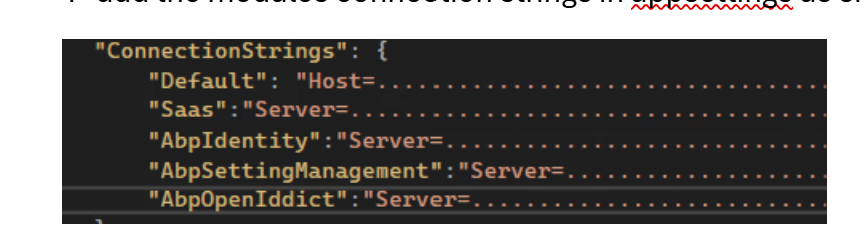 with out any changes in EntityFrameWorkCore module, the result not work.
2- Override the dB context with specific SQL provider , also not work
with out any changes in EntityFrameWorkCore module, the result not work.
2- Override the dB context with specific SQL provider , also not work
 3- I tired to use grouping connection string, also not work
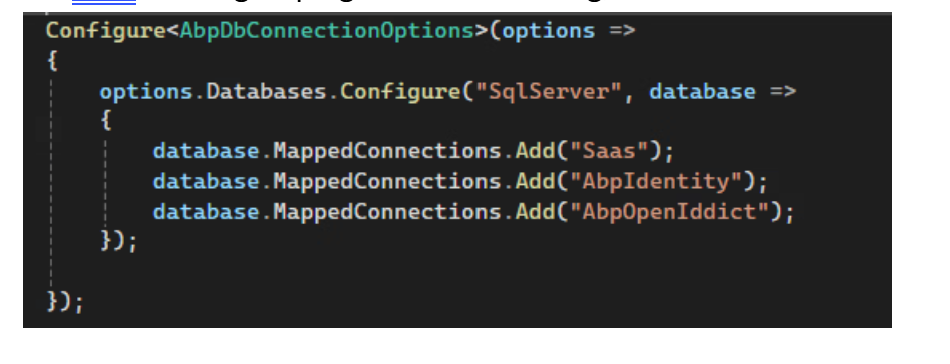
4 Answer(s)
-
0
hi
Can you share full debug/error logs?
Thanks.
liming.ma@volosoft.com
https://abp.io/support/questions/8622/How-to-enable-Debug-logs-for-troubleshoot-problems
Markdown supported.Copy, paste, or drag & drop images and files (max 100 MB per file, 100 MB total per post) -
0
2025-05-15 12:16:41.400 +04:00 [ERR] An exception occurred while iterating over the results of a query for context type 'Volo. Saas. EntityFrameworkCore. SaasDbContext'. System.ArgumentException: Couldn't set trusted_connection (Parameter 'trusted_connection') --- > System. Collections.Generic.KeyNotFoundException: The given key was not present in the dictionary. at Npgsql. NpgsqlConnectionStringBuilder.GeneratedActions(GeneratedAction action, String keyword, Object& value) at Npgsql.NpgsqlConnectionStringBuilder.set_Item(String keyword, Object value)
- End of inner exception stack trace at Npgsql.NpgsqlConnectionStringBuilder.set_Item(String keyword, Object value) at System. Data. Common. DbConnectionStringBuilder.set_ConnectionString(String value) at Npgsql.NpgsqlConnectionStringBuilder .. ctor(String connectionString) at Npgsql.NpgsqlConnection. SetupDataSource() at Npgsql.NpgsqlConnection.set_ConnectionString(String value) at Npgsql.NpgsqlConnection .. ctor(String connectionString) at Npgsql. EntityFrameworkCore.PostgreSQL.Storage. Internal.NpgsqlRelationalConnection.CreateDbConnection() at Microsoft. EntityFrameworkCore. Storage. RelationalConnection.get_DbConnection() at Microsoft. EntityFrameworkCore. Storage. RelationalConnection.OpenAsync(CancellationToken cancellationToken, Boolean errorsExpected) at Microsoft. EntityFrameworkCore. Storage. RelationalCommand. ExecuteReaderAsync(RelationalCommandParameterObject parameterObject, CancellationToken cancellationToken) at Microsoft. EntityFrameworkCore. Query. Internal.SplitQueryingEnumerable 1.AsyncEnumerator. InitializeReaderAsync(AsyncEnumerator enumerator, CancellationToken cancellationToken) at Npgsql. EntityFrameworkCore. PostgreSQL.Storage. Internal.NpgsqlExecutionStrategy. ExecuteAsync[TState, TResult] (TState state, Func 4 operation, Func 4 verifySucceeded, CancellationToken cancellationToken) at Microsoft. EntityFrameworkCore. Query. Internal. SplitQueryingEnumerable 1.AsyncEnumerator.MoveNextAsync() System. ArgumentException: Couldn't set trusted_connection (Parameter 'trusted_connection') --- > System. Collections.Generic. KeyNotFoundException: The given key was not present in the dictionary. at Npgsql. NpgsqlConnectionStringBuilder. GeneratedActions(GeneratedAction action, String keyword, Object& value) at Npgsql.NpgsqlConnectionStringBuilder.set_Item(String keyword, Object value)
- End of inner exception stack trace - at Npgsql.NpgsqlConnectionStringBuilder.set_Item(String keyword, Object value) at System.Data. Common. DbConnectionStringBuilder.set_ConnectionString(String value) at Npgsql. NpgsqlConnectionStringBuilder .. ctor(String connectionString) at Npgsql.NpgsqlConnection.SetupDataSource() at Npgsql.NpgsqlConnection.set_ConnectionString(String value) at Npgsql.NpgsqlConnection .. ctor(String connectionString) at Npgsql. EntityFrameworkCore. PostgreSQL.Storage. Internal.NpgsqlRelationalConnection.CreateDbConnection() at Microsoft. EntityFrameworkCore. Storage. RelationalConnection.get_DbConnection() at Microsoft. EntityFrameworkCore.Storage.RelationalConnection.OpenAsync(CancellationToken cancellationToken, Boolean errorsExpected) at Microsoft. EntityFrameworkCore. Storage. RelationalCommand. ExecuteReaderAsync(RelationalCommandParameterObject parameterObject, CancellationToken cancellationToken) at Microsoft. EntityFrameworkCore.Query. Internal. SplitQueryingEnumerable 1.AsyncEnumerator. InitializeReaderAsync(AsyncEnumerator enumerator, CancellationToken cancellationToken) at Npgsql. EntityFrameworkCore. PostgreSQL.Storage. Internal.NpgsqlExecutionStrategy. ExecuteAsync[TState, TResult] (TState state, Func 4 operation, Func 4 verifySucceeded, CancellationToken ellationToken)
Markdown supported.Copy, paste, or drag & drop images and files (max 100 MB per file, 100 MB total per post) -
0
Any update ?
Markdown supported.Copy, paste, or drag & drop images and files (max 100 MB per file, 100 MB total per post)


