Yes, sure - here you can find the attached github repo - https://github.com/Amitavpanda-omiyal/CMSModuleDemo
CMSModuleTest - is the project made of angular and .net - where we want to add CMSKit + Public website and want to have all features of CMS Kit.
Please once have a look.
Hi @maliming, can we get over a call, it will be easier for me to understand.
Yeah, but is there anyway that we can achieve in our case as we discussed above.
[abpdevPro] said: Hi @maliming,
We tried the same approach in our setup. Our Project A is an ABP solution with Angular UI + .NET backend.
- After installing CMS Kit in Project A, the backend side (DB migrations, tables, etc.) got updated successfully, but we couldn’t see any CMS Kit UI/menu on the Angular side. From what we understand, the CMS Kit UI is currently available only for MVC/Razor Pages (and Blazor Server via MVC/Razor hosting), not for Angular, so our tenants won’t have a UI to manage pages/menus/content from the Angular application. For reference, the CMS management screen is working fine for us in a separate Razor Pages-based project (screenshot attached). -
- Is there any official command or recommended approach to add the Public Website to an existing Angular + .NET solution (i.e., to generate/add the Web.Public project/folder into our current solution structure)? If there is no direct CLI command, please confirm the recommended way
Would appreciate guidance on the best supported path for an Angular UI solution where tenants need CMS management capabilities.
Hi @maliming , Need response from you on this - not satisifed with the response of AI.
Hi @maliming,
We tried the same approach in our setup. Our Project A is an ABP solution with Angular UI + .NET backend.
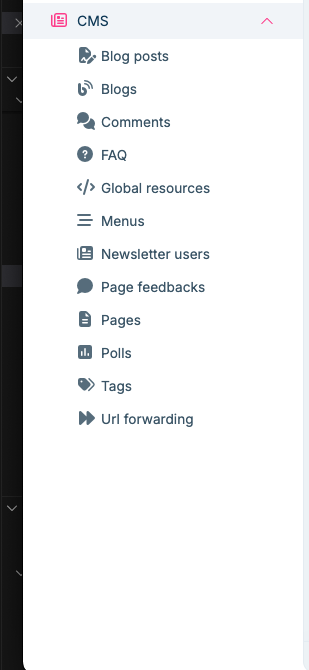
Would appreciate guidance on the best supported path for an Angular UI solution where tenants need CMS management capabilities.
I’m reviewing it now and will verify whether it’s working. I’ll get back to you with a response.
Hi Thanks, we are done, Need one advice :
How to implement this in our custom layout component.
[sumeyye.kurtulus] said: Hello again, I am glad that your problems are almost resolved. Could you clarify that you do not duplicate the theme providers in your
app.config.ts?//... providers: [ provideThemeLeptonX(), provideSideMenuLayout(), //You need to remove these if you have them //importProvidersFrom([ //ThemeLeptonxModule.forRoot(), //SideMenuLayoutModule.forRoot() //]) ] //...
no this is my app.config.ts code
import { provideAbpCore, SubscriptionService, withOptions } from '@abp/ng.core';
import { provideAbpOAuth } from '@abp/ng.oauth';
import { provideSettingManagementConfig } from '@abp/ng.setting-management/config';
import { provideFeatureManagementConfig } from '@abp/ng.feature-management';
import {
  provideAbpThemeShared,
  withValidationBluePrint,
  withHttpErrorConfig,
} from '@abp/ng.theme.shared';
import { provideIdentityConfig } from '@volo/abp.ng.identity/config';
import { provideCommercialUiConfig } from '@volo/abp.commercial.ng.ui/config';
import { provideAccountAdminConfig } from '@volo/abp.ng.account/admin/config';
import { provideAccountPublicConfig } from '@volo/abp.ng.account/public/config';
import { provideGdprConfig, withCookieConsentOptions } from '@volo/abp.ng.gdpr/config';
import { provideAuditLoggingConfig } from '@volo/abp.ng.audit-logging/config';
import { provideLanguageManagementConfig } from '@volo/abp.ng.language-management/config';
import { registerLocale } from '@volo/abp.ng.language-management/locale';
import { provideSaasConfig } from '@volo/abp.ng.saas/config';
import { provideTextTemplateManagementConfig } from '@volo/abp.ng.text-template-management/config';
import { provideOpeniddictproConfig } from '@volo/abp.ng.openiddictpro/config';
import { HttpErrorComponent, provideThemeLeptonX } from '@volosoft/abp.ng.theme.lepton-x';
import { provideSideMenuLayout } from '@volosoft/abp.ng.theme.lepton-x/layouts';
import { provideLogo, withEnvironmentOptions } from '@volo/ngx-lepton-x.core';
import { ApplicationConfig } from '@angular/core';
import {  importProvidersFrom } from '@angular/core';
import { provideAnimations } from '@angular/platform-browser/animations';
import { provideRouter } from '@angular/router';
import { environment } from '../environments/environment';
import { APP_ROUTES } from './app.routes';
import { APP_ROUTE_PROVIDER } from './route.provider';
import { CODE_STANDARDS_CODE_STANDARD_ROUTE_PROVIDER } from './code-standards/code-standard/providers/code-standard-route.provider';
import { CODE_VERSIONS_CODE_VERSION_ROUTE_PROVIDER } from './code-versions/code-version/providers/code-version-route.provider';
import { JURISDICTIONS_JURISDICTION_ROUTE_PROVIDER } from './jurisdictions/jurisdiction/providers/jurisdiction-route.provider';
import {
  CUSTOM_LAYOUT_PROVIDERS,
  myDynamicLayouts,
} from './shared/layouts/custom-application-layout/custom-application-layout';


import { CommonModule } from '@angular/common';
import { FormsModule } from '@angular/forms';
import { NgbModule } from '@ng-bootstrap/ng-bootstrap';
import { ThemeSharedModule } from '@abp/ng.theme.shared';
import { CoreModule } from '@abp/ng.core';
import { ThemeLeptonXModule } from '@volosoft/abp.ng.theme.lepton-x';
import { SideMenuLayoutModule } from '@volosoft/abp.ng.theme.lepton-x/layouts';
import { AccountLayoutModule } from '@volosoft/abp.ng.theme.lepton-x/account';
import { LpxSideMenuLayoutModule } from '@volosoft/ngx-lepton-x/layouts';
import { LpxResponsiveModule } from '@volo/ngx-lepton-x.core';
import { IdentityConfigModule } from '@volo/abp.ng.identity/config';
import { AccountAdminConfigModule } from '@volo/abp.ng.account/admin/config';
import { GdprConfigModule } from '@volo/abp.ng.gdpr/config';
import { AuditLoggingConfigModule } from '@volo/abp.ng.audit-logging/config';

export const appConfig: ApplicationConfig = {
  providers: [
    provideRouter(APP_ROUTES),
    APP_ROUTE_PROVIDER,
    CUSTOM_LAYOUT_PROVIDERS,

    // Import all required modules for LeptonX components
    importProvidersFrom(CommonModule),
    importProvidersFrom(FormsModule),
    importProvidersFrom(NgbModule),
    importProvidersFrom(ThemeSharedModule),
    importProvidersFrom(CoreModule),
    importProvidersFrom(ThemeLeptonXModule.forRoot()),
    importProvidersFrom(SideMenuLayoutModule.forRoot()),
    importProvidersFrom(AccountLayoutModule.forRoot()),
    importProvidersFrom(LpxSideMenuLayoutModule),
    importProvidersFrom(LpxResponsiveModule),
    importProvidersFrom(IdentityConfigModule),
    importProvidersFrom(AccountAdminConfigModule),
    importProvidersFrom(GdprConfigModule),
    importProvidersFrom(AuditLoggingConfigModule),

    provideAnimations(),


    provideAbpCore(
      withOptions({
        dynamicLayouts: myDynamicLayouts, // Essential for dynamic layout switching
        environment,
        registerLocaleFn: registerLocale(),
      })
    ),

    provideAbpOAuth(),
    provideIdentityConfig(),
    provideSettingManagementConfig(),
    provideFeatureManagementConfig(),
    provideAccountAdminConfig(),
    provideAccountPublicConfig(),
    provideCommercialUiConfig(),
    provideThemeLeptonX(),
    provideSideMenuLayout(),
    provideAbpThemeShared(
      withHttpErrorConfig({
        errorScreen: {
          component: HttpErrorComponent,
          forWhichErrors: [401, 403, 404, 500],
          hideCloseIcon: true,
        },
      }),
      withValidationBluePrint({
        wrongPassword: 'Please choose 1q2w3E*',
      })
    ),
    provideGdprConfig(
      withCookieConsentOptions({
        cookiePolicyUrl: '/gdpr-cookie-consent/cookie',
        privacyPolicyUrl: '/gdpr-cookie-consent/privacy',
      })
    ),
    provideLanguageManagementConfig(),
    provideSaasConfig(),
    provideAuditLoggingConfig(),
    provideOpeniddictproConfig(),
    provideTextTemplateManagementConfig(),
    CODE_STANDARDS_CODE_STANDARD_ROUTE_PROVIDER,
    CODE_VERSIONS_CODE_VERSION_ROUTE_PROVIDER,
    JURISDICTIONS_JURISDICTION_ROUTE_PROVIDER,
    SubscriptionService
  ],
};
Following the latest doucmentation, I am able to resolve the issue, now my leptonX components are working fine,
But i am encountering an issue with this,
we are getting two filter menus, which we don't want.
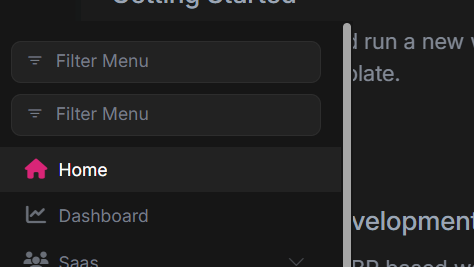
Can you guide me how to solve this issue.
You can refer to this up-to-date documentation for custom layout usage for lepton-x components: https://abp.io/docs/latest/ui-themes/lepton-x/how-to-use-lepton-x-components-with-angular-custom-layout
I followed the article and made the imports according to that, but still it's not working,
I mean unable to see the lpx components in the UI like lpx-navbar, lpx-settings.
Can we do one approach, will provide my code snippets how I am implementing the Customisations of the sidebar and you can better tell us how to fix this.









