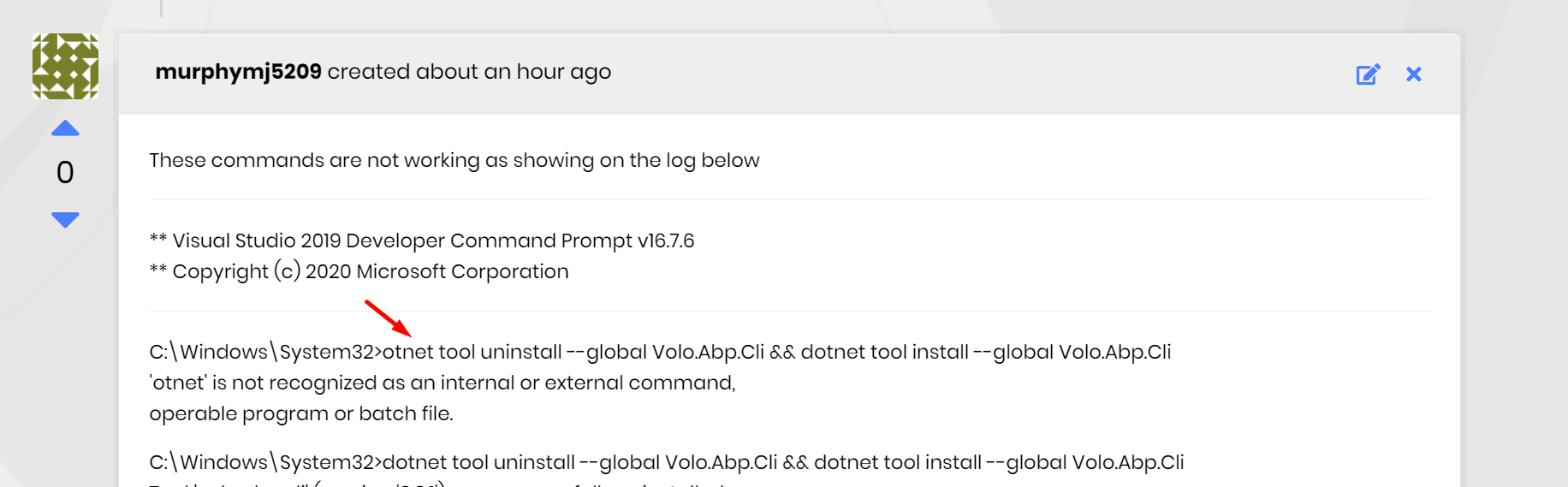
you write the command otnet . it's wrong! you must write dotnet
app.razor is a very simple razor file. see https://github.com/abpframework/abp/blob/dev/framework/src/Volo.Abp.AspNetCore.Components.WebAssembly.BasicTheme/Themes/Basic/App.razor
tell me what you want to add to this, so that we can add extension points to this class.
Did you configure your Identity Server in the database tables. Check out the tables with the prefix IdentityServer.
Especially IdentityServerClients, IdentityServerClientRedirectUris, IdentityServerClientPostLogoutRedirectUris
thanks for your feedback. I created a feature request for this to be done in ABP Suite.
see this class as an example:
using Microsoft.AspNetCore.Builder;
using Microsoft.AspNetCore.Hosting;
using Microsoft.Extensions.Configuration;
using Microsoft.Extensions.DependencyInjection;
using Volo.Saas.EntityFrameworkCore;
using Microsoft.OpenApi.Models;
using Swashbuckle.AspNetCore.Swagger;
using System.IO;
using System.Linq;
using Microsoft.Extensions.Hosting;
using Volo.Abp;
using Volo.Abp.Account;
using Volo.Abp.Account.Web;
using Volo.Abp.AspNetCore.Mvc.UI.Theme.Basic;
using Volo.Abp.AspNetCore.Mvc.UI.Theme.Shared;
using Volo.Abp.Authorization.Permissions;
using Volo.Abp.Autofac;
using Volo.Abp.Data;
using Volo.Abp.EntityFrameworkCore;
using Volo.Abp.EntityFrameworkCore.SqlServer;
using Volo.Abp.Identity;
using Volo.Abp.Identity.EntityFrameworkCore;
using Volo.Abp.Identity.Web;
using Volo.Abp.Localization;
using Volo.Abp.Modularity;
using Volo.Abp.PermissionManagement;
using Volo.Abp.PermissionManagement.EntityFrameworkCore;
using Volo.Abp.PermissionManagement.Identity;
using Volo.Abp.SettingManagement.EntityFrameworkCore;
using Volo.Abp.Threading;
using Volo.Abp.VirtualFileSystem;
using Volo.Saas.Host;

namespace Volo.Saas.DemoApp
{
    [DependsOn(
        typeof(SaasHostWebModule),
        typeof(SaasHostApplicationModule),
        typeof(SaasEntityFrameworkCoreModule),

        typeof(AbpPermissionManagementEntityFrameworkCoreModule),
        typeof(AbpSettingManagementEntityFrameworkCoreModule),
        typeof(AbpIdentityEntityFrameworkCoreModule),
        typeof(AbpEntityFrameworkCoreSqlServerModule),

        typeof(AbpAccountWebModule),
        typeof(AbpIdentityWebModule),
        typeof(AbpIdentityApplicationModule),
        typeof(AbpPermissionManagementApplicationModule),
        typeof(AbpPermissionManagementDomainIdentityModule),
        typeof(AbpAutofacModule),
        typeof(AbpAspNetCoreMvcUiBasicThemeModule),
        typeof(AbpAccountApplicationModule)
        )]
    public class DemoAppModule : AbpModule
    {
        public override void ConfigureServices(ServiceConfigurationContext context)
        {
            var hostingEnvironment = context.Services.GetHostingEnvironment();
            var configuration = context.Services.GetConfiguration();

            Configure<AbpDbConnectionOptions>(options =>
            {
                options.ConnectionStrings.Default = configuration.GetConnectionString("Default");
            });

            Configure<AbpDbContextOptions>(options =>
            {
                options.UseSqlServer();
            });

            context.Services.AddSwaggerGen(
                options =>
                {
                    options.SwaggerDoc("v1", new OpenApiInfo { Title = "Saas API", Version = "v1" });
                    options.DocInclusionPredicate((docName, description) => true);
                    options.CustomSchemaIds(type => type.FullName);
                });

            Configure<AbpLocalizationOptions>(options =>
            {
                options.Languages.Add(new LanguageInfo("en", "en", "English"));
                //...add other languages
            });
        }

        public override void OnApplicationInitialization(ApplicationInitializationContext context)
        {
            var app = context.GetApplicationBuilder();

            if (context.GetEnvironment().IsDevelopment())
            {
                app.UseDeveloperExceptionPage();
            }
            else
            {
                app.UseErrorPage();
            }

            app.UseVirtualFiles();

            app.UseRouting();

            app.UseSwagger();
            app.UseSwaggerUI(options =>
            {
                options.SwaggerEndpoint("/swagger/v1/swagger.json", "Test APP API");
            });

            app.UseAuthentication();
            app.UseAbpRequestLocalization();
            app.UseAuditing();

            app.UseConfiguredEndpoints();

            using (var scope = context.ServiceProvider.CreateScope())
            {
                AsyncHelper.RunSync(async () =>
                {
                    await scope.ServiceProvider
                        .GetRequiredService<IDataSeeder>()
                        .SeedAsync();
                });
            }
        }
    }
}
@jason.smith
dotnet tool install -g Volo.Abp.Suite --version 3.2.1 --add-source https://nuget.abp.io/<your-api-key>/v3/index.json
abp new Acme.BookStore -template app-pro --version 3.2.1
PS: If you create a new project via Suite, it always generates the latest version. So if you want to generate a specific version, use the CLI.
no need to relogin but needs page refresh to get the application-configuration. for MVC (cookie auth) , a page refresh is required to see the new permissions
1- I don't see a database module in the BackendAdminAppGatewayHostModule
2- writing a microservice documentation that covers all kinds of structures is impossible. every microservice solution must be custom tailored for the requirements. therefore you need build your own service structure. this is a sample that shows you can build a microservice solution with ABP.
run the following 2 commands in CMD
dotnet tool uninstall --global Volo.Abp.Cli && dotnet tool install --global Volo.Abp.Cli
dotnet tool uninstall --global Volo.Abp.Suite && dotnet tool install -g Volo.Abp.Suite --add-source https://nuget.abp.io/<your-api-key>/v3/index.json
you can find your api key in your NuGet.Config file which is in the root folder of your solution.
what's your specific question?









