Thank you very much for the information you provided.
To better understand your issue, could you please provide the following information?
yourusername/.abp/studio/ui/logs folder by default.Hello,
I'm so sorry for the problem you're experiencing. I've now forwarded your issue to my team. We will review it and get back to you as soon as possible. Thank you for your patience 🙏
Thanks for reaching out.
Please log out and log back in on the ABP website first. Then, do the same in ABP Studio.
If the issue persists, please run abp login-info in the CLI and share the output with us.
Hello,
We have released a new version for Studio, but since 2.1.5 does not work in your case, the application will not be able to update itself. Therefore, could you please delete Studio and download it again from here?
Hello again, some of my teammates are able to reproduce the issue. Please be advised that we will resolve the problem and release a new version as soon as possible.
Hi,
Could you please check whether the following file exists on your machine and, if so, share it with us?
.abp/studio/ui/logs/abp-studio-ui-logs.txt
This will help us investigate the issue more effectively.
Thank you in advance.
Best regards, Berkan
Hello Sroman,
First of all, thank you very much for your valuable insights. They will be very useful in understanding and solving the problem. As I said, although it is not a priority, we will definitely look into this remote cluster connection problem. Thank you for your patience 🙏
Issue(for abp team): https://github.com/volosoft/abp-studio/issues/4142
Hello again,
Following up on the first point you mentioned earlier regarding the AuthServer exposing OIDC endpoints over HTTP instead of HTTPS:
“The authserver is exposing the OIDC endpoints with HTTP instead of HTTPS. This causes the Angular application to reject the endpoints, and no matter how many configurations I have tried to prevent it from validating or ignoring them, it continues to fail.”
We have made several adjustments in the templates and configuration to address this behavior and ensure that the Angular application can start and work correctly behind reverse proxies and Kubernetes environments.
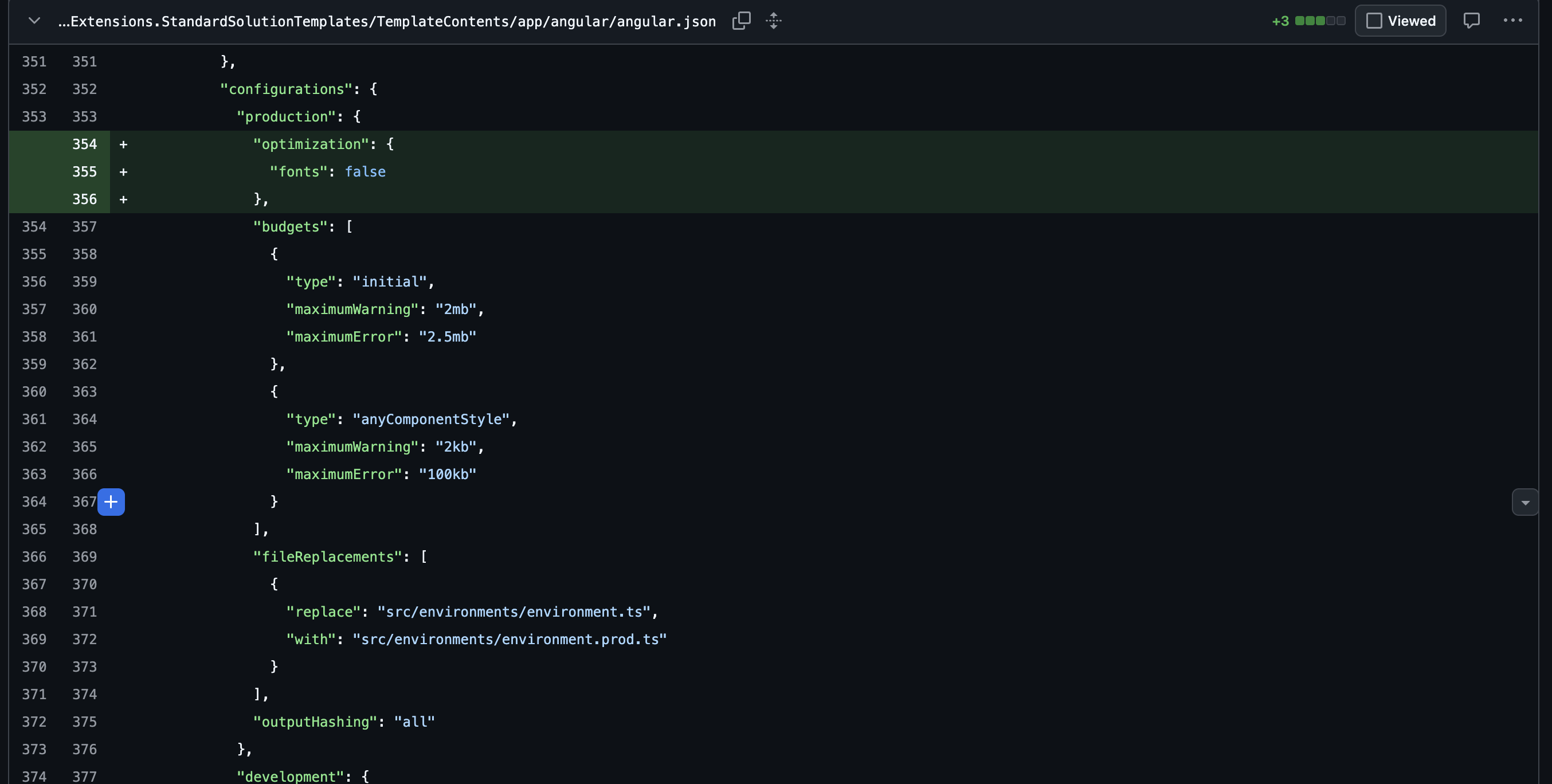
If you apply the changes below (shown in the screenshots), the Angular application should work as expected.
Please note that MyProjectName is a placeholder and must be replaced with your own project name.
Font optimization is disabled in angular.json to avoid build-time issues in containerized environments:
browser):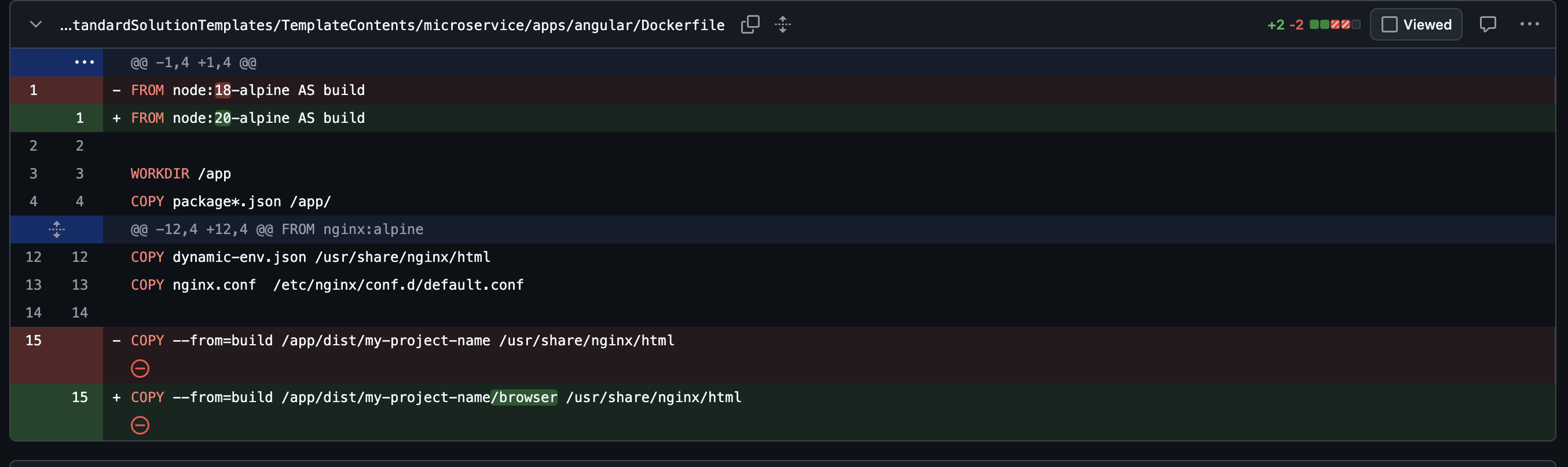
To correctly handle HTTPS termination at the reverse proxy level, the AuthServer configuration was updated:
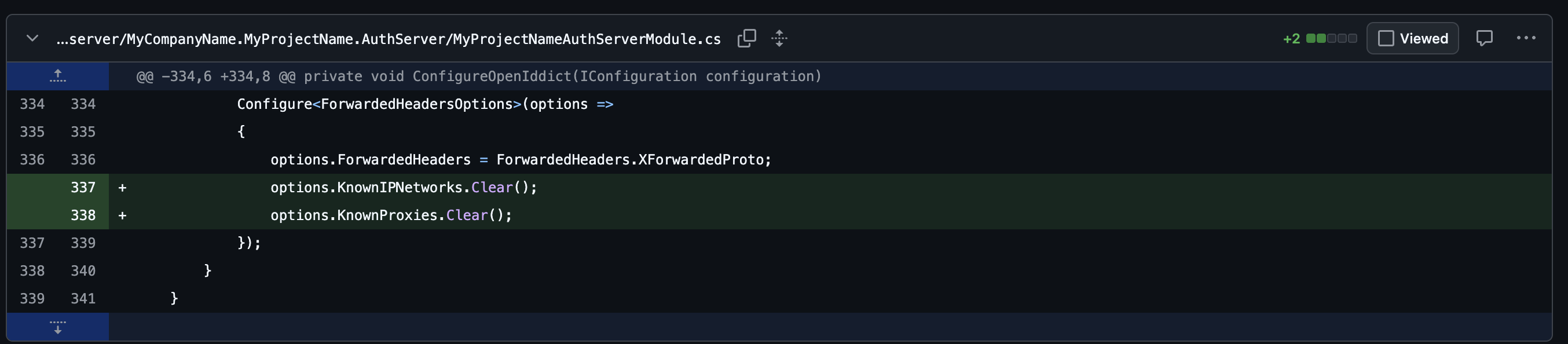
This ensures that the AuthServer correctly respects the original HTTPS scheme when running behind NGINX or an ingress controller.
In the Angular Helm ConfigMap, requireHttps is set to false for internal cluster communication:
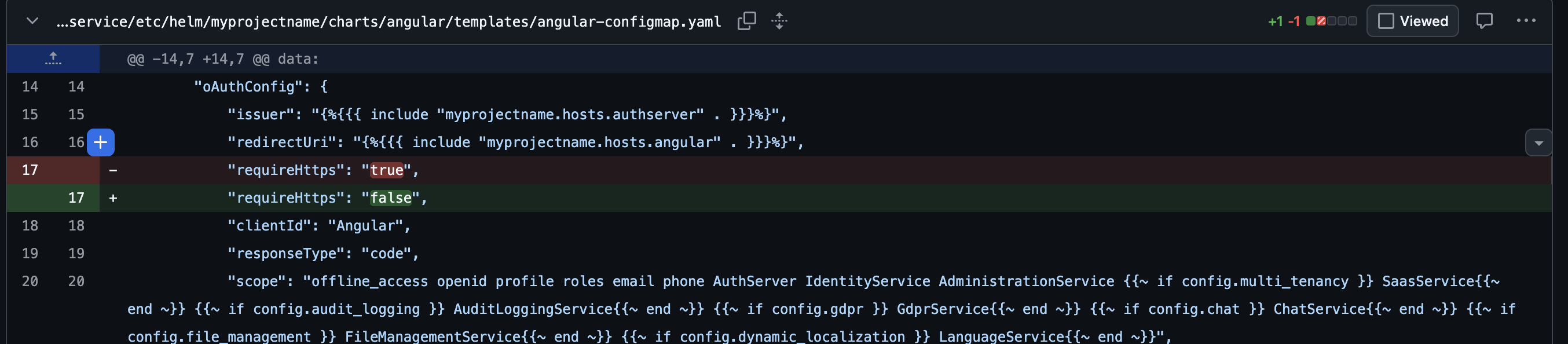
This prevents Angular from rejecting the OIDC endpoints when HTTPS is terminated upstream.
With these changes applied and after rebuilding/redeploying:
Please let us know if you continue to face issues after applying these changes.
Best regards, Berkan
The authserver is exposing the OIDC endpoints with HTTP instead of HTTPS. This causes the Angular application to reject the endpoints, and no matter how many configurations I have tried to prevent it from validating or ignoring them, it continues to fail.
I have created internal issues regarding this problem, and we will do our best to resolve them in the next Studio release. After solving the problem, I will provide you with a solution.
No matter how hard I try to connect to the services deployed in the cluster (Postgres, Redis, etc.) from my local computer connected to the cluster and with WireGuard, all attempts to connect to these services and endpoints time out. So when it comes to intercepting the request, the service cannot connect to either the database or Redis.
I will create a separate internal issue for this problem as well, but it may be low priority. It's difficult to say anything without reviewing it. I will update this after a detailed review.
I would like more information about the configuration, secrets, metadata, and other aspects of ABP Studio because the documentation is very scarce.
I will create a separate internal issue for this topic as well.
In addition, you have not updated the release notes for ABP Studio versions for a long time, which makes it difficult to know what improvements you have made in terms of application templates, configurations, and commands.
We will update it within today. Thank you for your understanding.









