Hello 👋,
The error occurs because .NET 7 Runtime is missing from the build agent. Since you are using version 7.. of ABP CLI, it requires .NET 7 Runtime but only .NET 6, 8, and 9 are installed.
To resolve this, install .NET 7 Runtime from the following link: https://dotnet.microsoft.com/en-us/download/dotnet/7.0
Once installed, retry the pipeline. Let us know if you need further assistance.
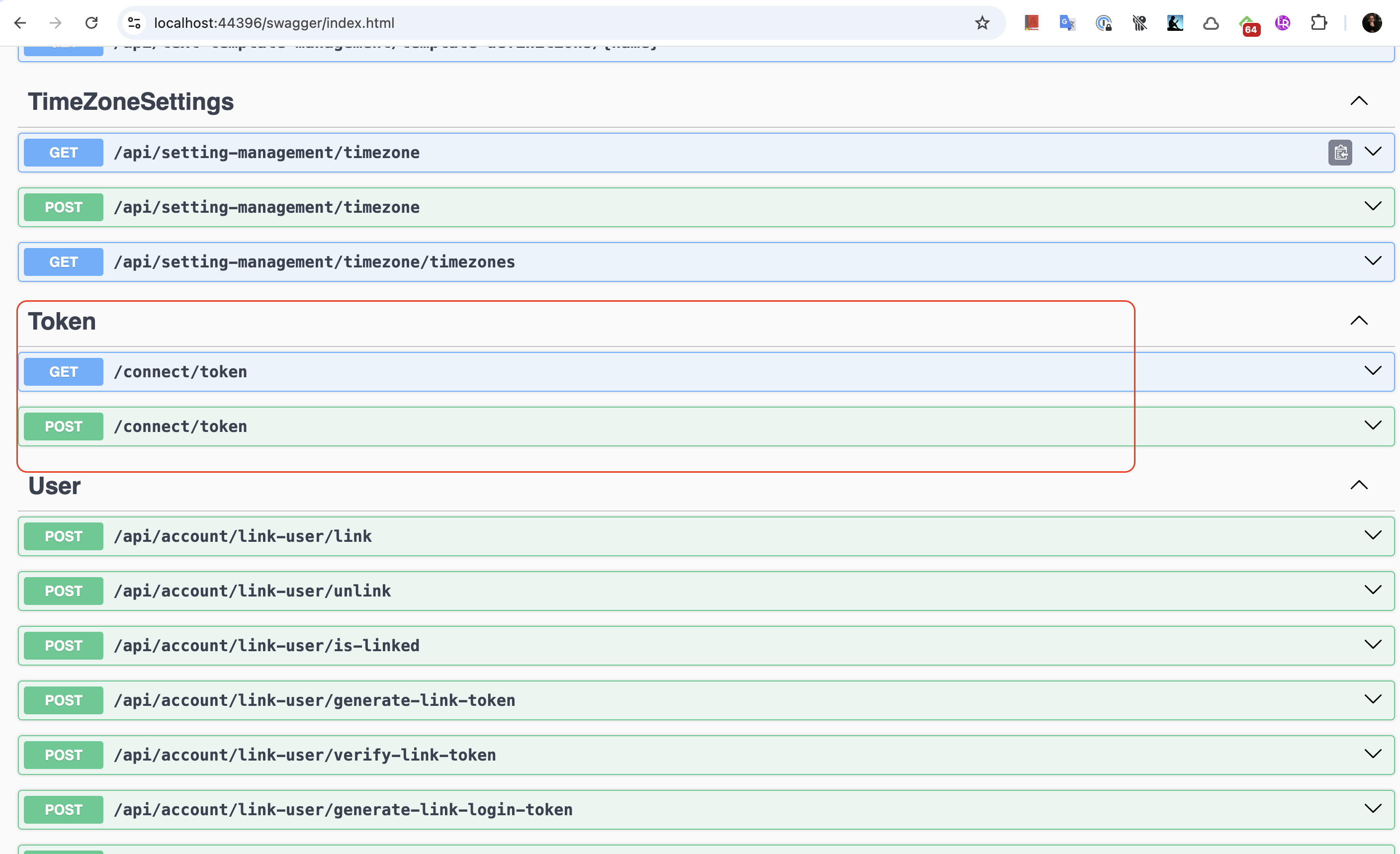
Hello, some endpoints of ABP are ignored using ApiExplorerSettings attribute for security reasons. For example TokenController : https://github.com/abpframework/abp/blob/8d1d89ac7fe3082e342add226e97f417e7f9d287/modules/openiddict/src/Volo.Abp.OpenIddict.AspNetCore/Volo/Abp/OpenIddict/Controllers/TokenController.cs#L12
If you want to see them in the swagger, you can follow these steps:
1-) Create class ForceApiExplorerVisibilityConvention in the AuthServer like the below:
public class ForceApiExplorerVisibilityConvention : IApplicationModelConvention
{
    public void Apply(ApplicationModel application)
    {
        foreach (var controller in application.Controllers)
        {
            // Controller seviyesinde Ignore edilmişse
            if (controller.ApiExplorer != null && controller.ApiExplorer.IsVisible == false)
            {
                controller.ApiExplorer.IsVisible = true;
            }

            // Aksiyon seviyesinde Ignore edilmişse
            foreach (var action in controller.Actions)
            {
                if (action.ApiExplorer != null && action.ApiExplorer.IsVisible == false)
                {
                    action.ApiExplorer.IsVisible = true;
                }
            }
        }
    }
}
2-) Add the following code blocks to the ConfigureServices method of module class in AuthServer project:
        context.Services.AddControllers(options =>
        {
            options.Conventions.Add(new ForceApiExplorerVisibilityConvention());
        });
If swagger is added in your AuthServer project, you can see the related endpoints as in the picture below:
Hello, I have reviewed your question, but your question seems very general, so I will try to explain the rough steps of how to do it.
1-) Replace the OpenIddict Source Code
You can do this through ABP Studio as in the picture below:

2-) Extend each OpenIddict entity (Application, Authorization, Scope, Token) with TenantId and implement IMultiTenant. Ensure your DbContext includes these modified entities, and run migrations to add the TenantId columns. This ensures you have the database schema that contains a TenantId column and, importantly, uses ABP’s multi-tenancy filtering.
You can basically follow these two steps. Afterwards, if you have a problem with this, if you can forward the log record directly, we can proceed more concretely from there.
For this template, you can leave the client_secret field empty as shown in the picture. Other information is already filled out automatically. You also need to select the scopes listed as scope.
Here is an example:

I received your mail and downloaded your project, but since I did not work on the weekend, I will review your project during working hours on Monday and get back to you. Thank you for your patience.
Have a good weekend.
Can you send the log record of Blazor Server? Also, if your application is tiered, can you send the log record of AuthServer and HttpApiHost?
You can send to your sample application to support@abp.io address with text like below:
Please forward my mail to Berkan Sasmaz regarding ticket #8701.
Can you confirm whether the site has a valid certificate?

We have a document written about certification in the production environment, if you have not read it, I recommend you to take a look there. See more: https://abp.io/docs/latest/deployment/ssl
You can also find more information about deployment here.
Hello, first of all, sorry for the late reply, this was somehow overlooked.
We don't have much experience with MassTransit, but if you can send a minimal reproducible example we would like to help as much as we can. Also, as a short information, ABP already supports Inbox/Outbox patterns and we have documentation for this. So I can say that you don't need MassTransit for this purpose. However, if you still want to use MassTransit, we will try to help as much as we can if you can send an application where I can reproduce the problem.
Note: I guarantee that you will have a much more holistic and easier experience if you use the solution provided by ABP. See more: https://abp.io/docs/latest/studio/monitoring-applications#events
Hello, first of all, sorry for the late reply, this was somehow overlooked.
I downloaded and ran your application to understand your problem. However, your application contains too much custom code and I see that you have changed some logic of the ABP framework. It is not possible for me to understand the problem through this application. By the way, I can't reproduce the problem when I test it in ABP's application startup template. I want to help you but this application contains too much custom code, if you can send me a minimal reproducible example instead, we can move much faster. You also mentioned that you added packages such as abp.zerocore.identityserver, 3chum.identityserver4.accesstokenvalidation to your application for the Authorize attribute to work and you cannot debug without them. I can definitely say that there is something wrong somewhere, you should never need these packages for these problems, ABP already handles these processes itself. For this, I strongly suggest you to compare the dependencies and configurations of ABP's Startup Template with the dependencies and configurations of your own application.










