You can send it to berkan.sasmaz@volosoft.com address.
1.) When trying to select "ABP Suite" from the top right menu, whole application crashes and i have to force close it.
I am creating an issue for the problem related to Suite.
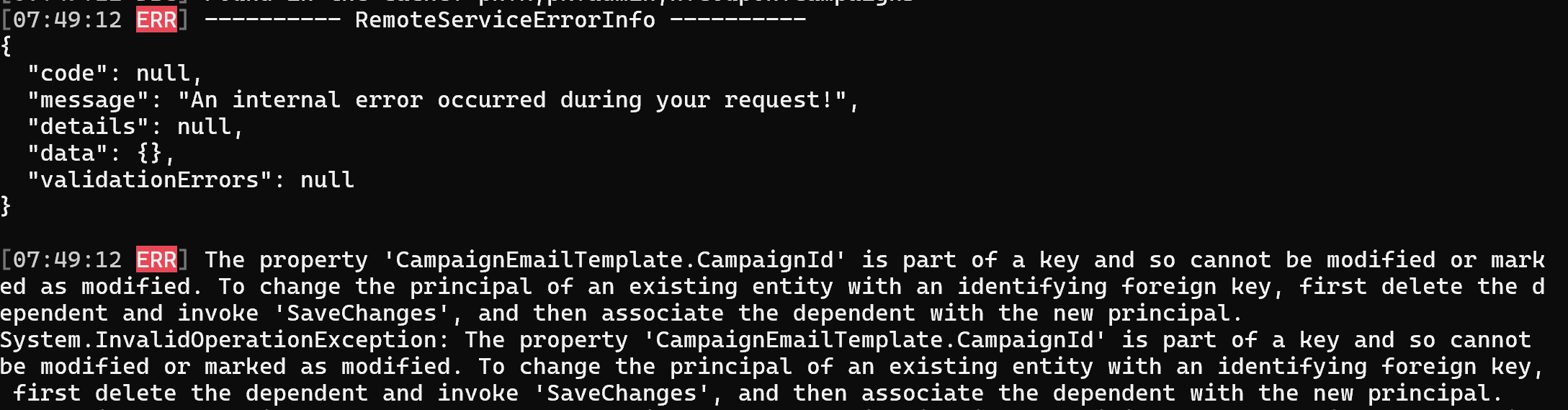
2.) I get an error when trying to create a new solution. "An internal error occurred during your request!"
Can you send me the log records of the ABP Studio?
Note: You can find the log file in ~/.abp/studio/ui/logs path.
Update with 0.6.6 : same issue
Can you provide me with the following information so that I can reproduce the problem?
- Is there an
abpcexecutable file in/Applications/ABP Studio.app/Contents/MacOSfolder?- Is there a symlink to
abpcin/usr/local/binfolder?- If the symlink is present, can you send me the full output of the terminal that opens when you double-click?
Hi, this is on windows. I now added abp folder to the env variables path (eg
C:\Program Files\Volosoft\ABP Studio, and it seems to work, although every command is getting this error'System.TypeInitializationException: The type initializer for 'Volo.Abp.Studio.Extensions.ExtensionConsts' threw an exception. ---> System.ArgumentNullException: Value cannot be null. (Parameter 'path1') at System.ArgumentNullException.Throw(String paramName) at System.IO.Path.Combine(String path1, String path2) at Volo.Abp.Studio.Extensions.ExtensionConsts.Iq2FRp3PHuxHdPuuR4ug(Object, Object) at Volo.Abp.Studio.Extensions.ExtensionConsts..cctor() --- End of inner exception stack trace --- at Volo.Abp.Studio.Extensions.StudioExtensionLoader.GetExtensions() at Volo.Abp.Studio.Extensions.StudioAbpApplicationCreationOptionsExtensions.LoadAbpStudioExtensions(AbpApplicationCreationOptions options, StudioExtensionApplicationType type) at Volo.Abp.Studio.Cli.Program.<>c.<Main>b__0_2(AbpApplicationCreationOptions options)'
This problem will be solved with the new version, thanks for the report 🙏
Update with 0.6.6 : same issue
Can you provide me with the following information so that I can reproduce the problem?
abpc executable file in /Applications/ABP Studio.app/Contents/MacOS folder?abpc in /usr/local/bin folder?We have released version 0.6.6 of ABP Studio, FYI 🥳🥳
Note: When running it for Mac, it is recommended to run it from the terminal with the following command:
sudo open /Applications/ABP\ Studio.app
We will be releasing the new version during the day, so I recommend you wait until then.
ABP Studio CLI is installed automatically when you install ABP Studio.
from cli, abpc command line is not found. Please let us know what we are missing.
We create issues for:
- ABP Commercial CLI not found.
- Internal error during project creation.
It will be fixed in the next version.
is this fixed? i seem to have same problem. MacBook pro, M2, Sonoma OS 14.4.1
Thanks for your report, this issue has been resolved and we will release a new version as soon as possible.
Using the Suite I've created two entities and used the navigation feature to setup a many-to-many relationship between them. I have saved and generated all of the code. I am using ABP CLI 8.0.5 and Suite v8.0.4.
When I run the code I can use the create modal to add the many to many items using the UI that has been generated, however when I use the edit modal to delete one or more of the many to many items I get "An internal error occurred during your request!" error message when I click save.
This feature used to work as expected in a v7 project.
I have forwarded your question to the relevant teammate, but this only covers topics related to ABP Studio, so you may not get an answer here.
Thank you for the information you provided. ABP supports nested permissions. You can do this as below:
var permission1 = myGroup.AddPermission("Permission1", L("Permission:MyPermission1"));
permission1.AddChild("Permission1.1", L("Permission:MyPermission1.1"));
permission1.AddChild("Permission1.2", L("Permission:MyPermission1.2"));
var permission1_3 = permission1.AddChild("Permission1.3", L("Permission:MyPermission1.3"));
permission1_3.AddChild("Permission1.3.1", L("Permission:MyPermission1.3.1"));
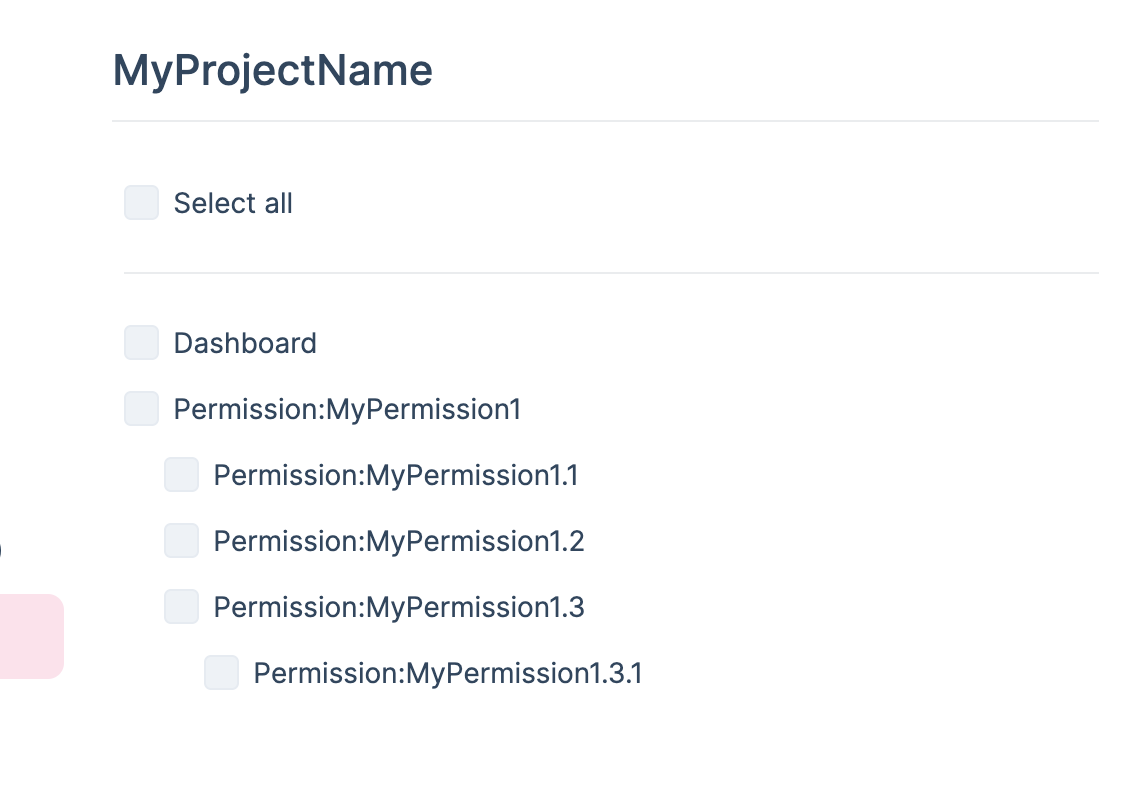
If you are wondering how this is done, please check the source code link below: https://github.com/abpframework/abp/blob/3f64fee22c805d0b22f63968c07d2d1ab3b583a5/modules/permission-management/src/Volo.Abp.PermissionManagement.Web/Pages/AbpPermissionManagement/PermissionManagementModal.cshtml#L23-L55
You can create your own structure similar to the one in the code block in the link above.
Hi @nabass,
I don't quite understand your problem, do you want to change the permission name(create, update, etc.)?