Go to you .AtuhServer or .HttpApi.Host project and find Module class of that project.
ConfigureServices method:
Configure<LeptonXThemeMvcOptions>(options =>
{
    options.ApplicationLayout = LeptonXMvcLayouts.TopMenu;
});
Ou... I just found something else related to the TopMenu.
9. TopMenu layout is not consistently applied everywhere: When you go to "My Account" or "Security Logs", the view changes to the SideMenu layout.
In this case; Account & Security logs pages are on AuthServer project which is an different MVC project. You have to configure your AuthServer as TopMenu too.
We have figured out the problem, prioritized and solved it. It'll be included in the next LeptonX release. Thanks for your patience.
Thanks for your feedback, We'll make it more visible in the template and documentation.
Hi @improwise
As mentioned in article, Secure Storage requires platform-specific configuration. Preferences usage is for development purposes. You should replace it for production.
As @woodyarray says
lpx-logo-icon parameter is for the icon for collapsed state.
--lpx-logo-icon: url('/images/logo/logo-icon.svg') !important;
Make sure both Authentication Server and Client Application styles are updated if you're using a tiered architecture
Hi @p.j.keukens
You can override the EntityHistoryHelper in your project to achieve solution in your app on your version.
[Dependency(ReplaceServices = true)]
[ExposeServices(typeof(EntityHistoryHelper))]
public class MyEntityHistoryHelper  : EntityHistoryHelper
{
     protected override List<EntityPropertyChangeInfo> GetPropertyChanges(EntityEntry entityEntry)
    {
        var propertyChanges = new List<EntityPropertyChangeInfo>();
        var properties = entityEntry.Metadata.GetProperties();
        var isCreated = IsCreated(entityEntry);
        var isDeleted = IsDeleted(entityEntry);

        foreach (var property in properties)
        {
            var propertyEntry = entityEntry.Property(property.Name);
            if (ShouldSavePropertyHistory(propertyEntry, isCreated || isDeleted) && !IsSoftDeleted(entityEntry))
            {
                propertyChanges.Add(new EntityPropertyChangeInfo
                {
                    NewValue = isDeleted ? null : JsonSerializer.Serialize(propertyEntry.CurrentValue).TruncateWithPostfix(YOUR_CUSTOM_VALUE),
                    OriginalValue = isCreated ? null : JsonSerializer.Serialize(propertyEntry.OriginalValue).TruncateWithPostfix(YOUR_CUSTOM_VALUE),
                    PropertyName = property.Name,
                    PropertyTypeFullName = property.ClrType.GetFirstGenericArgumentIfNullable().FullName
                });
            }
        }
}
Replace the YOUR_CUSTOM_VALUE with your requirement.
Also you can remove TruncateWithPostfix() method completely.
Hi
You can create a App.razor file in your application and use it via configuring it in the Module file of your application for Blazor WASM and _Host.cshtml for Blazor Server
MyApp.razor
@using Microsoft.Extensions.Options
@using Microsoft.Extensions.Localization
@using Volo.Abp.AspNetCore.Components.Web.LeptonXTheme
@using Volo.Abp.AspNetCore.Components.Web.LeptonXTheme.Components
@using global::Localization.Resources.AbpUi
@using Volo.Abp.AspNetCore.Components.Web.LeptonXTheme.Components.ApplicationLayout
@using Volo.Abp.AspNetCore.Components.Web.Theming.Routing
@inject IOptions<AbpRouterOptions> RouterOptions
@inject IOptions<LeptonXThemeBlazorOptions> LayoutOptions

@inject IStringLocalizer<AbpUiResource> UiLocalizer
<CascadingAuthenticationState>
    <Router AppAssembly="RouterOptions.Value.AppAssembly"
            AdditionalAssemblies="RouterOptions.Value.AdditionalAssemblies">
        <Found Context="routeData">
            <AuthorizeRouteView RouteData="@routeData" DefaultLayout="@LayoutOptions.Value.Layout">
                <NotAuthorized>
                    @if (context.User?.Identity?.IsAuthenticated == false)
                    {
                        <RedirectToLogin/>
                    }
                    else
                    {
                         <ErrorView
                            Title="@UiLocalizer["403Message"]"
                            HttpStatusCode="403"
                            Message="@UiLocalizer["403MessageDetail"]"/>
                    }
                </NotAuthorized>
            </AuthorizeRouteView>
        </Found>
        <NotFound>
            <LayoutView Layout="@LayoutOptions.Value.Layout">
                <ErrorView
                    Title="@UiLocalizer["404Message"]"
                    HttpStatusCode="404"
                    Message="@UiLocalizer["404MessageDetail"]"/>
            </LayoutView>
        </NotFound>
    </Router>
</CascadingAuthenticationState>
       var builder = context.Services.GetSingletonInstance<WebAssemblyHostBuilder>();
       builder.RootComponents.Add<MyApp>("#ApplicationContainer");
If you're using Blazor-Server, Go to your Pages/_Host.cshtml and change App to MyApp
<component type="typeof(MyApp)" render-mode="Server" />
Multiple Imports.razor can be used in a blazor project. So you can create a new _Imports.razor wherever you want in your application. It'll be applied to its own folder and subfolders.
Sorry about it, that was my test project name.
LeptonX uses IStringLocalizerFactory to localize theme names.
If you use a resource that configured in your application, it'll work.
LocalizableString.Create<AppMicroResource>("Theme:Red")
The example below should work. Can you check which resource is configured in your Domain.Shared module class?
Isn't it something like below?
Configure<AbpLocalizationOptions>(options =>
{
    options.Resources
        .Add<AppMicroResource>("en")
        .AddBaseTypes(typeof(AbpValidationResource))
        .AddVirtualJson("/Localization/AppMicroResource");
});
Hi @hakan.uskuner
It seems there is a mistake in the documentation.
Blazor has a special case while providing embedded resources. It accesses resources via assembly name. So place you files under wwwroot/_content/Volo.Abp.AspNetCore.Components.Web.LeptonXTheme/side-menu/css/ folder.
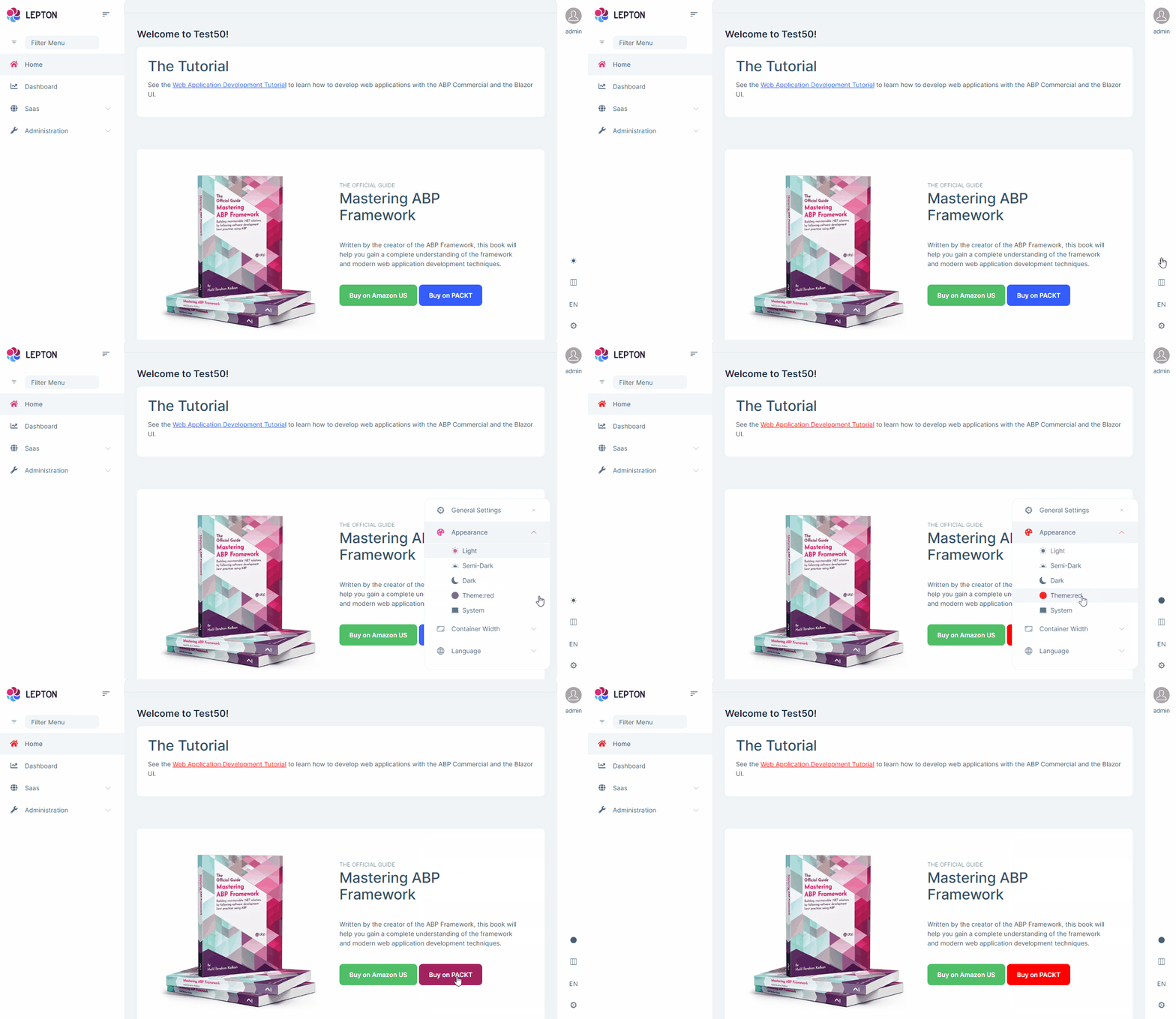
I've created two style files:

Configured them in Module file
Configure<LeptonXThemeOptions>(options =>
{
    options.DefaultStyle = LeptonXStyleNames.System;

    // Adding a new theme
    options.Styles.Add("red",
        new LeptonXThemeStyle(
        LocalizableString.Create<Test50Resource>("Theme:Red"),
        "bi bi-circle-fill"));
});
And the result:
Your credit is refunded since there is a mistake in documentation,









