Hi @rbautista,
Yes, this solution applies to Blazor but with some small changes. Support bot suggested you to download the source-code but your license is restricted to download the source-code. So I'll try to help you without downloading the source-code of the LeptonX Theme.
Here's how to achieve your custom layout (main menu, submenu, and page actions):
In your Blazor project, create Components/Layout/CustomApplicationLayout.razor:
@inherits LayoutComponentBase
@using Volo.Abp.AspNetCore.Components.Web.LeptonXTheme.Components.ApplicationLayout.Common
@using Volo.Abp.AspNetCore.Components.Web.Theming.Layout
@using YourProjectName.Blazor.Components.Layout

<div>
    <div id="lpx-wrapper" class="custom-layout">
        <MainHeader />

        <div class="lpx-content-container">
            <!-- GREEN AREA: Dynamic Submenu -->
            <CustomSubmenu />

            <!-- Breadcrumbs -->
            <div class="lpx-topbar-container">
                <div class="lpx-topbar">
                    <Breadcrumbs />
                </div>
            </div>

            <div class="lpx-content-wrapper">
                <div class="lpx-content">
                    <!-- BLUE AREA: Page Actions -->
                    <CustomPageActions />

                    @Body
                </div>
            </div>

            <footer><Footer /></footer>
        </div>

        <MobileNavbar />
    </div>
</div>
Components/Layout/CustomSubmenu.razor:
@using Volo.Abp.UI.Navigation
@inject IMenuManager MenuManager
@inject NavigationManager NavigationManager

@if (SubMenuItems.Any())
{
    <div class="custom-submenu">
        <ul class="submenu-list">
            @foreach (var item in SubMenuItems)
            {
                <li>
                    <a href="@item.Url" class="@GetActiveClass(item)">
                        @if (!string.IsNullOrEmpty(item.Icon))
                        {
                            <i class="@item.Icon"></i>
                        }
                        <span>@item.DisplayName</span>
                    </a>
                </li>
            }
        </ul>
    </div>
}

@code {
    protected List<ApplicationMenuItem> SubMenuItems { get; set; } = new();

    protected override async Task OnInitializedAsync()
    {
        await LoadSubMenuAsync();
        NavigationManager.LocationChanged += async (s, e) => await OnLocationChanged();
    }

    private async Task LoadSubMenuAsync()
    {
        var mainMenu = await MenuManager.GetMainMenuAsync();
        var currentUrl = NavigationManager.ToBaseRelativePath(NavigationManager.Uri);

        // Find active main menu and get its children
        var activeMainMenuItem = FindActiveMenuItem(mainMenu.Items, currentUrl);
        SubMenuItems = activeMainMenuItem?.Items.ToList() ?? new List<ApplicationMenuItem>();
    }

    private async Task OnLocationChanged()
    {
        await LoadSubMenuAsync();
        await InvokeAsync(StateHasChanged);
    }

    private ApplicationMenuItem FindActiveMenuItem(IList<ApplicationMenuItem> items, string currentUrl)
    {
        foreach (var item in items)
        {
            if (!string.IsNullOrEmpty(item.Url) && currentUrl.StartsWith(item.Url.TrimStart('/')))
                return item;

            if (item.Items.Any())
            {
                var child = FindActiveMenuItem(item.Items, currentUrl);
                if (child != null) return item;
            }
        }
        return null;
    }

    private string GetActiveClass(ApplicationMenuItem item)
    {
        var currentUrl = NavigationManager.ToBaseRelativePath(NavigationManager.Uri);
        return currentUrl.StartsWith(item.Url?.TrimStart('/') ?? "") ? "active" : "";
    }

    public void Dispose()
    {
        NavigationManager.LocationChanged -= async (s, e) => await OnLocationChanged();
    }
}
Components/Layout/CustomPageActions.razor:
@using Volo.Abp.AspNetCore.Components.Web.Theming.Layout
@inject PageLayout PageLayout

@if (!string.IsNullOrEmpty(PageLayout.Title) || ToolbarItemRenders.Any())
{
    <div class="custom-page-actions">
        <div class="page-title">
            <h1>@PageLayout.Title</h1>
        </div>
        <div class="page-actions">
            @foreach (var toolbarItem in ToolbarItemRenders)
            {
                @toolbarItem
            }
        </div>
    </div>
}

@code {
    protected List<RenderFragment> ToolbarItemRenders { get; } = new();

    protected override Task OnInitializedAsync()
    {
        PageLayout.ToolbarItems.CollectionChanged += async (s, e) => await RenderAsync();
        PageLayout.PropertyChanged += async (s, e) => await InvokeAsync(StateHasChanged);
        return base.OnInitializedAsync();
    }

    protected override async Task OnAfterRenderAsync(bool firstRender)
    {
        if (firstRender) await RenderAsync();
        await base.OnAfterRenderAsync(firstRender);
    }

    protected virtual async Task RenderAsync()
    {
        ToolbarItemRenders.Clear();
        foreach (var item in PageLayout.ToolbarItems)
        {
            var sequence = 0;
            ToolbarItemRenders.Add(builder =>
            {
                builder.OpenComponent(sequence, item.ComponentType);
                if (item.Arguments != null)
                {
                    foreach (var argument in item.Arguments)
                    {
                        sequence++;
                        builder.AddAttribute(sequence, argument.Key, argument.Value);
                    }
                }
                builder.CloseComponent();
            });
        }
        await InvokeAsync(StateHasChanged);
    }
}
In your module class (e.g., YourProjectBlazorModule.cs):
using Volo.Abp.AspNetCore.Components.Web.LeptonXTheme;
using YourProjectName.Blazor.Components.Layout;

public override void ConfigureServices(ServiceConfigurationContext context)
{
    Configure<LeptonXThemeBlazorOptions>(options =>
    {
        options.Layout = typeof(CustomApplicationLayout);
    });
}
In your MenuContributor:
private Task ConfigureMainMenuAsync(MenuConfigurationContext context)
{
    // RED AREA: Main menu item
    var products = new ApplicationMenuItem(
        "Products",
        "Products",
        icon: "fas fa-box"
    );

    // GREEN AREA: Submenu items (will appear when Products is active)
    products.AddItem(new ApplicationMenuItem(
        "Products.List",
        "Product List",
        url: "/products",
        icon: "fas fa-list"
    ));

    products.AddItem(new ApplicationMenuItem(
        "Products.Categories",
        "Categories",
        url: "/products/categories",
        icon: "fas fa-tags"
    ));

    context.Menu.AddItem(products);
    return Task.CompletedTask;
}
In your page component (e.g., Products/Index.razor.cs):
public partial class Index
{
    [Inject]
    protected PageLayout PageLayout { get; set; }

    protected override async Task OnInitializedAsync()
    {
        PageLayout.Title = "Products";

        // BLUE AREA: Add action buttons
        PageLayout.ToolbarItems.Add(new PageToolbarItem(typeof(CreateProductButton)));
        PageLayout.ToolbarItems.Add(new PageToolbarItem(typeof(ExportButton)));

        await base.OnInitializedAsync();
    }
}
Add this to your wwwroot/global-styles.css:
.custom-submenu {
    background-color: #f8f9fa;
    border-bottom: 1px solid #dee2e6;
    padding: 0.5rem 1rem;
}

.submenu-list {
    display: flex;
    list-style: none;
    margin: 0;
    padding: 0;
    gap: 0.5rem;
}

.submenu-list a {
    padding: 0.5rem 1rem;
    color: [#495057](https://abp.io/QA/Questions/495057);
    text-decoration: none;
    border-radius: 0.25rem;
}

.submenu-list a.active {
    background-color: #007bff;
    color: white;
}

.custom-page-actions {
    display: flex;
    justify-content: space-between;
    align-items: center;
    padding: 1rem 0;
    border-bottom: 2px solid #007bff;
    margin-bottom: 1rem;
}

.page-actions {
    display: flex;
    gap: 0.5rem;
}
I've created a complete example project structure showing all three areas (red, green, blue) you requested. Let me know if you need clarification on any part
Hello
Interesting that the LeptonX resource appered, but the texts for base english culture does not.
I checked LeptonX source code and it has only 1 resource for generic English (en) and there is no separation for en-GB.
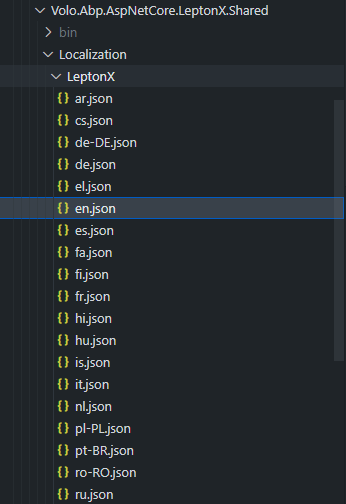
If your preferred default English is en-GB that might be the issue currently you face:
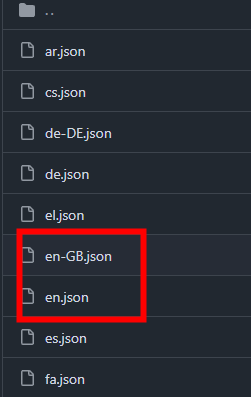
I'll check the same scenario as you mentioned and fix if it's a bug
Hi,
It depends on a couple of different cases:
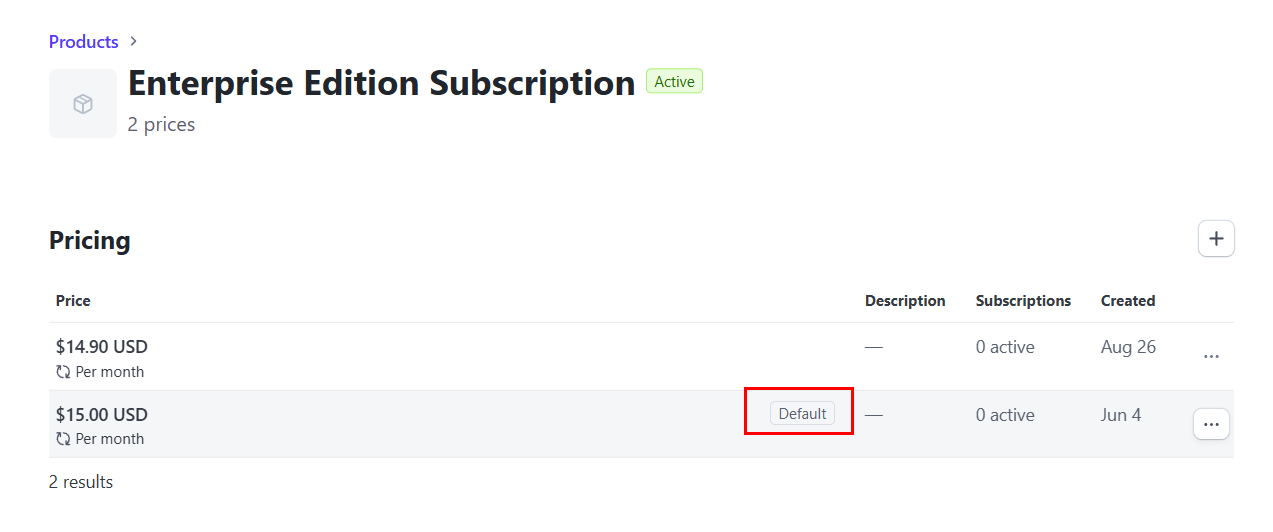
If still doesn't help, you can use directly price ID that starts with price_xx
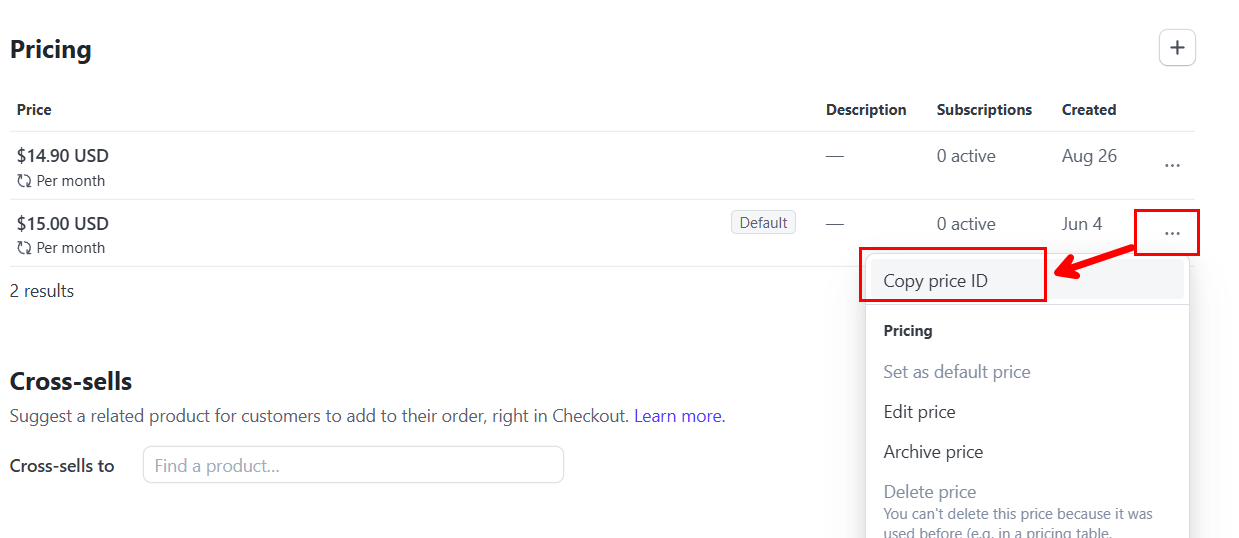
Both product and price id works as ExternalId in payment module.
My suggestion, you can directly try copying price id and using it, if it doesn't work please let us know.
Stripe or any other 3rd party service UIs are changing constanly, so we cannot mantain screenshots in our documentation, but here is the latest dashboard design of Stripe that I shared in this post
Short answer: Login is controlled by tenant activation state, not by subscription/edition expiry. Keep the tenant ActivationState as Active and do not use ActivationEndDate for subscription purposes. Subscription expiry is tracked with EditionEndDateUtc, which disables edition-based features but does not block login.
public virtual Task<bool> IsActiveAsync(Tenant tenant)
{
    return Task.FromResult(tenant.ActivationState switch
    {
        TenantActivationState.Active => true,
        TenantActivationState.Passive => false,
        TenantActivationState.ActiveWithLimitedTime => tenant.ActivationEndDate >= Clock.Now,
        _ => false
    });
}
This value is used when populating TenantConfiguration.IsActive in the TenantStore, which in turn controls tenant availability for login resolution.
tenant.EditionEndDateUtc = eventData.PeriodEndDate;
tenant.EditionId = Guid.Parse(eventData.ExtraProperties[EditionConsts.EditionIdParameterName]?.ToString());
if (tenant.EditionEndDateUtc <= DateTime.UtcNow)
{
    tenant.EditionId = null;
}
var tenant = await tenantRepository.FindAsync(currentTenant.Id.Value);
if (tenant?.GetActiveEditionId() != null)
{
    identity.AddOrReplace(new Claim(AbpClaimTypes.EditionId, tenant.GetActiveEditionId().ToString()));
}
public virtual Guid? GetActiveEditionId()
{
    if (!EditionEndDateUtc.HasValue)
    {
        return EditionId;
    }
    if (EditionEndDateUtc >= DateTime.UtcNow)
    {
        return EditionId;
    }
    return null;
}
To allow login after subscription ends: Leave the tenant ActivationState as Active (or avoid using ActiveWithLimitedTime/ActivationEndDate for subscription timing). Let the subscription simply expire via EditionEndDateUtc. Users can still log in but won’t have the edition claim/benefits until renewal.
To guide users to renew after login: Add a small middleware/authorization handler that checks GetActiveEditionId() (or the presence of the edition claim) and redirects to a renewal page when it is null.
Only if you must allow login for expired ActivationEndDate: Either set the tenant back to Active or customize the activation evaluation (advanced: replace TenantManager.IsActiveAsync logic), but this is discouraged for subscription logic. Prefer keeping activation for administrative suspension only.
ActivationEndDate for subscriptions. Using EditionEndDateUtc already allows login after expiry and prevents edition features until payment is renewed.Hi @MartinEhv
Here is my findings for your questions below;
Volo.CmsKit.Pro.Admin.Blazor.CmsKitContentWidgetOptions. By default, only Poll is registered for the Blazor admin editor. MVC/Common registers more widgets by default for the MVC pipeline.Volo.CmsKit.Pro.Admin.Blazor (plus its dependencies). It contributes CMS pages like Pages, Blogs, Polls, etc.GlobalFeatureConfigurator:// Domain.Shared
public static class GlobalFeatureConfigurator
{
public static void Configure()
{
GlobalFeatureManager.Instance.Modules.CmsKitPro(cmsKitPro =>
{
cmsKitPro.Contact.Enable();
cmsKitPro.Newsletters.Enable();
cmsKitPro.PollsFeature.Enable();
cmsKitPro.UrlShortingFeature.Enable();
cmsKitPro.PageFeedbackFeature.Enable();
cmsKitPro.FaqFeature.Enable();
});
}
}
[RequiresFeature(CmsKitProFeatures.PollEnable)]
[RequiresGlobalFeature(typeof(PollsFeature))]
Create and run database migrations after enabling features. This is important to ensure the database schema is updated to support the new features.
There are two distinct concepts often called “widgets” in CMS Kit Pro:
[Widget Type="..."]) used by the content editor and content renderer.In Blazor Admin, the markdown editor’s widget list comes from CmsKitContentWidgetOptions. By default, the Blazor Admin module only registers the Poll widget:
Configure<CmsKitContentWidgetOptions>(options =>
{
    options.AddWidget(null, "Poll", "CmsPollByCode", "CmsPolls", parameterWidgetType: typeof(PollsComponent));
});
In contrast, the MVC/Common web module registers multiple widgets for the MVC rendering pipeline (FAQ, Poll, PageFeedback, …):
Configure<CmsKitContentWidgetOptions>(options =>
{
    options.AddWidget("Faq", "CmsFaq", "CmsFaqOptions");
    options.AddWidget("Poll", "CmsPollByCode", "CmsPolls");
    options.AddWidget("PageFeedback", "CmsPageFeedback", "CmsPageFeedbacks");
    options.AddWidget("PageFeedbackModal", "CmsPageFeedbackModal", "CmsPageFeedbackModals");
});
That is why in an MVC admin/public you see more widget types by default, while the Blazor Admin editor shows only Poll unless you add more.
To add more content widgets to the Blazor Admin editor, register them in your app’s module:
// In your Blazor Admin AppModule.ConfigureServices
Configure<CmsKitContentWidgetOptions>(options =>
{
    // Renders a Blazor component for a CMS widget type
    options.AddWidget<MyFaqDisplayComponent>(
        widgetType: "Faq",
        widgetName: "CmsFaq",
        parameterWidgetName: "CmsFaqOptions" // optional editor parameter UI
    );

    options.AddWidget<MyPageFeedbackDisplayComponent>(
        widgetType: "PageFeedback",
        widgetName: "CmsPageFeedback",
        parameterWidgetName: "CmsPageFeedbacks"
    );
});
Notes:
widgetType is the value used inside [Widget Type="..."] tags.ComponentBase that can render the widget at preview/runtime.parameterWidgetName and optionally a parameterWidgetType component (see how Polls uses PollsComponent).The editor then inserts tokens like [Widget Type="CmsFaq" ...] into content. The Blazor Admin preview renders with ContentRender, which uses a render context to compose a ContentFragmentComponent from the fragments:
public virtual async Task<string> RenderAsync(string content)
{
    var contentDto = new DefaultContentDto { ContentFragments = await ContentParser.ParseAsync(content) };
    var contentFragment = RenderContext.RenderComponent<ContentFragmentComponent>(
        parameters => parameters.Add(p => p.ContentDto, contentDto));

    return contentFragment.Markup;
}
If your public site is also Blazor, you must similarly ensure your public app knows how to render these widget types (map them via CmsKitContentWidgetOptions and provide the corresponding components).
This dropdown is fed by CmsKitPollingOptions.WidgetNames and returned by GetWidgetsAsync() in the admin app service:
public Task<ListResultDto<PollWidgetDto>> GetWidgetsAsync()
{
    return Task.FromResult(new ListResultDto<PollWidgetDto>()
    {
        Items = _cmsKitPollingOptions.WidgetNames
            .Select(n => new PollWidgetDto { Name = n }).ToList()
    });
}
And the options type is:
public class CmsKitPollingOptions
{
    public List<string> WidgetNames { get; set; } = new();
    public void AddWidget(string name) { /* adds unique names */ }
}
So in your startup, configure named placements you want to appear in the Poll editor’s Widget dropdown:
Configure<CmsKitPollingOptions>(options =>
{
    options.AddWidget("Default");
    options.AddWidget("Sidebar");
    options.AddWidget("HomepageHero");
});
This is separate from content widgets. One is a Poll’s “placement name”, the other is the markdown‐embedded content widget system.
CmsKitProCommonWebModule.CmsKitContentWidgetOptions in the public app so that content rendering recognizes [Widget Type="..."] tokens at runtime.CmsKitPollingOptions names configured.CmsKitContentWidgetOptions registrations in the Blazor Admin app.CmsKitProFeatures.* are enabled (Feature Management and global features).Volo.CmsKit.Pro.Admin.Blazor and your public site references either Volo.CmsKit.Pro.Common.Web (MVC) or you have equivalent Blazor registrations.Configure<CmsKitContentWidgetOptions>(options =>
{
options.AddWidget(null, "Poll", "CmsPollByCode", "CmsPolls", parameterWidgetType: typeof(PollsComponent));
});
Configure<CmsKitContentWidgetOptions>(options =>
{
    options.AddWidget("Faq", "CmsFaq", "CmsFaqOptions");
    options.AddWidget("Poll", "CmsPollByCode", "CmsPolls");
    options.AddWidget("PageFeedback", "CmsPageFeedback", "CmsPageFeedbacks");
    options.AddWidget("PageFeedbackModal", "CmsPageFeedbackModal", "CmsPageFeedbackModals");
});
CmsKitPollingOptions/GetWidgetsAsync:public Task<ListResultDto<PollWidgetDto>> GetWidgetsAsync() { ... }
[RequiresFeature(CmsKitProFeatures.PollEnable)]
[RequiresGlobalFeature(typeof(PollsFeature))]
ITenantAppService) is host‑only and protected by SaasHostPermissions.Tenants.*.SubscriptionAppService.CreateSubscriptionAsync(Guid editionId, Guid tenantId)), which creates a PaymentRequest with required extra properties:
EditionConsts.EditionIdParameterNameTenantConsts.TenantIdParameterNameSubscriptionCreatedHandler sets tenant.EditionId and tenant.EditionEndDateUtc.SubscriptionUpdatedHandler refreshes tenant.EditionEndDateUtc and optionally tenant.EditionId.Relevant code in this repository:
SaaS tenant creation (host‑only app service): src/Volo.Saas.Host.Application/Volo/Saas/Host/TenantAppService.cssrc/Volo.Saas.Host.Application/Volo/Saas/Subscription/SubscriptionAppService.csabp/payment/src/Volo.Payment.Domain/Volo/Payment/...src/Volo.Saas.Domain/Volo/Payment/Subscription/SubscriptionCreatedHandler.cs, SubscriptionUpdatedHandler.csIf you call TenantAppService.CreateAsync from a public page, you’ll get AbpAuthorizationException because it is decorated with [Authorize(SaasHostPermissions.Tenants.Default)] and intended for host administrators.
Create a dedicated, public endpoint that:
ITenantManager + ITenantRepository) and publishes TenantCreatedEto (to seed the admin user, etc.),SubscriptionAppService.CreateSubscriptionAsync(editionId, tenantId),This avoids host‑only permissions while keeping the standard cross‑module behaviors (user seeding and subscription updates) intact.
using System;
using System.Threading.Tasks;
using Microsoft.AspNetCore.Authorization;
using Volo.Abp;
using Volo.Abp.EventBus.Distributed;
using Volo.Saas.Tenants;
using Volo.Saas.Host.Dtos; // for consistency if you reuse DTOs
using Volo.Saas.Host.Application.Volo.Saas.Subscription; // ISubscriptionAppService

[AllowAnonymous]
public class PublicTenantRegistrationAppService : MyAppAppService
{
    private readonly ITenantManager _tenantManager;
    private readonly ITenantRepository _tenantRepository;
    private readonly IDistributedEventBus _eventBus;
    private readonly ISubscriptionAppService _subscriptionAppService;

    public PublicTenantRegistrationAppService(
        ITenantManager tenantManager,
        ITenantRepository tenantRepository,
        IDistributedEventBus eventBus,
        ISubscriptionAppService subscriptionAppService)
    {
        _tenantManager = tenantManager;
        _tenantRepository = tenantRepository;
        _eventBus = eventBus;
        _subscriptionAppService = subscriptionAppService;
    }

    public async Task<StartSubscriptionResultDto> RegisterAndSubscribeAsync(RegisterTenantInput input)
    {
        // 1) Create tenant via domain layer (no host permission needed)
        var tenant = await _tenantManager.CreateAsync(input.TenantName, editionId: input.EditionId);

        tenant.SetActivationState(TenantActivationState.Passive); // keep passive until payment succeeds
        await _tenantRepository.InsertAsync(tenant, autoSave: true);

        // 2) Publish TenantCreatedEto to seed admin user (same as TenantAppService does)
        await _eventBus.PublishAsync(new TenantCreatedEto
        {
            Id = tenant.Id,
            Name = tenant.Name,
            Properties =
            {
                {"AdminEmail", input.AdminEmail},
                {"AdminPassword", input.AdminPassword}
            }
        });

        // 3) Start subscription (creates PaymentRequest with TenantId/EditionId extra props)
        var paymentRequest = await _subscriptionAppService.CreateSubscriptionAsync(input.EditionId, tenant.Id);

        return new StartSubscriptionResultDto
        {
            TenantId = tenant.Id,
            PaymentRequestId = paymentRequest.Id,
            // redirect URL depends on your payment gateway UI
        };
    }
}

public class RegisterTenantInput
{
    public string TenantName { get; set; }
    public Guid EditionId { get; set; }
    public string AdminEmail { get; set; }
    public string AdminPassword { get; set; }
}

public class StartSubscriptionResultDto
{
    public Guid TenantId { get; set; }
    public Guid PaymentRequestId { get; set; }
}
SubscriptionCreatedHandler and SubscriptionUpdatedHandler update edition and end date. If you also want to flip activation state on initial payment, add a small handler:
using System;
using System.Threading.Tasks;
using Volo.Abp.DependencyInjection;
using Volo.Abp.EventBus.Distributed;
using Volo.Payment.Subscription;
using Volo.Saas.Tenants;

public class ActivateTenantOnPaidHandler : IDistributedEventHandler<SubscriptionCreatedEto>, ITransientDependency
{
    private readonly ITenantRepository _tenantRepository;

    public ActivateTenantOnPaidHandler(ITenantRepository tenantRepository)
    {
        _tenantRepository = tenantRepository;
    }

    public async Task HandleEventAsync(SubscriptionCreatedEto eventData)
    {
        var tenantId = Guid.Parse(eventData.ExtraProperties[TenantConsts.TenantIdParameterName]?.ToString());
        var tenant = await _tenantRepository.FindAsync(tenantId);
        if (tenant == null) return;

        tenant.SetActivationState(TenantActivationState.Active);
        await _tenantRepository.UpdateAsync(tenant);
    }
}
using System.Threading.Tasks;
using Microsoft.AspNetCore.Http;
using Volo.Abp.MultiTenancy;

public class TenantRequiredMiddleware
{
    private readonly RequestDelegate _next;
    public TenantRequiredMiddleware(RequestDelegate next) => _next = next;

    public async Task InvokeAsync(HttpContext context, ICurrentTenant currentTenant)
    {
        var path = context.Request.Path.Value ?? string.Empty;
        if (path.StartsWith("/Account", StringComparison.OrdinalIgnoreCase) ||
            path.StartsWith("/Public", StringComparison.OrdinalIgnoreCase))
        {
            await _next(context);
            return;
        }

        if (!currentTenant.IsAvailable)
        {
            context.Response.Redirect("/Account/Login");
            return;
        }

        await _next(context);
    }
}
Also consider the domain/subdomain tenant resolver to route tenants to their own subdomains.
TenantAppService.CreateAsync is host‑only. Use domain + repository + event bus in a public endpoint to avoid authorization errors.SubscriptionAppService.CreateSubscriptionAsync must be invoked in host context with a valid tenantId. It automatically emits a PaymentRequest with PaymentType.Subscription and a product PlanId.EditionId and subscription periods. If you need custom onboarding (e.g., activation), add your own distributed event handler.[AllowAnonymous] but aggressively validate inputs and throttle to prevent abuse.This post answers how to combine tenant signup with edition subscription, how to restrict access to tenant-only, and how to fix the AbpAuthorizationException you hit when creating tenants from a public page.
Yes. Create the tenant first, then immediately create the subscription for the new tenantId, and redirect to the payment gateway. Keep the tenant Passive until payment succeeds, then activate it on the subscription-created event.
Why: CreateSubscriptionAsync(editionId, tenantId) expects a valid tenant context. The provided host-side implementation already packages the correct payment request with extra properties for EditionId and TenantId.
src/Volo.Saas.Host.Application/Volo/Saas/Subscription/SubscriptionAppService.csabp/payment/src/Volo.Payment.Domain/Volo/Payment/...EditionConsts.EditionIdParameterName and TenantConsts.TenantIdParameterNamePayment events update the tenant after checkout:
SubscriptionCreatedHandler sets tenant.EditionId and tenant.EditionEndDateUtc.SubscriptionUpdatedHandler refreshes tenant.EditionEndDateUtc and can update EditionId if provided.You don’t need to remove host; just restrict what end users see:
CurrentTenant.IsAvailable is false) or a policy.Docs: Multi-tenancy resolvers
TenantAppService.CreateAsync is host-only and protected by SaasHostPermissions.Tenants.*, so calling it from a public page throws. Instead:
[AllowAnonymous]) that uses the domain layer to create the tenant: ITenantManager + ITenantRepository.TenantCreatedEto (to seed admin user etc.).CreateSubscriptionAsync(editionId, tenantId) to start payment.SubscriptionCreatedEto if desired.Code pointers in the source code:
src/Volo.Saas.Host.Application/Volo/Saas/Host/TenantAppService.cssrc/Volo.Saas.Domain/Volo/Saas/Tenants/TenantManager.cssrc/Volo.Saas.Host.Application/Volo/Saas/Subscription/SubscriptionAppService.cssrc/Volo.Saas.Domain/Volo/Payment/Subscription/SubscriptionCreatedHandler.cssrc/Volo.Saas.Domain/Volo/Payment/Subscription/SubscriptionUpdatedHandler.cseditionId.ITenantManager), set Passive.TenantCreatedEto with admin email/password.CreateSubscriptionAsync(editionId, tenant.Id) and redirect to payment.SubscriptionCreatedEto: set tenant.ActivationState = Active (custom handler), while built-in handlers set edition + end date.Prepared a guide that explains how the ABP SaaS and Payment modules work together to enable tenant subscriptions, based on analysis of the source code and official documentation.
The tenant subscription process in ABP follows this workflow:
Tenant Must Exist First: The SubscriptionAppService.CreateSubscriptionAsync(editionId, tenantId) method requires both parameters, meaning a tenant must already be created before subscribing to an edition.
Payment Request Creation: When creating a subscription, the system:
PaymentType.SubscriptionExtraPropertiesEvent-Driven Updates: When payment is successful, the Payment module publishes a SubscriptionCreatedEto event, which the SaaS module handles to:
EditionIdEditionEndDateUtc based on the subscription period// From SubscriptionAppService.cs
public virtual async Task<PaymentRequestWithDetailsDto> CreateSubscriptionAsync(Guid editionId, Guid tenantId)
{
var edition = await EditionManager.GetEditionForSubscriptionAsync(editionId);
var paymentRequest = await PaymentRequestAppService.CreateAsync(new PaymentRequestCreateDto
{
Products = new List<PaymentRequestProductCreateDto>
{
new PaymentRequestProductCreateDto
{
PlanId = edition.PlanId,
Name = edition.DisplayName,
Code = $"{tenantId}_{edition.PlanId}",
Count = 1,
PaymentType = PaymentType.Subscription,
}
},
ExtraProperties =
{
{ EditionConsts.EditionIdParameterName, editionId },
{ TenantConsts.TenantIdParameterName, tenantId },
}
});
// Additional tenant setup...
}
Current State: You are correct that the current documentation assumes a tenant already exists. However, you can implement a combined registration flow.
Solution: Create a custom service that handles both tenant creation and subscription initiation:
public class TenantRegistrationService
{
    public async Task<TenantRegistrationResult> RegisterTenantWithSubscription(
        string tenantName,
        string adminEmail,
        string adminPassword,
        Guid editionId)
    {
        // 1. Create tenant first
        var tenant = await _tenantAppService.CreateAsync(new SaasTenantCreateDto
        {
            Name = tenantName,
            AdminEmailAddress = adminEmail,
            AdminPassword = adminPassword,
            EditionId = editionId, // Pre-assign edition
            ActivationState = TenantActivationState.Passive // Keep inactive until payment
        });

        // 2. Create subscription payment request
        var paymentRequest = await _subscriptionAppService.CreateSubscriptionAsync(
            editionId,
            tenant.Id);

        return new TenantRegistrationResult
        {
            TenantId = tenant.Id,
            PaymentRequestId = paymentRequest.Id,
            PaymentUrl = $"/Payment/GatewaySelection?paymentRequestId={paymentRequest.Id}"
        };
    }
}
Key Points:
ActivationState.Passive initiallySubscriptionCreatedHandler)Current Architecture: ABP's multi-tenancy system distinguishes between:
Solutions for Tenant-Only Access:
public class RequireTenantAuthorizationHandler : AuthorizationHandler<RequireTenantRequirement>
{
    protected override Task HandleRequirementAsync(
        AuthorizationHandlerContext context,
        RequireTenantRequirement requirement)
    {
        var currentTenant = context.User.FindFirst(AbpClaimTypes.TenantId);

        if (currentTenant != null && !string.IsNullOrEmpty(currentTenant.Value))
        {
            context.Succeed(requirement);
        }
        else
        {
            context.Fail();
        }

        return Task.CompletedTask;
    }
}
public class TenantRequiredMiddleware
{
    public async Task InvokeAsync(HttpContext context, ICurrentTenant currentTenant)
    {
        // Skip for authentication/registration pages
        if (IsAuthenticationPage(context.Request.Path))
        {
            await _next(context);
            return;
        }

        if (!currentTenant.IsAvailable)
        {
            context.Response.Redirect("/Account/TenantSelection");
            return;
        }

        await _next(context);
    }
}
public class HomeController : Controller
{
    public IActionResult Index()
    {
        if (!CurrentTenant.IsAvailable)
        {
            return RedirectToPage("/Account/TenantRegistration");
        }

        // Normal tenant home page logic
        return View();
    }
}
Based on the source code analysis, here's the recommended approach:
// Handle successful subscription to activate tenant
public class SubscriptionActivationHandler : IDistributedEventHandler<SubscriptionCreatedEto>
{
    public async Task HandleEventAsync(SubscriptionCreatedEto eventData)
    {
        var tenantId = Guid.Parse(eventData.ExtraProperties[TenantConsts.TenantIdParameterName]?.ToString());
        var tenant = await _tenantRepository.GetAsync(tenantId);

        // Activate tenant after successful payment
        tenant.SetActivationState(TenantActivationState.Active);
        await _tenantRepository.UpdateAsync(tenant);
    }
}
The current ABP SaaS module is designed for admin-managed tenants. For self-service tenant registration, you need to:
While ABP doesn't provide out-of-the-box self-service tenant registration, the architecture supports building this functionality. The key is to create custom services that combine tenant creation with payment initiation, and implement proper access controls to enforce tenant-only access.
According to your questions:
This example (var paymentRequest = await SubscriptionAppService.CreateSubscriptionAsync(editionId, CurrentTenant.GetId());) shows how to create a payment link. So you can create a tenant at the code-behind and pass that parameter to this method without actually chaning tenant yet and redirect browser to that payment link immediately. ABP provides you an infrastructure you can build your own way to implement it if you need custom solutions.
Host termionology stands for the manager of the system. If you need to build an application only accessed by tenants, you can use tenant domain resolvers and generate subdomain for your each tenant, so they can acess the application with their own special links: https://abp.io/docs/latest/framework/architecture/multi-tenancy#domain-subdomain-tenant-resolver
ABP provides you a structure but it doesn't force you to use it. The modules and framework is modular and highly customizable according to need. If you want to achieve a specific customization, please tell me to guide you. Do you need an example code how to create a tenant with a form and create payment for that tenant at the same time?
Given your app crashes only in Release mode on physical iOS devices while functioning properly in Debug mode and simulator, this strongly suggests an issue tied to linker behavior, AOT compilation, or runtime entitlements, especially with regards to ABP's internal use of Secure Storage.
Here are our prioritized suggestions to further isolate and resolve the issue:
If still unstable, try [Preserve] attributes or a linker descriptor (Linker.xml) for critical modules, especially those using reflection or DI-heavy services.
Entitlements.plist includes Keychain Access Groups.
In iOS Bundle Signing, Custom Entitlements points to your Entitlements.plist.
You’ve tested the SecureStorage sample independently in a Release build to validate your signing and entitlements pipeline.
Integrate a lightweight try-catch log writer for early startup to capture any fault at the MauiProgram.cs or DI registration level.









