hi
Can you try to change your Program.cs file to the new style?
You can create a new project and check its Program.cs and WebModule code.
eg: https://github.com/abpframework/abp/blob/dev/templates/app/aspnet-core/src/MyCompanyName.MyProjectName.Web/Program.cs#L11-L56 https://github.com/abpframework/abp/blob/dev/templates/app/aspnet-core/src/MyCompanyName.MyProjectName.Web/MyProjectNameWebModule.cs#L211-L252
Thanks.
hi
Not all your projects are using the source code references. Please check it.
Can you share all csproj files in your whole solution?
hi
You can change log level in SerilogConfigurationHelper.Configure(assemblyName); file
Can you set the MapInboundClaims property of AddJwtBearer/AddAbpJwtBearer method to false?
.AddAbpJwtBearer(options =>    {
    options.TokenValidationParameters = new TokenValidationParameters
    //...tions.MapInboundClaims = false;
    options.MapInboundClaims = false;
    //...
}
hi
Are you using the source code reference of account and openiddict modules?
Can you share your project source code?
Thanks.
hi
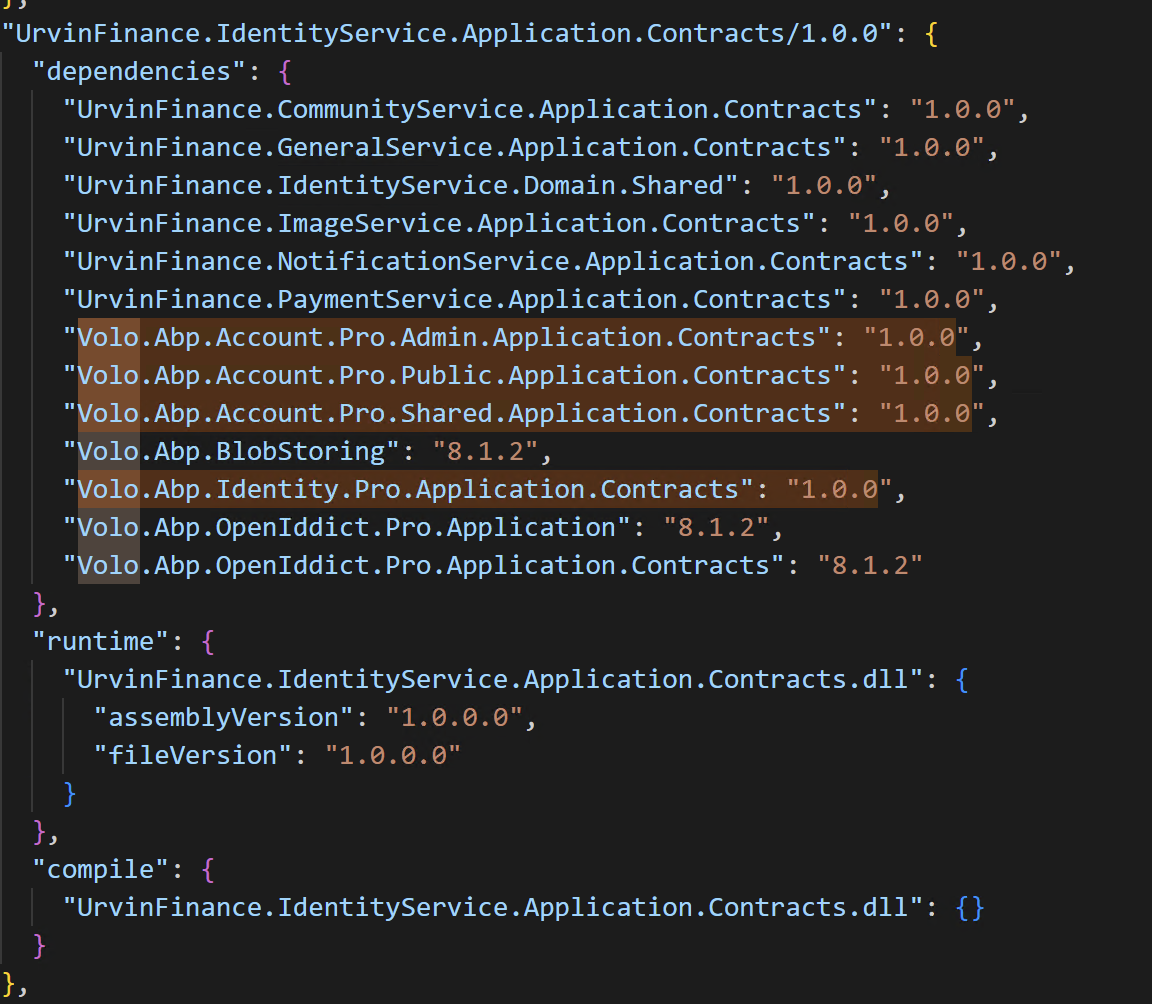
Your UrvinFinance.IdentityService.Application.Contracts/1.0.0 project uses the wrongdependencyy
hi
Can you zip your UrvinFinance.AuthServer's bin folder and share it?
liming.ma@volosoft.com
Thanks.
hi
Please add the custom middleware after app.UseAuthentication();
And share the debug logs again(https://abp.io/support/questions/9523/Upgraded-Application-from-732-to-90?CurrentPage=1#answer-3a1ad613-31cb-cb2a-6bd3-323b925e6dc0).
I think the AbpClaimTypes does not match the current claims.
Thanks.
app.UseAuthentication();

app.Use(async (httpContext, next) =>
{
    var logger = httpContext.RequestServices.GetRequiredService<ILogger<EmployeeServiceHttpApiHostModule>>();
    var claims = httpContext.User.Claims.Select(x => new { x.Type, x.Value }).ToList();
    logger.LogError("HttpContext.User Claims:");
    logger.LogError(JsonSerializer.Serialize(claims));

    var currentUser = httpContext.RequestServices.GetRequiredService<ICurrentUser>().GetAllClaims().Select(x => new { x.Type, x.Value }).ToList();
    logger.LogError("Current User Claims:");
    logger.LogError(JsonSerializer.Serialize(currentUser));


    var userid = AbpClaimTypes.UserId;
    var username = AbpClaimTypes.UserName;
    var roleClaimType = AbpClaimTypes.Role;

    logger.LogError($"UserId Claim Type: {userid}");
    logger.LogError($"UserName Claim Type: {username}");
    logger.LogError($"Role Claim Type: {roleClaimType}");

    var authorizationHeader = httpContext.Request.Headers["Authorization"];
    logger.LogError(!string.IsNullOrEmpty(authorizationHeader)
        ? $"Authorization Header: {authorizationHeader}"
        : "Authorization Header is missing or empty.");

    await next(httpContext);
});
hi
The Microsoft logs level still not Debug
Please use the log configuration code below.
var loggerConfiguration = new LoggerConfiguration()
    .MinimumLevel.Debug()
    .MinimumLevel.Override("Microsoft.EntityFrameworkCore", LogEventLevel.Warning)
    .Enrich.FromLogContext()
    .WriteTo.Async(c => c.File("Logs/logs.txt"))
2025-06-30 19:52:16.805 +05:30 [INF] Request starting HTTP/1.1 GET http://localhost:44371/api/employee-service/dashboard-pages?PageId=HOMEDASHBOARD&SkipCount=0&MaxResultCount=20000&api-version=1.0 - null 0

2025-06-30 19:52:17.252 +05:30 [INF] Executing endpoint 'Exceego.EHSWatch.AppV3.EmployeeService.Controllers.DashboardPages.DashboardPageController.GetListAsync (Exceego.EHSWatch.AppV3.EmployeeService.HttpApi)'

2025-06-30 19:52:18.685 +05:30 [INF] Authorization failed. These requirements were not met:
PermissionRequirement: EmployeeService.CustomReports

2025-06-30 19:52:19.936 +05:30 [INF] Request finished HTTP/1.1 GET https://localhost:44371/api/employee-service/dashboard-pages?PageId=HOMEDASHBOARD&SkipCount=0&MaxResultCount=20000&api-version=1.0 - 403 0 null 3131.5555ms
These requirements were not met: PermissionRequirement: EmployeeService.CustomReports
Does your current user have EmployeeService.CustomReports permission?
If the 403 error only happened on Exceego.EHSWatch.AppV3.EmployeeService.HttpApi.Host. website.
Please enable the Debug log level and share again.
Also output some info to the logs.
app.UseAuthentication();

app.Use(async (httpContext, next) =>
{
    var logger = httpContext.RequestServices.GetRequiredService<ILogger<EmployeeServiceHttpApiHostModule>>();
    var claims = httpContext.User.Claims.Select(x => new { x.Type, x.Value }).ToList();
    logger.LogError("HttpContext.User Claims:");
    logger.LogError(JsonSerializer.Serialize(claims));

    var currentUser = httpContext.RequestServices.GetRequiredService<ICurrentUser>().GetAllClaims().Select(x => new { x.Type, x.Value }).ToList();
    logger.LogError("Current User Claims:");
    logger.LogError(JsonSerializer.Serialize(currentUser));


    var userid = AbpClaimTypes.UserId;
    var username = AbpClaimTypes.UserName;
    var roleClaimType = AbpClaimTypes.Role;

    logger.LogError($"UserId Claim Type: {userid}");
    logger.LogError($"UserName Claim Type: {username}");
    logger.LogError($"Role Claim Type: {roleClaimType}");

    var authorizationHeader = httpContext.Request.Headers["Authorization"];
    logger.LogError(!string.IsNullOrEmpty(authorizationHeader)
        ? $"Authorization Header: {authorizationHeader}"
        : "Authorization Header is missing or empty.");

    await next(httpContext);
});
Thanks.
hi
Can you share the debug logs of the app that is under IIS?
liming.ma@volosoft.com
Thanks




