My test environment is missing Azure.Identity, I can't to execute DbMigrator
Can you reproduce your problem in a template project?
Thanks.
Migrating schema for host database...
[19:59:04 WRN] The entity type 'YearlySchedule' is an optional dependent using table sharing without any required non shared column that could be used to identify whether the entity exists. If all nullable properties contain a 'null' value in database then an object instance won't be created in the query. Add a required property to create instances with 'null' values for other properties or mark the incoming navigation as required to always create an instance.
Unhandled exception. Microsoft.Data.SqlClient.SqlException (0x80131904): DefaultAzureCredential failed to retrieve a token from the included credentials. See the troubleshooting guide for more information. https://aka.ms/azsdk/net/identity/defaultazurecredential/troubleshoot
- EnvironmentCredential authentication unavailable. Environment variables are not fully configured. See the troubleshooting guide for more information. https://aka.ms/azsdk/net/identity/environmentcredential/troubleshoot
- WorkloadIdentityCredential authentication unavailable. The workload options are not fully configured. See the troubleshooting guide for more information. https://aka.ms/azsdk/net/identity/workloadidentitycredential/troubleshoot
- ManagedIdentityCredential authentication unavailable. No response received from the managed identity endpoint.
- VisualStudioCredential authentication failed: Visual Studio Token provider can't be accessed at /Users/maliming/.IdentityService/AzureServiceAuth/tokenprovider.json
- VisualStudioCodeCredential requires the Azure.Identity.Broker package to be referenced from the project. VS Code Azure See the troubleshooting guide for more information. https://aka.ms/azsdk/net/identity/vscodecredential/troubleshoot
- AzureCliCredential authentication failed: Azure CLI not installed
- AzurePowerShellCredential authentication failed: Az.Accounts module >= 2.2.0 is not installed.
- AzureDeveloperCliCredential authentication failed: Azure Developer CLI could not be found.
- The BrokerCredential requires the Azure.Identity.Broker package to be referenced. See the troubleshooting guide for more information. https://aka.ms/azsdk/net/identity/brokercredential/troubleshoot
 ---> Azure.Identity.CredentialUnavailableException: DefaultAzureCredential failed to retrieve a token from the included credentials. See the troubleshooting guide for more information. https://aka.ms/azsdk/net/identity/defaultazurecredential/troubleshoot
- EnvironmentCredential authentication unavailable. Environment variables are not fully configured. See the troubleshooting guide for more information. https://aka.ms/azsdk/net/identity/environmentcredential/troubleshoot
- WorkloadIdentityCredential authentication unavailable. The workload options are not fully configured. See the troubleshooting guide for more information. https://aka.ms/azsdk/net/identity/workloadidentitycredential/troubleshoot
- ManagedIdentityCredential authentication unavailable. No response received from the managed identity endpoint.
- VisualStudioCredential authentication failed: Visual Studio Token provider can't be accessed at /Users/maliming/.IdentityService/AzureServiceAuth/tokenprovider.json
- VisualStudioCodeCredential requires the Azure.Identity.Broker package to be referenced from the project. VS Code Azure See the troubleshooting guide for more information. https://aka.ms/azsdk/net/identity/vscodecredential/troubleshoot
- AzureCliCredential authentication failed: Azure CLI not installed
- AzurePowerShellCredential authentication failed: Az.Accounts module >= 2.2.0 is not installed.
- AzureDeveloperCliCredential authentication failed: Azure Developer CLI could not be found.
- The BrokerCredential requires the Azure.Identity.Broker package to be referenced. See the troubleshooting guide for more information. https://aka.ms/azsdk/net/identity/brokercredential/troubleshoot
 ---> System.AggregateException: Multiple exceptions were encountered while attempting to authenticate. (EnvironmentCredential authentication unavailable. Environment variables are not fully configured. See the troubleshooting guide for more information. https://aka.ms/azsdk/net/identity/environmentcredential/troubleshoot) (WorkloadIdentityCredential authentication unavailable. The workload options are not fully configured. See the troubleshooting guide for more information. https://aka.ms/azsdk/net/identity/workloadidentitycredential/troubleshoot) (ManagedIdentityCredential authentication unavailable. No response received from the managed identity endpoint.) (VisualStudioCredential authentication failed: Visual Studio Token provider can't be accessed at /Users/maliming/.IdentityService/AzureServiceAuth/tokenprovider.json) (VisualStudioCodeCredential requires the Azure.Identity.Broker package to be referenced from the project. VS Code Azure See the troubleshooting guide for more information. https://aka.ms/azsdk/net/identity/vscodecredential/troubleshoot) (AzureCliCredential authentication failed: Azure CLI not installed) (AzurePowerShellCredential authentication failed: Az.Accounts module >= 2.2.0 is not installed.) (AzureDeveloperCliCredential authentication failed: Azure Developer CLI could not be found.) (The BrokerCredential requires the Azure.Identity.Broker package to be referenced. See the troubleshooting guide for more information. https://aka.ms/azsdk/net/identity/brokercredential/troubleshoot)
 ---> Azure.Identity.CredentialUnavailableException: EnvironmentCredential authentication unavailable. Environment variables are not fully configured. See the troubleshooting guide for more information. https://aka.ms/azsdk/net/identity/environmentcredential/troubleshoot
   at Azure.Identity.CredentialDiagnosticScope.FailWrapAndThrow(Exception ex, String additionalMessage, Boolean isCredentialUnavailable)
   at Azure.Identity.EnvironmentCredential.GetTokenImplAsync(Boolean async, TokenRequestContext requestContext, CancellationToken cancellationToken)
   at Azure.Identity.EnvironmentCredential.GetTokenAsync(TokenRequestContext requestContext, CancellationToken cancellationToken)
   at Azure.Identity.DefaultAzureCredential.GetTokenFromSourcesAsync(TokenCredential[] sources, TokenRequestContext requestContext, Boolean async, CancellationToken cancellationToken)
   --- End of inner exception stack trace ---
ok. sorry for that.
I will run :
TOG.DbMigratorSEF.Workflow.AuthServerSEF.Workflow.HttpApi.Hostite/src/SEF.BlazorAre there any other steps?
Thanks.
hi
If I remove the Github source
error NU1101: Unable to find package Fundanet.Messages. No packages exist with this id in source(s): ABP Commercial NuGet Source, ABP Nightly NuGet Source, BlazoriseMyGet, DevExpress, nuget.org
Can you update the NuGet.Config so I can restore the packages?
https://github.com/franciscosl-fnet/ArcoCoreCloned/blob/main/NuGet.Config
Thanks.
hi
Thanks. I will fix it in the Suite. 👍
ok, if you have any questions, feel free to ask anytime.
Happy New Year.
hi
I can't restore some nuget packges.
ArcoCoreCloned/src/Fundanet.Arco.Core.Samples.Blazor.Client/Fundanet.Arco.Core.Samples.Blazor.Client.csproj : error NU1301:
      Failed to retrieve information about 'Fundanet.WebHooks.Blazor' from remote source 'https://nuget.pkg.github.com/FundanetDev/download/fundanet.webhooks.blazor/index.json'.
Can you share the full steps?
For example:
hosts file.Fundanet.Arco.Core.Samples.DbMigratorFundanet.Arco.Core.Samples.HttpApi.HostFundanet.Arco.Core.Samples.BlazorDoes your project require any other environment setup?
I have to run your project and reproduce the "error": "invalid_grant",
Thanks.
hi
https://abp.io/api/abp-studio/download/r/osx/abp-studio-1.1.2-stable-full.nupkg
hi
How can we generate with Dotnet 9 and 9.2.3?
You can install the old Studio.
https://abp.io/api/abp-studio/download/r/windows/abp-studio-1.1.2-stable-full.nupkg
https://abp.io/docs/latest/studio/version-mapping
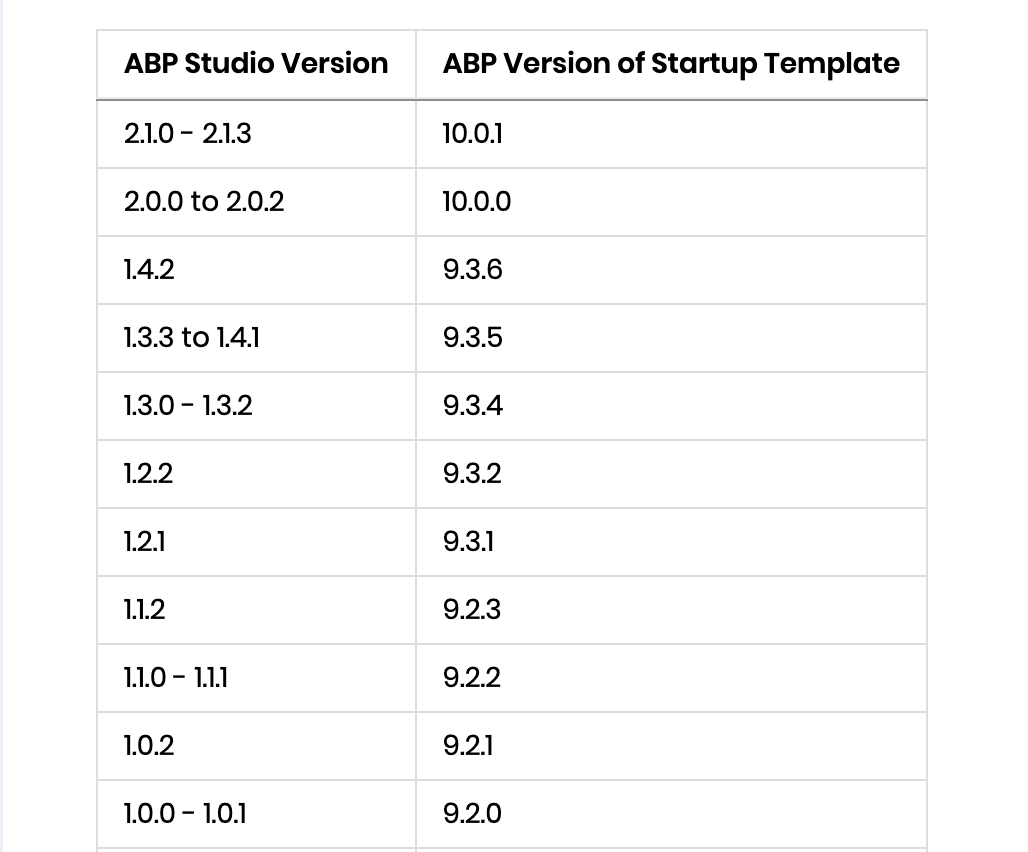
Thanks.
hi
I have downloaded it.
Can you share some steps to reproduce the problem?
Thanks.









