hi Mohammed
context.ProtocolMessage.RedirectUri = "http://localhost:4200";
You should not redirect to angular. It should be redirected to authserver, and then authserver will be redirected to angular.
Or can you explain why you did this?
hi
The token has returned, I guess this is an angular issue. Our angular team will reply to you ASAP. : )
hi
As you see, all url have http protocol.
You can add a middleware force set the scheme as https
app.Use((httpContext, next) =>
{
    httpContext.Request.Scheme = "https";
    return next();
});
hi
You don't need to clear all the resolvers.
You can add your Contributor after CurrentUserTenantResolveContributor
options.TenantResolvers.InsertAfter(
    r => r is CurrentUserTenantResolveContributor,
    new DomainTenantResolveContributor(domainFormat)
);
Please output some logs in your Contributor then check the logs to see what happened.
hi
The key point is: If you confirm you have found a valid tenant, then set context.Handled = true; and return a tenant name.
The DomainTenantResolveContributor always breaks the resolve process. It always has a tenant value.
So the second one will not be working anymore.
https://github.com/abpframework/abp/blob/dev/framework/src/Volo.Abp.AspNetCore.MultiTenancy/Volo/Abp/AspNetCore/MultiTenancy/DomainTenantResolveContributor.cs#L36
You can add your DomainTenantResolveContributor to change this behavior.
btw you can only call AddDomainTenantResolver once.
Otherwise one of them will not work
What is the angular url?
I need to reproduce the issue.
hi
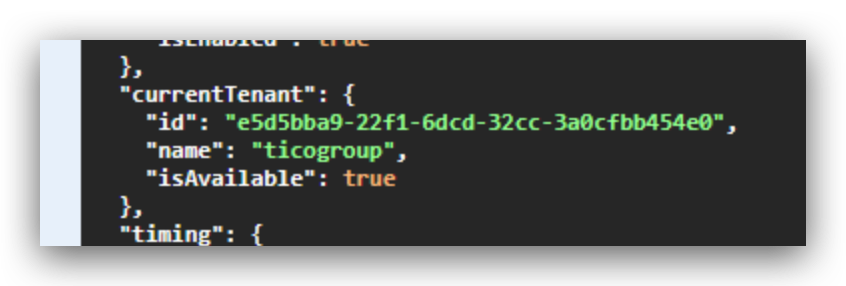
The below JSON response means the tenant resolves is works. Can you share an online website URL so we can test it online?
We will resolve all nullable warnings in 7.4









