hi
I think you can add email to id_token in your azure AD settings. https://docs.microsoft.com/en-us/azure/active-directory/develop/active-directory-optional-claims
or you can test with the below code.
private void ConfigureExternalProviders(ServiceConfigurationContext context)
    {
        context.Services.AddAuthentication()
            .AddMicrosoftIdentityWebApp(
                microsoftIdentityOptions =>
                {
                    microsoftIdentityOptions.Instance = "https://login.microsoftonline.com/";
                    microsoftIdentityOptions.Domain = "xxx";
                    microsoftIdentityOptions.TenantId = "xxx";
                    microsoftIdentityOptions.ClientId = "xxx";
                    microsoftIdentityOptions.ClientSecret = "xxx";
                    microsoftIdentityOptions.CallbackPath = "/signin-azuread-oidc";
                    microsoftIdentityOptions.SignedOutCallbackPath = "/signout-callback-oidc";

                    microsoftIdentityOptions.SignInScheme = IdentityConstants.ExternalScheme;
                },
                cookieAuthenticationOptions => { },
                OpenIdConnectDefaults.AuthenticationScheme,
                null);

        context.Services.PostConfigure<OpenIdConnectOptions>(OpenIdConnectDefaults.AuthenticationScheme, options =>
        {
            // Add email to id_token in your azure AD settings.
            options.ClaimActions.Add(new AddEmailClaim());
        });
    }
public class AddEmailClaim : ClaimAction
{
    public AddEmailClaim()
        : base(null, null)
    {
    }

    public override void Run(JsonElement userData, ClaimsIdentity identity, string issuer)
    {
        var preferred_username = identity.Claims.FirstOrDefault(x => x.Type == "preferred_username");
        if (preferred_username != null)
        {
            identity.AddClaim(new Claim(AbpClaimTypes.Email, preferred_username.Value));
        }
    }
}
hi
The LocalizationSettingNames.DefaultLanguage is a setting so you can change via https://docs.abp.io/en/abp/latest/Settings
how I can use it to translate string
https://docs.abp.io/en/abp/latest/Localization
hi
Yes, I will test is asap.
hi
Let's discuss this in https://support.abp.io/QA/Questions/3604#answer-999438a9-65ca-2b2d-72d6-3a060dff6511
hi
You can get language settings after changing to the tenant.
using (CurrentTenant.Change(tenantId))
{
    var defaultLanguage = await settingProvider.GetOrNullAsync(LocalizationSettingNames.DefaultLanguage);
}
hi

https://community.abp.io/posts/unifying-dbcontexts-for-ef-core-removing-the-ef-core-migrations-project-nsyhrtna
hi
You just need to share your azure info like 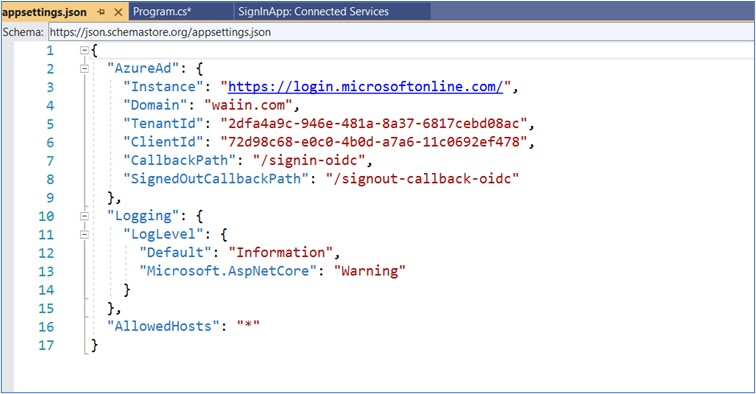
and a test account username & password
I will check `we know that claim is certainly available - but it does not appear to be working.
hi
we know that claim is certainly available - but it does not appear to be working.
Can you share your azure configuration with me? liming.ma@volosoft.com
I will test it in my locally.
hi
Can you share the full steps to reproduce the issue? or a project liming.ma@volosoft.com
hi
we can login via azure, but because there is no relationship between our abp users and our azure users we are not authorizing which of course means our menus are incorrect and our API calls are being bounced.
The framework will compare the local user's email with the azure user. Does your application fit this design?




