Good afternoon,
I need you to indicate me the changes to make that you indicated in this thread, we have the same problem, it forces to change the password,
the resource indicates that it is no longer available and I can not see the solution.
https://abp.io/support/questions/8722/External-user-being-prompted-to-generate-local-password-after-upgrading-to-ABP-9
Good morning,
In relation to this ticket: https://abp.io/support/questions/8743/Critical-Performance-Issue-in-Blazor-WebAssembly-with-ABP-Affecting-Multiple-Production-Applications
The conclusion you gave us was to migrate to webapp, this migration has been done at a great cost of time, However the problem is still there, the wasm is downloaded using blazor server and it is still very slow.
We have now changed it to use a CDN to download the files, We have published it and we can give you the link to the application where it has been applied,
Any other solution?
Hi, we need to change the login offered by abp to a blazor login.
We already had customised the default login, with the Default.cshtml file, but we need the login to be a razor.
We have migrated to webapp interactive auto and the wasm are not downloaded until you login, the idea is that as soon as you login the files are downloaded but it has to be a blazor page not a cshtml.
What would be the correct way to replace it?
Hi, I am migrating the webassembly application to webapp with interactive auto rendering and net 9,
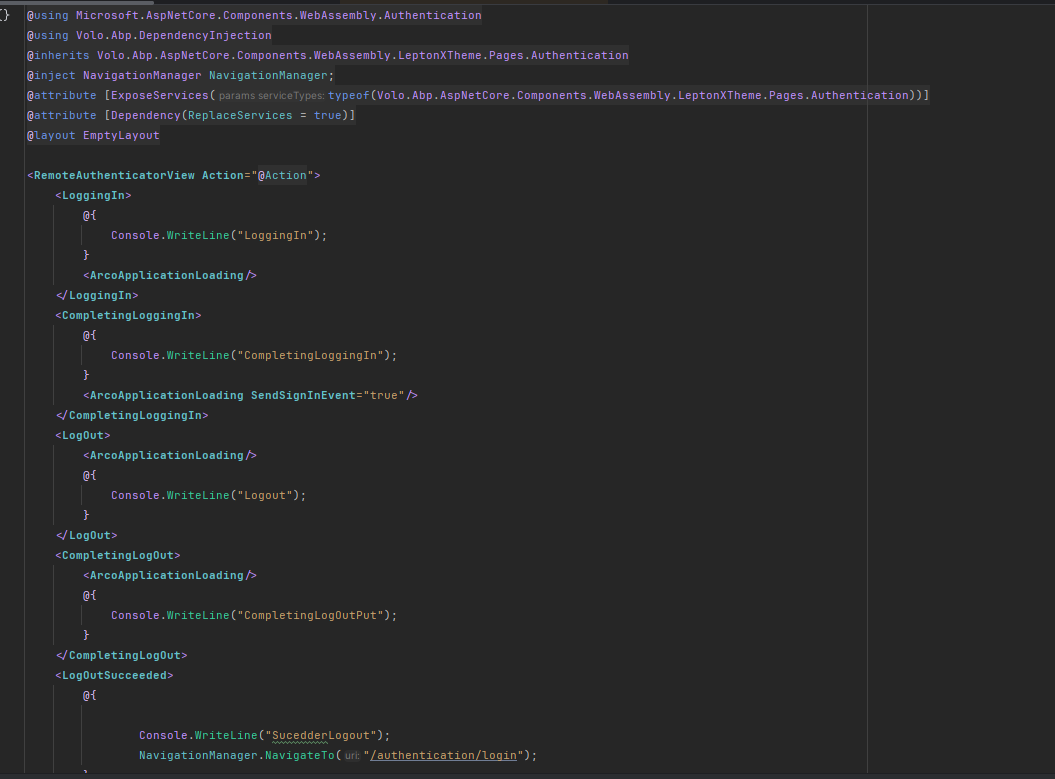
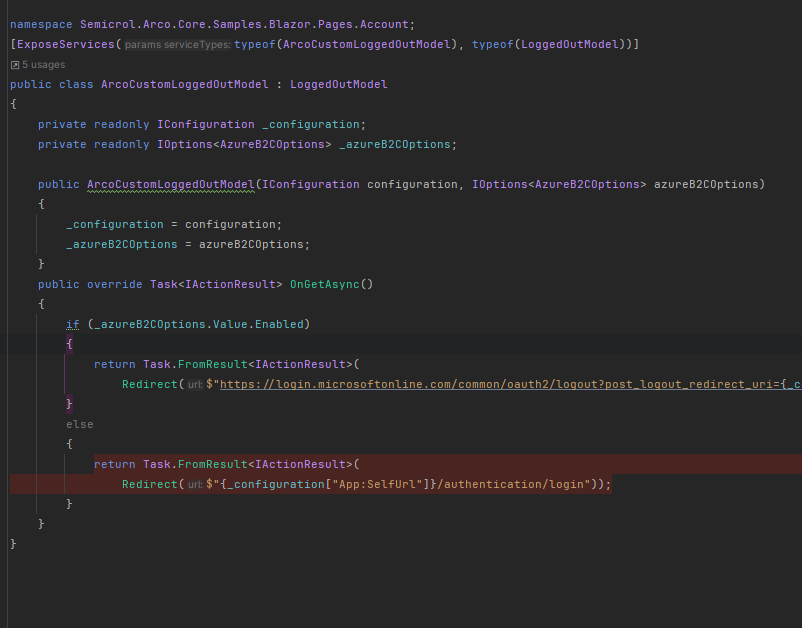
Login is overwritten,
it is indicated that the SignOutSessionStateManager is deprecated and needs to be modified by NavigateToLogout

The problem is that the url changes, but the abp application does not know that the logout has taken place.
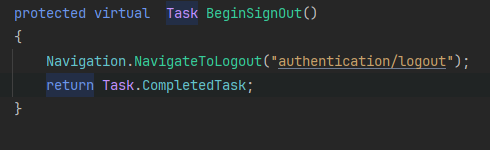
Can you tell me how to logout? Right now I have Authentication and LoggedOut overwritten.
We are facing a severe issue with access to our Blazor WebAssembly application based on ABP, which varies significantly between devices. We currently have six applications in production, and this issue is affecting all our users, who are already reporting access and performance problems.
We have been investigating this issue for months and have identified that other ABP customers have reported similar problems. Below are some relevant discussion threads:
https://abp.io/support/questions/3643/Guidance-required-on-Blazor-WASM-performance-issues https://github.com/dotnet/aspnetcore/issues/16956#issuecomment-552475370 https://github.com/Megabit/Blazorise/discussions/4291
It is important to note that this is not a WebAssembly download issue, as the browser inspector shows that files are fully downloaded in a short time. The problem occurs exclusively in production when the application is deployed on Azure, whereas in a local environment, it runs smoothly.
Given the significant impact on our users, we are conducting various tests to identify the root cause:
Verifying that the issue is not related to the database, DTUs, memory, or processor.
Analyzing metrics in Azure Application Insights and testing in alternative environments such as Docker or IIS to rule out caching or configuration issues.
Evaluating migration to .NET Core 9 due to its performance improvements and possible optimizations in ABP.
Setting breakpoints, removing the initial dashboard to rule out problematic components, and considering Blazor Server as a last resort.
Due to the critical nature of this issue, we urgently need a resolution. We can provide access to the application for testing or share videos demonstrating the problem.
We would greatly appreciate any guidance or solutions to resolve this issue as soon as possible.
Looking forward to your prompt response.
Unhandled exception rendering component: Cannot provide a value for property 'MainMenuProvider' on type 'Semicrol.Arco.Core.BlazorComponents.Abp.Themes.ArcoMenu'. There is no registered service of type 'Volo.Abp.AspNetCore.Components.Web.LeptonTheme.Components.ApplicationLayout.Navigation.MainMenuProvider'.
System.InvalidOperationException: Cannot provide a value for property 'MainMenuProvider' on type 'Semicrol.Arco.Core.BlazorComponents.Abp.Themes.ArcoMenu'. There is no registered service of type 'Volo.Abp.AspNetCore.Components.Web.LeptonTheme.Components.ApplicationLayout.Navigation.MainMenuProvider'.
at Microsoft.AspNetCore.Components.ComponentFactory.<>c__DisplayClass9_0.<CreatePropertyInjector>g__Initialize|1(IServiceProvider serviceProvider, IComponent component)
at Microsoft.AspNetCore.Components.ComponentFactory.InstantiateComponent(IServiceProvider serviceProvider, Type componentType, IComponentRenderMode callerSpecifiedRenderMode, Nullable`1 parentComponentId)
at Microsoft.AspNetCore.Components.RenderTree.Renderer.InstantiateChildComponentOnFrame(RenderTreeFrame[] frames, Int32 frameIndex, Int32 parentComponentId)
at Microsoft.AspNetCore.Components.RenderTree.RenderTreeDiffBuilder.InitializeNewComponentFrame(DiffContext& diffContext, Int32 frameIndex)
at Microsoft.AspNetCore.Components.RenderTree.RenderTreeDiffBuilder.InitializeNewSubtree(DiffContext& diffContext, Int32 frameIndex)
at Microsoft.AspNetCore.Components.RenderTree.RenderTreeDiffBuilder.InsertNewFrame(DiffContext& diffContext, Int32 newFrameIndex)
at Microsoft.AspNetCore.Components.RenderTree.RenderTreeDiffBuilder.AppendDiffEntriesForRange(DiffContext& diffContext, Int32 oldStartIndex, Int32 oldEndIndexExcl, Int32 newStartIndex, Int32 newEndIndexExcl)
at Microsoft.AspNetCore.Components.RenderTree.RenderTreeDiffBuilder.ComputeDiff(Renderer renderer, RenderBatchBuilder batchBuilder, Int32 componentId, ArrayRange`1 oldTree, ArrayRange`1 newTree)
at Microsoft.AspNetCore.Components.Rendering.ComponentState.RenderIntoBatch(RenderBatchBuilder batchBuilder, RenderFragment renderFragment, Exception& renderFragmentException)
at Microsoft.AspNetCore.Components.RenderTree.Renderer.ProcessRenderQueue()
[11:44:03 ERR] Unhandled exception in circuit 'AVGvqJF_bJFRyax23gXUNRUs_X1UBdLe7jvg7WmxiJg'.
System.InvalidOperationException: Cannot provide a value for property 'MainMenuProvider' on type 'Semicrol.Arco.Core.BlazorComponents.Abp.Themes.ArcoMenu'. There is no registered service of type 'Volo.Abp.AspNetCore.Components.Web.LeptonTheme.Components.ApplicationLayout.Navigation.MainMenuProvider'.
at Microsoft.AspNetCore.Components.ComponentFactory.<>c__DisplayClass9_0.<CreatePropertyInjector>g__Initialize|1(IServiceProvider serviceProvider, IComponent component)
at Microsoft.AspNetCore.Components.ComponentFactory.InstantiateComponent(IServiceProvider serviceProvider, Type componentType, IComponentRenderMode callerSpecifiedRenderMode, Nullable`1 parentComponentId)
at Microsoft.AspNetCore.Components.RenderTree.Renderer.InstantiateChildComponentOnFrame(RenderTreeFrame[] frames, Int32 frameIndex, Int32 parentComponentId)
at Microsoft.AspNetCore.Components.RenderTree.RenderTreeDiffBuilder.InitializeNewComponentFrame(DiffContext& diffContext, Int32 frameIndex)
at Microsoft.AspNetCore.Components.RenderTree.RenderTreeDiffBuilder.InitializeNewSubtree(DiffContext& diffContext, Int32 frameIndex)
at Microsoft.AspNetCore.Components.RenderTree.RenderTreeDiffBuilder.InsertNewFrame(DiffContext& diffContext, Int32 newFrameIndex)
at Microsoft.AspNetCore.Components.RenderTree.RenderTreeDiffBuilder.AppendDiffEntriesForRange(DiffContext& diffContext, Int32 oldStartIndex, Int32 oldEndIndexExcl, Int32 newStartIndex, Int32 newEndIndexExcl)
at Microsoft.AspNetCore.Components.RenderTree.RenderTreeDiffBuilder.ComputeDiff(Renderer renderer, RenderBatchBuilder batchBuilder, Int32 componentId, ArrayRange`1 oldTree, ArrayRange`1 newTree)
at Microsoft.AspNetCore.Components.Rendering.ComponentState.RenderIntoBatch(RenderBatchBuilder batchBuilder, RenderFragment renderFragment, Exception& renderFragmentException)
at Microsoft.AspNetCore.Components.RenderTree.Renderer.ProcessRenderQueue()
[11:44:03 INF] Executed endpoint 'Microsoft.AspNetCore.Routing.RouteEndpoint'
[11:44:03 INF] Request finished HTTP/2 CONNECT https://localhost:44312/_blazor?id=i45klUn8KXqKz5HM2nflZw - 200 null null 690.8093ms
[11:44:03 INF] Connection id "0HN8INOU4C9EC", Request id "0HN8INOU4C9EC:0000000D": the application completed without reading the entire request body.
[11:46:19 INF] Application is shutting down...

Do you know why this might be happening? Am I missing something to configure?
Why the command abp new BookStore -t app -u blazor-webapp does not create a Host project?
We are upgrading from abp 7.4.4 to 8.1.1 and when we authenticate and access the application it tells me in the browser console that we do not have these permissions for the admin user.
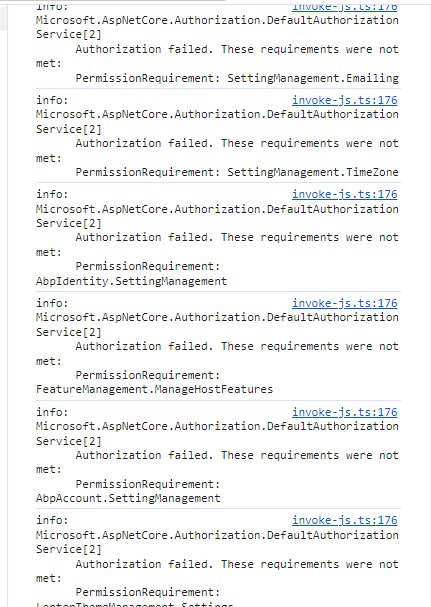
and when we go to access any entity it tells me that I don't have permissions.
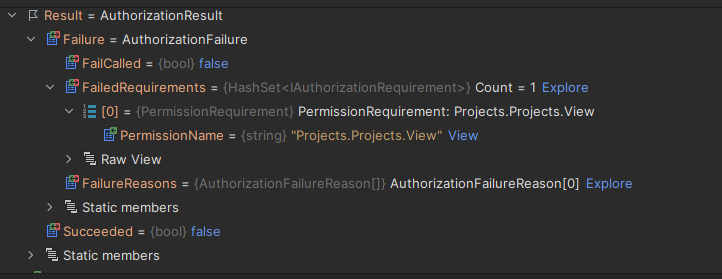
Only happens to me when updating,
Has anything changed in the permissions and authentication that we missed?
Provide us with the following info:
Should be the component not recognize the click
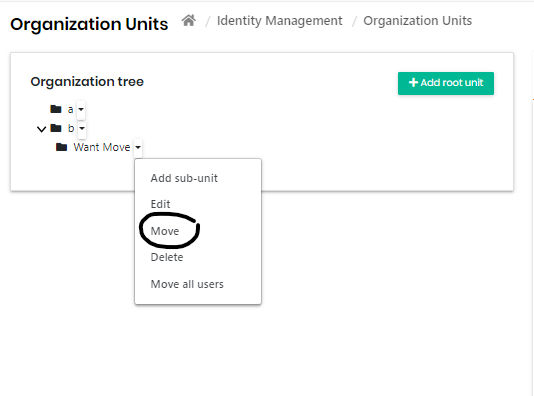
Not allow to select any
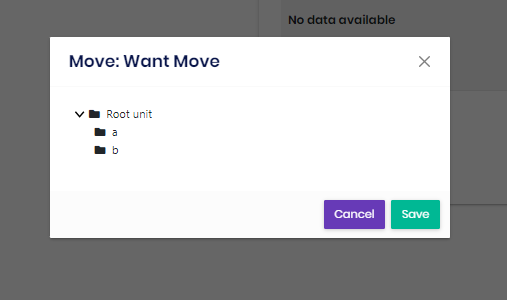
Even if I click on save, it does nothing.









