Hi Maliming, have you created a ticket we can follow up?
Just posting a comment so ABP team is aware of this issue.
Hi @maliming,
Thanks for the clarification. We understand the limitation, but using Isolated means giving up unified user accounts, which is the main reason we'd want to upgrade to Shared in the first place.
We'd like to propose a flow that could make per-tenant external IdP configuration work with Shared strategy:
Proposed Flow:
IMultiTenant data filter disabled, the system can query all IdentityUser records matching the email — each with a different TenantId. ABP already does something similar in IdentityUserManager.FindSharedUserByEmailAsync)Note: This flow could be opt-in via configuration (e.g.,
AbpAccountOptions.EnableTenantSelectionBeforeAuth), so it only activates when the application explicitly requires per-tenant IdP resolution in Shared mode. The default behavior would remain unchanged.
So, in Shared mode, the email is a cross-tenant identifier — we don't need domain-based tenant resolution. The tenant selection happens before authentication but after user identification, giving us the context needed to load per-tenant IdP settings.
Security Consideration:
This flow could expose tenant membership to unauthenticated users (email enumeration). This can be mitigated by:
We believe this is a reasonable tradeoff, especially since domain-based tenant resolution already implicitly reveals tenant existence today.
Request:
Would the ABP team consider either supporting this flow natively, or providing the necessary extensibility points (e.g., virtual methods, overridable services, or hooks in the login pipeline) so that we can implement this flow ourselves on top of the Shared strategy?
Any ABP team insights?
Hi, just to know if there is any feedback about this issue
Hi, it's the second time the bot closed this issue. Could someone from ABP check it, please?
Hi Engican, do you need this question to be opened or is it OK to close it?
[EngincanV] said:
[nacho] said: Hi! I just reopened what the bot closed :)
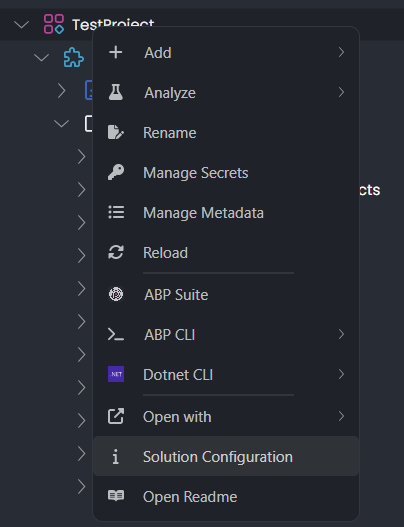
Just a reminder of something that I realized and wrote in my fist comment: "I do not see the option to get the solution configuration with ABP Studio, the button is not visible now"
I created a new solution with ABP Studio and the option "Solution Configuration" is available
Hi, this feature was added with v0.7.6+, and it basically puts configuration into your
*.abpslnfile while creating an application (section name:creatingStudioConfiguration). So, probably your solution was created before v0.7.6 and this is the reason why you don't see the "Solution Configuration" context menu item.
OK! this is our abpsln file, in case it helps:
{
  "id": "fff39d08-98bc-4ab2-9e28-c05a141732a2",
  "template": "empty",
  "modules": {
    "Driven2u.Cpaas": {
      "path": "Driven2u.Cpaas.abpmdl"
    }
  },
  "runProfiles": {
    "Default": {
      "path": "etc/abp-studio/run-profiles/Default.abprun.json"
    }
  }
}
Hi! I just reopened what the bot closed :)
Just a reminder of something that I realized and wrote in my fist comment: "I do not see the option to get the solution configuration with ABP Studio, the button is not visible now"
I created a new solution with ABP Studio and the option "Solution Configuration" is available