Hi @liangshiwei, I got the same issue after creating a new client, I had copied the SQL query to run on SQL Management Studio, it was extremely slow, the root cause is the ORDER BY part, please help us take a look:
ORDER BY [t].[Id], [i0].[ClientId], [i0].[GrantType], [i1].[ClientId], [i1].[RedirectUri], [i2].[ClientId], [i2].[PostLogoutRedirectUri], [i3].[ClientId], [i3].[Scope], [i4].[ClientId], [i4].[Type], [i4].[Value], [i5].[ClientId], [i5].[Type], [i5].[Value], [i6].[ClientId], [i6].[Provider], [i7].[ClientId], [i7].[Origin], [i8].[ClientId], [i8].[Key]
the log is too long, please check it here: https://drive.google.com/file/d/1Mg6XeFGRliqNKU24fH413FANKAMawgRL/view?usp=sharing
Hi @liangshiwei, thank you
Hi @alper, yes, I have shared the repo via email, please help take a look.
Thanks.
Hi @liangshiwei, thanks for your quick response. I am able to resolve the problem by clear browser cookies in the latest version 4.0.2.
However, I still got the unauthentication problem with version 3.3.2 due to missing access token
[21:56:21 WRN] Authorization failed! Given policy has not granted.
Volo.Abp.Authorization.AbpAuthorizationException: Authorization failed! Given policy has not granted.
please let me know is there a way to add the token in swagger like version 4.x
Thank you.
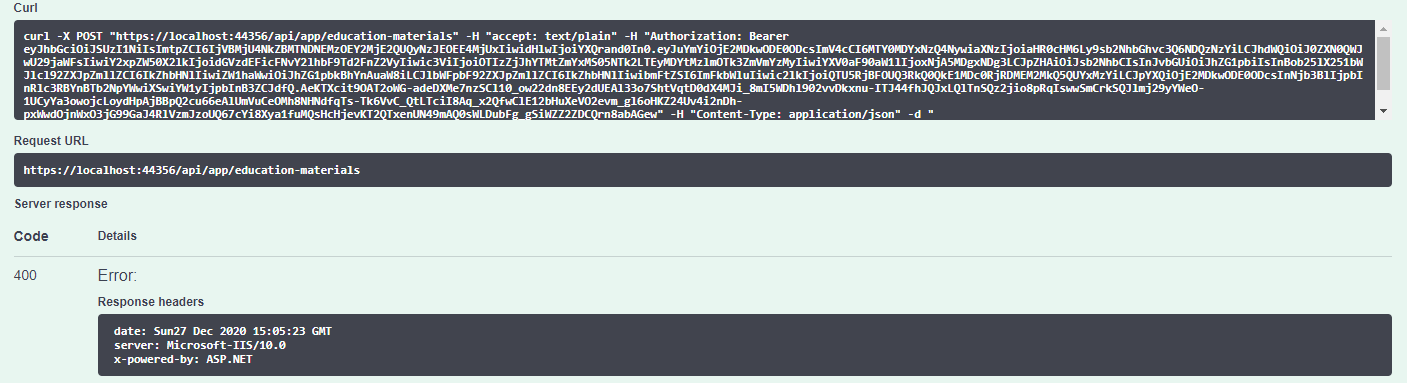
Hi, I got this error when trying to make a POST call via swagger, there is no issue with GET.
[22:55:53 INF] Request starting HTTP/2 POST https://localhost:44356/api/app/education-materials application/json 74
[22:55:53 INF] CORS policy execution failed.
[22:55:53 INF] Request origin https://localhost:44356 does not have permission to access the resource.
[22:55:54 INF] Successfully validated the token.
[22:55:54 INF] Executing endpoint 'testAbpSocial.Controllers.EducationMaterials.EducationMaterialController.CreateAsync (testAbpSocial.HttpApi)'
[22:55:54 INF] Route matched with {area = "app", controller = "EducationMaterial", action = "Create", page = ""}. Executing controller action with signature System.Threading.Tasks.Task`1[testAbpSocial.EducationMaterials.EducationMaterialDto] CreateAsync(testAbpSocial.EducationMaterials.EducationMaterialCreateDto) on controller testAbpSocial.Controllers.EducationMaterials.EducationMaterialController (testAbpSocial.HttpApi).
[22:55:54 ERR] The required antiforgery cookie ".AspNetCore.Antiforgery.k7aueVLaN4c" is not present.
[22:55:54 INF] Authorization failed for the request at filter 'Volo.Abp.AspNetCore.Mvc.AntiForgery.AbpAutoValidateAntiforgeryTokenAuthorizationFilter'.
[22:55:54 INF] Executing HttpStatusCodeResult, setting HTTP status code 400
Below is my application template:
Someone has faced the same issue and they have to downgrade the version, no solution so far: https://support.abp.io/QA/Questions/554/REST-API-Antiforgery-Cookie-Error-After-POST-apiLogin---POST-apimyentity-Call-Sequence
I also tried with the latest version 4.0.2 which I have authenticated and can see the token inside the request, still same issue:
Hi @gterdem, I have overrided the methods and found the root caue, the loginInfo is returned null if I login with the Identity Server A as authentication provider:
var loginInfo = await SignInManager.GetExternalLoginInfoAsync();
            if (loginInfo == null)
            {
                Logger.LogWarning("External login info is not available");
                return RedirectToPage("./Login");
            }
I have added Google authentication provider to check, it was able to retrieve the loginInfo and proceed redirect to /Register page to register new user while the Identity Server could not retrieve the info and redirected to /.Login page:
Google log:
[10:28:16 INF] Executing handler method internetAbp.Pages.Account.CustomLoginModel.OnGetExternalLoginCallbackAsync - ModelState is Valid
[10:28:17 DBG] Added 0 entity changes to the current audit log
[10:28:17 DBG] Added 0 entity changes to the current audit log
[10:28:17 INF] Executed handler method OnGetExternalLoginCallbackAsync, returned result Microsoft.AspNetCore.Mvc.RedirectToPageResult.
[10:28:17 DBG] Added 0 entity changes to the current audit log
[10:28:17 INF] Executing RedirectToPageResult, redirecting to ./Register.
Identity Server A log:
[10:30:30 INF] Executing handler method internetAbp.Pages.Account.CustomLoginModel.OnGetExternalLoginCallbackAsync - ModelState is Valid
[10:30:33 WRN] External login info is not available
[10:30:33 INF] Executed handler method OnGetExternalLoginCallbackAsync, returned result Microsoft.AspNetCore.Mvc.RedirectToPageResult.
[10:30:33 INF] Executing RedirectToPageResult, redirecting to ./Login.
[10:30:33 INF] Executed page /Account/Login in 3398.5971ms
[10:30:33 INF] Executed endpoint '/Account/Login'
Full Log:
Could you please help me check.
Hi @gterdem, yes, the returnUrl was in address bar after navigated to Application A login page:
https://localhost:44306/Account/Login?ReturnUrl=%2Fconnect%2Fauthorize%2Fcallback%3Fclient_id%3Dinternetprovider%26redirect_uri%3Dhttps%253A%252F%252Flocalhost%253A44366%252Fsignin-oidc%26response_type%3Dcode%26scope%3Dopenid%2520profile%2520email%26code_challenge....
Below is the log details in Identity Server B, there is a line "ModelState is invalid", could you help me check:
[00:41:39 INF] Request starting HTTP/2.0 POST https://localhost:44366/Account/Login?returnUrl=%2Fconnect%2Fauthorize%2Fcallback%3Fresponse_type%3Dcode%26client_id%3DinternetAbp_App%26state%3DNTdhV1BhekxYTjFQakFyMzAwWFhMeW9CRHAzVURfMEVUbk4weVl-aVZhZmtw%26redirect_uri%3Dhttp%253A%252F%252Flocalhost%253A4200%26scope%3Dopenid%2520offline_access%2520internetAbp%26code_challenge%3DdQlDYtTlRIf4QVskwYTFtNSzSLEHKkZ2Vi5tLCO3nMk%26code_challenge_method%3DS256%26nonce%3DNTdhV1BhekxYTjFQakFyMzAwWFhMeW9CRHAzVURfMEVUbk4weVl-aVZhZmtw&handler=ExternalLogin application/x-www-form-urlencoded 651 [00:41:39 INF] CORS policy execution failed. [00:41:39 INF] Request origin https://localhost:44366 does not have permission to access the resource. [00:41:39 INF] No CORS policy found for the specified request. [00:41:39 INF] Executing endpoint '/Account/Login' [00:41:39 INF] Route matched with {page = "/Account/Login", area = "", action = "", controller = ""}. Executing page /Account/Login [00:41:39 INF] Skipping the execution of current filter as its not the most effective filter implementing the policy Microsoft.AspNetCore.Mvc.ViewFeatures.IAntiforgeryPolicy [00:41:39 INF] Executing handler method Volo.Abp.Account.Public.Web.Pages.Account.LoginModel.OnPostExternalLogin - ModelState is Invalid [00:41:39 INF] Executed handler method OnPostExternalLogin, returned result Microsoft.AspNetCore.Mvc.ChallengeResult. [00:41:39 INF] Executing ChallengeResult with authentication schemes (["oidc"]). [00:41:39 INF] AuthenticationScheme: oidc was challenged. [00:41:39 INF] Executed page /Account/Login in 136.7324ms [00:41:39 INF] Executed endpoint '/Account/Login' [00:41:39 DBG] Added 0 entity changes to the current audit log [00:41:39 DBG] Added 0 entity changes to the current audit log [00:41:39 INF] Request finished in 159.1755ms 302
Hi @alper, I have found the root cause, I forgot to update the "audience" in HttpApi.Host project. Thanks
Hi, is it possible to have a shared Identity Server for multiple applications? I have tried to create 2 application with app-pro template as below
I have removed the Identity Server in one application and updated the Angular UI to point to the shared Identity Server, I already created a new client in the shared Identity Server. However, I am not able to login successul, it managed to get the token but dashboard still show login button, I suspected it due to no claims:
[12:14:21 DBG] In addition to an id_token, an access_token was requested. No claims other than sub are included in the id_token. To obtain more user claims, either use the user info endpoint or set AlwaysIncludeUserClaimsInIdToken on the client configuration.
Below is the log content:
[12:14:21 INF] Token request validation success, {"ClientId": "App_UI", "ClientName": "App_UI", "GrantType": "authorization_code", "Scopes": null, "AuthorizationCode": "O345sXye9QaFRc8RPs-Bs3MxRLDX_kdqkjiymvtcX8o", "RefreshToken": null, "UserName": null, "AuthenticationContextReferenceClasses": null, "Tenant": null, "IdP": null, "Raw": {"grant_type": "authorization_code", "code": "O345sXye9QaFRc8RPs-Bs3MxRLDX_kdqkjiymvtcX8o", "redirect_uri": "http://localhost:4200", "code_verifier": "N1VsY3FSSmhsRXlMYVY4R0pjajRXN3FTOWJMdmFvTmF3SW9xNURIUUQ3dWFZ", "client_id": "App_UI"}, "$type": "TokenRequestValidationLog"} [12:14:21 DBG] client configuration validation for client App_UI succeeded. [12:14:21 DBG] Getting claims for access token for client: App_UI [12:14:21 DBG] Getting claims for access token for subject: 50d71d93-636f-f84d-d2c1-39f97c701cbe [12:14:21 DBG] Creating refresh token [12:14:21 DBG] Setting an absolute lifetime: 2592000 [12:14:21 DBG] client configuration validation for client App_UI succeeded. [12:14:21 DBG] Getting claims for identity token for subject: 50d71d93-636f-f84d-d2c1-39f97c701cbe and client: App_UI [12:14:21 DBG] In addition to an id_token, an access_token was requested. No claims other than sub are included in the id_token. To obtain more user claims, either use the user info endpoint or set AlwaysIncludeUserClaimsInIdToken on the client configuration. [12:14:21 INF] {"ClientId": "App_UI", "ClientName": "App_UI", "RedirectUri": null, "Endpoint": "Token", "SubjectId": "50d71d93-636f-f84d-d2c1-39f97c701cbe", "Scopes": "openid App_UI offline_access", "GrantType": "authorization_code", "Tokens": [{"TokenType": "id_token", "TokenValue": "****8QnQ", "$type": "Token"}, {"TokenType": "refresh_token", "TokenValue": "****0m14", "$type": "Token"}, {"TokenType": "access_token", "TokenValue": "****N8rQ", "$type": "Token"}], "Category": "Token", "Name": "Token Issued Success", "EventType": "Success", "Id": 2000, "Message": null, "ActivityId": "80000095-0001-f700-b63f-84710c7967bb", "TimeStamp": "2020-12-18T04:14:21.0000000Z", "ProcessId": 23956, "LocalIpAddress": "::1:44306", "RemoteIpAddress": "::1", "$type": "TokenIssuedSuccessEvent"} [12:14:21 DBG] Token request success. [12:14:21 INF] Request finished in 148.3784ms 200 application/json; charset=UTF-8
Is it the correct way? please advise.
Hi @christophe.baille, I got the same issue, is there any work around for this issue?









