I have a newly created Blazor Server project (9.0.4). I am trying to switch from SideMenu to TopMenu.
In the BlazorModule, I changed the layout in the ConfigureTheme method from SideMenu to TopMenu:
    private void ConfigureTheme()
    {
        Configure<LeptonXThemeOptions>(options =>
        {
            options.DefaultStyle = LeptonXStyleNames.System;
        });

        Configure<LeptonXThemeMvcOptions>(options =>
        {
            options.ApplicationLayout = LeptonXMvcLayouts.TopMenu;
        });

        Configure<LeptonXThemeBlazorOptions>(options =>
        {
            options.Layout = LeptonXBlazorLayouts.TopMenu;
        });
    }
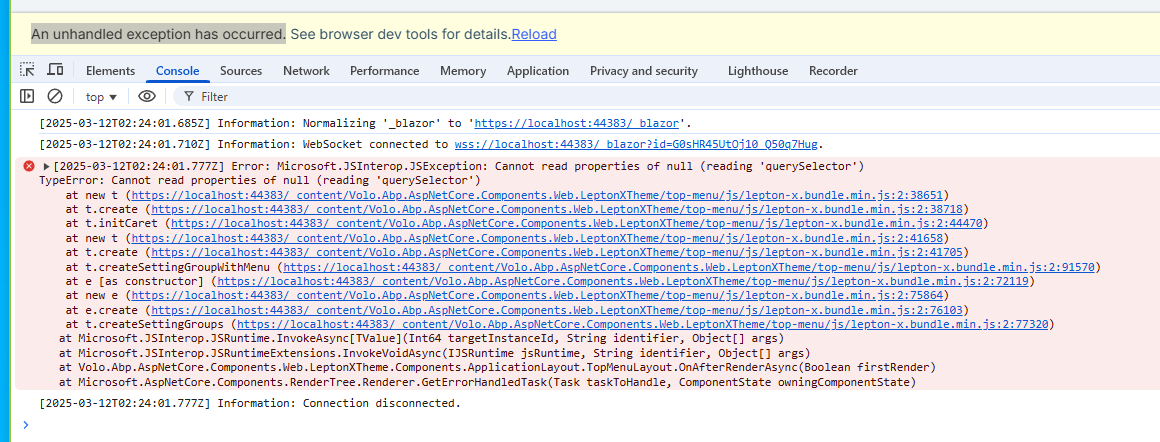
When I run the application, I get an unhandled exception.
I wanted to let you know that embedding the resources in the project file has solved the issue. Thanks so much for your time and assistance in troubleshooting this—it’s greatly appreciated!
Hello,
I created folders for AbpAccount and AbpIdentiy under Localizations within the Domain.Shared project.
Domain.Shared/Localizations/AbpAccount/en.json
{
	"Culture": "en",
	"Texts": {
		"DisplayName:Name": "First name",
		"DisplayName:Surname": "Last name"
	}
}
Domain.Shared/Localizations/AbpIdentity/en.json
{
	"Culture": "en",
	"Texts": {
		"DisplayName:Name": "First name",
		"DisplayName:Surname": "Last name",
		"Name": "First name",
		"Surname": "Last name"
	}
}
I modified the DomainSharedModule's ConfigureServices as follows:
Configure<AbpLocalizationOptions>(options =>
{
    ...

    options.Resources
        .Get<IdentityResource>()
        .AddVirtualJson("/Localization/AbpIdentity");

    ...
});
I modified the ApplicationContractModule's ConfigurationServices as follows:
Configure<AbpLocalizationOptions>(options =>
{
    options.Resources
        .Get<AccountResource>()
        .AddVirtualJson("/Localization/AbpAccount");
});
I read the article, and I think I will take the approach of creating a blank splash screen.
Thank you
Simple and easy, brilliant.
Thank you.
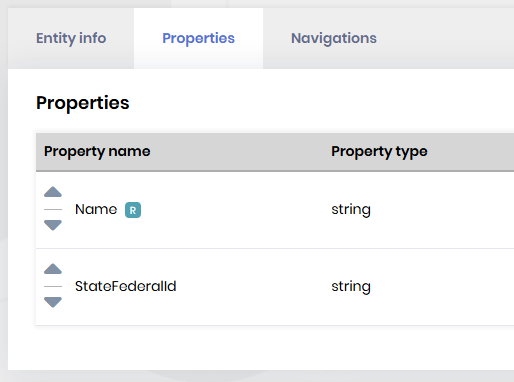
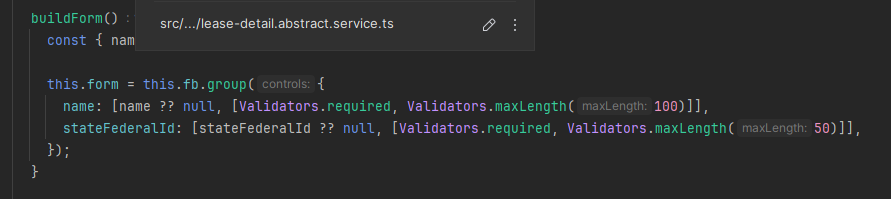
I am experiencing some unwanted behavior from the CRUD Page Generator. The CRUD Page Generator is marking all fields as required on the UI but the data schema is correct.
I am using an Angular frontend with MSSQL database.
Thank you.
Thank you for your response. I apologize if I was not clear.
The following link makes it sound like this will only work in MVC/Blazor: https://github.com/abpframework/abp/issues/13999
The link you referenced may be outdated because it states the extra property is not supported to show up on the user's personal information section. The link goes on to reference another outdated link.
Would you confirm if this is an MVC/Blazor-only feature? If yes, will Angular support this feature soon? If Angular does support this feature today, please direct me on how to hide the extra property on the user's personal information section. If I need to replace the entire user personal information section, please direct me to a current resource that will work for v8.0.2.
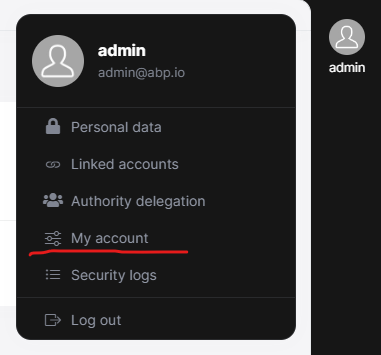
I am using the Angular front end. In version 7.4, a new tab is NOT opened when "My account" is selected from the user menu. In version 8.0.2 a new tab is opened when this option is selected.
hi @ninomartini
Now that the logic has changed, the settings must be defined before they can be used. If you have special requirements, you can override the default setting services
Yes, defining the settings in advance will correct my issue in v8.0. Thank you for the quick response.









