Hi, This is a continuation of my previous ticket.
In my application, some actions should only be allowed when the user is authenticated via BankID (external login).
I’m looking for a way to force a user to log in with a specific provider. So far, the only approach I found is overriding the LoginModel. While it works, it feels like a hack and may not be the recommended way.
navigateToBankIdLogin(){
    this.authService.navigateToLogin({
      prompt: 'login',
      bankid: true
    });
  }
[ExposeServices(typeof(Volo.Abp.Account.Public.Web.Pages.Account.LoginModel))]
public class LoginModel : Volo.Abp.Account.Public.Web.Pages.Account.LoginModel
{
    public LoginModel(IAuthenticationSchemeProvider schemeProvider,
        IOptions<AbpAccountOptions> accountOptions, IAbpRecaptchaValidatorFactory recaptchaValidatorFactory,
        IAccountExternalProviderAppService accountExternalProviderAppService,
        ICurrentPrincipalAccessor currentPrincipalAccessor, IOptions<IdentityOptions> identityOptions,
        IOptionsSnapshot<reCAPTCHAOptions> reCaptchaOptions) : base(schemeProvider, accountOptions,
        recaptchaValidatorFactory, accountExternalProviderAppService, currentPrincipalAccessor, identityOptions,
        reCaptchaOptions)
    {
    }

    public override Task<IActionResult> OnGetAsync()
    {
        return ShouldForceBankIdLogin()
            ? base.OnPostExternalLogin(MachineRegistryConsts.BankIdLoginProviderName)
            : base.OnGetAsync();
    }

    private bool ShouldForceBankIdLogin()
    {
        if (ReturnUrl.IsNullOrEmpty())
        {
            return false;
        }

        var decodedReturnUrl = HttpUtility.UrlDecode(ReturnUrl);
        return decodedReturnUrl.Split("&").Any(p => p.Equals("bankid=true", StringComparison.OrdinalIgnoreCase));
    }
}
Additionally, there’s a UI/flow issue: I have to click the login button twice before the user is navigated to the BankID login, even though the prompt is set to 'login'. Bellow is a gif showing the issue:
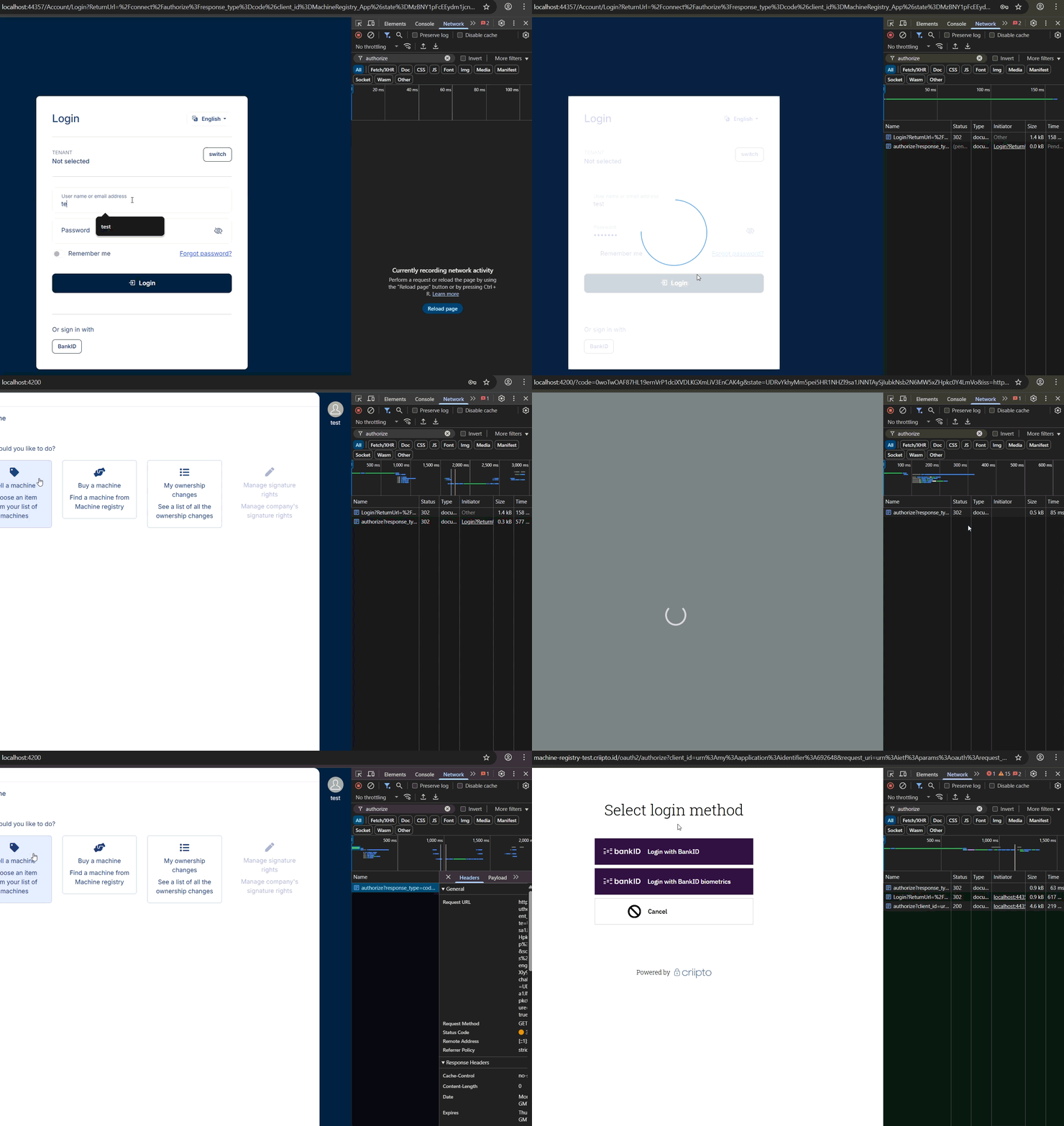 Could you advise on the recommended ABP way to enforce external login for specific actions and/or address the double-click issue?
Ok, thanks.
[maliming] said: hi
using System;
using System.Security.Claims;
using System.Threading.Tasks;
using Microsoft.AspNetCore;
using Microsoft.AspNetCore.Authentication;
using Microsoft.AspNetCore.Identity;
using OpenIddict.Abstractions;
using OpenIddict.Server;

namespace BankIdDemo;

public class BankIdOpenIddictServerHandler : IOpenIddictServerHandler<OpenIddictServerEvents.ProcessSignInContext>
{
    public static OpenIddictServerHandlerDescriptor Descriptor { get; }
        = OpenIddictServerHandlerDescriptor.CreateBuilder<OpenIddictServerEvents.ProcessSignInContext>()
            .UseSingletonHandler<BankIdOpenIddictServerHandler>()
            .SetOrder(100_000)
            .SetType(OpenIddictServerHandlerType.Custom)
            .Build();

    public async ValueTask HandleAsync(OpenIddictServerEvents.ProcessSignInContext context)
    {
        var httpContext = context.Transaction.GetHttpRequest()?.HttpContext;
        if (httpContext == null)
        {
            return;
        }

        if (context.EndpointType == OpenIddictServerEndpointType.Authorization && context.AuthorizationCodePrincipal != null)
        {
            var identity = await httpContext.AuthenticateAsync(IdentityConstants.ApplicationScheme);
            if (identity.Principal != null)
            {
                var bankIdClaim = identity.Principal.FindFirst("isbankidauthenticated");
                if (bankIdClaim != null)
                {
                    context.AuthorizationCodePrincipal?.AddClaim("isbankidauthenticated", bankIdClaim.Value);
                };
            };
        }

        if (context.EndpointType == OpenIddictServerEndpointType.Token)
        {
            if (context.AccessTokenPrincipal != null && context.IdentityTokenPrincipal != null)
            {
                var bankIdClaim = context.AccessTokenPrincipal .FindFirst("isbankidauthenticated");
                if (bankIdClaim != null)
                {
                    context.IdentityTokenPrincipal?.AddClaim("isbankidauthenticated", bankIdClaim.Value);
                }
            }
        }
    }
}
Thanks, that was very helpful. I have a couple more questions related to authentication, should I continue here or open a new ticket?
Looks like the archivator didn’t include the src folder. Could you check again now?
I've send a link to the BankID test app.
It's always null when context.EndpointType == OpenIddictServerEndpointType.Authorization.
I’ve been trying to do that, but both IdentityTokenPrincipal and AccessTokenPrincipal are null.
 Maybe this needs to be handled in a different event? I’m not very familiar with OpenIddict, what do you think?
You can use a custom claim to check it. eg nationalidentitynumber then try to get this claim from CurrentUser.
Here is my claims contributor:
public class BankIdClaimsPrincipalContributor : IAbpClaimsPrincipalContributor, ITransientDependency
{
    private readonly AbpSignInManager _signInManager;

    public BankIdClaimsPrincipalContributor(AbpSignInManager signInManager)
    {
        _signInManager = signInManager;
    }

    public async Task ContributeAsync(AbpClaimsPrincipalContributorContext context)
    {
        var identity = context.ClaimsPrincipal.Identities.FirstOrDefault();

        var externalLogin = await _signInManager.GetExternalLoginInfoAsync();
        if (externalLogin == null)
        {
            // Contributor is executed 4 times. Last 2 times externalLogin is null.
            // It results in 2 "isbankidauthenticated" claims, one has value of false and another is true.
            identity?.AddClaim(new Claim("isbankidauthenticated", false.ToString().ToLower()));
            return;
        }

        var isBankIdAuthenticated = externalLogin.LoginProvider == "Criipto";
        var claim = new Claim("isbankidauthenticated", isBankIdAuthenticated.ToString().ToLower());
        identity?.AddClaim(claim);
    }
}
I noticed that it gets executed 4 times. Is this the expected behavior? This causes an issue because I cannot reliably set my claim value to false.
You can check the BankID platform to see if it supports adding custom claims for a user.
I don’t quite understand how BankID is related here. As far as I know, the claims are set within the ABP application itself. Am I missing something?
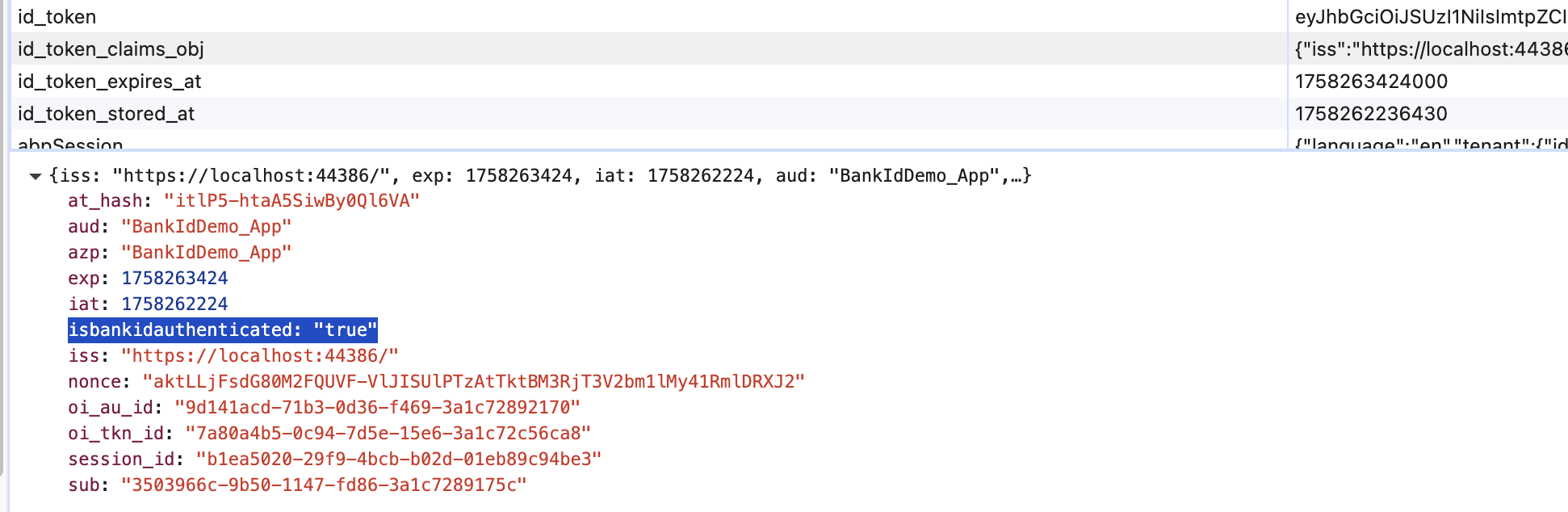
Previously, you suggested implementing IOpenIddictServerHandler<OpenIddictServerEvents.ProcessSignInContext>. This works, but it only adds the claim to the access_token. How can I also include the claim in the id_token?
public class BankIdOpenIddictServerHandler :  IOpenIddictServerHandler<OpenIddictServerEvents.ProcessSignInContext>
{
    public static OpenIddictServerHandlerDescriptor Descriptor { get; }
        = OpenIddictServerHandlerDescriptor.CreateBuilder<OpenIddictServerEvents.ProcessSignInContext>()
            .UseSingletonHandler<BankIdOpenIddictServerHandler>()
            .SetOrder(100_000)
            .SetType(OpenIddictServerHandlerType.Custom)
            .Build();

    public async ValueTask HandleAsync(OpenIddictServerEvents.ProcessSignInContext context)
    {
        if (context.EndpointType != OpenIddictServerEndpointType.Authorization ||
            context.AuthorizationCodePrincipal == null)
        {
            return;
        }

        var httpContext = context.Transaction.GetHttpRequest()?.HttpContext;
        if (httpContext == null)
        {
            return;
        }

        var identity = await httpContext.AuthenticateAsync(IdentityConstants.ApplicationScheme);
        if (identity.Principal == null)
        {
            return;
        }

        var bankIdClaim = identity.Principal.FindFirst("isbankidauthenticated");
        if (bankIdClaim != null)
        {
            context.AuthorizationCodePrincipal.AddClaim("isbankidauthenticated", bankIdClaim.Value);
        }
    }
}
To determine if a user logged in with a local account or via an external login (such as BankID), you can inspect the user's login providers. ABP's Identity system stores external login information in the user logins table.
As I understand it, this only shows which providers are associated with the user (from the user logins table), not which provider was actually used for the current login session. Is there a way to detect the login type of the current session?
To include a custom claim in both the access_token and id_token, you can use claims contributors in ABP. Implement IAbpClaimsPrincipalContributor and register it. In your contributor, add a custom claim (e.g., "login_type") based on the authentication context. This claim will be included in the generated tokens if added during the authentication process.
I have already implemented a claims contributor. But is this the recommended approach? I noticed it is executed four (4) times when a user logs in from Angular. Also, it does not add the claim to the id_token or access_token received on the client. This was partially solved by the suggested IOpenIddictServerHandler<OpenIddictServerEvents.ProcessSignInContext> implementation from my previous ticket, but that only adds the claim to the access_token, which is not very convenient on the client side.
The AI answer didn’t really address my third question either. Could you please clarify the recommended way to handle the scenario where a user adds a new external login?
Hi, I previously opened a ticket regarding external login with BankID, and I now have three additional questions:
Recognizing login type
Adding login type claim
Handling BankID-only actions There are some actions in my application that must only be allowed when a user is authenticated via BankID (external login).
Is there a recommended way to handle this scenario to avoid requiring double BankID authentication?