It works. Thank you!
I've shared a link to the BankID demo project via OneDrive. You should receive e-mail with link.
While testing the demo, I noticed that the issue only occurs when an external login is added to an existing user. If the user is registered directly via BankID, the problem doesn't appear.
Here are the steps to reproduce the issue:
04080599469otpqwer1234Below is result for same user in angular and swagger:
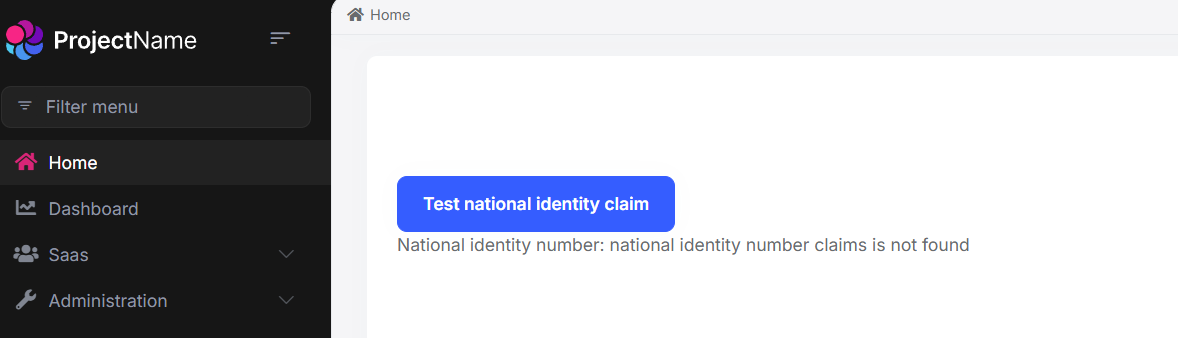
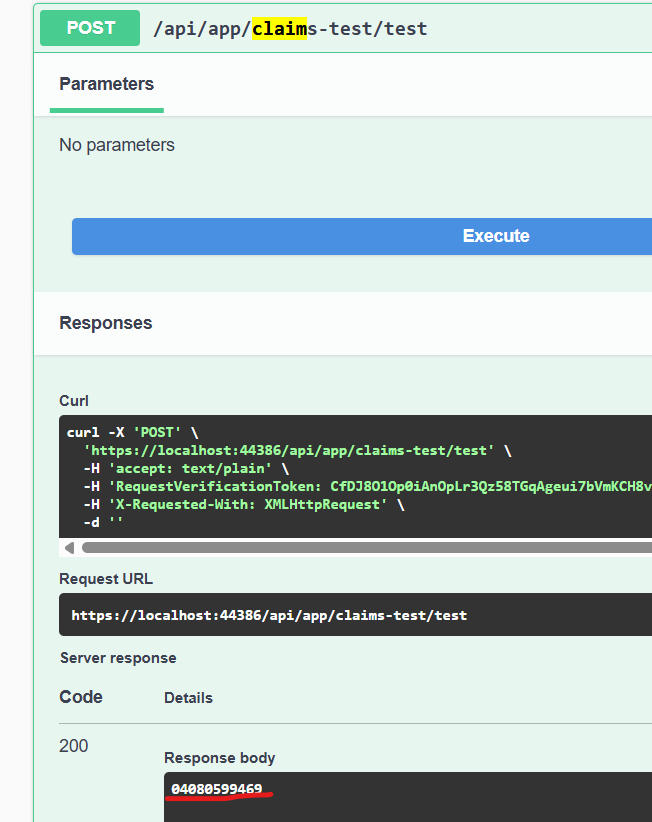
I will test your case with GitHub login.
Sounds good. Thanks
I can definitely create and share a demo project with you, but please note that I won’t be able to include the external login provider credentials (like the client secret), since those are sensitive. Would that still work for you?
I can provide a test user (test identity number), or you're welcome to generate one yourself using this link: https://ra-preprod.bankidnorge.no/#/generate We're using Criipto for Norwegian BankID. You can get test account for free.
That said, I assumed the issue wasn't specific to BankID, and that any external login provider would be sufficient for testing in a demo setup. Please let me know how you'd prefer to proceed!
Previously, I was using HttpContextAccessor.HttpContext.AuthenticateAsync(IdentityConstants.ExternalScheme) to retrieve the external claims principal.
After reviewing the link you provided, I switched to using SignInManager, but the behavior hasn't changed. When logging into the Angular app, the external login is null, and I'm not receiving the expected claims when calling the API from the Angular front end.
Here's the code for my IAbpClaimsPrincipalContributor implementation. Could you please take a look and let me know if there's anything wrong or missing?
public class BankIdClaimsPrincipalContributor : IAbpClaimsPrincipalContributor, ITransientDependency { private readonly SignInManager<IdentityUser> _signInManager;
public BankIdClaimsPrincipalContributor(SignInManager<IdentityUser> signInManager)
{
    _signInManager = signInManager;
}

public async Task ContributeAsync(AbpClaimsPrincipalContributorContext context)
{
    var identity = context.ClaimsPrincipal.Identities.FirstOrDefault();

    var externalLogin = await _signInManager.GetExternalLoginInfoAsync();
    if (externalLogin == null)
    {
        identity?.AddClaim(new Claim("isbankidauthenticated", false.ToString().ToLower()));
        return;
    }

    var authenticationTypeClaim = externalLogin.Principal.FindFirst(Claims.BankId.AuthenticationType);
    var isBankIdAuthenticated = authenticationTypeClaim is { Value: Claims.BankId.NorwegianAuthenticationTypeValue };
    identity?.AddClaim(new Claim("isbankidauthenticated", isBankIdAuthenticated.ToString().ToLower()));

    if (!isBankIdAuthenticated)
    {
        return;
    }

    ForwardClaim("socialno", "nationalidentitynumber");
    ForwardClaim("dateofbirth", "dateofbirth");

    return;

    void ForwardClaim(string bankIdClaimType, string claimType)
    {
        var claim = externalLogin.Principal.FindFirst(bankIdClaimType);
        if (claim != null)
        {
            identity?.AddClaim(new Claim(claimType, claim.Value));
        }
    }
}
}
I think it might be more convenient if you could create a demo project yourself with the setup you have in mind. :)
Hi, Thanks for your response.
Could you clarify the purpose of the demo project? I’m unable to share external provider credentials, so I'm not sure how useful it would be in this case.
If you’re familiar with retrieving additional claims, perhaps you could share a demo that demonstrates the solution? :)
Here is how external provider is added in our app:
private void ConfigureExternalProviders(ServiceConfigurationContext context, IConfiguration configuration)
{
    var criiptoAuthority = configuration["Authentication:Criipto:Authority"];
    var criiptoClientId = configuration["Authentication:Criipto:ClientId"];
    var criiptoClientSecret = configuration["Authentication:Criipto:ClientSecret"];

    context.Services.AddAuthentication()
        .AddOpenIdConnect("Criipto", "BankID", options =>
        {
            options.ClientId = criiptoClientId;
            options.ClientSecret = criiptoClientSecret;
            options.Authority = criiptoAuthority;
            options.ResponseType = OpenIdConnectResponseType.Code;
            options.CallbackPath = new PathString("/signin-bankid");

            options.Scope.Add("ssn");

            options.ClaimActions.MapJsonKey("socialno", "socialno");
            options.ClaimActions.MapJsonKey("dateofbirth", "dateofbirth");
        });
}
AI answer didn't solve the problem.
We have integrated an external login provider (BankID) into our ABP application v9 (Layered/Angular/No separate auth). Login flow works, but two issues remain regarding claims handling and distinguishing login type:
Notes: I don’t want to persist national identity number in the database, so I’m looking for a runtime claim-forwarding approach. I’ve already explored AbpUserClaimsPrincipalFactory and IAbpClaimsPrincipalContributor. Claims show up in Swagger tests but not from Angular.
Thanks!
Hello,
I've encountered another issue with entity extension regarding UI localization. Here's the code I'm working with:
property.DisplayName = new FixedLocalizableString("Label:BirthDate");
The label translates correctly in the "Create" and "Edit" forms, but it doesn't translate in the table headers.
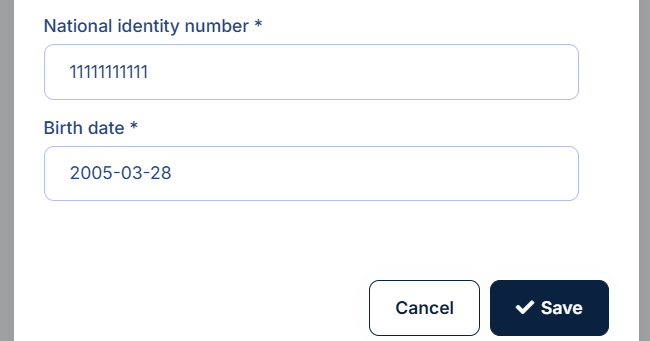
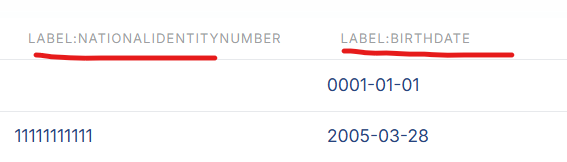 When I add :: before the localization key, the label is correctly translated in the table headers, but the "Create/Edit" forms show an empty string instead.
Could you please assist with resolving this?









