I'll send you an email with the login details for our private feed.
Thanks
[maliming] said: hi
The
XXX.YYY.FeedNuGet source requires an account. I can't restore packages.Can you test your case in a new Blazor WASM project and share it?
Thanks.
I added the package folder for this. I can't create a new solution because I need to make this one work. I'll modify the solution to have the packages integrated and not have to read them from the private feed and send it back to you.
Thank you
P.S. Please remove the image and project name references as they are confidential. ;-)
I have been authorized to share our project with you. I'll send you an email with a link to download the project. It includes packages because we use private feeds.
Thanks
These examples replicate the ABP solution, I need to be able to use a single ABP solution and control the features based on the deployment (application settings) or publishing profile.
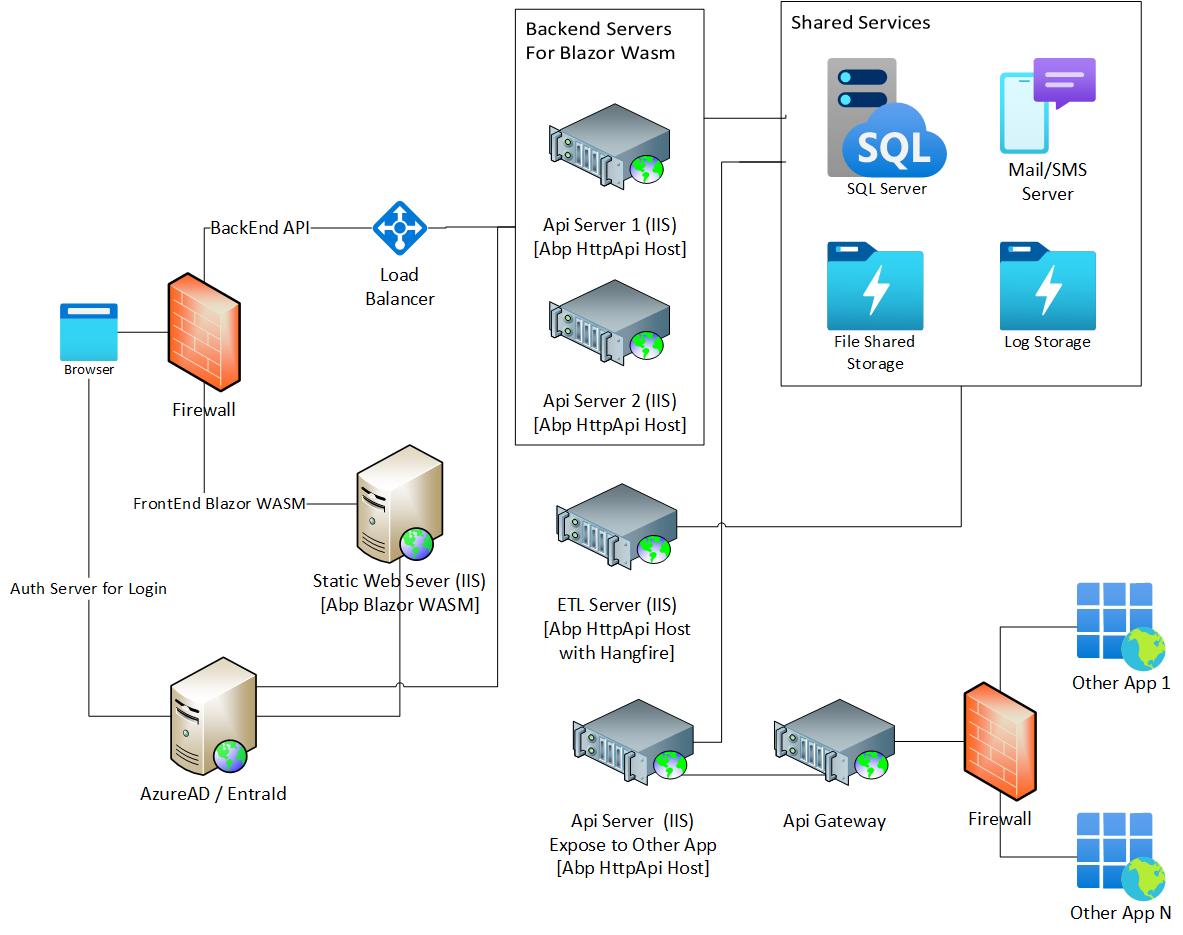
I created the Blazor WASM (Abp Commercial v.8.3.2) solution with Abp Studio, I use Hangfire to manage my ETL workflow.
The workflows must run on a single server (ETL Server - Abp with Hangfire) and must have the dashboard available.
The API endpoints, however, will be distributed across two servers (Application Servers - Only API), without Redis, which will run behind a load balancer. The Application Servers are intended for use with the Blazor WASM frontend.
I tried creating a configuration that enables and disables Hangfire via application settings, but I can't disable Hangfire on the application servers. Furthermore, I can't force the ABP background workers/jobs to run only on the ETL Server (Abp with Hangifire).
I need help and explanations on how to implement this configuration.
I'm attaching an example image of the final infrastructure.
Thanks
The problem may be that when you launch the two apps (Blazor+Api) the DLLs are recompiled and therefore Visual Studio cannot handle it correctly.
The project is large and we're not authorized to share it directly. Can we organize an online meeting?
Thanks
I saw your video with Abp 9. I'll try to use your suggestion but not working. I need to use also debug with "Edit and continue" option on razor.cs files.
My question was, how can I use Blazor.Client as if it were a real Blazor WASM application? If it worked like the standard Microsoft one, everything should work automatically, right?
Thanks for your support.
But I always run it as Blazor Hosted, right? If so, every time I make a change, it has to recompile the Balzor.Client DLL, which takes time and often prevents hot reloading. It looks like you're not using my version of ABP.
I don't have any launchSettings.json in Blazor.Client project. Should I copy it from the Blazor project? And what should I put as the project name in the command you indicated, Blazor.Client? "commandLineArgs": "watch run debug --launch-profile Myapp.Blazor.Client"
P.s. Are you using Apb 8.3.2?
I also tried creating a new project with Abp 9, which didn't produce an error; it started but didn't load the pages. In any case, I need to use Abp 8.3.2; I can't migrate to Abp 9.
Thanks









